Solved unable to get win7 onto new system

pjlucky

New member
Member
Local time
6:11 AM
Messages
22
A newer ITX MB from a generic China source with no support.
This is one of a very few that has onboard M.2 PCIe WiFi port and M.2 PCIe 2230 gen3 ( default format is xFAT )
The board is ( Jingsha H61S ) This is LGA 1155 intel with HDMI with compatible CPU with GPU The BIOS is AMI (American Megatrends ) The AMI support page does not support end users.
Current CPU Intel i-7 with 16G of ram

I wanted to install Win 7 to the NVMe with no success . The 2 SSD HDD that I have running on the system will only work with the RJ45
That was my first problem the ( Realtek PCIe HE Family controller was found to work.

The main issue is the failure to recognize the M.2 PCIe 1TB PNY 2230 from within the running win7 os
The PNY NVMe does show in the BIOS.

The final solution was to boot to USB Win10 UEFI and install This was not what I wanted. All my attempts to create Win 7 Media using 7upv64P and install would not recognize the NVMe
So now I do have an NVMe drive function But only through the win 10 installation
I can not see what relevance the board has to the media creation to supply the NVMe drivers for a win7 installation. I must have made a mistake creating the media. I am still looking for the resolution. If win 10 can see it and supply the drivers, it can not be anything to do with the MB
I wanted to discuss what I was doing wrong, creating media. I used Rufus 3.10 to make UEFI USB
It would not see the copy pasted revised media. It will only work with ISO image. I created standard rufus media and wrote over the files with copy past of revised media. ( did not work ) meaning the NVMe drivers did not show at isntall
As I said in the beginning I tried from the SSD HDD first, then creating the UEFI USB

All this to have the win7 and the virtual XP environment for older software at the speed of NVMe .
 

My Computer My Computer

At a glance

windows 7 pro 64bitintel 78 gig Skill ddr3 2133intel integrated
Computer type
PC/Desktop
Computer Manufacturer/Model Number
custom
OS
windows 7 pro 64bit
CPU
intel 7
Motherboard
ASUS Z97-A
Memory
8 gig Skill ddr3 2133
Graphics Card(s)
intel integrated
Hard Drives
1 tb ssd 6gbps
Antivirus
none
Browser
Firefox
Try getting a virtual machine with Windows 7 on it, and once you've installed Windows 7 on the virtual machine, copy files from the virtual machine's C:\ drive and copying them to your new machine. This will create a clean install of Windows 7 to your new machine without running the setup process on the new PC.
 

My Computers My Computers

  • At a glance

    Windows 7 Professional SP1 64 bit8 GB RAMIntegrated Intel® HD Graphics 4600
    Computer type
    PC/Desktop
    Computer Manufacturer/Model Number
    DELL
    OS
    Windows 7 Professional SP1 64 bit
    Memory
    8 GB RAM
    Graphics Card(s)
    Integrated Intel® HD Graphics 4600
    Sound Card
    High Definition Audio Device
    Monitor(s) Displays
    Dell™ E1910
    Screen Resolution
    1440 x 900
    Hard Drives
    1
    Keyboard
    HP KU-3016
    Mouse
    ione LYNX-M9 Optical Mouse
    Antivirus
    Microsoft Security Essentials
    Browser
    Mypal, Internet Explorer 8
    Other Info
    DELL™ Optiplex 9020
  • At a glance

    Windows 7 Ultimate SP1 64 bitIntel HD Graphics
    Computer type
    Laptop
    System Manufacturer/Model Number
    HP
    OS
    Windows 7 Ultimate SP1 64 bit
    Graphics Card(s)
    Intel HD Graphics
    Sound Card
    High Definition Audio Device
    Screen Resolution
    1440 x 900
    Keyboard
    Built in G72 Laptop Keyboard
    Mouse
    HP G72 Laptop Built in Touchpad
    Browser
    Mypal, Internet Explorer 8
    Other Info
    HP G72 C55DX Notebook PC
There is no need to do that. The win7 image could be applied from install.wim direct to a partition by using dism or dism++ or wimlib or gimagex or winntsetup or even using win10 setup.exe

But the applied win7 image won't see the nvme disks unless it is updated with nvme driver.
pjlucky

you can borrow my boot media

17514x64v30.iso

check if it can see the nvme disks.
 

My Computers My Computers

  • At a glance

    7 X64i5 84002x8gb 3200mhz
    Computer type
    PC/Desktop
    OS
    7 X64
    CPU
    i5 8400
    Motherboard
    gigabyte b365m ds3h
    Memory
    2x8gb 3200mhz
    Hard Drives
    various
    PSU
    pure power 11 400w cm
    Case
    Coolermaster
    Cooling
    cryorig m9i
  • At a glance

    7x64g54008gb ddr4 2400
    Computer type
    PC/Desktop
    OS
    7x64
    CPU
    g5400
    Motherboard
    ga b365m ds3h
    Memory
    8gb ddr4 2400
    PSU
    xfx pro 450w
Thank SWI2
I will need to get some DvD discs to burn to Unless there is a way to burn to a file on the HDD
I do not have such software .

On another Note I want to point out, what I consider a mystery.
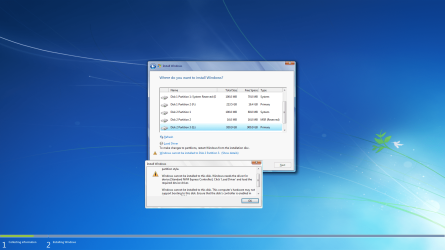
Why now after installing win 10 to the NVME does it show , When I boot to win 7 from the SSD HDD . But If I run the win7 install media it shows but says can not install to drv 2 there is no NVMe driver
 

My Computer My Computer

At a glance

windows 7 pro 64bitintel 78 gig Skill ddr3 2133intel integrated
Computer type
PC/Desktop
Computer Manufacturer/Model Number
custom
OS
windows 7 pro 64bit
CPU
intel 7
Motherboard
ASUS Z97-A
Memory
8 gig Skill ddr3 2133
Graphics Card(s)
intel integrated
Hard Drives
1 tb ssd 6gbps
Antivirus
none
Browser
Firefox

My Computers My Computers

  • At a glance

    7 X64i5 84002x8gb 3200mhz
    Computer type
    PC/Desktop
    OS
    7 X64
    CPU
    i5 8400
    Motherboard
    gigabyte b365m ds3h
    Memory
    2x8gb 3200mhz
    Hard Drives
    various
    PSU
    pure power 11 400w cm
    Case
    Coolermaster
    Cooling
    cryorig m9i
  • At a glance

    7x64g54008gb ddr4 2400
    Computer type
    PC/Desktop
    OS
    7x64
    CPU
    g5400
    Motherboard
    ga b365m ds3h
    Memory
    8gb ddr4 2400
    PSU
    xfx pro 450w
install stop.png
 

My Computer My Computer

At a glance

windows 7 pro 64bitintel 78 gig Skill ddr3 2133intel integrated
Computer type
PC/Desktop
Computer Manufacturer/Model Number
custom
OS
windows 7 pro 64bit
CPU
intel 7
Motherboard
ASUS Z97-A
Memory
8 gig Skill ddr3 2133
Graphics Card(s)
intel integrated
Hard Drives
1 tb ssd 6gbps
Antivirus
none
Browser
Firefox

My Computers My Computers

  • At a glance

    Windows 7 Professional SP1 64 bit8 GB RAMIntegrated Intel® HD Graphics 4600
    Computer type
    PC/Desktop
    Computer Manufacturer/Model Number
    DELL
    OS
    Windows 7 Professional SP1 64 bit
    Memory
    8 GB RAM
    Graphics Card(s)
    Integrated Intel® HD Graphics 4600
    Sound Card
    High Definition Audio Device
    Monitor(s) Displays
    Dell™ E1910
    Screen Resolution
    1440 x 900
    Hard Drives
    1
    Keyboard
    HP KU-3016
    Mouse
    ione LYNX-M9 Optical Mouse
    Antivirus
    Microsoft Security Essentials
    Browser
    Mypal, Internet Explorer 8
    Other Info
    DELL™ Optiplex 9020
  • At a glance

    Windows 7 Ultimate SP1 64 bitIntel HD Graphics
    Computer type
    Laptop
    System Manufacturer/Model Number
    HP
    OS
    Windows 7 Ultimate SP1 64 bit
    Graphics Card(s)
    Intel HD Graphics
    Sound Card
    High Definition Audio Device
    Screen Resolution
    1440 x 900
    Keyboard
    Built in G72 Laptop Keyboard
    Mouse
    HP G72 Laptop Built in Touchpad
    Browser
    Mypal, Internet Explorer 8
    Other Info
    HP G72 C55DX Notebook PC
To answer the first post I am a bit to old for complexity.
On the second post SIW2 I did what you said and ran the software installed to SSD on USB it worked just fine and booted to install showing the drive. I formatted the Drv to get rid of win 10 but I have made a mess of everything . Im on my newer system the ssd itx board needs recovery for all systems I have no clue as to why that format damaged the other installed drvs but they wont boot ether
I will mess with it tomorrow Merry Christmas to all .
 

My Computer My Computer

At a glance

windows 7 pro 64bitintel 78 gig Skill ddr3 2133intel integrated
Computer type
PC/Desktop
Computer Manufacturer/Model Number
custom
OS
windows 7 pro 64bit
CPU
intel 7
Motherboard
ASUS Z97-A
Memory
8 gig Skill ddr3 2133
Graphics Card(s)
intel integrated
Hard Drives
1 tb ssd 6gbps
Antivirus
none
Browser
Firefox
I've always been kind of weird and opened ISO files in WinRAR and extracting those files to a disk. :o

It can be done that way. Format usb stick to fat32 using diskmgmt or any decent partition manager that will write the vbr code during format. Make sure the partition is marked active. Extract the iso contents onto the usb partition with 7-zip - probably winrar will work ok as well. The usb stick should then be both bios and efi bootable ( if using win7 x64 media)

Or usb7ice does it all for you

- - - Updated - - -

To answer the first post I am a bit to old for complexity.
On the second post SIW2 I did what you said and ran the software installed to SSD on USB it worked just fine and booted to install showing the drive. I formatted the Drv to get rid of win 10 but I have made a mess of everything . Im on my newer system the ssd itx board needs recovery for all systems I have no clue as to why that format damaged the other installed drvs but they wont boot ether
I will mess with it tomorrow Merry Christmas to all .

Merry Christmas :party:
 

My Computers My Computers

  • At a glance

    7 X64i5 84002x8gb 3200mhz
    Computer type
    PC/Desktop
    OS
    7 X64
    CPU
    i5 8400
    Motherboard
    gigabyte b365m ds3h
    Memory
    2x8gb 3200mhz
    Hard Drives
    various
    PSU
    pure power 11 400w cm
    Case
    Coolermaster
    Cooling
    cryorig m9i
  • At a glance

    7x64g54008gb ddr4 2400
    Computer type
    PC/Desktop
    OS
    7x64
    CPU
    g5400
    Motherboard
    ga b365m ds3h
    Memory
    8gb ddr4 2400
    PSU
    xfx pro 450w
It can be done that way. Format usb stick to fat32

I usually format with the Windows® NT Filesystem (NTFS) file system.

Merry Christmas to all :D :orb: :party:

- - - Updated - - -

- - - Updated - - -

And other times, I use the Windows® 7 Media Creation Tool.

- - - Updated - - -

I haven't used usb7ice (and it's hard since Microsoft Security Essentials won't let me), but I'm sure that does it good like the Windows® 7 Media Creation Tool.

- - - Updated - - -

To answer the first post I am a bit to old for complexity.

Ahh, I see. I'll try and make things more simple for you.
 

My Computers My Computers

  • At a glance

    Windows 7 Professional SP1 64 bit8 GB RAMIntegrated Intel® HD Graphics 4600
    Computer type
    PC/Desktop
    Computer Manufacturer/Model Number
    DELL
    OS
    Windows 7 Professional SP1 64 bit
    Memory
    8 GB RAM
    Graphics Card(s)
    Integrated Intel® HD Graphics 4600
    Sound Card
    High Definition Audio Device
    Monitor(s) Displays
    Dell™ E1910
    Screen Resolution
    1440 x 900
    Hard Drives
    1
    Keyboard
    HP KU-3016
    Mouse
    ione LYNX-M9 Optical Mouse
    Antivirus
    Microsoft Security Essentials
    Browser
    Mypal, Internet Explorer 8
    Other Info
    DELL™ Optiplex 9020
  • At a glance

    Windows 7 Ultimate SP1 64 bitIntel HD Graphics
    Computer type
    Laptop
    System Manufacturer/Model Number
    HP
    OS
    Windows 7 Ultimate SP1 64 bit
    Graphics Card(s)
    Intel HD Graphics
    Sound Card
    High Definition Audio Device
    Screen Resolution
    1440 x 900
    Keyboard
    Built in G72 Laptop Keyboard
    Mouse
    HP G72 Laptop Built in Touchpad
    Browser
    Mypal, Internet Explorer 8
    Other Info
    HP G72 C55DX Notebook PC
I really messed up. Some how I deleted the primary SSD and lost everything from the past 2 yrs >( that was not on The older SSD ) I know I should have unplugged them .It would not have happened

This is a fresh install
I will reinstall the NVME and try again.

- - - Updated - - -

Thank you SIW2
I have now succeeded to install Win7 to the dang NVMe , Now to get the Xp environment into it.
I did lose the main drv and all it contained to the errors of Xmass day.
I do not know if there is a solution to the WiFi M.2 since there is no support for Win 7 that I know of.

What I used in the end was the USB created from the original 7UPv64P and Rufus 3.10 ( no idea why after all this the NVME shows up )
For some reason the USB external SDD HDD that I put your software on would not boot after the fiasco.
Mistakes made were to format drives. this caused the software to refuse to install .( incompatible format) The damaged drives even the SSD HDD had to have there partitions deleted, Only after this, reformat and then install new OS.
 

My Computer My Computer

At a glance

windows 7 pro 64bitintel 78 gig Skill ddr3 2133intel integrated
Computer type
PC/Desktop
Computer Manufacturer/Model Number
custom
OS
windows 7 pro 64bit
CPU
intel 7
Motherboard
ASUS Z97-A
Memory
8 gig Skill ddr3 2133
Graphics Card(s)
intel integrated
Hard Drives
1 tb ssd 6gbps
Antivirus
none
Browser
Firefox
I have now succeeded to install Win7 to the dang NVMe
What I used in the end was the USB created from the original 7UPv64P

:-)

Now to get the Xp environment into it.

I don't know how to do that. I have never had xp. Somebody at msfn forum might know.

I do not know if there is a solution to the WiFi M.2 since there is no support for Win 7 that I know of.

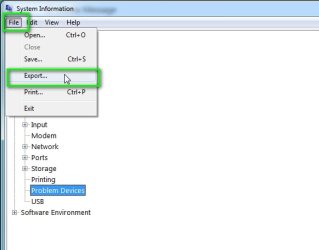
What is the pnp id ? msinfo32>components>problem devices >File>Export as a .txt file

msinfo32-problem-devices1.jpg

msinfo32-problem-devices2.jpg
 

My Computers My Computers

  • At a glance

    7 X64i5 84002x8gb 3200mhz
    Computer type
    PC/Desktop
    OS
    7 X64
    CPU
    i5 8400
    Motherboard
    gigabyte b365m ds3h
    Memory
    2x8gb 3200mhz
    Hard Drives
    various
    PSU
    pure power 11 400w cm
    Case
    Coolermaster
    Cooling
    cryorig m9i
  • At a glance

    7x64g54008gb ddr4 2400
    Computer type
    PC/Desktop
    OS
    7x64
    CPU
    g5400
    Motherboard
    ga b365m ds3h
    Memory
    8gb ddr4 2400
    PSU
    xfx pro 450w
Generic Bluetooth Adapter USB\VID_8087&PID_0032\6&186AFA3&0&3 This device is working properly.
SM Bus Controller PCI\VEN_8086&DEV_1C22&SUBSYS_1C228086&REV_05\3&11583659&0&FB The drivers for this device are not installed.
Network Controller PCI\VEN_8086&DEV_2725&SUBSYS_00248086&REV_1A\4&713D32&0&00E5 The drivers for this device are not installed.

- - - Updated - - -

AX210/AX200/pce-AX3000
Wireless PCI Express / M.2 Adapter
Generic Chinese of course . I do have disc for it but it is for win10 or 11 only
 

My Computer My Computer

At a glance

windows 7 pro 64bitintel 78 gig Skill ddr3 2133intel integrated
Computer type
PC/Desktop
Computer Manufacturer/Model Number
custom
OS
windows 7 pro 64bit
CPU
intel 7
Motherboard
ASUS Z97-A
Memory
8 gig Skill ddr3 2133
Graphics Card(s)
intel integrated
Hard Drives
1 tb ssd 6gbps
Antivirus
none
Browser
Firefox
Last edited:

My Computers My Computers

  • At a glance

    7 X64i5 84002x8gb 3200mhz
    Computer type
    PC/Desktop
    OS
    7 X64
    CPU
    i5 8400
    Motherboard
    gigabyte b365m ds3h
    Memory
    2x8gb 3200mhz
    Hard Drives
    various
    PSU
    pure power 11 400w cm
    Case
    Coolermaster
    Cooling
    cryorig m9i
  • At a glance

    7x64g54008gb ddr4 2400
    Computer type
    PC/Desktop
    OS
    7x64
    CPU
    g5400
    Motherboard
    ga b365m ds3h
    Memory
    8gb ddr4 2400
    PSU
    xfx pro 450w
I came to that conclusion too .Thanks SIW2 the WiFi is just wish its not reccessary.
I actually got the Xp virtual machine running also on the NVME. Now I will have reinstall Autocad 2000. That wont work with copy and paste from the other Virtual Xp Program folder.
I had all the necessary install files . for the Xp virtual machine.
 

My Computer My Computer

At a glance

windows 7 pro 64bitintel 78 gig Skill ddr3 2133intel integrated
Computer type
PC/Desktop
Computer Manufacturer/Model Number
custom
OS
windows 7 pro 64bit
CPU
intel 7
Motherboard
ASUS Z97-A
Memory
8 gig Skill ddr3 2133
Graphics Card(s)
intel integrated
Hard Drives
1 tb ssd 6gbps
Antivirus
none
Browser
Firefox
Back
Top