
Solved How to make a hard disc a system disc

FyrmnJ

FyrmnJ in Philly
Power User
Local time
1:45 PM
Messages
95
I think I may have found an answer to my boot problem. After reading the tutorial on system image restore I saw this statement.

"You can fool it into thinking that simply by marking the 7 partition as active.

May be as well to make it a "secondary" system partition , by copying across the relevant files - in case you forget to hand the active flag back"

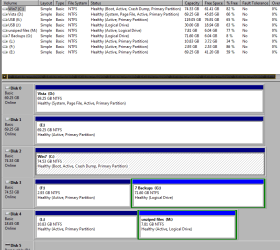
How would I be able to make my "C" WIN7 drive my system drive instead of my "D" Vista drive. Right now my "D" Vista is my system drive.
Or, can I have two system drives at the same time? Remember these are on TWO SEPERATE hard drives.
 

Attachments
  • FyrmnJ.PNG
    FyrmnJ.PNG
    21.2 KB · Views: 230

My Computer My Computer

At a glance

Dual Booting Windows Vista32 bit And Windows ...ntel(R) Core(TM)2 Quad CPU Q6700 @ 2.66GHz (4...3072MB RAM Available OS Memory: 2816MB RAMMSI RX1600Pro (MS-V040);VisionTek RADEON X130...
Computer Manufacturer/Model Number
White Box
OS
Dual Booting Windows Vista32 bit And Windows 7 Home premium (x64) (build 7600)
CPU
ntel(R) Core(TM)2 Quad CPU Q6700 @ 2.66GHz (4 CPUs),
Motherboard
Board: ASUSTeK Computer INC. P5B-Premium Rev 1.xx Bus Clock:
Memory
3072MB RAM Available OS Memory: 2816MB RAM
Graphics Card(s)
MSI RX1600Pro (MS-V040);VisionTek RADEON X1300 PCI SFF
Sound Card
SoundMAX Integrated Digital HD Audio
Monitor(s) Displays
Envision SP2107W [Monitor] (22.0"vis, s/n B7976JA007061, Jun
Screen Resolution
1680x1050
Hard Drives
PLEXTOR DVDR PX-712A ATA Device [CD-ROM drive]
3.5" format removeable media [Floppy drive]

INTEL SSDSA2MH080G1GC [Hard drive] (80.03 GB) -- drive 2, s/n CVEM926000FK080DGN, rev 045C8820, SMART Status: Healthy
IOMEGA ZIP 100 SCSI Disk Device -- d
PSU
Have 2 PSU's Installed
Case
Coolmaster
Keyboard
Microsoft Internet Keyboard Pro Hot Keys
Mouse
Logitec MX500
Internet Speed
DSL
Other Info
Rollback Rx system repair software by Horizon Data Systems
Texas Instruments 1394 OHCI Compliant Host Controller
Acronis True Image Backup Archive Explorer
HID-compliant device
Microsoft PS/2 Mouse
General Purpose USB Hub
Microsoft Internet Keyboard Pro Composite Device
USB Mass Storage Device
USB Root Hub (7x)
B:\
First make sure you are set to see hidden and protected files in Windows Explorer.

Copy bootmgr file from D: to C:
Copy boot folder from D: to C: and tell it to skip over copying bcd and bcd.log when it prompts.

Run this command from an elevated command prompt. You may copy and paste into it. Hit enter.

bcdedit /export C:\boot\bcd

Reboot into bios and change the primary boot device to be your C: drive.

Boot to Windows and make sure C: is now the system drive. If so, you may delete the boot folder and bootmgr file on D:

If you want two "system drives" so in case one fails you'll be able to boot from the other, don't delete anything and use bios to change drives in this instance.
 

My Computer My Computer

At a glance

7600.20510 x86P4 550 3.4 GHz HT running at 3.5 GHzOCZ 2 GB(2x1GB) DDR400mHz running @ 414 mHzHIS Radeon HD 3850 IceQ 3 Turbo HDMI Dual DL-...
Computer Manufacturer/Model Number
self built
OS
7600.20510 x86
CPU
P4 550 3.4 GHz HT running at 3.5 GHz
Motherboard
MSI PM8M3-V (MS-7211 v1.x) Micro-ATX mainboard
Memory
OCZ 2 GB(2x1GB) DDR400mHz running @ 414 mHz
Graphics Card(s)
HIS Radeon HD 3850 IceQ 3 Turbo HDMI Dual DL-DVI AGP
Sound Card
MOTU Traveler firewire studio interface 192 kHz 24 bit
Monitor(s) Displays
22" widescreen Acer X223W LCD, 17" Compaq P75 CRT
Screen Resolution
1680x1050 and 1280x1024
Hard Drives
SATA I x2 WD, 400 GB and 120 GB, SATA 2 WD Caviar Black 1 TB
PSU
350W generic
Case
Cybertronpc, it glows blue
Cooling
stock cpu fan, Ice-Q 3 gpu and system, many case fans
Keyboard
Logitch Classical Keyboard 200
Mouse
Logitech Mediaplay cordless
Internet Speed
1792/448 kbits/sec
Other Info
SATA II PCI fake RAID adapter, 1 GB Readyboost, original ATI Remote Wonder (even works with WMC perfectly), Logitech Rumblepad 2 game controller x2
First make sure you are set to see hidden and protected files in Windows Explorer.

Copy bootmgr file from D: to C:
Copy boot folder from D: to C: and tell it to skip over copying bcd and bcd.log when it prompts.

Run this command from an elevated command prompt. You may copy and paste into it. Hit enter.

bcdedit /export C:\boot\bcd

Reboot into bios and change the primary boot device to be your C: drive.

Boot to Windows and make sure C: is now the system drive. If so, you may delete the boot folder and bootmgr file on D:

If you want two "system drives" so in case one fails you'll be able to boot from the other, don't delete anything and use bios to change drives in this instance.

Thank You Thank You Thank You....you fixed something I have been working on for the last four days. Everything I tried ended up with me doing reinstalls, mbr repairs, changing boot managers, changing the boot order, and everything else you can think of. Nothing worked....this did. Now I can use my RollbackRX program with my dualboot system. Youse folkes are the best.
FyrmnJ
 

My Computer My Computer

At a glance

Dual Booting Windows Vista32 bit And Windows ...ntel(R) Core(TM)2 Quad CPU Q6700 @ 2.66GHz (4...3072MB RAM Available OS Memory: 2816MB RAMMSI RX1600Pro (MS-V040);VisionTek RADEON X130...
Computer Manufacturer/Model Number
White Box
OS
Dual Booting Windows Vista32 bit And Windows 7 Home premium (x64) (build 7600)
CPU
ntel(R) Core(TM)2 Quad CPU Q6700 @ 2.66GHz (4 CPUs),
Motherboard
Board: ASUSTeK Computer INC. P5B-Premium Rev 1.xx Bus Clock:
Memory
3072MB RAM Available OS Memory: 2816MB RAM
Graphics Card(s)
MSI RX1600Pro (MS-V040);VisionTek RADEON X1300 PCI SFF
Sound Card
SoundMAX Integrated Digital HD Audio
Monitor(s) Displays
Envision SP2107W [Monitor] (22.0"vis, s/n B7976JA007061, Jun
Screen Resolution
1680x1050
Hard Drives
PLEXTOR DVDR PX-712A ATA Device [CD-ROM drive]
3.5" format removeable media [Floppy drive]

INTEL SSDSA2MH080G1GC [Hard drive] (80.03 GB) -- drive 2, s/n CVEM926000FK080DGN, rev 045C8820, SMART Status: Healthy
IOMEGA ZIP 100 SCSI Disk Device -- d
PSU
Have 2 PSU's Installed
Case
Coolmaster
Keyboard
Microsoft Internet Keyboard Pro Hot Keys
Mouse
Logitec MX500
Internet Speed
DSL
Other Info
Rollback Rx system repair software by Horizon Data Systems
Texas Instruments 1394 OHCI Compliant Host Controller
Acronis True Image Backup Archive Explorer
HID-compliant device
Microsoft PS/2 Mouse
General Purpose USB Hub
Microsoft Internet Keyboard Pro Composite Device
USB Mass Storage Device
USB Root Hub (7x)
B:\
You're welcome. Very wise of you to have posted the screenshot in the OP.:D
 

My Computer My Computer

At a glance

7600.20510 x86P4 550 3.4 GHz HT running at 3.5 GHzOCZ 2 GB(2x1GB) DDR400mHz running @ 414 mHzHIS Radeon HD 3850 IceQ 3 Turbo HDMI Dual DL-...
Computer Manufacturer/Model Number
self built
OS
7600.20510 x86
CPU
P4 550 3.4 GHz HT running at 3.5 GHz
Motherboard
MSI PM8M3-V (MS-7211 v1.x) Micro-ATX mainboard
Memory
OCZ 2 GB(2x1GB) DDR400mHz running @ 414 mHz
Graphics Card(s)
HIS Radeon HD 3850 IceQ 3 Turbo HDMI Dual DL-DVI AGP
Sound Card
MOTU Traveler firewire studio interface 192 kHz 24 bit
Monitor(s) Displays
22" widescreen Acer X223W LCD, 17" Compaq P75 CRT
Screen Resolution
1680x1050 and 1280x1024
Hard Drives
SATA I x2 WD, 400 GB and 120 GB, SATA 2 WD Caviar Black 1 TB
PSU
350W generic
Case
Cybertronpc, it glows blue
Cooling
stock cpu fan, Ice-Q 3 gpu and system, many case fans
Keyboard
Logitch Classical Keyboard 200
Mouse
Logitech Mediaplay cordless
Internet Speed
1792/448 kbits/sec
Other Info
SATA II PCI fake RAID adapter, 1 GB Readyboost, original ATI Remote Wonder (even works with WMC perfectly), Logitech Rumblepad 2 game controller x2
First make sure you are set to see hidden and protected files in Windows Explorer.

Copy bootmgr file from D: to C:
Copy boot folder from D: to C: and tell it to skip over copying bcd and bcd.log when it prompts.

Run this command from an elevated command prompt. You may copy and paste into it. Hit enter.

bcdedit /export C:\boot\bcd

Reboot into bios and change the primary boot device to be your C: drive.

Boot to Windows and make sure C: is now the system drive. If so, you may delete the boot folder and bootmgr file on D:

If you want two "system drives" so in case one fails you'll be able to boot from the other, don't delete anything and use bios to change drives in this instance.

I did this and it didn't work.
I need to change the system disk from my F drive to my C drive, I'll attach an image.
http://img593.imageshack.us/img593/7853/diskmanagement.png

Please any help?

Also, After moving the exact files that you told me too, and running that scrip in cmd, When i tried to boot off the HDD that has windows installed, i couldnt get to windows... I had to tell the computer / bios to boot from the system drive which has NOTHING on it. :|

EDIT: And yes i know this is a really old thread, but i really need the help, and it is exactly what i need help with.

EDIT:
All good now!!!
My friend told me to put in my Win7 disc, boot off that, go into its repair section and launch its CMD. Then type in "bootrec /fixmbr" and that made it so that I could boot from the drive that actually had windows installed!

I have now installed Windows7 on my 250Gb HDD, and am using Software RAID1 to mirror my 2 1Tb HDD's, which is now lets me format because they are not needed to run my 250gb OS.

Huzzah!
 
Last edited:

My Computer My Computer

At a glance

Windows 7 Ultimate x64E44004Gb Kingstons DDR2 800MhzIceQ ATI 4670
OS
Windows 7 Ultimate x64
CPU
E4400
Motherboard
Gigabyte P35-DS3R
Memory
4Gb Kingstons DDR2 800Mhz
Graphics Card(s)
IceQ ATI 4670
Monitor(s) Displays
22" Chimei
Hard Drives
2x 1Tb HDD's
1x 250Gb HDD
PSU
600W Thermaltake ToughPower
Case
CAC-T05
Cooling
aftermarket CPU cooler
Back
Top