
New Hard Drive and Windows 7 = slower?

I owned a Samsung 2014N 200 gig drive and liked it very much. I saved the stats on it from HD Tune. I would guess it is representative of the original poster's old drive and can be used for comparison to the figures he quotes for the new WD drive:

Samsung 2014N

Transfer rate minimum 8.0
Transfer rate maximum 57.8
Average 47.7

Access time 15.5
Burst rate 79.8
 

Attachments
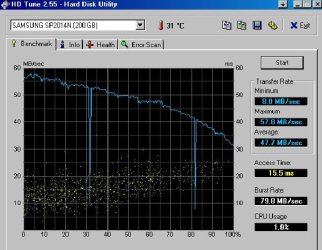
  • HD Tune test Samsung 200 gig 41608.jpg
    HD Tune test Samsung 200 gig 41608.jpg
    48.2 KB · Views: 8

My Computer My Computer

At a glance

Windows 7 Home Premium SP1, 64-bitIntel Skylake i5-6600K, not overclocked8 GB HyperX DDR4-2666 (2 x 4 GB)none; graphics are integrated on CPU
Computer type
PC/Desktop
Computer Manufacturer/Model Number
Ignatz Special; 4 speed manual gearbox; factory air conditioning; one of one
OS
Windows 7 Home Premium SP1, 64-bit
CPU
Intel Skylake i5-6600K, not overclocked
Motherboard
AsRock Z170M Extreme 4, micro ATX
Memory
8 GB HyperX DDR4-2666 (2 x 4 GB)
Graphics Card(s)
none; graphics are integrated on CPU
Sound Card
onboard: Realtek ALC1150; external: USB Behringer UF0-202
Monitor(s) Displays
Dell S2340M 23 inch IPS
Screen Resolution
1600 x 900
Hard Drives
System: Crucial MX100 series SSD, 128 GB;
Data: Samsung Spinpoint 103SJ, 1 TB;
Backup: WD Caviar Green WD30EZRX-00D8PB0, 3 TB
PSU
Rosewill SilentNight 500 watt fanless, semi-modular
Case
Antec Solo II
Cooling
Noctua NH-U12S; Noctua F12 intake, Noctua S12A exhaust
Keyboard
Microsoft 200 6JH-00001 USB
Mouse
Dell or Microsoft optical wired; USB
Antivirus
Microsoft Security Essentials and Malwarebytes Premium
Browser
Pale Moon
Other Info
All fans PWM; speeds at idle: CPU circa 500 rpm; intake circa 600 rpm; exhaust circa 600 rpm; CPU temps 27 idle and 47 C load in a warm room (27 C/81 F) when running Intel Extreme Tuning Utility stress test.
-I'm unsure what the Samsung HDD MB/sec, however, from the last run of HDTune, I can tell you the info on the WD Black. Min: 43.3 MB/Sec, Max: 103.7 MB/Sec, Average: 79.9 MB/Sec with Access Time: 12.6 ms, and Burst of 132.1 MB/Sec

79.9MB/sec, that is an excellent average. It's at the high end of the range.

12.6ms access time is a bit on the slow side, but shouldn't be really noticeable.

Samsung is about 8.9ms access time. That could explain for a tad of sluggishness on WD's part.

.


But it could also be windows accessing the disk excessively.
Try to find out if some process or service is accessing the disk constantly.

-Unsure on how to find this information, but hopefully you can steer me that direction?
1. ctrl alt delete to go into taskmanager

2. go to the performance tab

3. at the bottom there's a button "source control" or something like that. (I'm on Dutch OS)

4. In source control click on "Disk" tab.

5. Go fiddle around with the different views to find out which processes are accessing the disk.

It looks a bit complicated at first, but you'll figure it out.

I will check back tomorrow.
4:15 am over here, going to bed.

Greetings
 

My Computer My Computer

At a glance

Win7 Build 7600 x86Pentium II 300MHz32mb EDO RAMDiamond Viper
OS
Win7 Build 7600 x86
CPU
Pentium II 300MHz
Motherboard
Asus
Memory
32mb EDO RAM
Graphics Card(s)
Diamond Viper
Sound Card
Soundblaster 16
Monitor(s) Displays
14" AOC CRT 16K color
Screen Resolution
800x600
Hard Drives
300mb Quantum fireball
PSU
110 Watts
Cooling
Passive
Keyboard
Trust Ergonomic
Mouse
Generic
Internet Speed
256K u 128K d
-I'm unsure what the Samsung HDD MB/sec, however, from the last run of HDTune, I can tell you the info on the WD Black. Min: 43.3 MB/Sec, Max: 103.7 MB/Sec, Average: 79.9 MB/Sec with Access Time: 12.6 ms, and Burst of 132.1 MB/Sec

79.9MB/sec, that is an excellent average. It's at the high end of the range.

12.6ms access time is a bit on the slow side, but shouldn't be really noticeable.

Samsung is about 8.9ms access time. That could explain for a tad of sluggishness on WD's part.

.


But it could also be windows accessing the disk excessively.
Try to find out if some process or service is accessing the disk constantly.

-Unsure on how to find this information, but hopefully you can steer me that direction?
1. ctrl alt delete to go into taskmanager

2. go to the performance tab

3. at the bottom there's a button "source control" or something like that. (I'm on Dutch OS)

4. In source control click on "Disk" tab.

5. Go fiddle around with the different views to find out which processes are accessing the disk.

It looks a bit complicated at first, but you'll figure it out.

I will check back tomorrow.
4:15 am over here, going to bed.

Greetings

Seems the only thing taking up the write on the HD is System at the moment. It juggles between 7,000 - 30,000 B/Sec (Averaging 18,000 B/Sec).
 

My Computer My Computer

At a glance

Windows 7 x64AMD Phenom x4 95508GB DDR2
OS
Windows 7 x64
CPU
AMD Phenom x4 9550
Memory
8GB DDR2
Seems the only thing taking up the write on the HD is System at the moment. It juggles between 7,000 - 30,000 B/Sec (Averaging 18,000 B/Sec).

So we can rule excessive access out.

I suggest you start checking the disk for surface failures.
It could well be you have some poor sectors on the disk that need re-reading,
and that's what could cause the lag.

You might also consider installing a previous chipset driver, like one build before the last.
The latest isn't always the best. Sometimes new problems are introduced with new drivers.
It's also a way to rule it out as a cause.

Good luck
 

My Computer My Computer

At a glance

Win7 Build 7600 x86Pentium II 300MHz32mb EDO RAMDiamond Viper
OS
Win7 Build 7600 x86
CPU
Pentium II 300MHz
Motherboard
Asus
Memory
32mb EDO RAM
Graphics Card(s)
Diamond Viper
Sound Card
Soundblaster 16
Monitor(s) Displays
14" AOC CRT 16K color
Screen Resolution
800x600
Hard Drives
300mb Quantum fireball
PSU
110 Watts
Cooling
Passive
Keyboard
Trust Ergonomic
Mouse
Generic
Internet Speed
256K u 128K d
Well, i'm at a bit of a stand still. I made some progress with Photoshop today, it is no longer crashing, which I take as a good sign. Chipsets have no update from MSI or AMD/ATI. I had to adjust a few things with Photoshop to make it perform, such as adding some tweeks and a full update to insure I had everything current. Going to run WD's DLG on the hard drive and check for faults now.

Thanks to all for the help!
 

My Computer My Computer

At a glance

Windows 7 x64AMD Phenom x4 95508GB DDR2
OS
Windows 7 x64
CPU
AMD Phenom x4 9550
Memory
8GB DDR2
The chipset is not your mobo manufacturer. It would be from Intel, AMD, or Nvidia.
 

My Computer My Computer

At a glance

Windows 7 Ultimate x86-64[email protected] 1066MHz FSB6GB DDR3 1066MHz9300M GS 256MB Dedicated (Speed) + Intel4500M...
Computer Manufacturer/Model Number
Sony Vaio Z46GDU
OS
Windows 7 Ultimate x86-64
CPU
[email protected] 1066MHz FSB
Motherboard
Sony branded
Memory
6GB DDR3 1066MHz
Graphics Card(s)
9300M GS 256MB Dedicated (Speed) + Intel4500MHD (Stamina)
Sound Card
Realtek HD Audio
Monitor(s) Displays
13.1' WXGA
Screen Resolution
1600x900
Hard Drives
320GB 7200RPM w/ 16MB cache
Internet Speed
1MB/s
The chipset is not your mobo manufacturer. It would be from Intel, AMD, or Nvidia.

I also asked where to find chipset drivers at, and noone was able to give me any help. I appreciate the responses that I'm getting, but if you are saying I need to do something and I say I'm not sure I know how, please help guide me in the right direction.
 

My Computer My Computer

At a glance

Windows 7 x64AMD Phenom x4 95508GB DDR2
OS
Windows 7 x64
CPU
AMD Phenom x4 9550
Memory
8GB DDR2
I will attempt this, however, I have a feeling it's going to be a losing battle due to the PCI-E x16 slot covering these two ports. I will report back from my phone if there is any update.

Hi se7ensmatrix121,

I'm sorry to disappoint you but there's no way in the world you are going to get 3Gbit/s
That is a theoretical maximum for the Sata II standard, but that applies to the controller, not the disks themselves.

3gbit/s = 384 Mbytes per second and there isn't a "platter" disk in the world that can go that fast.

Somewhere between 60 and 80 Mbyte/s is the max sustained throughput you can get with a single platter disk. And about 128Mbyte/s bursts for very short periods when the disk's cache is read instead of the platters.


Why do they make a 3Gbit/s (384Mbyte/s) standard while no disk can reach that, I hear you think.

Well, for starters the controller standard always has to be ahead of the disk speeds,
so the disks have some headroom, and to allow development of faster disks.
there's no point in making a disk faster than the controller can handle.

Having said that,

The Sata II standard is created with SSD disks in mind.
The newest SSD disks are getting very close to that theoretical maximum.
The fastest to date reads and writes at 260 Mbytes/s.

It won't be long before SSD breaks the 384Mb barrier.
Therefore Sata III is already on it's way, that will be 6Gbit/s (768Mb/s)

Soon SSD will become more affordable and platter disks will die a slowly disappear, just like the floppy disk.

I hope this explains it.

Our good friend Anand gave us a look at the new inteface and how it will perform with "normal" disks.

A little off topic but it's good info on this subject.

AnandTech: Seagate Barracuda XT 2TB: SATA 6Gb/s Performance Preview
 

My Computer My Computer

At a glance

Windows 7 Professional x64Intel Core i7 8604GB DDR3 Mushkin 1600Mhz @ 7-8-7-20MSI GTS250 1GB DDR3 Twin Frozr
Computer Manufacturer/Model Number
Keeps changing - (Custom)
OS
Windows 7 Professional x64
CPU
Intel Core i7 860
Motherboard
Gigabyte GA-P55-UD4P
Memory
4GB DDR3 Mushkin 1600Mhz @ 7-8-7-20
Graphics Card(s)
MSI GTS250 1GB DDR3 Twin Frozr
Sound Card
Onboard realtek
Monitor(s) Displays
Samsung SyncMaster 24" P2450 + Samsung 20" 2033
Screen Resolution
1920 X 1080 and 1600 X 900 (#2 system 1440 X 900)
Hard Drives
Patriot Inferno 120GB SSD + 3 WD Blue 640GB drives
PSU
Corsair 750 HX Modular
Case
Lancool PC-K62
Cooling
Cooler Master TX3 CPU cooler and 4-140mm and 1-120mm case
Keyboard
Gigabyte USB keyboard
Mouse
Microsoft wireless laser mouse 5000
Internet Speed
7 Mb down 1.5 up
Other Info
System #2: AMD Phenom II X6 1055T (Freezer 7 Pro cooler) - Gigabyte 880GMA-UD2H - WD 500GB Black - 9500GT (1GB) 500W OCZ modular PSU - Antec 200 case. System #3 (LapTop) Core 2 Duo T6670 - 320GB 7200RPM HD - 4GB DDR3 RAM.
The chipset is not your mobo manufacturer. It would be from Intel, AMD, or Nvidia.

I also asked where to find chipset drivers at, and noone was able to give me any help. I appreciate the responses that I'm getting, but if you are saying I need to do something and I say I'm not sure I know how, please help guide me in the right direction.

What motherboard do you have? Type msinfo32.exe, then file export and upload that .txt file along with a Belarc Advisor report - all in a .zip file and I''ll point you in the right direction.
 

My Computer My Computer

At a glance

Windows 7 Ultimate x86-64[email protected] 1066MHz FSB6GB DDR3 1066MHz9300M GS 256MB Dedicated (Speed) + Intel4500M...
Computer Manufacturer/Model Number
Sony Vaio Z46GDU
OS
Windows 7 Ultimate x86-64
CPU
[email protected] 1066MHz FSB
Motherboard
Sony branded
Memory
6GB DDR3 1066MHz
Graphics Card(s)
9300M GS 256MB Dedicated (Speed) + Intel4500MHD (Stamina)
Sound Card
Realtek HD Audio
Monitor(s) Displays
13.1' WXGA
Screen Resolution
1600x900
Hard Drives
320GB 7200RPM w/ 16MB cache
Internet Speed
1MB/s
Here's the info you request. As mentioned in the first post, I have the MS-7388 Board from MSI (K9A2 CF Series), with an AMD Phenom 9750 Processor. This board uses the AMD 790X North Bridge, and a South Bridge 600.
 
Last edited:

My Computer My Computer

At a glance

Windows 7 x64AMD Phenom x4 95508GB DDR2
OS
Windows 7 x64
CPU
AMD Phenom x4 9550
Memory
8GB DDR2
AMD only has Vista drivers for 32-bit - install them unless you have x64 in vista compatibility mode. You only need the southbridge chipset driver.

Drivers & Support | GAME.AMD.COM

Then, untick logitech setpoint from starting, and uninstall Ad-Aware. Use AVG Free instead. Also what is Nostromo?
 

My Computer My Computer

At a glance

Windows 7 Ultimate x86-64[email protected] 1066MHz FSB6GB DDR3 1066MHz9300M GS 256MB Dedicated (Speed) + Intel4500M...
Computer Manufacturer/Model Number
Sony Vaio Z46GDU
OS
Windows 7 Ultimate x86-64
CPU
[email protected] 1066MHz FSB
Motherboard
Sony branded
Memory
6GB DDR3 1066MHz
Graphics Card(s)
9300M GS 256MB Dedicated (Speed) + Intel4500MHD (Stamina)
Sound Card
Realtek HD Audio
Monitor(s) Displays
13.1' WXGA
Screen Resolution
1600x900
Hard Drives
320GB 7200RPM w/ 16MB cache
Internet Speed
1MB/s
AMD only has Vista drivers for 32-bit - install them unless you have x64 in vista compatibility mode. You only need the southbridge chipset driver.

Drivers & Support | GAME.AMD.COM

Then, untick logitech setpoint from starting, and uninstall Ad-Aware. Use AVG Free instead. Also what is Nostromo?

I start Setpoint because it goes to my mouse and keyboard when running games, same with Nostromo. I will look into AVG.
 

My Computer My Computer

At a glance

Windows 7 x64AMD Phenom x4 95508GB DDR2
OS
Windows 7 x64
CPU
AMD Phenom x4 9550
Memory
8GB DDR2
Some drivers are listed as critical, so I would completely uninstall Setpoint. AVG is a better allrounder than Ad-Aware. Even Viewer also lists a number of problems with software - patches and cracks - have you modified any program?
 

My Computer My Computer

At a glance

Windows 7 Ultimate x86-64[email protected] 1066MHz FSB6GB DDR3 1066MHz9300M GS 256MB Dedicated (Speed) + Intel4500M...
Computer Manufacturer/Model Number
Sony Vaio Z46GDU
OS
Windows 7 Ultimate x86-64
CPU
[email protected] 1066MHz FSB
Motherboard
Sony branded
Memory
6GB DDR3 1066MHz
Graphics Card(s)
9300M GS 256MB Dedicated (Speed) + Intel4500MHD (Stamina)
Sound Card
Realtek HD Audio
Monitor(s) Displays
13.1' WXGA
Screen Resolution
1600x900
Hard Drives
320GB 7200RPM w/ 16MB cache
Internet Speed
1MB/s
Some drivers are listed as critical, so I would completely uninstall Setpoint. AVG is a better allrounder than Ad-Aware. Even Viewer also lists a number of problems with software - patches and cracks - have you modified any program?

I have tweeks made to a few programs to enable them to run faster, yes.

Which drivers are critical? This way I will know what to look for.
 

My Computer My Computer

At a glance

Windows 7 x64AMD Phenom x4 95508GB DDR2
OS
Windows 7 x64
CPU
AMD Phenom x4 9550
Memory
8GB DDR2
The critical items can be fixed by:

1) Installing the chipset if you have x86.

2) Uninstall every last bit of setpoint

3) Run Windows Update

4) Switch security apps.

5) Uninstall any apps you've modified.

6) Run driver sweeper on your sound and video card drivers. The program supports realtek + nvidia or ati drivers.

Reboot after each step, except if you don't install any windows updates.
 

My Computer My Computer

At a glance

Windows 7 Ultimate x86-64[email protected] 1066MHz FSB6GB DDR3 1066MHz9300M GS 256MB Dedicated (Speed) + Intel4500M...
Computer Manufacturer/Model Number
Sony Vaio Z46GDU
OS
Windows 7 Ultimate x86-64
CPU
[email protected] 1066MHz FSB
Motherboard
Sony branded
Memory
6GB DDR3 1066MHz
Graphics Card(s)
9300M GS 256MB Dedicated (Speed) + Intel4500MHD (Stamina)
Sound Card
Realtek HD Audio
Monitor(s) Displays
13.1' WXGA
Screen Resolution
1600x900
Hard Drives
320GB 7200RPM w/ 16MB cache
Internet Speed
1MB/s
Ok. Thanks for your help.
 

My Computer My Computer

At a glance

Windows 7 x64AMD Phenom x4 95508GB DDR2
OS
Windows 7 x64
CPU
AMD Phenom x4 9550
Memory
8GB DDR2
Problem solved!

WD DLG came back with no issues, so after following Frost's suggestions on Chipset drivers and double checking Windows Update, I am back to running in top shape again with Photoshop. Thank you very much to all that helped.
 

My Computer My Computer

At a glance

Windows 7 x64AMD Phenom x4 95508GB DDR2
OS
Windows 7 x64
CPU
AMD Phenom x4 9550
Memory
8GB DDR2
Excellent, report this thread as solved!
 

My Computer My Computer

At a glance

Windows 7 Ultimate x86-64[email protected] 1066MHz FSB6GB DDR3 1066MHz9300M GS 256MB Dedicated (Speed) + Intel4500M...
Computer Manufacturer/Model Number
Sony Vaio Z46GDU
OS
Windows 7 Ultimate x86-64
CPU
[email protected] 1066MHz FSB
Motherboard
Sony branded
Memory
6GB DDR3 1066MHz
Graphics Card(s)
9300M GS 256MB Dedicated (Speed) + Intel4500MHD (Stamina)
Sound Card
Realtek HD Audio
Monitor(s) Displays
13.1' WXGA
Screen Resolution
1600x900
Hard Drives
320GB 7200RPM w/ 16MB cache
Internet Speed
1MB/s
Silly question, I know...but how do I mark it as solved? Not finding any option for it.
 

My Computer My Computer

At a glance

Windows 7 x64AMD Phenom x4 95508GB DDR2
OS
Windows 7 x64
CPU
AMD Phenom x4 9550
Memory
8GB DDR2
Choose the exclamation picture in one of the thread windows. The scale icon adds reputation.

"
user_online.gif
"
 

My Computer My Computer

At a glance

Windows 7 Ultimate x86-64[email protected] 1066MHz FSB6GB DDR3 1066MHz9300M GS 256MB Dedicated (Speed) + Intel4500M...
Computer Manufacturer/Model Number
Sony Vaio Z46GDU
OS
Windows 7 Ultimate x86-64
CPU
[email protected] 1066MHz FSB
Motherboard
Sony branded
Memory
6GB DDR3 1066MHz
Graphics Card(s)
9300M GS 256MB Dedicated (Speed) + Intel4500MHD (Stamina)
Sound Card
Realtek HD Audio
Monitor(s) Displays
13.1' WXGA
Screen Resolution
1600x900
Hard Drives
320GB 7200RPM w/ 16MB cache
Internet Speed
1MB/s
Back
Top