Completely change language of Ultimate installation?

multimolti

New member
Local time
11:38 PM
Messages
4
Hi!

I received a German Windows 7 Ultimate Signature Edition with the HomeParty thingy Microsoft was sponsoring. But I want my Windows to be in English, so I downloaded the English Language Patch via Windows Update and installed it. Now everything is nicely in English AFTER I login.
Before login, it still says the German words for "Password", "Windows is starting up", "Windows is shutting down", "Windows is configuring updates", ...

Is there any way to completely patch it to English?

Thanks for your help!
 

My Computer My Computer

At a glance

Windows 7AMD Phenom II X4 955 3.20GHz BE2x2048MB Kit A-Data 1333MHz CL7 DDR3nVidia GTX 260 "Performance Edition"
OS
Windows 7
CPU
AMD Phenom II X4 955 3.20GHz BE
Motherboard
GIGABYTE GA-MA790XT-UD4P
Memory
2x2048MB Kit A-Data 1333MHz CL7 DDR3
Graphics Card(s)
nVidia GTX 260 "Performance Edition"
Sound Card
onboard
Monitor(s) Displays
Acer V223HQ
Screen Resolution
1920x1080
Hard Drives
2x Samsung 1000GB
1x Samsung 400GB
2x Unknown 120GB
PSU
ATX Artic Cooling Arctic Fusion 550
Case
ATX Midi Raidmax Tornado
Cooling
Scythe SCKTN-3000 Katana
Keyboard
Logitech Internet 350
Mouse
Razer Copperhead
Internet Speed
DSL 4000
Hi!

I received a German Windows 7 Ultimate Signature Edition with the HomeParty thingy Microsoft was sponsoring. But I want my Windows to be in English, so I downloaded the English Language Patch via Windows Update and installed it. Now everything is nicely in English AFTER I login.
Before login, it still says the German words for "Password", "Windows is starting up", "Windows is shutting down", "Windows is configuring updates", ...

Is there any way to completely patch it to English?

Thanks for your help!


The only way to do that is to use an English language version of the software. See if any of your friends have an English Ultimate DVD and reinstall using the key that came with your signature version.

Snarks:cool:
 

My Computer My Computer

At a glance

Windows 7 Ultimate x64 SP1Intel Core 2 Duo @ 2.4 ghz4 GBNvidia Quadro 7700x
Computer Manufacturer/Model Number
Dell Precision M4400
OS
Windows 7 Ultimate x64 SP1
CPU
Intel Core 2 Duo @ 2.4 ghz
Motherboard
Intel
Memory
4 GB
Graphics Card(s)
Nvidia Quadro 7700x
Sound Card
Onboard
Monitor(s) Displays
Dell LCD
Screen Resolution
1440x900
PSU
Absolutely! How else would this hunk o' junk run?
So my Ultimate Signature key will work with any Ultimate version? All my friends have German Windows 7 as well (not that uncommon since I live in Germany :P), but I could download it "somewhere" in the internet and use my legal key then if it will work with the normal Ultimate as well.
 

My Computer My Computer

At a glance

Windows 7AMD Phenom II X4 955 3.20GHz BE2x2048MB Kit A-Data 1333MHz CL7 DDR3nVidia GTX 260 "Performance Edition"
OS
Windows 7
CPU
AMD Phenom II X4 955 3.20GHz BE
Motherboard
GIGABYTE GA-MA790XT-UD4P
Memory
2x2048MB Kit A-Data 1333MHz CL7 DDR3
Graphics Card(s)
nVidia GTX 260 "Performance Edition"
Sound Card
onboard
Monitor(s) Displays
Acer V223HQ
Screen Resolution
1920x1080
Hard Drives
2x Samsung 1000GB
1x Samsung 400GB
2x Unknown 120GB
PSU
ATX Artic Cooling Arctic Fusion 550
Case
ATX Midi Raidmax Tornado
Cooling
Scythe SCKTN-3000 Katana
Keyboard
Logitech Internet 350
Mouse
Razer Copperhead
Internet Speed
DSL 4000
You don't have to reinstall or have the Ultimate version to change the language with Vistalizator. Check out my thread here.
 

My Computer My Computer

At a glance

Windows 7 Professional (x64)AMD Phenom II X4 955 Black Edition6GB (3 x 2GB) Kingston DDR3 1333 SDRAMNVIDIA GeForce GTX 260
Computer Manufacturer/Model Number
Cyberpower, Inc.
OS
Windows 7 Professional (x64)
CPU
AMD Phenom II X4 955 Black Edition
Motherboard
Gigabyte AMD MA770T-UD3P AM3 DDR3 1666+/1333/1066
Memory
6GB (3 x 2GB) Kingston DDR3 1333 SDRAM
Graphics Card(s)
NVIDIA GeForce GTX 260
Sound Card
Onboard 7.1 Sound
Monitor(s) Displays
Samsung 24" SyncMaster 2422
Screen Resolution
1920 x 1200
Hard Drives
500GB Sata II 3.0GB 16MB 7200RPM,
Western Digital 1TB USB 2.0 External Hard Drive
PSU
Kingwin 700 Watt Power Supply
Case
Silver X-Cruiser 2 Mid No Power
Cooling
Asetek 120MM Watercooler
Keyboard
HTK-1001
Mouse
Razer Viper
Internet Speed
Incoming: 2496 kbps, Outgoing: 512 kbps
The Win 7 installers are all the same (with versions hidden due to ei.cfg file in Sources), but the keys are version-specific, and I believe also language-specific from what I have read.
 
No they aren't language specific, they are just version specific. They use the same algorithyms (god i can't spell) for english/french/russian/spanish/german ect... Because all they have to do is swap out the language packs (well figuratively speaking) and re-configure the setup files. BAM different language same system. You should be able to modify every piece of text on the OS somewhere, as I remember mucking around a lot with Vista when it came out.

Either way you purchased a Ultimate version, and you should be able to install ultimate no matter what language you choose. =)

[edit] I may be wrong... =( I guess you can install, but activation might be different? Though I'm sure you could activate via phone, or call MS to find out.

http://en.wikipedia.org/wiki/Windows_Product_Activation

I know wikipedia isn't the best, but they do mention region specific which I'm going to say might be language specific.... THOUGH I don't know if it really means that or you just have to live there (as it would contact their servers).

[final edit] AHHHH solution found!

http://www.howtogeek.com/forum/topic/windows-7-activation-key-language-question

BAH I knew I was /probably/ correct! I was pretty sure I knew how they did the installs, as it is a 'language pack' so every installer is the same, it's just region activation that's different. (though that's just knowing how the inet works hehe)

So there is your answer!
 
Last edited:

My Computer My Computer

At a glance

Windows 7, LinuxAMD Phemon II x2 3@37501G Crucial 16668800GT OC (custom OC)
Computer Manufacturer/Model Number
Custom
OS
Windows 7, Linux
CPU
AMD Phemon II x2 3@3750
Motherboard
ASRock M3A770DE
Memory
1G Crucial 1666
Graphics Card(s)
8800GT OC (custom OC)
Sound Card
Sound Blaster Live! (never changes!)
Monitor(s) Displays
Vivitron 22"
Screen Resolution
1600x1200
Hard Drives
Western Digital 120G/160G SATA
Maxtor 80G IDE
PSU
450w
Case
Unknown
Cooling
Custom Air cooled
Keyboard
Logitech
Mouse
Logitech M-BZ15A Laser
Internet Speed
Cable 10mbit
Mushroom has it. I have an English and a foreign language edition. Both take the same key. (But remember the Eula.) If you are honest, you will need two keys for two separate language version installs.
Fwiw. Also for personal useage, I have two alternative MUI's installed, other than English but, as the OP has discovered, they do not translate the whole range.

From MS
"Windows 7 MUIs provide a translated version of most of the user interface. MUIs require a license to be used and are only available in Windows 7 Ultimate and Windows 7 Enterprise. If you are using Windows 7 Enterprise, contact your system administrator for information about installing additional languages."
Maybe the program mentioned in a previous post covers the problem, if you have other than Ultimate/Enterprise?
 
Last edited:

My Computer My Computer

At a glance

Vista and now 7 in 32 and 64 bit.
Computer Manufacturer/Model Number
Three desktops and one laptop with good specs..
OS
Vista and now 7 in 32 and 64 bit.
Mushroom has it. I have an English and a foreign language edition. Both take the same keys. (But remember the Eula. I have more than one key (technet) - if you are honest, you will need two keys for two separate language installs.
Fwiw. Also for personal useage, I have two alternative MUI's installed, other than English but, as the OP has discovered, they do not translate the whole range.

From MS
"Windows 7 MUIs provide a translated version of most of the user interface. MUIs require a license to be used and are only available in Windows 7 Ultimate and Windows 7 Enterprise. If you are using Windows 7 Enterprise, contact your system administrator for information about installing additional languages."
Maybe the program mentioned in a previous post covers the problem, if you have other than Ultimate/Enterprise?

I like your post.... "if you are honest".... Though if the OP only wants to install English and not the other language if I'm reading things right... So really the EULA doesn't have any say in this. He payed for the key, really you can have multiple versions of the software as that's not illegal, just as long as one machine is registered per key. He has all legal rights to install from a friends CD, though if he wants to be sure he could call up MS and either ask for a key or ask for the technical details of how he has to go about getting an english install without paying for another key. I'm pretty sure MS would do something in his favor, as they want to keep the respected customers.

[edit]

I'm basing this off the fact that you can install a 'demo' of Win7 on any machine, that's not illegal. And if you so happened to purchase a key for the ultimate and registered with the 'demo' that in itself isn't illegal. So really if that's not illegal then it's a pretty big gray line that defines that and borrowing a friends english version just because you got the wrong language. In all reality you don't really purchase MS's software so much as the right to use it, and in reality you aren't even doing that. You are purchasing the right to use X version, such as Basic, Home, Ultimate... Regardless of where you are and what language. Though due to certain laws they do have certain region specific activations and I think that's because of country laws.
 

My Computer My Computer

At a glance

Windows 7, LinuxAMD Phemon II x2 3@37501G Crucial 16668800GT OC (custom OC)
Computer Manufacturer/Model Number
Custom
OS
Windows 7, Linux
CPU
AMD Phemon II x2 3@3750
Motherboard
ASRock M3A770DE
Memory
1G Crucial 1666
Graphics Card(s)
8800GT OC (custom OC)
Sound Card
Sound Blaster Live! (never changes!)
Monitor(s) Displays
Vivitron 22"
Screen Resolution
1600x1200
Hard Drives
Western Digital 120G/160G SATA
Maxtor 80G IDE
PSU
450w
Case
Unknown
Cooling
Custom Air cooled
Keyboard
Logitech
Mouse
Logitech M-BZ15A Laser
Internet Speed
Cable 10mbit
I am sure whatever you said there is correct. I was merely supporting your post. Unfortunately, when I have another read of the OP, neither post answers his question.. If I were in multimulti's position, I would feel confident in contacting Microsoft and asking for a swap to the English version, which would solve his problem..
 

My Computer My Computer

At a glance

Vista and now 7 in 32 and 64 bit.
Computer Manufacturer/Model Number
Three desktops and one laptop with good specs..
OS
Vista and now 7 in 32 and 64 bit.
Hi there

Doesn't Ultimate come with Language packs -- if it does then you can change the GUI etc languages in the regional options.

Otherwise I think you can download Language packs for most common Languages -- English shouldn't be a problem.

I've switched languages loads of times on XP - There's no Language pack for me for W7 yet however :cry:.

You can of course bypass W7's logon screen in any case ==> go to acessories===> Run and type in control userpasswords2

Now disable "Users must enter a password to use this machine"

You'll get a popup asking for the default user and the password to be used at logon.

Next time you boot up you'll be taken straight into your session without getting a password prompt (in German or whatever) and your session will be in English.

Cheers
jimbo
 

My Computer My Computer

At a glance

Linux CENTOS 7 / various Windows OS'es and se...Intel i7 Intel i58GB, 16GBOn Motherboard
Computer type
PC/Desktop
Computer Manufacturer/Model Number
Custom built, several laptops HP/ASUS
OS
Linux CENTOS 7 / various Windows OS'es and servers
CPU
Intel i7 Intel i5
Memory
8GB, 16GB
Graphics Card(s)
On Motherboard
Sound Card
Realtek HD audio
Monitor(s) Displays
Apple Cinema display, Samsung LCD
Screen Resolution
1920 X 1080
Hard Drives
4 X 1TB SATA
Mouse
Toshiba wireless laser
Internet Speed
> 20MB up

My Computer My Computer

At a glance

Vista and now 7 in 32 and 64 bit.
Computer Manufacturer/Model Number
Three desktops and one laptop with good specs..
OS
Vista and now 7 in 32 and 64 bit.
Hallo, multimolti. Your issue is that you just forgot one step when installing a language.

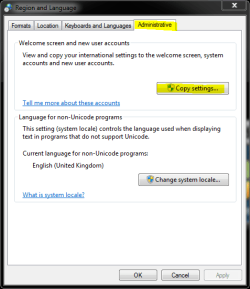
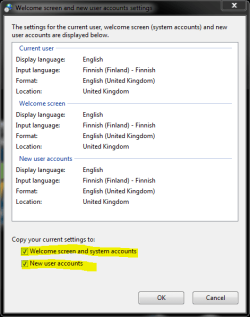
Go to Control Panel > Region and Languages. Click Administrative tab, click Copy settings (image 1). In settings window, check the two checkboxes at bottom (image 2). Click OK.

Done. Your system is now completely English.

Kari

Image 1:
lp1.PNG

Image 2:
LP2.PNG
 

My Computer My Computer

At a glance

Windows 10 Pro x64 EN-GB1.6 GHz Intel Core i7-720QM Processor6 GBATI Mobility Radeon HD 5850 Graphics
Computer type
Laptop
Computer Manufacturer/Model Number
HP ENVY 17-1150eg
OS
Windows 10 Pro x64 EN-GB
CPU
1.6 GHz Intel Core i7-720QM Processor
Memory
6 GB
Graphics Card(s)
ATI Mobility Radeon HD 5850 Graphics
Sound Card
Beats sound system with integrated subwoofer
Monitor(s) Displays
17" laptop display, 22" LED and 32" Full HD TV through HDMI
Screen Resolution
1600*900 (1), 1920*1080 (2&3)
Hard Drives
Internal: 2 x 500 GB SATA Hard Disk Drive 7200 rpm
External: 2TB for backups, 3TB USB3 network drive for media
Cooling
As Envy runs a bit warm, I have it on a Cooler Master pad
Keyboard
Logitech diNovo Media Desktop Laser (bluetooth)
Mouse
Logitech Performance Mouse MX
Internet Speed
50/10 Mbps VDSL
Antivirus
Windows Defender 4.3.9431.0
Browser
Maxthon 3.5.2., IE11

My Computer My Computer

At a glance

Linux CENTOS 7 / various Windows OS'es and se...Intel i7 Intel i58GB, 16GBOn Motherboard
Computer type
PC/Desktop
Computer Manufacturer/Model Number
Custom built, several laptops HP/ASUS
OS
Linux CENTOS 7 / various Windows OS'es and servers
CPU
Intel i7 Intel i5
Memory
8GB, 16GB
Graphics Card(s)
On Motherboard
Sound Card
Realtek HD audio
Monitor(s) Displays
Apple Cinema display, Samsung LCD
Screen Resolution
1920 X 1080
Hard Drives
4 X 1TB SATA
Mouse
Toshiba wireless laser
Internet Speed
> 20MB up
Hallo, multimolti. Your issue is that you just forgot one step when installing a language.

As I read his post, he has completed that step but, as he says, the language packs do not , in most cases (as I said, I,m using two extras) do not do a 100% job, but are, nevertheless, pretty useful.
 

My Computer My Computer

At a glance

Vista and now 7 in 32 and 64 bit.
Computer Manufacturer/Model Number
Three desktops and one laptop with good specs..
OS
Vista and now 7 in 32 and 64 bit.
Yeah if you read up he got the english language installed, but since it's still a german (right?) base install the login ect... aren't in english. He just wants to know if he used an english installer if it'd work.

[edit] OH I forgot, a language pack won't change everything. Some things are hard coded into files, such as image files ect... and those won't get changed by a language pack. It's like how some video games that are foreign still aren't 100% english. It's just how language packs are made, it's supposed to be a DB of certain files/phrases that swap out easy. Certain files don't get changed as if he gets an update it'll get replaced anyways. Language files don't get replaced on updates, hence the idea of a "db" for language files.
 

My Computer My Computer

At a glance

Windows 7, LinuxAMD Phemon II x2 3@37501G Crucial 16668800GT OC (custom OC)
Computer Manufacturer/Model Number
Custom
OS
Windows 7, Linux
CPU
AMD Phemon II x2 3@3750
Motherboard
ASRock M3A770DE
Memory
1G Crucial 1666
Graphics Card(s)
8800GT OC (custom OC)
Sound Card
Sound Blaster Live! (never changes!)
Monitor(s) Displays
Vivitron 22"
Screen Resolution
1600x1200
Hard Drives
Western Digital 120G/160G SATA
Maxtor 80G IDE
PSU
450w
Case
Unknown
Cooling
Custom Air cooled
Keyboard
Logitech
Mouse
Logitech M-BZ15A Laser
Internet Speed
Cable 10mbit
Dave, Mushroomboy: I understood exactly what OP wrote. If he does as I told, his issue is solved and the system language is completely changed. Also in login, logout and welcome screens.

Multimolti, it is of course up to you who you believe, but I know what I am talking about. Just do as I told you above in my earlier post.

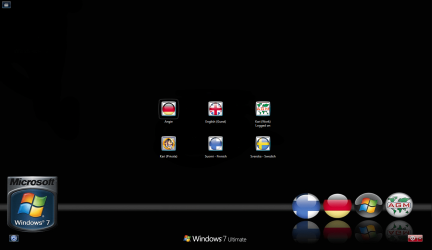
Language pack changes the language of Vista or Win7 completely. I've been using Windows in four different languages since it is been possible, from early beta versions of Vista in 2005. My main system today is a German 7 Ultimate with English, Finnish and Swedish language packs (see my attached login screen) and I have never seen one single word of German here except when logging in to a German account. The system is completely English when I log in to my work account, or completely Finnish when I log in to my private account, completely Swedish when I sometimes have to login to Swedish account.

When installing this German 7 Ultimate, I first created the main (and only administrative) account (Kari (Work) in the image). Then I installed the language packs I need, changed my main account's language to English and did as described in my post above before creating any additional accounts. As the result, all additional accounts I create have English as default and the logon and welcome screens are in English.

Kari
 

Attachments

  • Logon.PNG
    Logon.PNG
    87.8 KB · Views: 132
Last edited:

My Computer My Computer

At a glance

Windows 10 Pro x64 EN-GB1.6 GHz Intel Core i7-720QM Processor6 GBATI Mobility Radeon HD 5850 Graphics
Computer type
Laptop
Computer Manufacturer/Model Number
HP ENVY 17-1150eg
OS
Windows 10 Pro x64 EN-GB
CPU
1.6 GHz Intel Core i7-720QM Processor
Memory
6 GB
Graphics Card(s)
ATI Mobility Radeon HD 5850 Graphics
Sound Card
Beats sound system with integrated subwoofer
Monitor(s) Displays
17" laptop display, 22" LED and 32" Full HD TV through HDMI
Screen Resolution
1600*900 (1), 1920*1080 (2&3)
Hard Drives
Internal: 2 x 500 GB SATA Hard Disk Drive 7200 rpm
External: 2TB for backups, 3TB USB3 network drive for media
Cooling
As Envy runs a bit warm, I have it on a Cooler Master pad
Keyboard
Logitech diNovo Media Desktop Laser (bluetooth)
Mouse
Logitech Performance Mouse MX
Internet Speed
50/10 Mbps VDSL
Antivirus
Windows Defender 4.3.9431.0
Browser
Maxthon 3.5.2., IE11
:doh:
I have some difficulties to understand your point. Something I do understand is Windows 7 language packs and how they work, that's why I would like to use this opportunity and correct something you've got wrong:
Certain files don't get changed as if he gets an update it'll get replaced anyways. Language files don't get replaced on updates, hence the idea of a "db" for language files.
Because I changed the system language of my German Win7, it is now completely English. It means Windows Update works perfectly, updating my files and software with English files. IE8 updates, system updates, everything is in English though the original install language is German. Language pack does not change the behaviour of Windows Update or leave something out from update.

Language pack IS NOT A DATABASE OF WORDS in another language. It is a complete Windows system in chosen language thus completely and normally updated by Windows Update.

I really want to ask you not to spread wrong information, especially when it is quite clear you do not know even the basics of Windows Language Packs and how they work. When you response to an issue here always check your facts before posting if you are not sure.

Kari
 
Last edited by a moderator:

My Computer My Computer

At a glance

Windows 10 Pro x64 EN-GB1.6 GHz Intel Core i7-720QM Processor6 GBATI Mobility Radeon HD 5850 Graphics
Computer type
Laptop
Computer Manufacturer/Model Number
HP ENVY 17-1150eg
OS
Windows 10 Pro x64 EN-GB
CPU
1.6 GHz Intel Core i7-720QM Processor
Memory
6 GB
Graphics Card(s)
ATI Mobility Radeon HD 5850 Graphics
Sound Card
Beats sound system with integrated subwoofer
Monitor(s) Displays
17" laptop display, 22" LED and 32" Full HD TV through HDMI
Screen Resolution
1600*900 (1), 1920*1080 (2&3)
Hard Drives
Internal: 2 x 500 GB SATA Hard Disk Drive 7200 rpm
External: 2TB for backups, 3TB USB3 network drive for media
Cooling
As Envy runs a bit warm, I have it on a Cooler Master pad
Keyboard
Logitech diNovo Media Desktop Laser (bluetooth)
Mouse
Logitech Performance Mouse MX
Internet Speed
50/10 Mbps VDSL
Antivirus
Windows Defender 4.3.9431.0
Browser
Maxthon 3.5.2., IE11
Kari.
I am not inexperienced, but, the truth is, maybe in haste or "I don't give a damn!", I had never looked at those two boxes at the bottom. You are 100% correct. Apart from some dedicated English language items, I ticked those boxes, and now have now created two separate accounts with my alternative languages, with just about a perfect translation.. Thank you for your observation and advice.
 

My Computer My Computer

At a glance

Vista and now 7 in 32 and 64 bit.
Computer Manufacturer/Model Number
Three desktops and one laptop with good specs..
OS
Vista and now 7 in 32 and 64 bit.
Hallo, multimolti. Your issue is that you just forgot one step when installing a language.

Go to Control Panel > Region and Languages. Click Administrative tab, click Copy settings (image 1). In settings window, check the two checkboxes at bottom (image 2). Click OK.

Done. Your system is now completely English.

Kari

Image 1:
View attachment 41882

Image 2:
View attachment 41883


Thanks a lot, that's exactly what I was looking for :)
 

My Computer My Computer

At a glance

Win7 64 bits FR2500K @ 4.5 GHz4x4GB 1600MHz GSkill CL9.HD6850 Powercolor stock
OS
Win7 64 bits FR
CPU
2500K @ 4.5 GHz
Motherboard
Asrock Z68 Gen3 Extreme3
Memory
4x4GB 1600MHz GSkill CL9.
Graphics Card(s)
HD6850 Powercolor stock
Sound Card
Integrated
Monitor(s) Displays
Samsung 2343 + Dell 20in 4/3
Screen Resolution
2048x1152, 1600x1200
Hard Drives
OCZ Vertex LE SSD, 50GB
OCZ Solid 3 120GB
OCZ Vertex 2 240GB
Western Digital Scorpio 320GB 5400 rpm
PSU
KingWin Lazer Platinum (90+) 550Watts
Case
HAF912
Cooling
CPU: OCZ Vendetta 2
Keyboard
MX5500 revolution bluetooth
Mouse
MX5500 revolution bluetooth
Internet Speed
Cable 7 Mbps
Hallo, multimolti. Your issue is that you just forgot one step when installing a language.

Go to Control Panel > Region and Languages. Click Administrative tab, click Copy settings (image 1). In settings window, check the two checkboxes at bottom (image 2). Click OK.

Done. Your system is now completely English.

Kari

Image 1:
View attachment 41882

Image 2:
View attachment 41883

Kari, I know this is an old thread, but i came searching and you had the answer, Thank you so much this was exactly what i needed to do.
Cheers for the info, you saved me a re-installation .
:D
 

My Computer My Computer

At a glance

Windows 7 Professional3.002gb
Computer Manufacturer/Model Number
Dell
OS
Windows 7 Professional
CPU
3.00
Motherboard
dell
Memory
2gb
Back
Top