Slow start up?

jonesnewton

New member
Member
VIP
Local time
4:19 PM
Messages
211
Location
Prague, Czech Rep
Hi
I have an Acer 5738Z with Win 7 Intel Pentium T4300 2.1GHz, 3GB memory, 320GB HDD and it seems to be starting and running up slow?
I have deleted cache and recent history, emptied recycle bin, done virus and malware (MSE and Malware)- no nasties reported, plus a defrag and there is 220GB of free space, but still seems to run slow?

Is there anything else I could try?

Thanks in advance.
 
Last edited:

My Computer My Computer

At a glance

Acer Aspire 7738G Win 7 X64 bit Home Premium
Computer type
Laptop
Computer Manufacturer/Model Number
Acer 7738G
OS
Acer Aspire 7738G Win 7 X64 bit Home Premium
open up msconfig/startup and disable everything but anti-virus and your firewall and see if that helps... ;)
 

My Computer My Computer

At a glance

64-bit Windows 8.1 ProCore(TM) i5 CPU 4330 Haswell @ 3.20GHz12.00 GBIntel(R) HD Graphics
Computer type
PC/Desktop
Computer Manufacturer/Model Number
LENOVO K450 @3.0GHZ
OS
64-bit Windows 8.1 Pro
CPU
Core(TM) i5 CPU 4330 Haswell @ 3.20GHz
Motherboard
LENOVO
Memory
12.00 GB
Graphics Card(s)
Intel(R) HD Graphics
Sound Card
Intel HD integtrated
Monitor(s) Displays
HP 25' ISP Monitor
Screen Resolution
1900/1020
Hard Drives
(1) ST1000DM003-1CH162 (2) Generic STORAGE DEVICE USB Device (3) Generic STORAGE DEVICE USB Device
Internet Speed
100mb down/10mb up
The first thing you should try is telling us how long it takes to boot.
 

My Computer My Computer

At a glance

Windows 7 Home Premium SP1, 64-bitIntel Skylake i5-6600K, not overclocked8 GB HyperX DDR4-2666 (2 x 4 GB)none; graphics are integrated on CPU
Computer type
PC/Desktop
Computer Manufacturer/Model Number
Ignatz Special; 4 speed manual gearbox; factory air conditioning; one of one
OS
Windows 7 Home Premium SP1, 64-bit
CPU
Intel Skylake i5-6600K, not overclocked
Motherboard
AsRock Z170M Extreme 4, micro ATX
Memory
8 GB HyperX DDR4-2666 (2 x 4 GB)
Graphics Card(s)
none; graphics are integrated on CPU
Sound Card
onboard: Realtek ALC1150; external: USB Behringer UF0-202
Monitor(s) Displays
Dell S2340M 23 inch IPS
Screen Resolution
1600 x 900
Hard Drives
System: Crucial MX100 series SSD, 128 GB;
Data: Samsung Spinpoint 103SJ, 1 TB;
Backup: WD Caviar Green WD30EZRX-00D8PB0, 3 TB
PSU
Rosewill SilentNight 500 watt fanless, semi-modular
Case
Antec Solo II
Cooling
Noctua NH-U12S; Noctua F12 intake, Noctua S12A exhaust
Keyboard
Microsoft 200 6JH-00001 USB
Mouse
Dell or Microsoft optical wired; USB
Antivirus
Microsoft Security Essentials and Malwarebytes Premium
Browser
Pale Moon
Other Info
All fans PWM; speeds at idle: CPU circa 500 rpm; intake circa 600 rpm; exhaust circa 600 rpm; CPU temps 27 idle and 47 C load in a warm room (27 C/81 F) when running Intel Extreme Tuning Utility stress test.
It takes around 2 mins to complete start up, I do tend to Hibernate it alot, tho occasionally I switch off completely.
 

My Computer My Computer

At a glance

Acer Aspire 7738G Win 7 X64 bit Home Premium
Computer type
Laptop
Computer Manufacturer/Model Number
Acer 7738G
OS
Acer Aspire 7738G Win 7 X64 bit Home Premium
Put a clock on it and time it to the second.

Most people here take over a minute to boot. I don't know anything about your PC, but if it is a modestly powered laptop, it might take 2 minutes. Dunno.

If you are positive it has slowed down, then you probably have questionable stuff trying to load at boot time, like Tews suggested. Turn all that stuff off in msconfig other than antivirus and see if you set the world on fire. If not, maybe it's just a puny processor.
 

My Computer My Computer

At a glance

Windows 7 Home Premium SP1, 64-bitIntel Skylake i5-6600K, not overclocked8 GB HyperX DDR4-2666 (2 x 4 GB)none; graphics are integrated on CPU
Computer type
PC/Desktop
Computer Manufacturer/Model Number
Ignatz Special; 4 speed manual gearbox; factory air conditioning; one of one
OS
Windows 7 Home Premium SP1, 64-bit
CPU
Intel Skylake i5-6600K, not overclocked
Motherboard
AsRock Z170M Extreme 4, micro ATX
Memory
8 GB HyperX DDR4-2666 (2 x 4 GB)
Graphics Card(s)
none; graphics are integrated on CPU
Sound Card
onboard: Realtek ALC1150; external: USB Behringer UF0-202
Monitor(s) Displays
Dell S2340M 23 inch IPS
Screen Resolution
1600 x 900
Hard Drives
System: Crucial MX100 series SSD, 128 GB;
Data: Samsung Spinpoint 103SJ, 1 TB;
Backup: WD Caviar Green WD30EZRX-00D8PB0, 3 TB
PSU
Rosewill SilentNight 500 watt fanless, semi-modular
Case
Antec Solo II
Cooling
Noctua NH-U12S; Noctua F12 intake, Noctua S12A exhaust
Keyboard
Microsoft 200 6JH-00001 USB
Mouse
Dell or Microsoft optical wired; USB
Antivirus
Microsoft Security Essentials and Malwarebytes Premium
Browser
Pale Moon
Other Info
All fans PWM; speeds at idle: CPU circa 500 rpm; intake circa 600 rpm; exhaust circa 600 rpm; CPU temps 27 idle and 47 C load in a warm room (27 C/81 F) when running Intel Extreme Tuning Utility stress test.
open up msconfig/startup and disable everything but anti-virus and your firewall and see if that helps... ;)

Dosnt your computer need half these files to help it boot?
 

My Computer My Computer

At a glance

Windows 7 Pro X64Intel i7, 930 2.8Ghz - O/c to 4Ghz @ 1.29v3x2GB = 6GB Mushkin Redline 998805Nvidia Geforce 8800GTX
Computer Manufacturer/Model Number
Home Grown
OS
Windows 7 Pro X64
CPU
Intel i7, 930 2.8Ghz - O/c to 4Ghz @ 1.29v
Motherboard
ASUS Rampage II Gene
Memory
3x2GB = 6GB Mushkin Redline 998805
Graphics Card(s)
Nvidia Geforce 8800GTX
Sound Card
Audigy Soundblaster 24 Bit Extreme
Monitor(s) Displays
Samsung SyncMaster 913N
Screen Resolution
1280 x 1024
Hard Drives
1x Western Digital 500GB, 16MB Crèche, 7,200RPM
1x Western Digital 150GB, 2MB Crèche, 7,200RPM
1x Seagate 250GB, 16MB Crèche, 7,200RPM
PSU
Thermaltake 850W PSU
Case
A butchered case with holes cut out for extra cooling lol
Cooling
CPU = Corsair H50 with 2x 120mm Noctua NF-S12B fans on rad
Keyboard
QWERTY
Mouse
Micky
Internet Speed
Not fast enough
No... these are programs that are loaded as a part of the boot process, but are not required to boot..
 

My Computer My Computer

At a glance

64-bit Windows 8.1 ProCore(TM) i5 CPU 4330 Haswell @ 3.20GHz12.00 GBIntel(R) HD Graphics
Computer type
PC/Desktop
Computer Manufacturer/Model Number
LENOVO K450 @3.0GHZ
OS
64-bit Windows 8.1 Pro
CPU
Core(TM) i5 CPU 4330 Haswell @ 3.20GHz
Motherboard
LENOVO
Memory
12.00 GB
Graphics Card(s)
Intel(R) HD Graphics
Sound Card
Intel HD integtrated
Monitor(s) Displays
HP 25' ISP Monitor
Screen Resolution
1900/1020
Hard Drives
(1) ST1000DM003-1CH162 (2) Generic STORAGE DEVICE USB Device (3) Generic STORAGE DEVICE USB Device
Internet Speed
100mb down/10mb up
Hi
I have an Acer 5738Z with Win 7 Intel Pentium T4300 2.1GHz, 3GB memory, 320GB HDD and it seems to be starting and running up slow?
I have deleted cache and recent history, emptied recycle bin, done virus and malware (MSE and Malware)- no nasties reported, plus a defrag and there is 220GB of free space, but still seems to run slow?

Is there anything else I could try?

Thanks in advance.
.
Run Disk Cleanup. You could also post a screenshot of all the processes running in the task manager after your system boots. Then we could give you some feedback about what's auto-starting and whether or not it's necessary.
 

My Computer My Computer

At a glance

Windows 7 x64Intel Core2 Extreme Q6850 3.00GHz8 GBRadeon R7 260X
Computer type
PC/Desktop
OS
Windows 7 x64
CPU
Intel Core2 Extreme Q6850 3.00GHz
Motherboard
EVGA 132-CK-NF79
Memory
8 GB
Graphics Card(s)
Radeon R7 260X
Sound Card
Xonar DS
Hard Drives
Hitachi Deskstar 1 tb
As crazy as it sounds, Windows alerted me that Windows Live Messenger was slowing down my computer.
 

My Computer My Computer

At a glance

Windows 7 Home Premium 64-bitIntel Core i-5 2500 @ 3.3 GHz Quad Core8.192 GB DDR3 PC3-10700 (667 MHz)Sapphire ATI HD 6870
Computer type
PC/Desktop
Computer Manufacturer/Model Number
Custom Desktop
OS
Windows 7 Home Premium 64-bit
CPU
Intel Core i-5 2500 @ 3.3 GHz Quad Core
Motherboard
Gigabyte Z68M-D2H
Memory
8.192 GB DDR3 PC3-10700 (667 MHz)
Graphics Card(s)
Sapphire ATI HD 6870
Sound Card
Integrated - Realtek HD Audio ALC889
Monitor(s) Displays
LG Flatron Wide 19" LCD
Screen Resolution
1440 x 900
Hard Drives
250 GB Samsung SSD ( for OS )
250 GB Samsung SSD ( for Games )
1500 GB Sata HDD ( for pictures and Video )
PSU
Foxxconn 600 W
Case
Foxxconn
Keyboard
Logitech USB Keyboard
Mouse
Logitech Optical Mouse
Internet Speed
25 MB/s download 2 MB/s upload Rogers Telecommunications.
Antivirus
Microsoft Security Essentials
Browser
IE and Chrome
Yeah a good possibilty as I have only installed it a few weeks ago, will un install it and let you know..
Thanks
 

My Computer My Computer

At a glance

Acer Aspire 7738G Win 7 X64 bit Home Premium
Computer type
Laptop
Computer Manufacturer/Model Number
Acer 7738G
OS
Acer Aspire 7738G Win 7 X64 bit Home Premium
Yeah a good possibilty as I have only installed it a few weeks ago, will un install it and let you know..
Thanks

I set mine to not run at startup.
 

My Computer My Computer

At a glance

Windows 7 Home Premium 64-bitIntel Core i-5 2500 @ 3.3 GHz Quad Core8.192 GB DDR3 PC3-10700 (667 MHz)Sapphire ATI HD 6870
Computer type
PC/Desktop
Computer Manufacturer/Model Number
Custom Desktop
OS
Windows 7 Home Premium 64-bit
CPU
Intel Core i-5 2500 @ 3.3 GHz Quad Core
Motherboard
Gigabyte Z68M-D2H
Memory
8.192 GB DDR3 PC3-10700 (667 MHz)
Graphics Card(s)
Sapphire ATI HD 6870
Sound Card
Integrated - Realtek HD Audio ALC889
Monitor(s) Displays
LG Flatron Wide 19" LCD
Screen Resolution
1440 x 900
Hard Drives
250 GB Samsung SSD ( for OS )
250 GB Samsung SSD ( for Games )
1500 GB Sata HDD ( for pictures and Video )
PSU
Foxxconn 600 W
Case
Foxxconn
Keyboard
Logitech USB Keyboard
Mouse
Logitech Optical Mouse
Internet Speed
25 MB/s download 2 MB/s upload Rogers Telecommunications.
Antivirus
Microsoft Security Essentials
Browser
IE and Chrome
How do I uninstall it when it comes under Windows Live, I only want to remove Mesenger?
 

My Computer My Computer

At a glance

Acer Aspire 7738G Win 7 X64 bit Home Premium
Computer type
Laptop
Computer Manufacturer/Model Number
Acer 7738G
OS
Acer Aspire 7738G Win 7 X64 bit Home Premium
How do I uninstall it when it comes under Windows Live, I only want to remove Messenger?
.
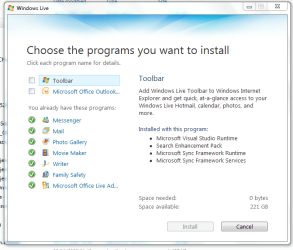
Run the Windows Live general installer and uncheck the box next to Messenger. You may need to uncheck other boxes as well so you don't download other apps that you don't want.
 

My Computer My Computer

At a glance

Windows 7 x64Intel Core2 Extreme Q6850 3.00GHz8 GBRadeon R7 260X
Computer type
PC/Desktop
OS
Windows 7 x64
CPU
Intel Core2 Extreme Q6850 3.00GHz
Motherboard
EVGA 132-CK-NF79
Memory
8 GB
Graphics Card(s)
Radeon R7 260X
Sound Card
Xonar DS
Hard Drives
Hitachi Deskstar 1 tb
How do I uninstall it when it comes under Windows Live, I only want to remove Messenger?
.
Run the Windows Live general installer and uncheck the box next to Messenger. You may need to uncheck other boxes as well so you don't download other apps that you don't want.

Thanks Victek,
but where do I find this> Windows Live general installer :confused:.

I love Win 7, but to find stuff somedays is a killer.
 

My Computer My Computer

At a glance

Acer Aspire 7738G Win 7 X64 bit Home Premium
Computer type
Laptop
Computer Manufacturer/Model Number
Acer 7738G
OS
Acer Aspire 7738G Win 7 X64 bit Home Premium
Remove useless program form the start up.
To much programs loaded is the reason. You can
Click on Start >> Run and in the run line type in “msconfig” hit enter or click on OK.
Next click on the Start Up tab. By default all items are usually checked, but you can remove any items that you don’t feel need to be running when you start your computer.
After you have made your selection, click Apply, OK and Restart. You should now notice a remarkable improvement in your start up time.
 

My Computer My Computer

At a glance

win xp
OS
win xp

My Computer My Computer

At a glance

Windows 7 x64Intel Core2 Extreme Q6850 3.00GHz8 GBRadeon R7 260X
Computer type
PC/Desktop
OS
Windows 7 x64
CPU
Intel Core2 Extreme Q6850 3.00GHz
Motherboard
EVGA 132-CK-NF79
Memory
8 GB
Graphics Card(s)
Radeon R7 260X
Sound Card
Xonar DS
Hard Drives
Hitachi Deskstar 1 tb
Thanks Victek,
but where do I find this> Windows Live general installer :confused:.

I love Win 7, but to find stuff somedays is a killer.
.
You should have an entry for it in the Programs and Features section of the Control Panel. If not you can download it again from here:

Essentials - Windows Live

Hi Victek
I have tried the installer, but it is already loaded and I cannot uncheck or remove it?

I also ran msconfig and start up that sevenming suggested, but its not even listed there?

Any ideas??
 

Attachments

  • WIN LIVE.PNG
    WIN LIVE.PNG
    32.3 KB · Views: 21

My Computer My Computer

At a glance

Acer Aspire 7738G Win 7 X64 bit Home Premium
Computer type
Laptop
Computer Manufacturer/Model Number
Acer 7738G
OS
Acer Aspire 7738G Win 7 X64 bit Home Premium
.
You should have an entry for it in the Programs and Features section of the Control Panel. If not you can download it again from here:

Essentials - Windows Live

Hi Victek
I have tried the installer, but it is already loaded and I cannot uncheck or remove it?

I also ran msconfig and start up that sevenming suggested, but its not even listed there?

Any ideas??
.
If you use the Change/Uninstall link in Programs and Features it should give you the option to uncheck the box next to Messenger (I just tried it).
 

My Computer My Computer

At a glance

Windows 7 x64Intel Core2 Extreme Q6850 3.00GHz8 GBRadeon R7 260X
Computer type
PC/Desktop
OS
Windows 7 x64
CPU
Intel Core2 Extreme Q6850 3.00GHz
Motherboard
EVGA 132-CK-NF79
Memory
8 GB
Graphics Card(s)
Radeon R7 260X
Sound Card
Xonar DS
Hard Drives
Hitachi Deskstar 1 tb
I assume I need to look for Windows Messenger? I dont have it listed anywhere that I can see?? Even a search reveals nothing?
 

My Computer My Computer

At a glance

Acer Aspire 7738G Win 7 X64 bit Home Premium
Computer type
Laptop
Computer Manufacturer/Model Number
Acer 7738G
OS
Acer Aspire 7738G Win 7 X64 bit Home Premium
I assume I need to look for Windows Messenger? I dont have it listed anywhere that I can see?? Even a search reveals nothing?
.
You will not see an entry for Messenger in Programs and Features. You will see an entry for Windows Live Essentials. That is what you have to select. After clicking on it choose Uninstall (not repair). Then you will be able to select messenger for removal. :geek:
 

My Computer My Computer

At a glance

Windows 7 x64Intel Core2 Extreme Q6850 3.00GHz8 GBRadeon R7 260X
Computer type
PC/Desktop
OS
Windows 7 x64
CPU
Intel Core2 Extreme Q6850 3.00GHz
Motherboard
EVGA 132-CK-NF79
Memory
8 GB
Graphics Card(s)
Radeon R7 260X
Sound Card
Xonar DS
Hard Drives
Hitachi Deskstar 1 tb
Back
Top