Removing Windows Vista from Dual Boot with Windows 7

darren13

New member
Member
Local time
6:57 AM
Messages
33
Hello all,

Hopefully someone can point me in the right direction here....

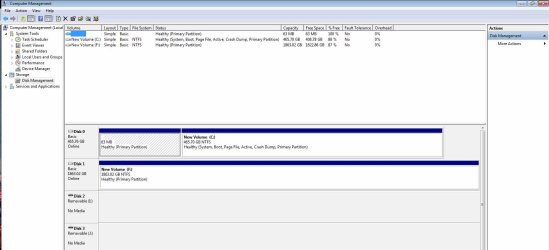
I've got a dual boot system at the moment - screenshot attached of my Disk Management screen if that helps.

I would like to remove the Vista OS and reclaim the space now that I've transferred everything over to 7 and have a backup.

I've deleted the Vista Boot entry in msconfig's Boot section, and have looked at these posts on this forum but don't seem to be getting anywhere -

http://www.sevenforums.com/installa...windows-7-want-remove-vista-all-together.html

http://www.sevenforums.com/tutorials/20864-mbr-restore-windows-7-master-boot-record.html


As you can see from my screenshot - E: is the old, 32bit Vista partition (system active, primary partition). C: is the new, 64bit Windows 7 partition.

I'd like to remove E, and expand C, but I don't have the option to format E: when I right click.

If anyone has any tips or can point me in the right direction, it would be most appreciated. Have downloaded EasyBCD 1.7.2, although from their website I don't see Windows 7 as being supported:cry:

Thanks in advance,
Darren.
 

Attachments
  • ComputerManagement.jpg
    ComputerManagement.jpg
    130.7 KB · Views: 95

My Computer My Computer

At a glance

win 7 x64AMD Phenom II X6 1055T 2.80 GHz8Gb - 4x Kingson Hyper X 2Gb 1600 (KHX1600C9D...1 x MSI R5770 Hawk (ATI Radeon HD 5700) / 1 x...
Computer type
PC/Desktop
Computer Manufacturer/Model Number
AMD Phenom II X6 1055T 2.80 GHz
OS
win 7 x64
CPU
AMD Phenom II X6 1055T 2.80 GHz
Motherboard
msi 870a-g54
Memory
8Gb - 4x Kingson Hyper X 2Gb 1600 (KHX1600C9D3B1 / 2GB)
Graphics Card(s)
1 x MSI R5770 Hawk (ATI Radeon HD 5700) / 1 x ATI HD 2400
Sound Card
Onboard Realtek HD Audio
Monitor(s) Displays
Dell 21", Dell 17", Asus 22"
Screen Resolution
1680 x 1050, 1280 x 1024, 1920 x 1080
Hard Drives
Intel X25-M SATA SSD 80Gb
Raptor 300Gb
2 x Barracuda 1Tb (eco / 5200 rpm)
PSU
700W Super Flower 80 Plus Gold
Case
Coolermaster CM 690 Plus
Cooling
Coolermaster V6
Keyboard
Dell
Mouse
Logitech M705
Internet Speed
60M down / 5M up
Welcome to SevenForums, Darren!

It looks as if you have Windows 7 on a logical drive. While it is possible to boot to Windows on a logical drive, it would require the 100MB system partition Windows 7 creates on installation.

How hard would it be to start over? You do not want Vista anymore, so if you start the installation process, you can delete the Vista and 7 partitions, and create a new, Primary one.

Let us know if you need help, and we will be happy to assist you.
 

My Computer My Computer

At a glance

Windows 7 Professional x64Intel i7 2600K OC'd @ 4620 MHz16GB GSkill Sniper 2133 Mhz (4x4GB)EVGA GeForce GTX 480 SuperClocked+
Computer Manufacturer/Model Number
Custom
OS
Windows 7 Professional x64
CPU
Intel i7 2600K OC'd @ 4620 MHz
Motherboard
Asus P8Z68-V Pro
Memory
16GB GSkill Sniper 2133 Mhz (4x4GB)
Graphics Card(s)
EVGA GeForce GTX 480 SuperClocked+
Sound Card
Realtek High Definition Audio
Monitor(s) Displays
2x Acer S273HLbmii 27"
Screen Resolution
2 x 1920x1080
Hard Drives
64GB Crucial M4 SSD

Storage: Hitachi 1TB 5400RPM, Samsung 1.5TB 5400RPM
PSU
Corsair HW Series 750w (modular)
Case
Cooler Master HAF 932 Advanced Blue Edition
Cooling
CM Hyper 212+ CPU cooler, 3x 230mm + 1x 140mm case fans
Keyboard
Logitech MK320 (wireless)
Mouse
Logitech MK320 (wireless)
Internet Speed
30 Mb/s : 2 Mb/s
You can accomplish what you want using free Partition Wizard Bootable CD and your Win7 DVD.

Back up your files and a Win7 Backup image externally as resizing operations can fail. Make your Recovery Disks from the Recovery Partition as it will likely be disabled after Vista removal.

Boot Partition Wizard CD, select 1 for screen resolution, right click E>Modify>Set Inactive, OK.

Now rightclick E>Delete, OK, and if you want rightclick G:Recovery>Delete, OK.

Now rightclick C>Modify>Convert to Primary, OK, and rightclick C:Modify>Set to Active, OK.

Now rightclick C>Resize, drag left grey border all the way over deleted E and G space, OK. Apply all steps.

When steps are completed, confirm C is now Active Primary.

Boot into Win7 DVD Repair console, click through to Recovery Tools list to run Startup Repair up to 3 separate times with reboots to write System MBR to C.

When Win7 is configured as you wish, be sure to save a Win7 Backup image externally so you never have to reinstall again, just reimage the HD or a replacement from the DVD.
 
Last edited:
Welcome to SevenForums, Darren!

How hard would it be to start over? You do not want Vista anymore, so if you start the installation process, you can delete the Vista and 7 partitions, and create a new, Primary one.

Let us know if you need help, and we will be happy to assist you.

Thanks Jonathan for the reply -

Yes, it would be a major ball-ache to start fresh now - it's my main work and home machine, and I've spent the last couple of weeks of my spare time migrating, re-installing, setting up local versions of websites I work on and installing all my Adobe, Wamp, Vis Studio....different web browsers....waffle waffle...:sleepy:!

I wish I'd known it would be a problem before installing, but I was a bit cautious with 7 and wanted to play it safe...

Regards,
Darren.
 

My Computer My Computer

At a glance

win 7 x64AMD Phenom II X6 1055T 2.80 GHz8Gb - 4x Kingson Hyper X 2Gb 1600 (KHX1600C9D...1 x MSI R5770 Hawk (ATI Radeon HD 5700) / 1 x...
Computer type
PC/Desktop
Computer Manufacturer/Model Number
AMD Phenom II X6 1055T 2.80 GHz
OS
win 7 x64
CPU
AMD Phenom II X6 1055T 2.80 GHz
Motherboard
msi 870a-g54
Memory
8Gb - 4x Kingson Hyper X 2Gb 1600 (KHX1600C9D3B1 / 2GB)
Graphics Card(s)
1 x MSI R5770 Hawk (ATI Radeon HD 5700) / 1 x ATI HD 2400
Sound Card
Onboard Realtek HD Audio
Monitor(s) Displays
Dell 21", Dell 17", Asus 22"
Screen Resolution
1680 x 1050, 1280 x 1024, 1920 x 1080
Hard Drives
Intel X25-M SATA SSD 80Gb
Raptor 300Gb
2 x Barracuda 1Tb (eco / 5200 rpm)
PSU
700W Super Flower 80 Plus Gold
Case
Coolermaster CM 690 Plus
Cooling
Coolermaster V6
Keyboard
Dell
Mouse
Logitech M705
Internet Speed
60M down / 5M up
We have helped remove 150+ dual boots here since Win7 release with almost perfect success, as long as the steps are followed exactly.
 
We have helped remove 150+ dual boots here since Win7 release with almost perfect success, as long as the steps are followed exactly.

Hey Greg,

Thanks for the reply

I'll follow through tomorrow - thanks for the info, much appreciated. :D

Regards,
Darren.
 

My Computer My Computer

At a glance

win 7 x64AMD Phenom II X6 1055T 2.80 GHz8Gb - 4x Kingson Hyper X 2Gb 1600 (KHX1600C9D...1 x MSI R5770 Hawk (ATI Radeon HD 5700) / 1 x...
Computer type
PC/Desktop
Computer Manufacturer/Model Number
AMD Phenom II X6 1055T 2.80 GHz
OS
win 7 x64
CPU
AMD Phenom II X6 1055T 2.80 GHz
Motherboard
msi 870a-g54
Memory
8Gb - 4x Kingson Hyper X 2Gb 1600 (KHX1600C9D3B1 / 2GB)
Graphics Card(s)
1 x MSI R5770 Hawk (ATI Radeon HD 5700) / 1 x ATI HD 2400
Sound Card
Onboard Realtek HD Audio
Monitor(s) Displays
Dell 21", Dell 17", Asus 22"
Screen Resolution
1680 x 1050, 1280 x 1024, 1920 x 1080
Hard Drives
Intel X25-M SATA SSD 80Gb
Raptor 300Gb
2 x Barracuda 1Tb (eco / 5200 rpm)
PSU
700W Super Flower 80 Plus Gold
Case
Coolermaster CM 690 Plus
Cooling
Coolermaster V6
Keyboard
Dell
Mouse
Logitech M705
Internet Speed
60M down / 5M up
Back up your files and a Win7 Backup image externally as resizing operations can fail. Make your Recovery Disks from the Recovery Partition as it will likely be disabled after Vista removal.

Boot Partition Wizard CD, select 1 for screen resolution, right click E>Modify>Set Inactive, OK.

Okay...Backinig up a System Image now from Win 7. It selected C and E by default with greyed-out checkboxes, so I've started that. 189Gb so may take a little while.

Have downloaded the Boot CD image and will burn that ready to run the fun!

Thanks again,
Darren.
 

My Computer My Computer

At a glance

win 7 x64AMD Phenom II X6 1055T 2.80 GHz8Gb - 4x Kingson Hyper X 2Gb 1600 (KHX1600C9D...1 x MSI R5770 Hawk (ATI Radeon HD 5700) / 1 x...
Computer type
PC/Desktop
Computer Manufacturer/Model Number
AMD Phenom II X6 1055T 2.80 GHz
OS
win 7 x64
CPU
AMD Phenom II X6 1055T 2.80 GHz
Motherboard
msi 870a-g54
Memory
8Gb - 4x Kingson Hyper X 2Gb 1600 (KHX1600C9D3B1 / 2GB)
Graphics Card(s)
1 x MSI R5770 Hawk (ATI Radeon HD 5700) / 1 x ATI HD 2400
Sound Card
Onboard Realtek HD Audio
Monitor(s) Displays
Dell 21", Dell 17", Asus 22"
Screen Resolution
1680 x 1050, 1280 x 1024, 1920 x 1080
Hard Drives
Intel X25-M SATA SSD 80Gb
Raptor 300Gb
2 x Barracuda 1Tb (eco / 5200 rpm)
PSU
700W Super Flower 80 Plus Gold
Case
Coolermaster CM 690 Plus
Cooling
Coolermaster V6
Keyboard
Dell
Mouse
Logitech M705
Internet Speed
60M down / 5M up
You're welcome, Darren.

Will be checking in throughout the day and night.

Just follow the steps carefully and ask any questions if you have them.
 
Hi there guys,

A BIG Thank you for providing the above information -

Followed the above steps as closely as I could, then rebooted. BOOTMGR missing, so rebooted with Win7 disk inserted as described above. Couple or 3 reboots, and BINGO!

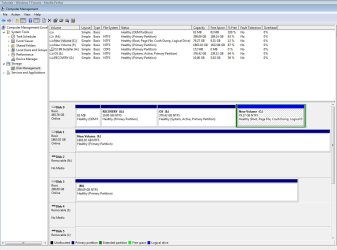
I now have the 500Gb drive with Windows 7 as one partition.

Really pleased, thanks so much chaps.

Regards,
Darren.
 

My Computer My Computer

At a glance

win 7 x64AMD Phenom II X6 1055T 2.80 GHz8Gb - 4x Kingson Hyper X 2Gb 1600 (KHX1600C9D...1 x MSI R5770 Hawk (ATI Radeon HD 5700) / 1 x...
Computer type
PC/Desktop
Computer Manufacturer/Model Number
AMD Phenom II X6 1055T 2.80 GHz
OS
win 7 x64
CPU
AMD Phenom II X6 1055T 2.80 GHz
Motherboard
msi 870a-g54
Memory
8Gb - 4x Kingson Hyper X 2Gb 1600 (KHX1600C9D3B1 / 2GB)
Graphics Card(s)
1 x MSI R5770 Hawk (ATI Radeon HD 5700) / 1 x ATI HD 2400
Sound Card
Onboard Realtek HD Audio
Monitor(s) Displays
Dell 21", Dell 17", Asus 22"
Screen Resolution
1680 x 1050, 1280 x 1024, 1920 x 1080
Hard Drives
Intel X25-M SATA SSD 80Gb
Raptor 300Gb
2 x Barracuda 1Tb (eco / 5200 rpm)
PSU
700W Super Flower 80 Plus Gold
Case
Coolermaster CM 690 Plus
Cooling
Coolermaster V6
Keyboard
Dell
Mouse
Logitech M705
Internet Speed
60M down / 5M up
Computer Management Screen

Screenshot of end result :party:
 

Attachments

  • ComputerManagementPartionRemoved.jpg
    ComputerManagementPartionRemoved.jpg
    89.7 KB · Views: 58

My Computer My Computer

At a glance

win 7 x64AMD Phenom II X6 1055T 2.80 GHz8Gb - 4x Kingson Hyper X 2Gb 1600 (KHX1600C9D...1 x MSI R5770 Hawk (ATI Radeon HD 5700) / 1 x...
Computer type
PC/Desktop
Computer Manufacturer/Model Number
AMD Phenom II X6 1055T 2.80 GHz
OS
win 7 x64
CPU
AMD Phenom II X6 1055T 2.80 GHz
Motherboard
msi 870a-g54
Memory
8Gb - 4x Kingson Hyper X 2Gb 1600 (KHX1600C9D3B1 / 2GB)
Graphics Card(s)
1 x MSI R5770 Hawk (ATI Radeon HD 5700) / 1 x ATI HD 2400
Sound Card
Onboard Realtek HD Audio
Monitor(s) Displays
Dell 21", Dell 17", Asus 22"
Screen Resolution
1680 x 1050, 1280 x 1024, 1920 x 1080
Hard Drives
Intel X25-M SATA SSD 80Gb
Raptor 300Gb
2 x Barracuda 1Tb (eco / 5200 rpm)
PSU
700W Super Flower 80 Plus Gold
Case
Coolermaster CM 690 Plus
Cooling
Coolermaster V6
Keyboard
Dell
Mouse
Logitech M705
Internet Speed
60M down / 5M up
Good job, Darren.

After verifying performance, suggest you replace the Win7/Vista backup image made earlier with a new Win7 backup image so you never have to reinstall again.
 
Hey there Greg/Jonathan,

Just a quickie - further to removing the Vista partition now, I've copied a large-ish folder (17Gb) from the C: to the F: drive, and it took about 20 minutes....I might be wrong, but I'm sure it was a lot faster than this before - is there maybe something that can happen during the procedure I followed that can slow up the disks?

I've defragged both drives and rebooted a couple times to see if that helps?

Thanks again,
Darren.
 

My Computer My Computer

At a glance

win 7 x64AMD Phenom II X6 1055T 2.80 GHz8Gb - 4x Kingson Hyper X 2Gb 1600 (KHX1600C9D...1 x MSI R5770 Hawk (ATI Radeon HD 5700) / 1 x...
Computer type
PC/Desktop
Computer Manufacturer/Model Number
AMD Phenom II X6 1055T 2.80 GHz
OS
win 7 x64
CPU
AMD Phenom II X6 1055T 2.80 GHz
Motherboard
msi 870a-g54
Memory
8Gb - 4x Kingson Hyper X 2Gb 1600 (KHX1600C9D3B1 / 2GB)
Graphics Card(s)
1 x MSI R5770 Hawk (ATI Radeon HD 5700) / 1 x ATI HD 2400
Sound Card
Onboard Realtek HD Audio
Monitor(s) Displays
Dell 21", Dell 17", Asus 22"
Screen Resolution
1680 x 1050, 1280 x 1024, 1920 x 1080
Hard Drives
Intel X25-M SATA SSD 80Gb
Raptor 300Gb
2 x Barracuda 1Tb (eco / 5200 rpm)
PSU
700W Super Flower 80 Plus Gold
Case
Coolermaster CM 690 Plus
Cooling
Coolermaster V6
Keyboard
Dell
Mouse
Logitech M705
Internet Speed
60M down / 5M up
Is there anything other than copying this one file that shows diminished performance?

The reason I ask is that we've had no one who used these steps to remove XP or Vista come back with reports of reduced performance so far.

But if there were further evidence of a performance hit, I would personally run chkdsk, sfc /scannow and possibly http://www.sevenforums.com/tutorials/3413-repair-install.html?ltr=R.
 
Thanks again Greg,

chkdsk ran when I rebooted and I don't think I saw any errors, so maybe all is well. I just thought a 17Gb file would transfer a lot quicker than it did - maybe my expectations are too high here! Other than that, everything seems to be sweet ;-)

Regards,
Darren.
 

My Computer My Computer

At a glance

win 7 x64AMD Phenom II X6 1055T 2.80 GHz8Gb - 4x Kingson Hyper X 2Gb 1600 (KHX1600C9D...1 x MSI R5770 Hawk (ATI Radeon HD 5700) / 1 x...
Computer type
PC/Desktop
Computer Manufacturer/Model Number
AMD Phenom II X6 1055T 2.80 GHz
OS
win 7 x64
CPU
AMD Phenom II X6 1055T 2.80 GHz
Motherboard
msi 870a-g54
Memory
8Gb - 4x Kingson Hyper X 2Gb 1600 (KHX1600C9D3B1 / 2GB)
Graphics Card(s)
1 x MSI R5770 Hawk (ATI Radeon HD 5700) / 1 x ATI HD 2400
Sound Card
Onboard Realtek HD Audio
Monitor(s) Displays
Dell 21", Dell 17", Asus 22"
Screen Resolution
1680 x 1050, 1280 x 1024, 1920 x 1080
Hard Drives
Intel X25-M SATA SSD 80Gb
Raptor 300Gb
2 x Barracuda 1Tb (eco / 5200 rpm)
PSU
700W Super Flower 80 Plus Gold
Case
Coolermaster CM 690 Plus
Cooling
Coolermaster V6
Keyboard
Dell
Mouse
Logitech M705
Internet Speed
60M down / 5M up
If chkdsk ran initially then it saw an error. I'd be extra sure by scheduling it to run again (rightclick HD>Tools>Check for Errrors) after reboot.

Then run the HD Surface Scan on Partion Wizard booted CD.

A 17gb file is always a wait.
 
Thanks Greg -

I've right-clicked C: again, >Properties>Tools tab>Error-checking - Check Now button>

On the Check Disk New Volume (C:) window that pops up, 'Automatically fix file errors' is checked, 'Scan for and attempt recovery of bad sectors' is unchecked.

Then I had a window that I clicked Schedule on next restart.

Will post back with results later, maybe I'll run Partition Wizard first.

Thanks again,
Darren.
 

My Computer My Computer

At a glance

win 7 x64AMD Phenom II X6 1055T 2.80 GHz8Gb - 4x Kingson Hyper X 2Gb 1600 (KHX1600C9D...1 x MSI R5770 Hawk (ATI Radeon HD 5700) / 1 x...
Computer type
PC/Desktop
Computer Manufacturer/Model Number
AMD Phenom II X6 1055T 2.80 GHz
OS
win 7 x64
CPU
AMD Phenom II X6 1055T 2.80 GHz
Motherboard
msi 870a-g54
Memory
8Gb - 4x Kingson Hyper X 2Gb 1600 (KHX1600C9D3B1 / 2GB)
Graphics Card(s)
1 x MSI R5770 Hawk (ATI Radeon HD 5700) / 1 x ATI HD 2400
Sound Card
Onboard Realtek HD Audio
Monitor(s) Displays
Dell 21", Dell 17", Asus 22"
Screen Resolution
1680 x 1050, 1280 x 1024, 1920 x 1080
Hard Drives
Intel X25-M SATA SSD 80Gb
Raptor 300Gb
2 x Barracuda 1Tb (eco / 5200 rpm)
PSU
700W Super Flower 80 Plus Gold
Case
Coolermaster CM 690 Plus
Cooling
Coolermaster V6
Keyboard
Dell
Mouse
Logitech M705
Internet Speed
60M down / 5M up
......I ran the surface test on Partition Wizard boot CD and no bad sectors found at all. So I guess all is good :D

A very large thank you for helping me out there Greg & Jonathan, very much appreciated!

Best,
Darren.
 

My Computer My Computer

At a glance

win 7 x64AMD Phenom II X6 1055T 2.80 GHz8Gb - 4x Kingson Hyper X 2Gb 1600 (KHX1600C9D...1 x MSI R5770 Hawk (ATI Radeon HD 5700) / 1 x...
Computer type
PC/Desktop
Computer Manufacturer/Model Number
AMD Phenom II X6 1055T 2.80 GHz
OS
win 7 x64
CPU
AMD Phenom II X6 1055T 2.80 GHz
Motherboard
msi 870a-g54
Memory
8Gb - 4x Kingson Hyper X 2Gb 1600 (KHX1600C9D3B1 / 2GB)
Graphics Card(s)
1 x MSI R5770 Hawk (ATI Radeon HD 5700) / 1 x ATI HD 2400
Sound Card
Onboard Realtek HD Audio
Monitor(s) Displays
Dell 21", Dell 17", Asus 22"
Screen Resolution
1680 x 1050, 1280 x 1024, 1920 x 1080
Hard Drives
Intel X25-M SATA SSD 80Gb
Raptor 300Gb
2 x Barracuda 1Tb (eco / 5200 rpm)
PSU
700W Super Flower 80 Plus Gold
Case
Coolermaster CM 690 Plus
Cooling
Coolermaster V6
Keyboard
Dell
Mouse
Logitech M705
Internet Speed
60M down / 5M up
I've right-clicked C: again, >Properties>Tools tab>Error-checking - Check Now button>

On the Check Disk New Volume (C:) window that pops up, 'Automatically fix file errors' is checked, 'Scan for and attempt recovery of bad sectors' is unchecked.

Then I had a window that I clicked Schedule on next restart.

Tick both boxes then restart to run chkdsk.
 
[/QUOTE]

Tick both boxes then restart to run chkdsk.[/QUOTE]

Okay - I'll give that a run hopefully later today - thanks again,
Darren
 

My Computer My Computer

At a glance

win 7 x64AMD Phenom II X6 1055T 2.80 GHz8Gb - 4x Kingson Hyper X 2Gb 1600 (KHX1600C9D...1 x MSI R5770 Hawk (ATI Radeon HD 5700) / 1 x...
Computer type
PC/Desktop
Computer Manufacturer/Model Number
AMD Phenom II X6 1055T 2.80 GHz
OS
win 7 x64
CPU
AMD Phenom II X6 1055T 2.80 GHz
Motherboard
msi 870a-g54
Memory
8Gb - 4x Kingson Hyper X 2Gb 1600 (KHX1600C9D3B1 / 2GB)
Graphics Card(s)
1 x MSI R5770 Hawk (ATI Radeon HD 5700) / 1 x ATI HD 2400
Sound Card
Onboard Realtek HD Audio
Monitor(s) Displays
Dell 21", Dell 17", Asus 22"
Screen Resolution
1680 x 1050, 1280 x 1024, 1920 x 1080
Hard Drives
Intel X25-M SATA SSD 80Gb
Raptor 300Gb
2 x Barracuda 1Tb (eco / 5200 rpm)
PSU
700W Super Flower 80 Plus Gold
Case
Coolermaster CM 690 Plus
Cooling
Coolermaster V6
Keyboard
Dell
Mouse
Logitech M705
Internet Speed
60M down / 5M up
REmove vista tri boot setup

Hi Greg: I've got XP, vista and win7 setup in tri boot mode. All is working well but I now want to get rid of vista. What are the steps so I can be left with XP and Win7? I currently have xp and win7 on a raptor drive and vista on a separate drive. I've looked everywhere but can't seem to get the answer I'm looking for. I'm familiar with bcdedit and vista boot pro if those help. Here's what I've got when in Windows 7:

disk0 VISTA64 (D:) Healthy(system,active,primary)
disk 1 APPS_DATA (E:) Healthy(active, primary)
disk 2 XP-PRO (F:) Healthy(active, primary)
disk 2 WIN7 64 (C:) Healthy(boot, pagefile,crash dump,primary)

Bios is set to boot from disk 0. I tried booting from disk 2 but got an error saying I was missing a file. Any help appreciated.:(
 

My Computer My Computer

At a glance

xp,vista and win7Intel quad4gbGt8800
OS
xp,vista and win7
CPU
Intel quad
Motherboard
asus
Memory
4gb
Graphics Card(s)
Gt8800
Sound Card
GT8800
Monitor(s) Displays
Sony 32" HD TV
Hard Drives
3 WD
PSU
corsair 850
Case
cooler Master
Cooling
Fans
Back
Top