
Hello all,
Hopefully someone can point me in the right direction here....
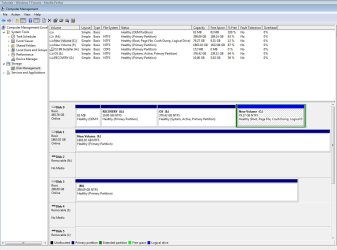
I've got a dual boot system at the moment - screenshot attached of my Disk Management screen if that helps.
I would like to remove the Vista OS and reclaim the space now that I've transferred everything over to 7 and have a backup.
I've deleted the Vista Boot entry in msconfig's Boot section, and have looked at these posts on this forum but don't seem to be getting anywhere -
http://www.sevenforums.com/installa...windows-7-want-remove-vista-all-together.html
http://www.sevenforums.com/tutorials/20864-mbr-restore-windows-7-master-boot-record.html
As you can see from my screenshot - E: is the old, 32bit Vista partition (system active, primary partition). C: is the new, 64bit Windows 7 partition.
I'd like to remove E, and expand C, but I don't have the option to format E: when I right click.
If anyone has any tips or can point me in the right direction, it would be most appreciated. Have downloaded EasyBCD 1.7.2, although from their website I don't see Windows 7 as being supported
Thanks in advance,
Darren.
Hopefully someone can point me in the right direction here....
I've got a dual boot system at the moment - screenshot attached of my Disk Management screen if that helps.
I would like to remove the Vista OS and reclaim the space now that I've transferred everything over to 7 and have a backup.
I've deleted the Vista Boot entry in msconfig's Boot section, and have looked at these posts on this forum but don't seem to be getting anywhere -
http://www.sevenforums.com/installa...windows-7-want-remove-vista-all-together.html
http://www.sevenforums.com/tutorials/20864-mbr-restore-windows-7-master-boot-record.html
As you can see from my screenshot - E: is the old, 32bit Vista partition (system active, primary partition). C: is the new, 64bit Windows 7 partition.
I'd like to remove E, and expand C, but I don't have the option to format E: when I right click.
If anyone has any tips or can point me in the right direction, it would be most appreciated. Have downloaded EasyBCD 1.7.2, although from their website I don't see Windows 7 as being supported
Thanks in advance,
Darren.
Attachments
My Computer
At a glance
win 7 x64AMD Phenom II X6 1055T 2.80 GHz8Gb - 4x Kingson Hyper X 2Gb 1600 (KHX1600C9D...1 x MSI R5770 Hawk (ATI Radeon HD 5700) / 1 x...
- Computer type
- PC/Desktop
- Computer Manufacturer/Model Number
- AMD Phenom II X6 1055T 2.80 GHz
- OS
- win 7 x64
- CPU
- AMD Phenom II X6 1055T 2.80 GHz
- Motherboard
- msi 870a-g54
- Memory
- 8Gb - 4x Kingson Hyper X 2Gb 1600 (KHX1600C9D3B1 / 2GB)
- Graphics Card(s)
- 1 x MSI R5770 Hawk (ATI Radeon HD 5700) / 1 x ATI HD 2400
- Sound Card
- Onboard Realtek HD Audio
- Monitor(s) Displays
- Dell 21", Dell 17", Asus 22"
- Screen Resolution
- 1680 x 1050, 1280 x 1024, 1920 x 1080
- Hard Drives
- Intel X25-M SATA SSD 80Gb
Raptor 300Gb
2 x Barracuda 1Tb (eco / 5200 rpm)
- PSU
- 700W Super Flower 80 Plus Gold
- Case
- Coolermaster CM 690 Plus
- Cooling
- Coolermaster V6
- Keyboard
- Dell
- Mouse
- Logitech M705
- Internet Speed
- 60M down / 5M up


 !
!


 window that pops up, 'Automatically fix file errors' is checked, 'Scan for and attempt recovery of bad sectors' is unchecked.


