wininit.exe - Safe to allow connection or not?

Dj SharK

New member
Member
Local time
4:18 AM
Messages
93
Location
S.E.A
Hello.

I've always been using Windows built-in firewall for years but decided to try one that's reasonable. I tried Comodo Firewall and everything seems to work fine.
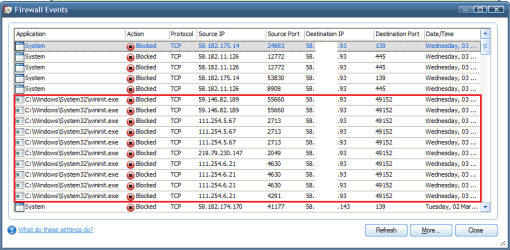
But these past 2-3 days, i've been getting alerts about wininit.exe trying to receive a connection or something to that extend. - C:\Windows\System32\wininit.exe -

I'm really clueless with stuff like these so i did a couple google search and there's mixed opinions from users. I just need some confirmation from the professionals here.

I did a search for the IPs that is trying to send a connection to wininit.exe and they're from Asia. Such as Japan, Hong Kong and Taiwan.

Some expert opinions would be appreciated. :D


Edit :
Forgot to mention, i have a few similar logs in Eventviewer too. No idea what it means. ( Image #3 )

Danny
 

Attachments

  • Figure 1.png
    Figure 1.png
    9.6 KB · Views: 37
  • Figure 2.png
    Figure 2.png
    13.7 KB · Views: 195
  • Figure 3.png
    Figure 3.png
    15.2 KB · Views: 73

My Computer My Computer

Computer Manufacturer/Model Number
DIY
OS
Windows 7 Ultimate x86 7600
CPU
Intel Pentium Dual CPU E2180 @ 2.00 GHz
Motherboard
Gigabyte G41M Combo (rev 1.3)
Memory
1 x 2GB | 1 x 1GB Kingston 667
Graphics Card(s)
512MB Nvidia GeForce EN8500GT Silent Magic
Sound Card
Onboard HD 7.1 Audio
Monitor(s) Displays
22" LG W2242T
Screen Resolution
1680 X 1050
Hard Drives
1 x 500GB SATA Hitachi ( Internal )
1 x 1TB SATA Hitachi ( Internal )
1 x 320GB Western Digital ( External )
PSU
500W
Case
Coolermaster
Cooling
Coolermaster
Keyboard
Logitech Media Wireless Keyboard
Mouse
A4Tech G6 Wireless Mouse
Internet Speed
DL : 12MB/s | UL : 1.2MB/s
Other Info
I'm not a gamer. I don't overclock. I use my PC for web browsing, listening to music and watching HD movies.
This is why people shouldn't be using firewalls like this. They get paranoid over normal system files.
 

My Computer My Computer

OS
Windows 7 Home Premium x64
CPU
Intel Core 2 Quad Q9450 @ 3.2GHz
Motherboard
Asus P5Q PRO Turbo
Memory
4GB DDR2-800
Graphics Card(s)
MSI Radeon HD 5850
Sound Card
Creative Labs Audigy2 ZS
Monitor(s) Displays
Samsung 225BW
Hard Drives
(2) 1TB Samsung F1, (2) 1.5TB Samsung F2, 1TB Samsung F2, 2TB Samsung F3
PSU
Corsair HX650
Case
Antec Nine Hundred
allow it, nothing bad will happen =) it is just a normal process.
I would suggest windows firewall instead of any third party solutions.
In addition, if you have a router, you already have hardware firewall. Cheers!
 

My Computer My Computer

Computer Manufacturer/Model Number
Dell Studio XPS 8000
OS
Windows 7 Home Premium
allow it, nothing bad will happen =) it is just a normal process.
I would suggest windows firewall instead of any third party solutions.
In addition, if you have a router, you already have hardware firewall. Cheers!

Cheers for the clever and straight-forward response.
I'm not on a router unfortunately.

I might consider removing the firewall since it's asking me way too much questions.
Eset Smart Security seems to be a better alternative since i've used it before and feels comfortable with it.


Cheers.
 

My Computer My Computer

Computer Manufacturer/Model Number
DIY
OS
Windows 7 Ultimate x86 7600
CPU
Intel Pentium Dual CPU E2180 @ 2.00 GHz
Motherboard
Gigabyte G41M Combo (rev 1.3)
Memory
1 x 2GB | 1 x 1GB Kingston 667
Graphics Card(s)
512MB Nvidia GeForce EN8500GT Silent Magic
Sound Card
Onboard HD 7.1 Audio
Monitor(s) Displays
22" LG W2242T
Screen Resolution
1680 X 1050
Hard Drives
1 x 500GB SATA Hitachi ( Internal )
1 x 1TB SATA Hitachi ( Internal )
1 x 320GB Western Digital ( External )
PSU
500W
Case
Coolermaster
Cooling
Coolermaster
Keyboard
Logitech Media Wireless Keyboard
Mouse
A4Tech G6 Wireless Mouse
Internet Speed
DL : 12MB/s | UL : 1.2MB/s
Other Info
I'm not a gamer. I don't overclock. I use my PC for web browsing, listening to music and watching HD movies.
allow it, nothing bad will happen =) it is just a normal process.
I would suggest windows firewall instead of any third party solutions.
In addition, if you have a router, you already have hardware firewall. Cheers!

Cheers for the clever and straight-forward response.
I'm not on a router unfortunately.

I might consider removing the firewall since it's asking me way too much questions.
Eset Smart Security seems to be a better alternative since i've used it before and feels comfortable with it.


Cheers.

I think that is a well-informed and good solution. Eset is a good company and Im sure their firewall is much less intruding. Don't you just hate the firewall that notifies you every minute? :cry:
 

My Computer My Computer

Computer Manufacturer/Model Number
Dell Studio XPS 8000
OS
Windows 7 Home Premium
I think that is a well-informed and good solution. Eset is a good company and Im sure their firewall is much less intruding. Don't you just hate the firewall that notifies you every minute? :cry:

It's good if it's asking the 'important' stuff but not everything. :rolleyes:
I've been using Eset for a long time before this and it never actually asked me
to allow or block anything before. :eek: But i'm sure it's working fine since i've never got into any sort of trouble with the program or my PC's security. :)


Cheers
 

My Computer My Computer

Computer Manufacturer/Model Number
DIY
OS
Windows 7 Ultimate x86 7600
CPU
Intel Pentium Dual CPU E2180 @ 2.00 GHz
Motherboard
Gigabyte G41M Combo (rev 1.3)
Memory
1 x 2GB | 1 x 1GB Kingston 667
Graphics Card(s)
512MB Nvidia GeForce EN8500GT Silent Magic
Sound Card
Onboard HD 7.1 Audio
Monitor(s) Displays
22" LG W2242T
Screen Resolution
1680 X 1050
Hard Drives
1 x 500GB SATA Hitachi ( Internal )
1 x 1TB SATA Hitachi ( Internal )
1 x 320GB Western Digital ( External )
PSU
500W
Case
Coolermaster
Cooling
Coolermaster
Keyboard
Logitech Media Wireless Keyboard
Mouse
A4Tech G6 Wireless Mouse
Internet Speed
DL : 12MB/s | UL : 1.2MB/s
Other Info
I'm not a gamer. I don't overclock. I use my PC for web browsing, listening to music and watching HD movies.
In any case, make sure your firewall includes both inbound and outbound protection, as both are equally important! :)
 

My Computer My Computer

Computer Manufacturer/Model Number
Dell Studio XPS 8000
OS
Windows 7 Home Premium
In any case, make sure your firewall includes both inbound and outbound protection, as both are equally important! :)

Got that. Do you have any recommendations though?
Besides Windows default and/or Comodo. I just want to try something new i guess.
 

My Computer My Computer

Computer Manufacturer/Model Number
DIY
OS
Windows 7 Ultimate x86 7600
CPU
Intel Pentium Dual CPU E2180 @ 2.00 GHz
Motherboard
Gigabyte G41M Combo (rev 1.3)
Memory
1 x 2GB | 1 x 1GB Kingston 667
Graphics Card(s)
512MB Nvidia GeForce EN8500GT Silent Magic
Sound Card
Onboard HD 7.1 Audio
Monitor(s) Displays
22" LG W2242T
Screen Resolution
1680 X 1050
Hard Drives
1 x 500GB SATA Hitachi ( Internal )
1 x 1TB SATA Hitachi ( Internal )
1 x 320GB Western Digital ( External )
PSU
500W
Case
Coolermaster
Cooling
Coolermaster
Keyboard
Logitech Media Wireless Keyboard
Mouse
A4Tech G6 Wireless Mouse
Internet Speed
DL : 12MB/s | UL : 1.2MB/s
Other Info
I'm not a gamer. I don't overclock. I use my PC for web browsing, listening to music and watching HD movies.
why don't you try this first of all, go to https://www.grc.com/x/ne.dll?bh0bkyd2

Do their port checker. If you have all your ports on stealth mode, I really don't think you ever need a firewall. ^^
 

My Computer My Computer

Computer Manufacturer/Model Number
Dell Studio XPS 8000
OS
Windows 7 Home Premium
Here's what i got.

On File Sharing :
[FONT=Verdana,Arial,Helvetica,Sans-Serif,MS Sans Serif][SIZE=+0]Your Internet port 139 does not appear to exist!
[SIZE=-1]One or more ports on this system are operating in FULL STEALTH MODE! Standard Internet behavior requires port connection attempts to be answered with a success or refusal response. Therefore, only an attempt to connect to a nonexistent computer results in no response of either kind. But YOUR computer has DELIBERATELY CHOSEN NOT TO RESPOND (that's very cool!) which represents advanced computer and port stealthing capabilities. A machine configured in this fashion is well hardened to Internet NetBIOS attack and intrusion.

[/SIZE]
[/SIZE][/FONT][FONT=Verdana,Arial,Helvetica,Sans-Serif,MS Sans Serif][SIZE=+0]Unable to connect with NetBIOS to your computer.
[SIZE=-1]All attempts to get any information from your computer have FAILED. (This is very uncommon for a Windows networking-based PC.) Relative to vulnerabilities from Windows networking, this computer appears to be VERY SECURE since it is NOT exposing ANY of its internal NetBIOS networking protocol over the Inter[/SIZE]
[/SIZE][/FONT][FONT=Verdana,Arial,Helvetica,Sans-Serif,MS Sans Serif][SIZE=+0][SIZE=-1]net.[/SIZE][/SIZE][/FONT]
On Common Ports :
[FONT=Verdana,Arial,Helvetica,Sans-Serif,MS Sans Serif][SIZE=-1]Your system has achieved a perfect "TruStealth" rating. Not a single packet — solicited or otherwise — was received from your system as a result of our security probing tests. Your system ignored and refused to reply to repeated Pings (ICMP Echo Requests). From the standpoint of the passing probes of any hacker, this machine does not exist on the Internet. Some questionable personal security systems expose their users by attempting to "counter-probe the prober", thus revealing themselves. But your system wisely remained silent in every way. Very nice.[/SIZE][/FONT]
Everything shows as : [FONT=Verdana,Arial,Helvetica,Sans-Serif,MS Sans Serif]There is NO EVIDENCE WHATSOEVER that a port (or even any computer) exists at this IP address!


[/FONT]On All Service Ports : Everything is in Green ( [FONT=Verdana,Arial,Helvetica,Sans-Serif,MS Sans Serif]Stealth )[/FONT]

All these was done after i turn off Comodo Firewall.
 

My Computer My Computer

Computer Manufacturer/Model Number
DIY
OS
Windows 7 Ultimate x86 7600
CPU
Intel Pentium Dual CPU E2180 @ 2.00 GHz
Motherboard
Gigabyte G41M Combo (rev 1.3)
Memory
1 x 2GB | 1 x 1GB Kingston 667
Graphics Card(s)
512MB Nvidia GeForce EN8500GT Silent Magic
Sound Card
Onboard HD 7.1 Audio
Monitor(s) Displays
22" LG W2242T
Screen Resolution
1680 X 1050
Hard Drives
1 x 500GB SATA Hitachi ( Internal )
1 x 1TB SATA Hitachi ( Internal )
1 x 320GB Western Digital ( External )
PSU
500W
Case
Coolermaster
Cooling
Coolermaster
Keyboard
Logitech Media Wireless Keyboard
Mouse
A4Tech G6 Wireless Mouse
Internet Speed
DL : 12MB/s | UL : 1.2MB/s
Other Info
I'm not a gamer. I don't overclock. I use my PC for web browsing, listening to music and watching HD movies.
lol do you even need a firewall? What is your firewall suppose to protect anyways...=P
though, it might still be a good idea either way lol, but examining your test results, a strong firewall is unnecessary. Perhaps, you should just stick with windows firewall XD. Your stealth tests are impressive. You shouldn't have much to worry about. In this case, the only way for a connection to cause damage to your computer is if you allow it to, like clicking a button that allows a connection. You are mostly secure
Cheers!
 

My Computer My Computer

Computer Manufacturer/Model Number
Dell Studio XPS 8000
OS
Windows 7 Home Premium
lol do you even need a firewall? What is your firewall suppose to protect anyways...=P
though, it might still be a good idea either way lol, but examining your test results, a strong firewall is unnecessary. Perhaps, you should just stick with windows firewall XD. Your stealth tests are impressive. You shouldn't have much to worry about. In this case, the only way for a connection to cause damage to your computer is if you allow it to, like clicking a button that allows a connection. You are mostly secure
Cheers!

Cheers for all your assistance and response mate.
I'm very confident with the security part of it now and will remove Comodo and use Windows build-in firewall instead.

Thank you. :)
 

My Computer My Computer

Computer Manufacturer/Model Number
DIY
OS
Windows 7 Ultimate x86 7600
CPU
Intel Pentium Dual CPU E2180 @ 2.00 GHz
Motherboard
Gigabyte G41M Combo (rev 1.3)
Memory
1 x 2GB | 1 x 1GB Kingston 667
Graphics Card(s)
512MB Nvidia GeForce EN8500GT Silent Magic
Sound Card
Onboard HD 7.1 Audio
Monitor(s) Displays
22" LG W2242T
Screen Resolution
1680 X 1050
Hard Drives
1 x 500GB SATA Hitachi ( Internal )
1 x 1TB SATA Hitachi ( Internal )
1 x 320GB Western Digital ( External )
PSU
500W
Case
Coolermaster
Cooling
Coolermaster
Keyboard
Logitech Media Wireless Keyboard
Mouse
A4Tech G6 Wireless Mouse
Internet Speed
DL : 12MB/s | UL : 1.2MB/s
Other Info
I'm not a gamer. I don't overclock. I use my PC for web browsing, listening to music and watching HD movies.
You might just want to run Malwarebytes to make sure everything is okay:

download Malwarebytes' Anti-Malware to your desktop
|MG| Malwarebytes Anti-Malware 1.44 Download
* Double-click mbam-setup.exe and follow the prompts to install the program.
* At the end, be sure a checkmark is placed next to Update Malwarebytes' Anti-Malware and Launch Malwarebytes' Anti-Malware, then click Finish.
* If an update is found, it will download and install the latest version.
* Once the program has loaded, select Perform full scan, then click Scan.
* When the scan is complete, click OK, then Show Results to view the results.
* Be sure that everything is checked, and click Remove Selected.
 

My Computer My Computer

Computer type
PC/Desktop
Computer Manufacturer/Model Number
Bruce ... somewhere in his 40's
OS
Windows 7 Ultimate 32bit SP1
CPU
Intel(R) Core(TM)2 Quad CPU @ 2.40GHz, 2400 MHz
Motherboard
INTEL/D975XBX2
Memory
4 GB
Graphics Card(s)
ATI Radeon HD 2600 Pro
Monitor(s) Displays
Samsung SyncMaster 914v
Screen Resolution
1280 x 1024
Hard Drives
2/500GB each ... ST3500630AS ATA Device.
One is not connected
PSU
Rocketfish 700 W
Case
G.Skill Gigabyte Chassis
Keyboard
Standard PS/2 Keyboard
Mouse
Microsoft PS/2 Mouse
Internet Speed
DSL
Antivirus
Avira Internet Security
Browser
IE 11
Other Info
ATI HDMI Audio
Thanks Jacee. Just did that and here are the results.

Malwarebytes' Anti-Malware 1.44
Database version: 3824
Windows 6.1.7600
Internet Explorer 8.0.7600.16385

Friday, 05 Mar 2010 3:29:56 AM
mbam-log-2010-03-05 (03-29-56).txt

Scan type: Full Scan (C:\|)
Objects scanned: 192947
Time elapsed: 55 minute(s), 5 second(s)

Memory Processes Infected: 0
Memory Modules Infected: 0
Registry Keys Infected: 0
Registry Values Infected: 1
Registry Data Items Infected: 0
Folders Infected: 0
Files Infected: 0

Memory Processes Infected:
(No malicious items detected)

Memory Modules Infected:
(No malicious items detected)

Registry Keys Infected:
(No malicious items detected)

Registry Values Infected:
HKEY_LOCAL_MACHINE\SOFTWARE\Microsoft\Windows\CurrentVersion\Run\spy protector (Rogue.SpyProtector) -> Quarantined and deleted successfully.

Registry Data Items Infected:
(No malicious items detected)

Folders Infected:
(No malicious items detected)

Files Infected:
(No malicious items detected)
 

My Computer My Computer

Computer Manufacturer/Model Number
DIY
OS
Windows 7 Ultimate x86 7600
CPU
Intel Pentium Dual CPU E2180 @ 2.00 GHz
Motherboard
Gigabyte G41M Combo (rev 1.3)
Memory
1 x 2GB | 1 x 1GB Kingston 667
Graphics Card(s)
512MB Nvidia GeForce EN8500GT Silent Magic
Sound Card
Onboard HD 7.1 Audio
Monitor(s) Displays
22" LG W2242T
Screen Resolution
1680 X 1050
Hard Drives
1 x 500GB SATA Hitachi ( Internal )
1 x 1TB SATA Hitachi ( Internal )
1 x 320GB Western Digital ( External )
PSU
500W
Case
Coolermaster
Cooling
Coolermaster
Keyboard
Logitech Media Wireless Keyboard
Mouse
A4Tech G6 Wireless Mouse
Internet Speed
DL : 12MB/s | UL : 1.2MB/s
Other Info
I'm not a gamer. I don't overclock. I use my PC for web browsing, listening to music and watching HD movies.
Thanks Jacee. Just did that and here are the results.

Malwarebytes' Anti-Malware 1.44
Database version: 3824
Windows 6.1.7600
Internet Explorer 8.0.7600.16385

Friday, 05 Mar 2010 3:29:56 AM
mbam-log-2010-03-05 (03-29-56).txt

Scan type: Full Scan (C:\|)
Objects scanned: 192947
Time elapsed: 55 minute(s), 5 second(s)

Memory Processes Infected: 0
Memory Modules Infected: 0
Registry Keys Infected: 0
Registry Values Infected: 1
Registry Data Items Infected: 0
Folders Infected: 0
Files Infected: 0

Memory Processes Infected:
(No malicious items detected)

Memory Modules Infected:
(No malicious items detected)

Registry Keys Infected:
(No malicious items detected)

Registry Values Infected:
HKEY_LOCAL_MACHINE\SOFTWARE\Microsoft\Windows\CurrentVersion\Run\spy protector (Rogue.SpyProtector) -> Quarantined and deleted successfully.

Registry Data Items Infected:
(No malicious items detected)

Folders Infected:
(No malicious items detected)

Files Infected:
(No malicious items detected)

:eek: I'm surprised that something managed to get a registry key to into your computer...It doesn't seem to be a firewall issue though.

Simply, make sure anti-malwarebyte does not use the real-time protection as it is never recommended to use more than one real-time protection on a computer. :cry:
 

My Computer My Computer

Computer Manufacturer/Model Number
Dell Studio XPS 8000
OS
Windows 7 Home Premium
Back
Top