Warning VMLite screws your VirtualBox setup!

Kari

An Angry Old Man
Guru
VIP
SF Team
Local time
1:24 AM
Messages
17,473
Location
A Finnish ex-pat in Leipzig, Germany
My fellow virtualization friends, here's a warning:

Do not in any circumstances install and use VMLite, if you don't want to screw your VirtualBox!

This is how my Sun VirtualBox looked before installing, a few different Linux distros and Windows versions, all working perfectly well:

VB_machines.PNG

To test VMlite, I downloaded and installed it yesterday. Let it setup VMlite XP Mode. It took ages but was finally done.

Launched VirtualBox. First sign that something was wrong was this:

VB_VMlite_2.PNG

My registered, English Sun VirtualBox shows me an empty registration form in German! WTF, I thought and closed it, only to see this:

VB_VMlite.PNG

All my virtual machines gone, replaced with VMLite XP Mode. AND MY ENGLISH VIRTUALBOX HAD CHANGED THE LANGUAGE!

I'm running an English Windows 7 Ultimate, my working language is English, all my software is English and I would never install or use a German version of anything if there is an English or a Finnish version available.

VirtualBox was downloaded and installed as an English version, on an English Ultimate. So VMLite, without asking my permission, checked the system location data and decided that this user is certainly happier when we surprise him and change the language of one of the most important applications he has!

So, next logical step was of course to uninstall VMLite. After unstalling, I launched VirtualBox, only to get this:
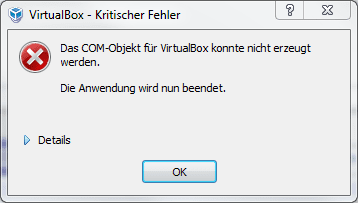
VB_OhShit!.PNG

Of course it was also in German, saying that the COM-object can not be used and the application must be closed.

Next step was naturally to try VirtualBox repair installation. Reboot, launch VirtualBox. What a relief! All my virtual machines were there, and VirtualBox was once again in English.

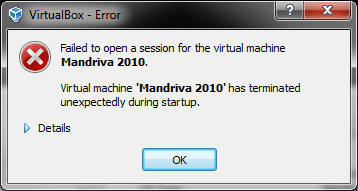
Decided to test and see if my virtual machines work. Launched Mandriva Linux. Got this:
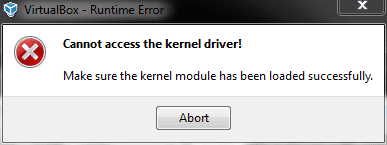
VB_OhShit!_2.PNG

And after pressing Abort, this:

VB_OhShit!_3.PNG

Tried every virtual machine. Same error.

Started the repair process. After manually uninstalling and reinstalling VirtualBox and a couple of reboots, I had to manually setup my virtual machines back. Everything works now but you can be absolutely sure that I am never going to use any products from VMLite, and I am going to tell this to anybody who wants to hear about it, using all the possibilities I have.

I have never seen a program behaving this bad, hijacking and destroying another program.

Notice please: before talking this harsh about a program, before recommending not to use it, I must of course be sure that I tell the facts. I have now repeated this procedure 4 times to be sure; I've uninstalled VirtualBox and VMLite, reinstalled them and exactly same happens every time.

I am as sure as it is possible to be.

Very honestly and sincerely,

Kari
 

My Computer

Computer type
Laptop
Computer Manufacturer/Model Number
HP ENVY 17-1150eg
OS
Windows 10 Pro x64 EN-GB
CPU
1.6 GHz Intel Core i7-720QM Processor
Memory
6 GB
Graphics Card(s)
ATI Mobility Radeon HD 5850 Graphics
Sound Card
Beats sound system with integrated subwoofer
Monitor(s) Displays
17" laptop display, 22" LED and 32" Full HD TV through HDMI
Screen Resolution
1600*900 (1), 1920*1080 (2&3)
Hard Drives
Internal: 2 x 500 GB SATA Hard Disk Drive 7200 rpm
External: 2TB for backups, 3TB USB3 network drive for media
Cooling
As Envy runs a bit warm, I have it on a Cooler Master pad
Keyboard
Logitech diNovo Media Desktop Laser (bluetooth)
Mouse
Logitech Performance Mouse MX
Internet Speed
50/10 Mbps VDSL
Antivirus
Windows Defender 4.3.9431.0
Browser
Maxthon 3.5.2., IE11
Thanks Kari.

I am using the vmlite plugin for XP Mode in VirtualBox. I haven't had any problems. :confused:
 

My Computer

Computer Manufacturer/Model Number
Custom
OS
Windows 7 Professional x64
CPU
Intel i7 2600K OC'd @ 4620 MHz
Motherboard
Asus P8Z68-V Pro
Memory
16GB GSkill Sniper 2133 Mhz (4x4GB)
Graphics Card(s)
EVGA GeForce GTX 480 SuperClocked+
Sound Card
Realtek High Definition Audio
Monitor(s) Displays
2x Acer S273HLbmii 27"
Screen Resolution
2 x 1920x1080
Hard Drives
64GB Crucial M4 SSD

Storage: Hitachi 1TB 5400RPM, Samsung 1.5TB 5400RPM
PSU
Corsair HW Series 750w (modular)
Case
Cooler Master HAF 932 Advanced Blue Edition
Cooling
CM Hyper 212+ CPU cooler, 3x 230mm + 1x 140mm case fans
Keyboard
Logitech MK320 (wireless)
Mouse
Logitech MK320 (wireless)
Internet Speed
30 Mb/s : 2 Mb/s
Its like running 2 antivirus in one PC.
That was very sad. Kari, could you try doing a system restore to see if it brings back things to normal?
 

My Computer

Computer Manufacturer/Model Number
Samsung NP530U4B-S02IN
OS
Windows® 8 Pro (64-bit)
CPU
Intel® Core™ i5 Processor 2467M (1.60GHz, 3MB L3 Cache)
Motherboard
Samsung Electronics
Memory
6GB DDR3 System Memory at 1,333MHz (on BD 4GB + 2GB x 1)
Graphics Card(s)
AMD Radeon™ HD7550M 1GB DDR3 (Ext. Graphic)
Sound Card
Realtek High Definition Audio
Monitor(s) Displays
35.56cm (14.0) SuperBright 300nit HD LED Display
Screen Resolution
1366x768
Hard Drives
1TB S-ATA II Hard Drive (5400RPM) with ExpressCache 16GB SSD
Internet Speed
sucks
Antivirus
Microsoft Security Essentials
Browser
Google Chrome (Sync enabled)
Its like running 2 antivirus in one PC.
That was very sad. Kari, could you try doing a system restore to see if it brings back things to normal?

its actually worse than that..;)
they are both made using Virtualbox OSE source so im not actually surprised this didn't happen...
most likely it overwrote the config files and your images should still be there...;)
you might just need to recreate the machines...:(
 

My Computer

Computer Manufacturer/Model Number
Tx2500z Tablet Pc/Homemade Server
OS
Windows 7 Ult x64(x2), HomePrem x32(x4), Server 08 (+VM), 08 R2 (VM) , SuSe 11.2 (VM), XP 32 (VM)
CPU
Turion X2 ultra (oh well came with laptop)/P4 @3.2 (yes P4)
Motherboard
IDK HP Motherboard / Intel DG965SS
Memory
OCZ Dual Channel 4GB kit/ 1gb Dual Channel
Graphics Card(s)
HD 3200 graphics /GMA x3100 (yay for intergrated!!)
Sound Card
Realtek HD Audio(mic working, well sort of)/Siig IC-70012
Monitor(s) Displays
built-in Hp 12" laptop screen/ Acer 19"
Screen Resolution
1280x800 /1440x900
Cooling
All Air Cooled
Mouse
Logi MX Rev. /MS Wheel Optical 1.1A /Logitech Optical Mouse
Internet Speed
College baby but its still routed through vpn to 1536k...
Other Info
love my wacom pen and pressure sensitivity...
wished it worked in 7, SUSE for that matter though
Thanks Kari.

I am using the vmlite plugin for XP Mode in VirtualBox. I haven't had any problems. :confused:
Did you have any other VBox virtual machines set up prior to installing it?
Its like running 2 antivirus in one PC.
That was very sad. Kari, could you try doing a system restore to see if it brings back things to normal?

its actually worse than that..;)
they are both made using Virtualbox OSE source so im not actually surprised this didn't happen...
most likely it overwrote the config files and your images should still be there...;)
you might just need to recreate the machines...:(

The virtual disks were still there, intact, so no need to system restore. I just recreated them, mounted to new virtual machines.
 

My Computer

Computer type
Laptop
Computer Manufacturer/Model Number
HP ENVY 17-1150eg
OS
Windows 10 Pro x64 EN-GB
CPU
1.6 GHz Intel Core i7-720QM Processor
Memory
6 GB
Graphics Card(s)
ATI Mobility Radeon HD 5850 Graphics
Sound Card
Beats sound system with integrated subwoofer
Monitor(s) Displays
17" laptop display, 22" LED and 32" Full HD TV through HDMI
Screen Resolution
1600*900 (1), 1920*1080 (2&3)
Hard Drives
Internal: 2 x 500 GB SATA Hard Disk Drive 7200 rpm
External: 2TB for backups, 3TB USB3 network drive for media
Cooling
As Envy runs a bit warm, I have it on a Cooler Master pad
Keyboard
Logitech diNovo Media Desktop Laser (bluetooth)
Mouse
Logitech Performance Mouse MX
Internet Speed
50/10 Mbps VDSL
Antivirus
Windows Defender 4.3.9431.0
Browser
Maxthon 3.5.2., IE11
Did you have any other VBox virtual machines setup prior to installing it?
I really don't remember. Maybe I'll do some testing tomorrow.
 

My Computer

Computer Manufacturer/Model Number
Custom
OS
Windows 7 Professional x64
CPU
Intel i7 2600K OC'd @ 4620 MHz
Motherboard
Asus P8Z68-V Pro
Memory
16GB GSkill Sniper 2133 Mhz (4x4GB)
Graphics Card(s)
EVGA GeForce GTX 480 SuperClocked+
Sound Card
Realtek High Definition Audio
Monitor(s) Displays
2x Acer S273HLbmii 27"
Screen Resolution
2 x 1920x1080
Hard Drives
64GB Crucial M4 SSD

Storage: Hitachi 1TB 5400RPM, Samsung 1.5TB 5400RPM
PSU
Corsair HW Series 750w (modular)
Case
Cooler Master HAF 932 Advanced Blue Edition
Cooling
CM Hyper 212+ CPU cooler, 3x 230mm + 1x 140mm case fans
Keyboard
Logitech MK320 (wireless)
Mouse
Logitech MK320 (wireless)
Internet Speed
30 Mb/s : 2 Mb/s
Thanks Kari.

I am using the vmlite plugin for XP Mode in VirtualBox. I haven't had any problems. :confused:
Did you have any other VBox virtual machines set up prior to installing it?
Its like running 2 antivirus in one PC.
That was very sad. Kari, could you try doing a system restore to see if it brings back things to normal?

its actually worse than that..;)
they are both made using Virtualbox OSE source so im not actually surprised this didn't happen...
most likely it overwrote the config files and your images should still be there...;)
you might just need to recreate the machines...:(

The virtual disks were still there, intact, so no need to system restore. I just recreated them, mounted to new virtual machines.

just as i thought...:)

Did you have any other VBox virtual machines setup prior to installing it?
I really don't remember. Maybe I'll do some testing tomorrow.

he is using the VMlite plugin and from what i can infer you tested the full release...
the plugin just adds the funtionality that VMlite does without messing around and reseting VB config...;)
Install XP Mode with VirtualBox Using the VMLite Plugin - How-To Geek
please correct me if i am wrong...;)
 

My Computer

Computer Manufacturer/Model Number
Tx2500z Tablet Pc/Homemade Server
OS
Windows 7 Ult x64(x2), HomePrem x32(x4), Server 08 (+VM), 08 R2 (VM) , SuSe 11.2 (VM), XP 32 (VM)
CPU
Turion X2 ultra (oh well came with laptop)/P4 @3.2 (yes P4)
Motherboard
IDK HP Motherboard / Intel DG965SS
Memory
OCZ Dual Channel 4GB kit/ 1gb Dual Channel
Graphics Card(s)
HD 3200 graphics /GMA x3100 (yay for intergrated!!)
Sound Card
Realtek HD Audio(mic working, well sort of)/Siig IC-70012
Monitor(s) Displays
built-in Hp 12" laptop screen/ Acer 19"
Screen Resolution
1280x800 /1440x900
Cooling
All Air Cooled
Mouse
Logi MX Rev. /MS Wheel Optical 1.1A /Logitech Optical Mouse
Internet Speed
College baby but its still routed through vpn to 1536k...
Other Info
love my wacom pen and pressure sensitivity...
wished it worked in 7, SUSE for that matter though
just as i thought...:)
Yes. I also back up my virtual disks regularly, so that was not a problem.


he is using the VMlite plugin and from what i can infer you tested the full release...
the plugin just adds the funtionality that VMlite does without messing around and reseting VB config...;)
Install XP Mode with VirtualBox Using the VMLite Plugin - How-To Geek
please correct me if i am wrong...;)
OK, that sounds credible.

But:
  • I did not see any reference in documentation that if I use full version, VMLite hijacks the whole VBox
  • Installation did not ask if I want to change the language of VBox
  • Installation did not mention or warn that VBox virtual machines would be lost
  • Uninstallation did not return VBox to the state prior to VMLite installation
  • etc.
For me that's enough reasons to think that coders at VMLite do not really know what they are doing. You can not make a program like this and not to think what happens to other programs or what happens if user wants to uninstall. Really bad coding practice.

Luckily Microsoft is now offering XP Mode also to computers without virtualization technology, and those who want to use a non-Microsoft alternative, or have only Windows 7 HB / HP editions can always use WMware player.

I am really angry. I think that if this was a commercial product, I would demand an immediate refund plus a compensation.

Please forget VMlite. Use Windows XP Mode or WMware!

Kari
 

My Computer

Computer type
Laptop
Computer Manufacturer/Model Number
HP ENVY 17-1150eg
OS
Windows 10 Pro x64 EN-GB
CPU
1.6 GHz Intel Core i7-720QM Processor
Memory
6 GB
Graphics Card(s)
ATI Mobility Radeon HD 5850 Graphics
Sound Card
Beats sound system with integrated subwoofer
Monitor(s) Displays
17" laptop display, 22" LED and 32" Full HD TV through HDMI
Screen Resolution
1600*900 (1), 1920*1080 (2&3)
Hard Drives
Internal: 2 x 500 GB SATA Hard Disk Drive 7200 rpm
External: 2TB for backups, 3TB USB3 network drive for media
Cooling
As Envy runs a bit warm, I have it on a Cooler Master pad
Keyboard
Logitech diNovo Media Desktop Laser (bluetooth)
Mouse
Logitech Performance Mouse MX
Internet Speed
50/10 Mbps VDSL
Antivirus
Windows Defender 4.3.9431.0
Browser
Maxthon 3.5.2., IE11
Sorry about the problems. It's unfortunate that you got into this. Most likely, Vbox was running at the time you are installing VMLite. Also is VBox 3.1.2 or above? The plugin have been extensively tested against 3.1.2.

We have more than 50k installations, and more than 200k xpm vms have been created. Thus far, only a few people reported installation issues.

By no means VMLite would remove your virtual machine configure files. It stores stuff to a totally different folder. All of your existing vbox config files and virtual disk files should be present. Let me know if not.

VBox and VMLite uses different root folders, and different top level xml configure file.
 

My Computer

OS
windows 7
OK, that sounds credible.

But:
  • I did not see any reference in documentation that if I use full version, VMLite hijacks the whole VBox
  • Installation did not ask if I want to change the language of VBox
  • Installation did not mention or warn that VBox virtual machines would be lost
  • Uninstallation did not return VBox to the state prior to VMLite installation
  • etc.
For me that's enough reasons to think that coders at VMLite do not really know what they are doing. You can not make a program like this and not to think what happens to other programs or what happens if user wants to uninstall. Really bad coding practice.

Luckily Microsoft is now offering XP Mode also to computers without virtualization technology, and those who want to use a non-Microsoft alternative, or have only Windows 7 HB / HP editions can always use WMware player.

I am really angry.

Please forget VMlite. Use Windows XP Mode or WMware!

Kari

funny enough i think that because of this software made MS back down from having VT necessary in the HW
the only reason now to use it would be for VB 3d acceleration or if you are using Vista or W7 hp or lower (which is against the EULA and ill leave it at that)
 

My Computer

Computer Manufacturer/Model Number
Tx2500z Tablet Pc/Homemade Server
OS
Windows 7 Ult x64(x2), HomePrem x32(x4), Server 08 (+VM), 08 R2 (VM) , SuSe 11.2 (VM), XP 32 (VM)
CPU
Turion X2 ultra (oh well came with laptop)/P4 @3.2 (yes P4)
Motherboard
IDK HP Motherboard / Intel DG965SS
Memory
OCZ Dual Channel 4GB kit/ 1gb Dual Channel
Graphics Card(s)
HD 3200 graphics /GMA x3100 (yay for intergrated!!)
Sound Card
Realtek HD Audio(mic working, well sort of)/Siig IC-70012
Monitor(s) Displays
built-in Hp 12" laptop screen/ Acer 19"
Screen Resolution
1280x800 /1440x900
Cooling
All Air Cooled
Mouse
Logi MX Rev. /MS Wheel Optical 1.1A /Logitech Optical Mouse
Internet Speed
College baby but its still routed through vpn to 1536k...
Other Info
love my wacom pen and pressure sensitivity...
wished it worked in 7, SUSE for that matter though
we will release unqiue features to attract users (xp mode was not the reason we developed vmlite), next version will allow you to virtualize the current running OS instance on the host, so you have an identical os running inside a vm, for example, Windows 7 on Windows 7.
 

My Computer

OS
windows 7
Sorry about the problems. It's unfortunate that you got into this. Most likely, Vbox was running at the time you are installing VMLite. Also is VBox 3.1.2 or above? The plugin have been extensively tested against 3.1.2.
VirtualBox 3.1.4-57640. It was most definitely not running.


We have more than 50k installations, and more than 200k xpm vms have been created. Thus far, only a few people reported installation issues.
Like I mentioned, I reproduced this exact behavior 3 more times, tried totally 4 times with exactly same results.

What I did not mention is why I reproduced it so many times: I first repeated the same steps once on the rig I first installed VMLite. When result was the same, I installed VirtualBox and VMLite to another rig and tried once which resulted exactly the same, corrupted VirtualBox. Also on this other rig I did it once more, to be sure.

Totally four failures out of four installations, on two computers out of two.


By no means VMLite would remove your virtual machine configure files. It stores stuff to a totally different folder. All of your existing vbox config files and virtual disk files should be present. Let me know if not.
Not.
(Virtual disks of course, configuration not)

Kari
 

My Computer

Computer type
Laptop
Computer Manufacturer/Model Number
HP ENVY 17-1150eg
OS
Windows 10 Pro x64 EN-GB
CPU
1.6 GHz Intel Core i7-720QM Processor
Memory
6 GB
Graphics Card(s)
ATI Mobility Radeon HD 5850 Graphics
Sound Card
Beats sound system with integrated subwoofer
Monitor(s) Displays
17" laptop display, 22" LED and 32" Full HD TV through HDMI
Screen Resolution
1600*900 (1), 1920*1080 (2&3)
Hard Drives
Internal: 2 x 500 GB SATA Hard Disk Drive 7200 rpm
External: 2TB for backups, 3TB USB3 network drive for media
Cooling
As Envy runs a bit warm, I have it on a Cooler Master pad
Keyboard
Logitech diNovo Media Desktop Laser (bluetooth)
Mouse
Logitech Performance Mouse MX
Internet Speed
50/10 Mbps VDSL
Antivirus
Windows Defender 4.3.9431.0
Browser
Maxthon 3.5.2., IE11
Need to make sure VBoxSvc.exe was killed before installtion of VMLite Plugin, which is why we recommend a reboot.

With regard to the performance, it takes a few minutes to set up first XP Mode vm, just like Microsoft XP Mode takes a few mins too.
 

My Computer

OS
windows 7
So VMLite, without asking my permission, checked the system location data and decided that this user is certainly happier when we surprise him and change the language of one of the most important applications he has!

Everything works now but you can be absolutely sure that I am never going to use any products from VMLite, and I am going to tell this to anybody who wants to hear about it, using all the possibilities I have.

I have never seen a program behaving this bad, hijacking and destroying another program.

For me that's enough reasons to think that coders at VMLite do not really know what they are doing. You can not make a program like this and not to think what happens to other programs or what happens if user wants to uninstall. Really bad coding practice.

Kari

Kari,

Your going a bit overboard here arnt you?

Huisinro is the lead developer of VMLite, I would hope you listen to his advice and apologize for making insulting comments about him!

Steven
 
Kari,

Your going a bit overboard here arnt you?

Huisinro is the lead developer of VMLite, I would hope you listen to his advice and apologize for making insulting comments about him!

Steven

What advice?

Could you please show me where and how I have insulted him?

I have told about my experience about testing the product as honestly as I can. I'm willing to show that my conclusions are accurate and that it really happens, when my word is not enough I can produce a video to show that every word in my original post is true.

Based on these experiences, or rather the results of my experiments, I have stated my honest and sincere opinion.

You can not mean that it's OK to criticize and warn people about non-functioning or problem causing software, but not if the coder is a member of Seven Forums?

I re-read my original post. I'll stay behind every word. I have insulted nobody, I have told about my tests as a very experienced computer and virtualization technology user, and warned people when I noticed how this product has so obvious coding or integration errors it can cause a lot of trouble and problems, not to mention the time waisted.

Those members who have read my posts should know I'll always apologize when I'm done or said something wrong.

In this matter, I have nothing to apologize.

Kari
 

My Computer

Computer type
Laptop
Computer Manufacturer/Model Number
HP ENVY 17-1150eg
OS
Windows 10 Pro x64 EN-GB
CPU
1.6 GHz Intel Core i7-720QM Processor
Memory
6 GB
Graphics Card(s)
ATI Mobility Radeon HD 5850 Graphics
Sound Card
Beats sound system with integrated subwoofer
Monitor(s) Displays
17" laptop display, 22" LED and 32" Full HD TV through HDMI
Screen Resolution
1600*900 (1), 1920*1080 (2&3)
Hard Drives
Internal: 2 x 500 GB SATA Hard Disk Drive 7200 rpm
External: 2TB for backups, 3TB USB3 network drive for media
Cooling
As Envy runs a bit warm, I have it on a Cooler Master pad
Keyboard
Logitech diNovo Media Desktop Laser (bluetooth)
Mouse
Logitech Performance Mouse MX
Internet Speed
50/10 Mbps VDSL
Antivirus
Windows Defender 4.3.9431.0
Browser
Maxthon 3.5.2., IE11
I think what you experienced is some extreme case, that somehow got messed up during one of the installation steps.

I just tested it again, and works fine.

Make sure you have downloaded the correct file from our site. If you have already installed VirtualBox, then you need the VMLite Plugin.

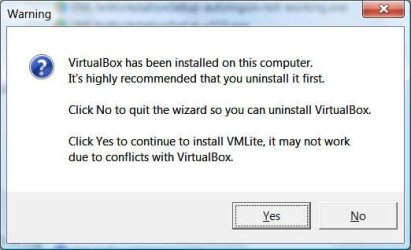
If you install the full VMLite Workstation, when VirtualBox is detected, it will issue an warning that says VMLite is not compatiable with VirtualBox, and the installation will stop at that moment.

If you install VMLite Plugin, it is compatible with VirtualBox 3.1.2 and above, but you will have to follow this sequence: Install VirtualBox first, then install VMLite Plugin. Make sure VBoxSvc.exe and other vbox processes are terminated.

What you experienced here has not been experienced by other users, and the number of other users are many many more than a single user, so to generalize a conclusion based on a single case is difficult. All software has bugs, but we won't release a product if it does something like that, and we wouldn't call it a plugin if it's so conflicted with VirtualBox.
 

My Computer

OS
windows 7
Kari,

Your going a bit overboard here arnt you?

Huisinro is the lead developer of VMLite, I would hope you listen to his advice and apologize for making insulting comments about him!

Steven

What advice?

Could you please show me where and how I have insulted him?

I have told about my experience about testing the product as honestly as I can. I'm willing to show that my conclusions are accurate and that it really happens, when my word is not enough I can produce a video to show that every word in my original post is true.

Based on these experiences, or rather the results of my experiments, I have stated my honest and sincere opinion.

You can not mean that it's OK to criticize and warn people about non-functioning or problem causing software, but not if the coder is a member of Seven Forums?

I re-read my original post. I'll stay behind every word. I have insulted nobody, I have told about my tests as a very experienced computer and virtualization technology user, and warned people when I noticed how this product has so obvious coding or integration errors it can cause a lot of trouble and problems, not to mention the time waisted.

Those members who have read my posts should know I'll always apologize when I'm done or said something wrong.

In this matter, I have nothing to apologize.

Kari

Did you read all of what I quoted?

Everything works now but you can be absolutely sure that I am never going to use any products from VMLite, and I am going to tell this to anybody who wants to hear about it, using all the possibilities I have.

I have never seen a program behaving this bad, hijacking and destroying another program.

For me that's enough reasons to think that coders at VMLite do not really know what they are doing. You can not make a program like this and not to think what happens to other programs or what happens if user wants to uninstall. Really bad coding practice.

You didnt follow the instructions, had problems, decided to blame VMLite for your mistake, had a huge rant to make it look like it wasn't your fault, then to top it off you said Huisinro doesnt know what he is doing.

Its obvious you didn't bother to get support or ask Huisinro, Now instead of contacting the VMLite support or Huisinro, you ranted and made insulting/stupid comments and yet you still dont see how the comments I quoted are insulting?

As a developer myself, I find all of these actions quite offensive, If you bothered contacting him first or at least attempting to get support then it would all be a different story.
 
Make sure you have downloaded the correct file from our site. If you have already installed VirtualBox, then you need the VMLite Plugin.
I have Virtual PC, VirtualBox and WMware virtualization software installed.

A few questions:
  1. Could you please show me where on your website or published documentation could I find the information, that although Virtual PC and WMware are not affected when installing VMLite XP Mode, you can not install it when VirtualBox is present? That you must instead of full version use VirtualBox plugin?
  2. Where on your website or published documentation could I find the information, that VMLite (full) is not compatible with VirtualBox?
  3. Which of these two files you would download and install, if your sole purpose was to test the full version of VMLite XP Mode:
    vml_2.PNG

If you install the full VMLite Workstation, when VirtualBox is detected, it will issue an warning that says VMLite is not compatiable with VirtualBox, and the installation will stop at that moment.
Simply not true. Installation went to the end without a glitch.


What you experienced here has not been experienced by other users, and the number of other users are many many more than a single user, so to generalize a conclusion based on a single case is difficult. All software has bugs, but we won't release a product if it does something like that, and we wouldn't call it a plugin if it's so conflicted with VirtualBox.
I'm not calling it a plugin, neither. I did not test a plugin. I tested the full version.

Kari
 

My Computer

Computer type
Laptop
Computer Manufacturer/Model Number
HP ENVY 17-1150eg
OS
Windows 10 Pro x64 EN-GB
CPU
1.6 GHz Intel Core i7-720QM Processor
Memory
6 GB
Graphics Card(s)
ATI Mobility Radeon HD 5850 Graphics
Sound Card
Beats sound system with integrated subwoofer
Monitor(s) Displays
17" laptop display, 22" LED and 32" Full HD TV through HDMI
Screen Resolution
1600*900 (1), 1920*1080 (2&3)
Hard Drives
Internal: 2 x 500 GB SATA Hard Disk Drive 7200 rpm
External: 2TB for backups, 3TB USB3 network drive for media
Cooling
As Envy runs a bit warm, I have it on a Cooler Master pad
Keyboard
Logitech diNovo Media Desktop Laser (bluetooth)
Mouse
Logitech Performance Mouse MX
Internet Speed
50/10 Mbps VDSL
Antivirus
Windows Defender 4.3.9431.0
Browser
Maxthon 3.5.2., IE11
The plugin was announced to our registered users in our forum, with instructions:

VMLite XP Mode Plugin for VirtualBox released - VMLite

The second setup exe should be the one to use, in addition to your existing VBox installation.

If you use first exe, then it should stop to install if VBox is detected. We check this key to determine whether VBox is installed, the following is the warning dialog:


[HKEY_LOCAL_MACHINE\SOFTWARE\Sun\VirtualBox]
"InstallDir"="C:\Program Files\Sun\VirtualBox\"

If somehow, your computer has the above key deleted, then VMLite may proceed to install, as if there is no VBox on the computer.
 

Attachments

  • vmlite-vbox-warning.jpg
    vmlite-vbox-warning.jpg
    23.5 KB · Views: 20

My Computer

OS
windows 7
The plugin was announced to our registered users in our forum, with instructions:

VMLite XP Mode Plugin for VirtualBox released - VMLite

The second setup exe should be the one to use, in addition to your existing VBox installation.

If you use first exe, then it should stop to install if VBox is detected. We check this key to determine whether VBox is installed, the following is the warning dialog:


[HKEY_LOCAL_MACHINE\SOFTWARE\Sun\VirtualBox]
"InstallDir"="C:\Program Files\Sun\VirtualBox\"

If somehow, your computer has the above key deleted, then VMLite may proceed to install, as if there is no VBox on the computer.
so this is the install check right?
the check just needs to have that key in the registry if i got it correct to pop-up
do you also have a check for wow6432node (32 bit VB in 64 win (i believe from the looks of it should ))?
 

My Computer

Computer Manufacturer/Model Number
Tx2500z Tablet Pc/Homemade Server
OS
Windows 7 Ult x64(x2), HomePrem x32(x4), Server 08 (+VM), 08 R2 (VM) , SuSe 11.2 (VM), XP 32 (VM)
CPU
Turion X2 ultra (oh well came with laptop)/P4 @3.2 (yes P4)
Motherboard
IDK HP Motherboard / Intel DG965SS
Memory
OCZ Dual Channel 4GB kit/ 1gb Dual Channel
Graphics Card(s)
HD 3200 graphics /GMA x3100 (yay for intergrated!!)
Sound Card
Realtek HD Audio(mic working, well sort of)/Siig IC-70012
Monitor(s) Displays
built-in Hp 12" laptop screen/ Acer 19"
Screen Resolution
1280x800 /1440x900
Cooling
All Air Cooled
Mouse
Logi MX Rev. /MS Wheel Optical 1.1A /Logitech Optical Mouse
Internet Speed
College baby but its still routed through vpn to 1536k...
Other Info
love my wacom pen and pressure sensitivity...
wished it worked in 7, SUSE for that matter though
Back
Top