10 Windows speed tips that DON'T work.

I understand that services being stopped or disabled doesn't do much, and I would not stop superfetch. Registry tweaks are risky too.


Superfetch is more of a convenience and not applicable for the situation I've been describing. But...but..but.. I've been tweaking the registry since Win95... can't stop now! :)
 

My Computer My Computer

Computer Manufacturer/Model Number
Assembled in my workshop
OS
Windows 7 Home Premium
CPU
Intel Core 2 Duo @ 3.00gHz
Motherboard
Gigabyte GA-P35-S3G
Memory
4 GB
Graphics Card(s)
ATI Radeon HD 2600 XT
Sound Card
RME 24/96 Card, Realtek Internal Audio PreSonus FireStudio
Monitor(s) Displays
Acer 1917 (x2)
Screen Resolution
1280 x 1024 on both monitors
Hard Drives
Three 250GB Seagate SATA Barracuda 7200rpm
PSU
Rosewill 500-watt
Case
Rosewill mid-tower
Cooling
Noctua NH-U9B (CPU), PwrSupply fan + single large case Fan
Keyboard
Macally w/2/USB ports.
Mouse
Trackman Wheel
Other Info
Event 20/20 bas studio monitors, Yamaha sub.
Rackmount Korg/Roland/Yamaha synthesizers,
Cubase MIDI/audio recording. Sony Soundforge audio/mastering software. CD Architect Mastering. RME & Presonus audio interfaces.
I understand that services being stopped or disabled doesn't do much, and I would not stop superfetch. Registry tweaks are risky too.


Superfetch is more of a convenience and not applicable for the situation I've been describing. But...but..but.. I've been tweaking the registry since Win95... can't stop now! :)

I suspected you were a closet "tweaker". They have rehab facilities to help with that! ;)

(d)

P.S. Thanks for the info!​
 

My Computer My Computer

OS
XP Pro & Vista Home Premium (x86); Windows Ultimate 7600 x64 Retail
The only thing that will speed up your computer is more RAM.

Do you really believe this? I suppose you must or you wouldn't have posted it.

If this is really the case, how can I get my system to use all of its memory? I have a 2 x Quad-core Opteron system with 16 gig of ram; 8 gig per CPU. However, it never uses any more than 3 gig. I keep ResMon running on my second monitor and even with 75 processes, 900 threads and almost 22000 handles in use, only 2076 mb (2 gig) of ram is used.

Right now I'm running 2 index update programs as background processes (I was able to get a performance increase by changing the task scheduler's priority setting to "background processes" rather than programs) used memory varies only slightly, even when hard faults are seen. One would think that as a "hard fault" (i.e. not finding the requested data in memory cache) that the memory allocated would increase as the new data was loaded into memory.

Btw, I'm not running a swapfile. I have the OS and very few programs installed on a 60 gig SSD. Removing the swapfile made absolutely no difference in performance...and I still have programs "graying out" for up to 30 seconds as if the system is trying to reload data into memory. Now since there's no swapfile, (I just double checked) I'm at a loss to explain how the memory manager could be waiting to reload data, unless it's static data from a file and it's discarding it and then reloading it while the program "grays out."

I'm very much aware that certain data types (in memory) can be discarded when more RAM is required, such as a disk's read buffer, (I also know that a lot of that is done in the disks and controller) but if there's a huge amount of RAM marked as Standby and/or Free (I confess that I don't know the exact definition of this distinction) why would it be discarded rather than just storing the newly required data into RAM and using ALL of memory rather than just 2 gig?

This apparent limitation is driving me nuts. Well, maybe I was there to start with for building a box like this. But this situation was the underlying reason for building it. I was running a dual-core box with 4 gig RAM under XP which could only see 2 gig. Its performance was terrible, so I decided to go all-out. Many things are better, but the memory limit seems to be one of the 2 bottlenecks (the other being disk drives...which I could probably fix if I took the time to reconfigure the system to a RAID 3 or 4 setup, but I don't have that time at present.)

If anyone can offer insight here, especially the definition of Standby and Free memory in ResMon (this is what the ResMon Help says about Standby memory: "
In Physical Memory, review the Available to Programs value. Available memory is the combined total of standby memory and free memory. Free memory includes zero page memory.") I'd be very grateful.

 

My Computer My Computer

Computer Manufacturer/Model Number
Home Built
OS
Windows 7 Pro 64-bit
CPU
2 x Opteron quad-core
Motherboard
TYAN Thunder N3600B Dual processor mobo
Memory
16 gig buffered
Graphics Card(s)
Radeon 4890 feeding my compnent stereo system. Sounds great
Sound Card
M-Audio Delta Audiophile
Monitor(s) Displays
Acer 24", Acer 21"
Screen Resolution
1980x1050 & 1680x1050
Hard Drives
Internal:

OCZ 60 gig SSD
2 x WD 1tb
1 WD 1.5tb
1 WD 320 GB

External:

3 x WD Mybook 1TB
PSU
Corsair 900w
Case
Coolermaster HAF 932
Cooling
Many fans, liquid cooling on the way but likely in November
Keyboard
Saitek red backlit
Mouse
Logitek USB
Internet Speed
Way too slow for a DSL line
Other Info
This is a build that was in progress but got pressed into service because of the need for large photo editing capability.

More will be revealed after "car season" (race cars, Salt Flats, etc.) is over in October. That's when the serious tweaking will start.

See Build Diary here:
http://www.raytherat.com/dreadnought/Welcome.html
Ok. I found the answer.
Take advantage of tools to monitor memory usage in Windows 7 | Microsoft Windows | TechRepublic.com

Here's what it says about memory and its different status labels:

Hardware Reserved: Memory that is reserved for use by the BIOS and some drivers for other peripherals.
In Use: Memory used by process working sets, drivers, nonpaged pools, and operating system functions.
Modified: Memory whose contents must be [written]to disk before it can be used for another purpose.
Standby: Memory that contains cached data and code that is not actively in use.
Free Memory that does not contain any valuable data and that will be used first when processes or the operating system needs more memory.

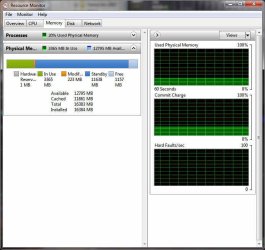
Looking at the attached image (screen dump done just prior to this post) it shows 3365 mb In Use, 223 Modified, 11638 Standby and 1157 free.

Apparently it IS working just the way it "should." Since the Free amount is slowly decreasing, it'll be interesting to see if the memory manager starts kicking chunks outta Standby as it requires more space for new data.

This is the first time I've seen this amount of free memory so low. I think I understand this better and I'm gonna quit looking for any setting that would allow the system to use all RAM, since it apparently is.

I find the "Labels" for the different status of memory to be awkward and less than intuitive, but I guess I can stop worrying about it...unless it crashes when it runs out of "Free" memory.
 

Attachments

  • Resmon20100510.jpg
    Resmon20100510.jpg
    54.5 KB · Views: 13

My Computer My Computer

Computer Manufacturer/Model Number
Home Built
OS
Windows 7 Pro 64-bit
CPU
2 x Opteron quad-core
Motherboard
TYAN Thunder N3600B Dual processor mobo
Memory
16 gig buffered
Graphics Card(s)
Radeon 4890 feeding my compnent stereo system. Sounds great
Sound Card
M-Audio Delta Audiophile
Monitor(s) Displays
Acer 24", Acer 21"
Screen Resolution
1980x1050 & 1680x1050
Hard Drives
Internal:

OCZ 60 gig SSD
2 x WD 1tb
1 WD 1.5tb
1 WD 320 GB

External:

3 x WD Mybook 1TB
PSU
Corsair 900w
Case
Coolermaster HAF 932
Cooling
Many fans, liquid cooling on the way but likely in November
Keyboard
Saitek red backlit
Mouse
Logitek USB
Internet Speed
Way too slow for a DSL line
Other Info
This is a build that was in progress but got pressed into service because of the need for large photo editing capability.

More will be revealed after "car season" (race cars, Salt Flats, etc.) is over in October. That's when the serious tweaking will start.

See Build Diary here:
http://www.raytherat.com/dreadnought/Welcome.html
Here something else for you....

What version of Windows are you using? I hope for your sake its 64-bit, because 32-bit is limited to only 4-gig of RAM, and out of that 4, your video memory takes some away.

Long story short - If your video card is 1gig, then the available "system" memory is 3gig as Windows must allocate resource to the video card memory.

Think of it this way, you have a 4 room office building you want to rent, but one room must be reserved for the office manager, that means you can only rent 3 rooms, as the 4 one is left out because it’s already in use.

So, again, if you have a video card that has 1gig of memory and you physically have 4gig of system memory installed. Windows will only use 3 of it, as the other one gig is reserved by the video card. So the extra memory is left out in the cold.

With that said, if you want more memory (rooms) get a 64-bit OS (bigger office) because someone is going to get left out.

You can check out this PDF which uses the room/building analogy - Gaming Performance Analysis

My article here - Max amount of RAM for Vista 32bit? - Vista Forums
 

My Computer My Computer

Computer type
PC/Desktop
Computer Manufacturer/Model Number
Custom built by me.
OS
Windows 10 Pro
CPU
Intel Core i7-4770K (3.5Ghz)
Motherboard
Gigabyte G1 Sniper 5 (F10 Bios)
Memory
32 gig Corsair Dominator Platinum (4x8Gig)
Graphics Card(s)
Sapphire Tri-X R9 Fury
Sound Card
Soundblaster ZXR
Monitor(s) Displays
NEC PA242W 24" LCD Monitor
Screen Resolution
1920 x 1200
Hard Drives
Primary - Samsung 850 Pro (512gig), Samsung 840 Pro (256gig), 2TB WD Caviar Black.
PSU
EVGA Supernova 1000 G2
Case
Cooler Master HAF X
Cooling
Corsair H100i with Corsair Air Series SP120 Quiet Fans
Keyboard
Logitech Wireless Wave
Mouse
Logitech Performance MX
Internet Speed
High Speed Cable
Antivirus
Norton Security
Browser
IE11
Other Info
Memory Timings - 1866MHz @ 9-9-9-27-1T @ 1.5 volts
Sorry, I guess I need to add that to my sig. It's Pro 64-bit. I'm running a XFX Radeon HD 4890 Video Card and M-Audio Audiophile 2496 Sound Card so I believe that a lot of the video memory is handled by the GPU...at least that's why I went that route. I hope the sound card takes some load off the CPUs. As an aside, I'm a freelance photographer and web developer (2nd and 3rd careers...I'm supposedly retired) and I spend one hell of a lotta time editing and managing high resolution photos. So far, the Radeon card is acceptable as a driver for two Acer flat panel monitors. I spose it'd be a little better if they were the same size (the secondary is slightly smaller) but it works ok. The sound card is great, although I haven't connected it to a midi device (I dabble at organ and keyboard as well as blues bass) and I'm curious to see how it's gonna work for mixing digital audio. Right now I just use it to play mp3s thru my component audio system. It's great for that purpose.

I'm happy to report that as "Free" memory got down to a very low level (about 3mb) the memory manager seems to be working fine and is discarding "Standby" chunks as it requires new space. And it's done so with no apparent performance degradation. I'm using it hard and it seems to be doing exactly what I'd hoped it would when I built it: running a lot of processes without degradation. I'm going to chalk the "graying out" of certain programs (Firefox is where I see that behavior the most) to their own internal thread management. I think that several things have contributed to performance optimization in my case: The first is the change I made to the task scheduler. That really seemed to help. Second is not using Windows Explorer. I'm using Free Commander and/or Xplorer2. They both have some shortcomings, but it seems to have helped performance and stability. Finally, I've turned off many of the Aero whizbangs that are more of a "designed slowdown" like zooming dialog boxes and fading things in and out. I prefer not to wait while this effect is displayed.

I'm not sure why this is the first time I've seen this behavior with Standby/Free memory, but I'll take what I can get.

Since I'm gonna be hammering on this thing for the rest of the (non-existent) spring, the summer and the better part of the fall, I'll have plenty of time in "production mode" to see how it goes before I jump into the RAID conversion.

Maybe I can do the RAID setup in the late fall when my busy season is over.

I've taken this one off my "things to worry about" list.
 

My Computer My Computer

Computer Manufacturer/Model Number
Home Built
OS
Windows 7 Pro 64-bit
CPU
2 x Opteron quad-core
Motherboard
TYAN Thunder N3600B Dual processor mobo
Memory
16 gig buffered
Graphics Card(s)
Radeon 4890 feeding my compnent stereo system. Sounds great
Sound Card
M-Audio Delta Audiophile
Monitor(s) Displays
Acer 24", Acer 21"
Screen Resolution
1980x1050 & 1680x1050
Hard Drives
Internal:

OCZ 60 gig SSD
2 x WD 1tb
1 WD 1.5tb
1 WD 320 GB

External:

3 x WD Mybook 1TB
PSU
Corsair 900w
Case
Coolermaster HAF 932
Cooling
Many fans, liquid cooling on the way but likely in November
Keyboard
Saitek red backlit
Mouse
Logitek USB
Internet Speed
Way too slow for a DSL line
Other Info
This is a build that was in progress but got pressed into service because of the need for large photo editing capability.

More will be revealed after "car season" (race cars, Salt Flats, etc.) is over in October. That's when the serious tweaking will start.

See Build Diary here:
http://www.raytherat.com/dreadnought/Welcome.html
I just re-read the portion about the GPU memory rendering CPU RAM unusable. That seems pretty strange. I'll read the article and do a little more testing. But for the moment, it's ok...and I gotta get a web site update done.
 

My Computer My Computer

Computer Manufacturer/Model Number
Home Built
OS
Windows 7 Pro 64-bit
CPU
2 x Opteron quad-core
Motherboard
TYAN Thunder N3600B Dual processor mobo
Memory
16 gig buffered
Graphics Card(s)
Radeon 4890 feeding my compnent stereo system. Sounds great
Sound Card
M-Audio Delta Audiophile
Monitor(s) Displays
Acer 24", Acer 21"
Screen Resolution
1980x1050 & 1680x1050
Hard Drives
Internal:

OCZ 60 gig SSD
2 x WD 1tb
1 WD 1.5tb
1 WD 320 GB

External:

3 x WD Mybook 1TB
PSU
Corsair 900w
Case
Coolermaster HAF 932
Cooling
Many fans, liquid cooling on the way but likely in November
Keyboard
Saitek red backlit
Mouse
Logitek USB
Internet Speed
Way too slow for a DSL line
Other Info
This is a build that was in progress but got pressed into service because of the need for large photo editing capability.

More will be revealed after "car season" (race cars, Salt Flats, etc.) is over in October. That's when the serious tweaking will start.

See Build Diary here:
http://www.raytherat.com/dreadnought/Welcome.html
Back
Top