
Can't boot into Windows7 after deleted primary partition.

dimpel

New member
Local time
4:35 PM
Messages
5
Location
Malaysia
Hi, I'm using Windows7, dual boot with Linux Ubuntu 10.04, Recently, I installed another OS (Linux Mint). Before installing this Mint, I deleted primary partition (sda1) and created entended partition from the earlier primary partition sda1. Since that, I cannot boot into my Windows7 anymore (received error message something like "no bootable device insert boot disk and press any key"), but I've no problem in booting into both Linux Ubuntu and Mint.

I've tried a few things, but seems like the luck is not with me. Below are the things that I've tried:

1. Boot Recovery Disc Windows7 and done the Repair Startup many times (more than 5 times), still no luck.

2. Boot Recovery Disc Windows7 and chose Command Prompt to use:
Bootrec /scanos - The Windows is listed.
Bootrec /fixboot - No element found,
Bootrec /fixmbr - Completed succesfully.

3. Boot Recovery Disc Windows7 and chose Command Prompt to use Diskpart, everything seems okay for the list disk, select disk, list partiton, select partion, except the "active" command. I've been prompted with something like "Virtual Disk Service Error: the specified partition type is not valid for this operation".

I've installed back grub for me to log in into Linux Ubuntu/Mint. From Linux Gparted, I can see this windows partition is flagged as boot. Currently, I've unplugged the other 320 GB hard disk and only use one 320 GB hard disk for all the OS above. I've read a few threads with similar issues, but I think it's time for me to open a new thread for my problem. Please help, I want to log in into my Windows7. Thank you in advance.
 

My Computer My Computer

At a glance

Windows Seven, Linux Ubuntu, Linux MintAMD Phenom 95504 GBHD4670
OS
Windows Seven, Linux Ubuntu, Linux Mint
CPU
AMD Phenom 9550
Motherboard
XFX Geforce 8200
Memory
4 GB
Graphics Card(s)
HD4670
Monitor(s) Displays
17' CRT
Screen Resolution
1024x768
Hard Drives
WD 320 GB
PSU
460 watt
I think a screen shot of the disk manger will be helpful.
 

My Computer My Computer

At a glance

XP/W7/Lucid/Arch2 gigs
Computer Manufacturer/Model Number
ACER aspire one
OS
XP/W7/Lucid/Arch
Memory
2 gigs
Yes, we need a screen shot. And you said you deleted the primary partition? Isn't your Windows 7 Installation on that or something? Please clarify.
 

My Computer My Computer

At a glance

Mc Donald OS Version BetaAwesome Beef PattyPro 1 KB MemoryTomato FX10
Computer Manufacturer/Model Number
Mc Donald's
OS
Mc Donald OS Version Beta
CPU
Awesome Beef Patty
Motherboard
Lettuce (It's green!)
Memory
Pro 1 KB Memory
Graphics Card(s)
Tomato FX10
Sound Card
The Box
Monitor(s) Displays
Yummy 5-D Touch
Screen Resolution
20 x 20
Hard Drives
The Top Bun and the Bottom Buns
PSU
Um.
Case
The Box With Pics!
Cooling
That's Why i Have a Refrigerator
Keyboard
N/A
Mouse
N/A
Internet Speed
Same as McDonald's Wi-fi
Other Info
Note : This is not real. (Hope You Knew That)
:p Deleting the primary partition was not a great thing to do,
the boot table and files are always saved on the primary partition.

In this case the only solution is to back up your data and then do a clean install of both the os's :(
 

My Computer My Computer

At a glance

xp, vista, sevenxxx
Computer Manufacturer/Model Number
x
OS
xp, vista, seven
CPU
x
Motherboard
x
Memory
x
Graphics Card(s)
x
Sound Card
x
Monitor(s) Displays
x
Hard Drives
x
PSU
x
Case
x
Cooling
x
Yeah, it's my mistake that I deleted the primary partition. I wish there is any other way/method to boot into that Windows7 again, without formatting.

The Windows installation is another extended partition, and the deleted primary partition was holding some other data. I decided to delete the primary partition before I installed Linux Mint, didn't know this problem will happen.

I'm at workplace now, and that computer is at home. I'll attach the Disk Management's screenshot later in the evening.
 

My Computer My Computer

At a glance

Windows Seven, Linux Ubuntu, Linux MintAMD Phenom 95504 GBHD4670
OS
Windows Seven, Linux Ubuntu, Linux Mint
CPU
AMD Phenom 9550
Motherboard
XFX Geforce 8200
Memory
4 GB
Graphics Card(s)
HD4670
Monitor(s) Displays
17' CRT
Screen Resolution
1024x768
Hard Drives
WD 320 GB
PSU
460 watt
not important
 

My Computer My Computer

At a glance

XP/W7/Lucid/Arch2 gigs
Computer Manufacturer/Model Number
ACER aspire one
OS
XP/W7/Lucid/Arch
Memory
2 gigs
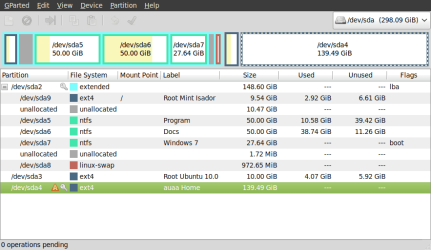
Here is the screenshot for the Disk Management, captured by using Gparted from Linux Mint 9.

Windows7 installation is in sda7. The earlier deleted primary partition is now divided into sda9 and the unallocated partition next to sda9.

I wish there is any other way/method to boot into that Windows7 again, without formatting. Please help. Thanks.
 

Attachments

  • GParted.png
    GParted.png
    23 KB · Views: 401

My Computer My Computer

At a glance

Windows Seven, Linux Ubuntu, Linux MintAMD Phenom 95504 GBHD4670
OS
Windows Seven, Linux Ubuntu, Linux Mint
CPU
AMD Phenom 9550
Motherboard
XFX Geforce 8200
Memory
4 GB
Graphics Card(s)
HD4670
Monitor(s) Displays
17' CRT
Screen Resolution
1024x768
Hard Drives
WD 320 GB
PSU
460 watt
From just a quick look, it may be salvageable, I can't guarantee this but besides possibly missing some boot stuff that may be able to be reinstalled the extended partition is a problem I believe. A more experienced windows user will be needed here to take a look. I guess since you can't get into windows a screen shot from the disc manager isn't possible for them if needed. I use gparted all the time so I recognize the setup. I will be busy tomorrow writing a paper for a class, pacific LA time but I will look in on the progress. If you have to do a reinstall I think it will only be W7 the Linux stuff since it boots seems to be using the same grub. A custom install of W7 is easy if you have a install dvd.
 

My Computer My Computer

At a glance

XP/W7/Lucid/Arch2 gigs
Computer Manufacturer/Model Number
ACER aspire one
OS
XP/W7/Lucid/Arch
Memory
2 gigs
Thanks for the comment Wee. I also hope this is only about boot stuff issues that might possible to solve.

I'm still looking for others to comment, please help. Thanks.
 

My Computer My Computer

At a glance

Windows Seven, Linux Ubuntu, Linux MintAMD Phenom 95504 GBHD4670
OS
Windows Seven, Linux Ubuntu, Linux Mint
CPU
AMD Phenom 9550
Motherboard
XFX Geforce 8200
Memory
4 GB
Graphics Card(s)
HD4670
Monitor(s) Displays
17' CRT
Screen Resolution
1024x768
Hard Drives
WD 320 GB
PSU
460 watt
You need to have a primary partition to boot windows.

Boot PW , http://www.partitionwizard.com/partition-wizard-bootable-cd.html rt click the win 7 volume, select Modify>set as primary.

Apply. Rt click it again , Modify>set as active. Apply.

Boot the 7 install dvd and run startup repair ( it will probably take 3 runs ).

It will rewrite the disk code , so you would have to reinstall the linux bootmgr .

EDIT - hold that thought - looks like PW doesn't handle ext4.
 
Last edited:

My Computers My Computers

  • At a glance

    7 X64i5 84002x8gb 3200mhz
    Computer type
    PC/Desktop
    OS
    7 X64
    CPU
    i5 8400
    Motherboard
    gigabyte b365m ds3h
    Memory
    2x8gb 3200mhz
    Hard Drives
    various
    PSU
    pure power 11 400w cm
    Case
    Coolermaster
    Cooling
    cryorig m9i
  • At a glance

    7x64g54008gb ddr4 2400
    Computer type
    PC/Desktop
    OS
    7x64
    CPU
    g5400
    Motherboard
    ga b365m ds3h
    Memory
    8gb ddr4 2400
    PSU
    xfx pro 450w
All bets are off with GRUB on the HD, but the procedure to repair or rewrite the MBR into the WIn7 partition is to first mark it active, then run Startup Repair up to 3 separate times with reboots until Win7 starts.
 
Last edited:
Except PW doesn't handle ext4 - just realized.

Unless Wee has a better idea:

Use Gparted to make an ntfs primary partition - it doesn't need to be big 200mb will do. Mark it Active ( rt click and Flag On )

Boot 7 dvd go to command prompt, type diskpart, lis vol, select the new primary with sel vol, ass ( to assign next available drive letter). Exi ( to leave diskpart).

bcdboot <7volumeletter>:\windows /s <newprimaryletter>:

bootsect /nt60 <newprimaryletter>: /mbr

That should get you booting back into 7.

Wee will advise what to do about booting linux afterwards.
 

My Computers My Computers

  • At a glance

    7 X64i5 84002x8gb 3200mhz
    Computer type
    PC/Desktop
    OS
    7 X64
    CPU
    i5 8400
    Motherboard
    gigabyte b365m ds3h
    Memory
    2x8gb 3200mhz
    Hard Drives
    various
    PSU
    pure power 11 400w cm
    Case
    Coolermaster
    Cooling
    cryorig m9i
  • At a glance

    7x64g54008gb ddr4 2400
    Computer type
    PC/Desktop
    OS
    7x64
    CPU
    g5400
    Motherboard
    ga b365m ds3h
    Memory
    8gb ddr4 2400
    PSU
    xfx pro 450w
Except PW doesn't handle ext4 - just realized.

Unless Wee has a better idea:

Use Gparted to make an ntfs primary partition - it doesn't need to be big 200mb will do. Mark it Active ( rt click and Flag On )

Boot 7 dvd go to command prompt, type diskpart, lis vol, select the new primary with sel vol, ass ( to assign next available drive letter). Exi ( to leave diskpart).

bcdboot <7volumeletter>:\windows /s <newprimaryletter>:

bootsect /nt60 <newprimaryletter>: /mbr

That should get you booting back into 7.

Wee will advise what to do about booting linux afterwards.

I will be interested to see if the partition wizard can change that extended to a primary, I think you guys are certainly on the right track I'm just not familiar with that partitioner.

I'm going to assume that the grub in there now is grub 2 so here is a link to get it back in the mbr with a live cd.
https://help.ubuntu.com/community/Grub2#Reinstalling%20GRUB%202
The commands here are pretty straight forward to reload grub2 and to mount the Linux partition it probably doesn't matter which Linux mint or lucid, just run the
Code:
sudo update-grub
command after getting back into the mounted installed OS after this reload. You want to boot to that mounted partition after reloading grub

The indicator in gparted for the extended is the light blue outline around the whole set, when you look at a gparted shot, and see partitions inside of a partition that is a extended partition generally, if you look closely you will see that that blue outline goes around the whole set and between the partitions.
 

My Computer My Computer

At a glance

XP/W7/Lucid/Arch2 gigs
Computer Manufacturer/Model Number
ACER aspire one
OS
XP/W7/Lucid/Arch
Memory
2 gigs
In case that wasn't clear, I don't think PW is a good idea in this case.

The lack of ext 4 support could cause all kinds of issues.

Paragon paid versions will do the job of course.

An alternative is to use the method posted here:

Use Gparted to make an ntfs primary partition - it doesn't need to be big 200mb will do. Mark it Active ( rt click and Flag On )

Boot 7 dvd go to command prompt, type diskpart, lis vol, select the new primary with sel vol, ass ( to assign next available drive letter). Exi ( to leave diskpart).

bcdboot <7volumeletter>:\windows /s <newprimaryletter>:

bootsect /nt60 <newprimaryletter>: /mbr

That should get you booting back into 7.

Wee will advise what to do about booting linux afterwards.
 

My Computers My Computers

  • At a glance

    7 X64i5 84002x8gb 3200mhz
    Computer type
    PC/Desktop
    OS
    7 X64
    CPU
    i5 8400
    Motherboard
    gigabyte b365m ds3h
    Memory
    2x8gb 3200mhz
    Hard Drives
    various
    PSU
    pure power 11 400w cm
    Case
    Coolermaster
    Cooling
    cryorig m9i
  • At a glance

    7x64g54008gb ddr4 2400
    Computer type
    PC/Desktop
    OS
    7x64
    CPU
    g5400
    Motherboard
    ga b365m ds3h
    Memory
    8gb ddr4 2400
    PSU
    xfx pro 450w
Use Gparted to make an ntfs primary partition - it doesn't need to be big 200mb will do. Mark it Active ( rt click and Flag On )

Boot 7 dvd go to command prompt, type diskpart, lis vol, select the new primary with sel vol, ass ( to assign next available drive letter). Exi ( to leave diskpart).

bcdboot <7volumeletter>:\windows /s <newprimaryletter>:

bootsect /nt60 <newprimaryletter>: /mbr
Hooray !!

Thanks a lot SIW2, your steps above solved my problem.

Using Gparted I can't create primary partition from the unallocated partition inside extended partition. I can only created another primary partition by shrunk my sda4 partition (last partition in Gparted) and use the 'just unallocated partition' as the primary partition for the 200 MB partition required. That's all the difficult part, the rest of the steps are as same as mentioned by SIW2. Yeah at last, I managed to boot into windows7.

I also reinstalled Grub, using Linux Mint Live-CD. Everything seems okay just that I can't see Windows bootloader upon start although I can see it is listed when I've done the 'sudo update-grub'. I edited file 'grub.cfg' manually, changed the (hd0,1) to (hd0,7) in Windows7 menuentry (my Windows installation is in sda7). I then run again 'sudo update-grub' and restart, this time Windows bootloader really listed in Linux Mint's grub. Hooray !! :D

Thanks also to everybody who helped. ;)
 

My Computer My Computer

At a glance

Windows Seven, Linux Ubuntu, Linux MintAMD Phenom 95504 GBHD4670
OS
Windows Seven, Linux Ubuntu, Linux Mint
CPU
AMD Phenom 9550
Motherboard
XFX Geforce 8200
Memory
4 GB
Graphics Card(s)
HD4670
Monitor(s) Displays
17' CRT
Screen Resolution
1024x768
Hard Drives
WD 320 GB
PSU
460 watt
You're welcome - glad it's all working for you.
 

My Computers My Computers

  • At a glance

    7 X64i5 84002x8gb 3200mhz
    Computer type
    PC/Desktop
    OS
    7 X64
    CPU
    i5 8400
    Motherboard
    gigabyte b365m ds3h
    Memory
    2x8gb 3200mhz
    Hard Drives
    various
    PSU
    pure power 11 400w cm
    Case
    Coolermaster
    Cooling
    cryorig m9i
  • At a glance

    7x64g54008gb ddr4 2400
    Computer type
    PC/Desktop
    OS
    7x64
    CPU
    g5400
    Motherboard
    ga b365m ds3h
    Memory
    8gb ddr4 2400
    PSU
    xfx pro 450w
Back
Top