
You are using an out of date browser. It may not display this or other websites correctly.
You should upgrade or use an alternative browser.
You should upgrade or use an alternative browser.
Can't connect to the internet
- Thread starter Skyrg
- Start date
Thanks wlbandy! The Dell Wireless Manager might help?You should be using the Dell Wireless Utility to connect, the Windows Wireless should be disabled.Right, I'm not sure if we're doing this right.
On the upper left we are clicking on 'manage wireless networks'. It then comes up with 'manage wireless networks that use (Wireless Network Connection). Windows tries to connect to these networks in the order listed below.'
But there is nothing listed below!
Thanks torchwood, I have duplicated the images so hopefully some of them can now be seen?couple of quickies to try
1) dissable the mini card youv got 2 competing wifis
2) on another comp download the latest belkin drivers to disk and ONLY load the updated drivers bet that disk been on the shelf a while
3) new computer is faulty change it for one that works
PS never saw picks either
My Computer
- OS
- ...
Unfortunately, sometimes disabling is not severe enough? Has he tried to reboot after disabling?He's tried disabling the Anti-Virus and firewall, still no luck connecting.
My Computer
- OS
- ...
Ok, thanks for the suggestions guys, but a few questions:
We don't know how to disable the mini-card. Tbh, that doesn't seem to be working anyway, which is why we're trying the Belkin USB adapter thing. Could disabling the mini-card help?
I have no idea what the difference is between the Dell Wireless manager and the Windows Wireless, or indeed where they can be found.
Torchwood, you may be right, it looks like the computer could be faulty, but I've done searches and others seem to have similar problems, so perhaps we're just doing something wrong!
We don't know how to disable the mini-card. Tbh, that doesn't seem to be working anyway, which is why we're trying the Belkin USB adapter thing. Could disabling the mini-card help?
I have no idea what the difference is between the Dell Wireless manager and the Windows Wireless, or indeed where they can be found.
Torchwood, you may be right, it looks like the computer could be faulty, but I've done searches and others seem to have similar problems, so perhaps we're just doing something wrong!
My Computer
- OS
- Windows 7

- Local time
- 12:45 PM
- Messages
- 7,393
dissable minicrd and check belkin
open control panel select device manager,
RIGHT click mini card select dissable
Right click Belkin select properties in the box it will say if device is working correctly and then look in the driver tab asee what date the driver was issued
open control panel select device manager,
RIGHT click mini card select dissable
Right click Belkin select properties in the box it will say if device is working correctly and then look in the driver tab asee what date the driver was issued
My Computer
- Computer type
- PC/Desktop
- Computer Manufacturer/Model Number
- medionl/Aspire 6930G/acer x55a
- OS
- W7 home premium 32bit/W7HP 64bit/w10 tp insider ring
- CPU
- E5300 dual core
- Motherboard
- medion MS7366
- Memory
- 3gb
- Graphics Card(s)
- Nvidia Geforce 7100 Nforce 630i
- Monitor(s) Displays
- avixc
- Internet Speed
- n (isp resticted to 72)
- Antivirus
- mse/pands
- Browser
- palemoon
- Other Info
- Belkin Fd7050 n USB using Railink RT2870 drivers, more upto date
To double check your on-board wifi, shut down the computer and unplug the USB wifi device. Restart, then: first check the wifi lightOk, thanks for the suggestions guys, but a few questions:
We don't know how to disable the mini-card. Tbh, that doesn't seem to be working anyway, which is why we're trying the Belkin USB adapter thing. Could disabling the mini-card help?
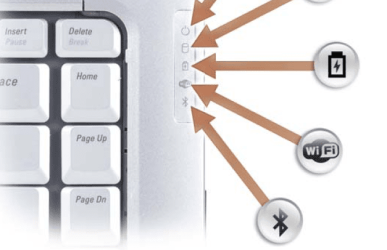
Then try the wifi switch

You can use the switch to disable the on-board wifi so you can use the USB device in its place.
Cheers!
Robert
My Computer
- OS
- ...
Ok thanks Torchwood.
Update: we disabled the mini-card and finally got as far as the security key. Now it says it's connected, but we can't open any webpages!
The Belkin device is working properly, driver issued 2007.
Update: we disabled the mini-card and finally got as far as the security key. Now it says it's connected, but we can't open any webpages!
The Belkin device is working properly, driver issued 2007.
My Computer
- OS
- Windows 7
- Local time
- 12:45 PM
- Messages
- 7,393
that s out of date go to belkin select device wireless cards series fd7050 and model 1.3,5 or 7, download to disk (on another comp) then load and select DRIVER only
My Computer
- Computer type
- PC/Desktop
- Computer Manufacturer/Model Number
- medionl/Aspire 6930G/acer x55a
- OS
- W7 home premium 32bit/W7HP 64bit/w10 tp insider ring
- CPU
- E5300 dual core
- Motherboard
- medion MS7366
- Memory
- 3gb
- Graphics Card(s)
- Nvidia Geforce 7100 Nforce 630i
- Monitor(s) Displays
- avixc
- Internet Speed
- n (isp resticted to 72)
- Antivirus
- mse/pands
- Browser
- palemoon
- Other Info
- Belkin Fd7050 n USB using Railink RT2870 drivers, more upto date
- Local time
- 12:45 PM
- Messages
- 7,393
do a quick troubleshoot it might just need reseting now
My Computer
- Computer type
- PC/Desktop
- Computer Manufacturer/Model Number
- medionl/Aspire 6930G/acer x55a
- OS
- W7 home premium 32bit/W7HP 64bit/w10 tp insider ring
- CPU
- E5300 dual core
- Motherboard
- medion MS7366
- Memory
- 3gb
- Graphics Card(s)
- Nvidia Geforce 7100 Nforce 630i
- Monitor(s) Displays
- avixc
- Internet Speed
- n (isp resticted to 72)
- Antivirus
- mse/pands
- Browser
- palemoon
- Other Info
- Belkin Fd7050 n USB using Railink RT2870 drivers, more upto date
Just a guess from out here in left field, but if you had to disable the on-board wifi to get the Belkin to work, then perhaps the on-board wifi is just fine ... it just needed to be "Switched" on?
Later!
Robert
Later!
Robert
My Computer
- OS
- ...
Similar threads
- Replies
- 6
- Views
- 3K
- Replies
- 0
- Views
- 3K
- Replies
- 19
- Views
- 13K
- Replies
- 19
- Views
- 7K

