Solved InPrivate Filtering-back to turn on... screen

prukeyhi

New member
Power User
VIP
Local time
9:47 PM
Messages
224
Location
Haifa-IL
hi all :cool:
i started to use InPrivate Filtering wizard and choose the 1st option "block for me"
now i would like to get back the wizard main windows like in the photo. how can i do it?


Attachments

  • inprivate_6.gif
    inprivate_6.gif
    91.1 KB · Views: 38

My Computer My Computer

Computer type
PC/Desktop
OS
98SE/XP/windows7 32bit/ win10
hi all :cool:
i started to use InPrivate Filtering wizard and choose the 1st option "block for me"
now i would like to get back the wizard main windows like in the photo. how can i do it?


I don't think you can get that screen back (at least not easily), but you can change the setting another way. Go to Tools >> Toolbars >> Menu Bar. Then in the Menu Bar (while File, Edit, View, etc, are), go to Tools >> InPrivate Filtering Settings. In the window that comes up, you can choose "Automatically block" or "Choose content to block or allow", which are the same as the two options in the wizard screen.

Hope this helps!
 

My Computer My Computer

Computer Manufacturer/Model Number
Alienware X51
OS
Windows 7 Home Premium x64
CPU
Intel Core i7-2600 @3.40GHz
Memory
8.00GB DDR3
Graphics Card(s)
NVIDIA GeForce GTX 555 w/1.0GB RAM
Monitor(s) Displays
BenQ XL2420TX
Screen Resolution
1920x1080@120Hz
Hard Drives
1TB
PSU
330-watt
Keyboard
Logitech Wireless Illuminated Keyboard K800
Mouse
Razer Orochi
Internet Speed
Campus Internet

My Computer My Computer

Computer type
PC/Desktop
OS
Windows 10 Home x64
CPU
INTEL Core i5-750 Quad-Core 3.37GHz
Motherboard
ASUS P7P55D
Memory
HyperX Fury Black Series 8GB (2 x 4GB) 1866Mhz
Graphics Card(s)
EVGA GeForce GTX 750 Superclocked 1GB 128-Bit GDDR5
Monitor(s) Displays
LG 32MA68HY 32" IPS
Screen Resolution
1920 x 1080
Hard Drives
Samsung 840 Evo 120GB, SEAGATE 500GB Barracuda® 7200.12, SATA 3 Gb/s, 7200 RPM, 16MB cache
PSU
ANTEC TruePower New TP-550, 80 PLUS, 550W
Case
ANTEC Three Hundred Illusion
Cooling
COOLER MASTER Hyper 212 Plus, 4 x 120mm 1 x 140mm Noctua's
Internet Speed
85 + Mbps
Antivirus
Avast
Browser
Vivaldi
thanks you both for your answer,
i know about InPrivate Filtering Settings. i just wonder if i can get back the wizard main windows
 

My Computer My Computer

Computer type
PC/Desktop
OS
98SE/XP/windows7 32bit/ win10
thanks you both for your answer,
i know about InPrivate Filtering Settings. i just wonder if i can get back the wizard main windows

I suspect that is a 1st time usage window. You can do everything you can do from there through the setup. Try turning it off and see when turn in back on again? A Guy
 

My Computer My Computer

Computer type
PC/Desktop
OS
Windows 10 Home x64
CPU
INTEL Core i5-750 Quad-Core 3.37GHz
Motherboard
ASUS P7P55D
Memory
HyperX Fury Black Series 8GB (2 x 4GB) 1866Mhz
Graphics Card(s)
EVGA GeForce GTX 750 Superclocked 1GB 128-Bit GDDR5
Monitor(s) Displays
LG 32MA68HY 32" IPS
Screen Resolution
1920 x 1080
Hard Drives
Samsung 840 Evo 120GB, SEAGATE 500GB Barracuda® 7200.12, SATA 3 Gb/s, 7200 RPM, 16MB cache
PSU
ANTEC TruePower New TP-550, 80 PLUS, 550W
Case
ANTEC Three Hundred Illusion
Cooling
COOLER MASTER Hyper 212 Plus, 4 x 120mm 1 x 140mm Noctua's
Internet Speed
85 + Mbps
Antivirus
Avast
Browser
Vivaldi
NO,
1st time usage window did not turn in back on again :(
any other idea?
 

My Computer My Computer

Computer type
PC/Desktop
OS
98SE/XP/windows7 32bit/ win10
Try Ctrl + Shift + F (Brings up the screen in your OP).

Works for me on IE8, sorry if it's not what your wanting.
 

My Computer My Computer

Computer Manufacturer/Model Number
Acer Aspire 5742
OS
Windows 7 Ultimate x64 SP1
CPU
Intel Core i3-370M @ 2.4GHz
Motherboard
Mobile Intel HM55 Express Chipset
Memory
6GB 1333MHz DDR3
Graphics Card(s)
Intel GMA HD
Monitor(s) Displays
15.6" HD Acer CineCrystal LED LCD
Screen Resolution
1366×768
Hard Drives
320GB (5400 RPM) SATA
PSU
65W
Mouse
Microsoft Wireless Optical Mouse 3000
Internet Speed
6Mbps
Other Info
WEI Score: 4.6
Ctrl + Shift + F doesn't bring the initial screen, it just turns on/off InPrivate Filtering on the task bar(green curved arrow)
 

My Computer My Computer

Computer type
PC/Desktop
OS
98SE/XP/windows7 32bit/ win10
Right, sorry I've misunderstood what your after here, in your OP you said you wanted the screen in the picture you attached.

On my IE8 pressing Ctrl + Shift + F brings up that exact screen in your post, there must be another screen I'm unaware of that your after.

Sorry for giving you the wrong information, hope someone else here can help with your problem.
 

My Computer My Computer

Computer Manufacturer/Model Number
Acer Aspire 5742
OS
Windows 7 Ultimate x64 SP1
CPU
Intel Core i3-370M @ 2.4GHz
Motherboard
Mobile Intel HM55 Express Chipset
Memory
6GB 1333MHz DDR3
Graphics Card(s)
Intel GMA HD
Monitor(s) Displays
15.6" HD Acer CineCrystal LED LCD
Screen Resolution
1366×768
Hard Drives
320GB (5400 RPM) SATA
PSU
65W
Mouse
Microsoft Wireless Optical Mouse 3000
Internet Speed
6Mbps
Other Info
WEI Score: 4.6
Right, sorry I've misunderstood what your after here, in your OP you said you wanted the screen in the picture you attached.

On my IE8 pressing Ctrl + Shift + F brings up that exact screen in your post, there must be another screen I'm unaware of that your after.

Sorry for giving you the wrong information, hope someone else here can help with your problem.

That's because the screen in the OP only comes up when you first activate InPrivate. Once you've gone through that screen, it won't come up again.

Prukeyhi, out of curiosity, why is it that you want to get that screen back?

Hopefully this afternoon I can do some intense study of IE8 and figure out a solution for you. We basically need to trick IE8 into thinking you have never enabled InPrivate before.
 

My Computer My Computer

Computer Manufacturer/Model Number
Alienware X51
OS
Windows 7 Home Premium x64
CPU
Intel Core i7-2600 @3.40GHz
Memory
8.00GB DDR3
Graphics Card(s)
NVIDIA GeForce GTX 555 w/1.0GB RAM
Monitor(s) Displays
BenQ XL2420TX
Screen Resolution
1920x1080@120Hz
Hard Drives
1TB
PSU
330-watt
Keyboard
Logitech Wireless Illuminated Keyboard K800
Mouse
Razer Orochi
Internet Speed
Campus Internet
That's because the screen in the OP only comes up when you first activate InPrivate. Once you've gone through that screen, it won't come up again.

Prukeyhi, out of curiosity, why is it that you want to get that screen back?

Hopefully this afternoon I can do some intense study of IE8 and figure out a solution for you. We basically need to trick IE8 into thinking you have never enabled InPrivate before.

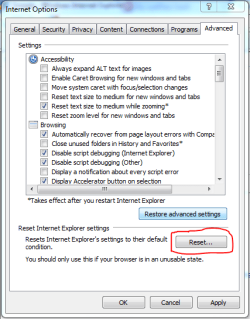
Could the user not just reset IE using the button marked in the attached image then go from there?

Tools > Internet Options > Advanced > Reset
 

Attachments

  • IE_Reset.PNG
    IE_Reset.PNG
    17.7 KB · Views: 2

My Computer My Computer

Computer Manufacturer/Model Number
Acer Aspire 5742
OS
Windows 7 Ultimate x64 SP1
CPU
Intel Core i3-370M @ 2.4GHz
Motherboard
Mobile Intel HM55 Express Chipset
Memory
6GB 1333MHz DDR3
Graphics Card(s)
Intel GMA HD
Monitor(s) Displays
15.6" HD Acer CineCrystal LED LCD
Screen Resolution
1366×768
Hard Drives
320GB (5400 RPM) SATA
PSU
65W
Mouse
Microsoft Wireless Optical Mouse 3000
Internet Speed
6Mbps
Other Info
WEI Score: 4.6
G1LLY, no problemo :D
**did you tried your above suggestion?

BCXtreme,
i want to get that screen back because i do not like it when i can not control IE8 mainly and out of curiosity as well.
Hope you'll find a way to restore it.

p.s- i thought resetting IE8 to it's default setting will do it - but it did not. maybe you can test this issue too.

Thanks
 

My Computer My Computer

Computer type
PC/Desktop
OS
98SE/XP/windows7 32bit/ win10
That's because the screen in the OP only comes up when you first activate InPrivate. Once you've gone through that screen, it won't come up again.

Prukeyhi, out of curiosity, why is it that you want to get that screen back?

Hopefully this afternoon I can do some intense study of IE8 and figure out a solution for you. We basically need to trick IE8 into thinking you have never enabled InPrivate before.

Could the user not just reset IE using the button marked in the attached image then go from there?

Tools > Internet Options > Advanced > Reset

That's possible, but I have no idea how selective it allows you to be in what exactly is reset.

OP, if you're going to try that, be very careful because that button could easily erase other IE data that you would want to keep.
 

My Computer My Computer

Computer Manufacturer/Model Number
Alienware X51
OS
Windows 7 Home Premium x64
CPU
Intel Core i7-2600 @3.40GHz
Memory
8.00GB DDR3
Graphics Card(s)
NVIDIA GeForce GTX 555 w/1.0GB RAM
Monitor(s) Displays
BenQ XL2420TX
Screen Resolution
1920x1080@120Hz
Hard Drives
1TB
PSU
330-watt
Keyboard
Logitech Wireless Illuminated Keyboard K800
Mouse
Razer Orochi
Internet Speed
Campus Internet
This forum needs to tell you when more responses came up while you were typing! :confused:

Will definitely look at it later.
 

My Computer My Computer

Computer Manufacturer/Model Number
Alienware X51
OS
Windows 7 Home Premium x64
CPU
Intel Core i7-2600 @3.40GHz
Memory
8.00GB DDR3
Graphics Card(s)
NVIDIA GeForce GTX 555 w/1.0GB RAM
Monitor(s) Displays
BenQ XL2420TX
Screen Resolution
1920x1080@120Hz
Hard Drives
1TB
PSU
330-watt
Keyboard
Logitech Wireless Illuminated Keyboard K800
Mouse
Razer Orochi
Internet Speed
Campus Internet
Okay, I even tried completely disabling/re-enabling Internet Explorer, and it still wouldn't really reset. This kind of setting must be stored somewhere that is not affected by anything else you do to IE8.

Does anyone else know where IE8 stores its settings in the Windows file system?
 

My Computer My Computer

Computer Manufacturer/Model Number
Alienware X51
OS
Windows 7 Home Premium x64
CPU
Intel Core i7-2600 @3.40GHz
Memory
8.00GB DDR3
Graphics Card(s)
NVIDIA GeForce GTX 555 w/1.0GB RAM
Monitor(s) Displays
BenQ XL2420TX
Screen Resolution
1920x1080@120Hz
Hard Drives
1TB
PSU
330-watt
Keyboard
Logitech Wireless Illuminated Keyboard K800
Mouse
Razer Orochi
Internet Speed
Campus Internet
Does anyone else know where IE8 stores its settings in the Windows file system?
I would imagine that in the registry under software/microsoft/internet explorer that there would be a key of first run or run once or something similar. Changing the value of it should initiate that again.

Also there is a key Saftey/PrivacIE with a string of ShowFirstRun and a value of 0. You might change it to 1 and see what flies. I don't know if this is for InPrivateBrowsing or InPrivateFiltering or both but it can't hurt to try it especially if your values are already set. Values meaning Start mode and data. I'm guessing it's InPrivateFiltering though.
 

My Computer My Computer

Computer Manufacturer/Model Number
Averatec 6130HS-20
OS
Windows 7 Professional 32-bit (6.1, Build 7600)
CPU
Intel(R) Pentium(R) 4 3.00 GHz HT
Memory
2.0 GB
Graphics Card(s)
ATI Mobility Radeon 9600 64MB
Sound Card
Realtek AC'97 Audio
Screen Resolution
1280 x 800
Hard Drives
Seagate 96023A 60GB 7200RPM -
Seagate FreeAgentDesktop 250GB
Cooling
20 Inch Box Fan
Mouse
Targus PAWM10 Wireless Optical Laptop Mouse
I'm sorry as well, when I said I suspect that is a 1st time usage window, the second sentence was not meant as a way to return to the window. As others suggested, that window, as is often the case with "wizards" will only run once. But almost always all the settings available there are available within the actual program, just not on one logical screen as in the wizard. A Guy
 

My Computer My Computer

Computer type
PC/Desktop
OS
Windows 10 Home x64
CPU
INTEL Core i5-750 Quad-Core 3.37GHz
Motherboard
ASUS P7P55D
Memory
HyperX Fury Black Series 8GB (2 x 4GB) 1866Mhz
Graphics Card(s)
EVGA GeForce GTX 750 Superclocked 1GB 128-Bit GDDR5
Monitor(s) Displays
LG 32MA68HY 32" IPS
Screen Resolution
1920 x 1080
Hard Drives
Samsung 840 Evo 120GB, SEAGATE 500GB Barracuda® 7200.12, SATA 3 Gb/s, 7200 RPM, 16MB cache
PSU
ANTEC TruePower New TP-550, 80 PLUS, 550W
Case
ANTEC Three Hundred Illusion
Cooling
COOLER MASTER Hyper 212 Plus, 4 x 120mm 1 x 140mm Noctua's
Internet Speed
85 + Mbps
Antivirus
Avast
Browser
Vivaldi
Greg S,
i did not find any key of first run or run once :(
hopeBCXtreme will find out something.....
 

My Computer My Computer

Computer type
PC/Desktop
OS
98SE/XP/windows7 32bit/ win10
Greg S,
i did not find any key of first run or run once :(
hopeBCXtreme will find out something.....

Try here in the registry. This is the closest thing I could find

Code:
HKEY_CURRENT_USER\Software\Microsoft\Internet Explorer\Safety\PrivacIE
Right side pane ShowFirstRun

Before changing anything in the registry at that location, right click the key and select "Export", save it somewhere you can easily find for a quick import.
 

My Computer My Computer

Computer Manufacturer/Model Number
Averatec 6130HS-20
OS
Windows 7 Professional 32-bit (6.1, Build 7600)
CPU
Intel(R) Pentium(R) 4 3.00 GHz HT
Memory
2.0 GB
Graphics Card(s)
ATI Mobility Radeon 9600 64MB
Sound Card
Realtek AC'97 Audio
Screen Resolution
1280 x 800
Hard Drives
Seagate 96023A 60GB 7200RPM -
Seagate FreeAgentDesktop 250GB
Cooling
20 Inch Box Fan
Mouse
Targus PAWM10 Wireless Optical Laptop Mouse
Greg S,
i did not find any key of first run or run once :(
hopeBCXtreme will find out something.....

Try here in the registry. This is the closest thing I could find

Code:
HKEY_CURRENT_USER\Software\Microsoft\Internet Explorer\Safety\PrivacIE
Right side pane ShowFirstRun

Before changing anything in the registry at that location, right click the key and select "Export", save it somewhere you can easily find for a quick import.

The above solution posted by Greg S works in my test environment. Change that ShowFirstRun value from 0 to 1 and you're good to go!
 

My Computer My Computer

Computer Manufacturer/Model Number
Alienware X51
OS
Windows 7 Home Premium x64
CPU
Intel Core i7-2600 @3.40GHz
Memory
8.00GB DDR3
Graphics Card(s)
NVIDIA GeForce GTX 555 w/1.0GB RAM
Monitor(s) Displays
BenQ XL2420TX
Screen Resolution
1920x1080@120Hz
Hard Drives
1TB
PSU
330-watt
Keyboard
Logitech Wireless Illuminated Keyboard K800
Mouse
Razer Orochi
Internet Speed
Campus Internet
Back
Top