My Computer
- Computer type
- PC/Desktop
- OS
- 98SE/XP/windows7 32bit/ win10



thanks you both for your answer,
i know about InPrivate Filtering Settings. i just wonder if i can get back the wizard main windows
Right, sorry I've misunderstood what your after here, in your OP you said you wanted the screen in the picture you attached.
On my IE8 pressing Ctrl + Shift + F brings up that exact screen in your post, there must be another screen I'm unaware of that your after.
Sorry for giving you the wrong information, hope someone else here can help with your problem.
That's because the screen in the OP only comes up when you first activate InPrivate. Once you've gone through that screen, it won't come up again.
Prukeyhi, out of curiosity, why is it that you want to get that screen back?
Hopefully this afternoon I can do some intense study of IE8 and figure out a solution for you. We basically need to trick IE8 into thinking you have never enabled InPrivate before.

That's because the screen in the OP only comes up when you first activate InPrivate. Once you've gone through that screen, it won't come up again.
Prukeyhi, out of curiosity, why is it that you want to get that screen back?
Hopefully this afternoon I can do some intense study of IE8 and figure out a solution for you. We basically need to trick IE8 into thinking you have never enabled InPrivate before.
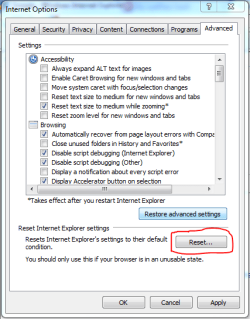
Could the user not just reset IE using the button marked in the attached image then go from there?
Tools > Internet Options > Advanced > Reset

I would imagine that in the registry under software/microsoft/internet explorer that there would be a key of first run or run once or something similar. Changing the value of it should initiate that again.Does anyone else know where IE8 stores its settings in the Windows file system?
Greg S,
i did not find any key of first run or run once
hopeBCXtreme will find out something.....
HKEY_CURRENT_USER\Software\Microsoft\Internet Explorer\Safety\PrivacIEGreg S,
i did not find any key of first run or run once
hopeBCXtreme will find out something.....
Try here in the registry. This is the closest thing I could find
Right side pane ShowFirstRunCode:HKEY_CURRENT_USER\Software\Microsoft\Internet Explorer\Safety\PrivacIE
Before changing anything in the registry at that location, right click the key and select "Export", save it somewhere you can easily find for a quick import.