
Need Help - HDD Not Detected in BIOS

bgettel

New member
Local time
2:16 AM
Messages
8
Hi All,

I'm new here and have dug around a bit but can't find anything that helps with my problem.

First the HW details:

PC is 5-6 years old
It was built by a local, well known computer shop that's been around for years
MOBO is an Asus K8VSE Deluxe
BIOS is AMI version 08.00.09, Build date 09/08/05, ID A0058002

Next a little back story:

The PC was running WinXP Pro until one day it wouldn't boot, saying that a critical file was missing. I played around with it and *thought* the HDD had failed. So I parked the PC for a while and just used my laptop, until this week, when I decided to get this pig working again.

While troubleshooting the issue (months ago) I noticed that my one and only SATA HD was not plugged into the standard SATA port on the Mobo, but on the SATA port on the on-board RAID controller. Why this was done is beyond me, but it was done when this machine was built.

Now the current situation:

I decided to go with a new WD Caviar Black, 1.0TB drive, and Windows 7 Pro. Plugged everything in, set the BIOS to boot to the Windows CD, and fired it up.

First thing is that the BIOS does not see a HDD, hit F1 to continue. So I did.

Windows 7 started loading files, and I thought I was in good shape. But alas, 7 could also not see the HDD but asked if I wanted to load drivers.

Now I am confused; drivers should not help if the BIOS can't even see the HDD, right?

So I futzed around with the BIOS, and can't see a whole lot of anything mentioning SATA. I thought that if you set the IDE type to auto detect, the BIOS would figure out there was a SATA drive, but apparently not in my case.

All cables are from HDD to mobo are plugged in firmly, the drive spins up. I even tried a new SATA cable and got the same result.

I reset the BIOS to factory defaults and got the same result.

I disabled and re-enabled the on-board Promise controller and got the same result.

At this point, I think it's either something so simple that I am overlooking it, or the MOBO is fried. But remember, when this all started all was fine save for a missing file that would not allow Win XP to boot, so . . . . .

WHAT GIVES?

Thanks in advance for any and all responses.
 

My Computer My Computer

At a glance

Windows 7
OS
Windows 7
Can you pre-format the HD on another computer. Do you still have a MB driver disk ?

Might need to load SATA drivers on that old of MB.
 

My Computer My Computer

At a glance

Win7 Enterprise, Win7 x86 (Ult 7600), Win7 x6...AMD fx8350 4ghz, AMD-32 2400mhz, AMD-64 3200m...2gb, 4gb on the Ult 7600, 4gb on Technet RTM,...Draw my own Graphics, several nVidia cards
Computer type
PC/Desktop
Computer Manufacturer/Model Number
Built them myself, Science Experiments !
OS
Win7 Enterprise, Win7 x86 (Ult 7600), Win7 x64 Ult 7600, TechNet RTM on AMD x64 (2.8Ghz)
CPU
AMD fx8350 4ghz, AMD-32 2400mhz, AMD-64 3200mhz, AMDx64 2.8G
Motherboard
SIS 755, ECS-K8M890M-M (Ult 7600), GigaByte & others
Memory
2gb, 4gb on the Ult 7600, 4gb on Technet RTM, 32gb on FX8350
Graphics Card(s)
Draw my own Graphics, several nVidia cards
Sound Card
on motherboard
Monitor(s) Displays
19" flat scr, 28" I-Inc widescr,22" Emprex Widescr, 23" Acer
Screen Resolution
1280 x 1024, 1440 x 900, 1920 x 1080
Hard Drives
6 pata Ide HD's & 2 Sata HD's
added 80gb external on Ult 7600 computer,
numerous extra 1tb, 2TB, 3Tb SATA HD's
A collection of ext HD Docks w/ HDs
PSU
430w, 550w, 600w, 700, 800, etc
Case
All Generic Full Towers
Cooling
Open Air & a few fans, some w/ colored LEDs
Keyboard
Compaq & Dell recycled from GoodWill
Mouse
Made in China Optical Wired Mouse
Internet Speed
Fast Cable InterNet
Antivirus
AVG Free on 24 different Desktops, NO Problems!
Browser
IE 8 is preferred, but use FireFox sometimes
Other Info
Linksys Routers, switches, & Hubs
Too Many USB Flash Drives to count, Biggest is 64GB !
Eight computers in my home network.
Sixteen computers at my business network.
Linked via TeamViewer !
Lots of old used spare computer parts everywhere!
Where is the new drive plugged in? The mother board or the Raid controller? Try moving it to which ever one it's not plugged into. If not help, check BIOS and select the non-RAID settings.
 

My Computer My Computer

At a glance

Windows 10 Pro X64Intel Quad Core i7-4770 @ 3.4Ghz16.0GB PC3-12800 DDR3 SDRAM 1600 MHzIntel Integrated HD Graphics
Computer type
PC/Desktop
Computer Manufacturer/Model Number
Lenovo IdeaCenter 450
OS
Windows 10 Pro X64
CPU
Intel Quad Core i7-4770 @ 3.4Ghz
Memory
16.0GB PC3-12800 DDR3 SDRAM 1600 MHz
Graphics Card(s)
Intel Integrated HD Graphics
Sound Card
Realtek HD Audio
Monitor(s) Displays
HP 22" LCD
Screen Resolution
1680 x 1050
Hard Drives
250GB Samsung EVO SATA-3 SSD
2TB Seagate ST2000DM001 SATA-2
1.5TB Seagate ST3150041AS SATA
Keyboard
Dell USB
Mouse
Lenovo USB
Internet Speed
Cable via Road Runner 3MB Upload, 30MB Download
Antivirus
Windows Defender, MBAM Pro, MBAE
Browser
Seamonkey
Other Info
UEFI/GPT
PLDS DVD-RW DH16AERSH
Is the new drive plugged into the primary SATA controller (not the "RAID" controller)? That may be required for the BIOS to detect the drive. (Was the old drive visible to the BIOS before, or only in the sub-BIOS for the third-party RAID controller?)

If the drive isn't defective, there's a chance that the mainboard's SATA controller does not like a 300MB/s drive. (The controller is a 150MB/s one.) The drive can be set to 150MB/s with a jumper. That may be worth a try.

This isn't relevant to whether the drive is detected, but you may need to install drivers for the Via chipset. Via doesn't list any for Win7, but the Vista ones will probably work:

http://www.viaarena.com/Driver/VIA_HyperionPro_V524A.zip

Old (Socket 754) system. Good luck.
 

My Computer My Computer

At a glance

Windows 7 Pro X64 SP1Intel Core I7-3930k16 GB Gskill DDR3-2133eVGA GTX680
Computer Manufacturer/Model Number
homegrown
OS
Windows 7 Pro X64 SP1
CPU
Intel Core I7-3930k
Motherboard
Asus P9X79 Pro
Memory
16 GB Gskill DDR3-2133
Graphics Card(s)
eVGA GTX680
Sound Card
Creative X-Fi Titanium
Monitor(s) Displays
As PA246Q
Screen Resolution
1920 X 1200
Hard Drives
Corsair Force GT, 120 GB
WDC 1.5TB Caviar Black
PSU
PCP&C Silencer 750 Crossfire
Case
Silverstone FT02
Cooling
Noctua NH-D14
Keyboard
cheap Logitech USB
Mouse
Microsoft Intellimouse Explorer (old optical) USB
Internet Speed
6Mb cable
Other Info
Pioneer BDR-205
Samsung SH-203B
Monsoon 5.1 speakers
Thanks for the responses thus far, everyone.

The new drive is currently plugged into the regular, non-RAID SATA1 port on the motherboard.

The old drive was plugged into the RAID controller (which is built in to this mobo). Bob, your 150 vs. 300 Mb/s comment is interesting and may very well explain why my single drive was plugged into the RAID controller instead of the normal SATA port in the first place.

I'll now try to plug things into the RAID controller and see if anything works. I'll report back once I've had a chance to play around some more.
 

My Computer My Computer

At a glance

Windows 7
OS
Windows 7
If the computer is that old it predates the availability of 1TB drives. A simple BIOS update might fix you right up. :)

(Keep in mind that there is no such thing as "A simple BIOS update" - should you go this route be very careful and follow the MB manufacturers instructions to a "T".)

I would read the Release Notes for any newer BIOS's which might be available and see if they address detection of larger hard drives.
 

My Computer My Computer

At a glance

Main - Windows 7 Pro SP1 64-Bit; 2nd - Window...Main - Core i7 2600K; 2nd - Core i7 920Main - 16GB Corsair Vengeance; 2nd - 12GB Cor...Main - XFX Radeon 6870 1GB; 2nd - XFX Radeon ...
Computer Manufacturer/Model Number
Self
OS
Main - Windows 7 Pro SP1 64-Bit; 2nd - Windows Server 2008 R2
CPU
Main - Core i7 2600K; 2nd - Core i7 920
Motherboard
Main - Asus P8Z68-V Pro/Gen3; 2nd - Gigabyte GA-EX58-UDR3
Memory
Main - 16GB Corsair Vengeance; 2nd - 12GB Corsair Vengeance
Graphics Card(s)
Main - XFX Radeon 6870 1GB; 2nd - XFX Radeon 4870 1GB
Sound Card
Both: Onboard Realtek Azalia
Monitor(s) Displays
Main - Hann 25" + I-INC 25" + Acer 23"; 2nd - Upgrading Soon
Screen Resolution
Main - 1920x1080 (All Three Monitors); 2nd - Upgrading Soon
Hard Drives
Main - (1) Crucial M4 128GB (Boot)
Main - (1) Seagate 2TB 64MB Cache (Data)
Main - (1) Seagate 2TB 64MB Cache (Data Backup)
2nd - (1) Intel X25-M SSD 80GB (Boot)
2nd - (3) Seagate 1TB 32MB Cache (Data Backup)
2nd - (1) Seagate 320GB (Because)
PSU
Main - OCZ 600W Modular; 2nd - OCZ 600W
Case
Main - Thermaltake Element G; 2nd - NZXT something or other
Cooling
Main - Corsair H80; 2nd - Prolimatech Megahalems
Keyboard
Main - Razer Reclusa; 2nd - Old MS Keyboard
Mouse
Main - Logitech MX Revolution; 2nd - Old MS Mouse
Internet Speed
20Mbps Time-Warner Cable
OK - progress, but not much.

I plugged the new drive into the RAID controller. BIOS now sees the drive, but Windows 7 does not.

This is a fresh, new drive and I am doing a clean install of Win 7.

Someone suggested that I chuck the mobo cd into the drive and let the drivers load.
The problem is, I was not given that CD when I had this computer built.

I went to the Asus support web site and all I see for available downloads are several different BIOS versions.

I went to WD's site to look for help and didn't find anything there.

Where do I go next?
 

My Computer My Computer

At a glance

Windows 7
OS
Windows 7


How do I take a screen shot when the PC has no OS? This is a brand new, clean drive, and I am trying to install Win 7 on it. BIOS sees the drive but Windows 7 does not.
 

My Computer My Computer

At a glance

Windows 7
OS
Windows 7
Do we assume you have initiated the HDD already. If it is brand spanking new, you have to setup the drive first. And you may need to install a 3rd party driver for it, as Win7 may not have the driver pre-loaded for that drive.
 

My Computer My Computer

At a glance

Windows 7 Ultimate 64 BitIntel Core 2 Quad 9400 2.66Ghz @ 3.204Gb (2x2g) Kingston HyperX 1066Mhz Dual Chann...Gigabyte HD5670 1Gig no o/c
Computer Manufacturer/Model Number
I'll Fix IT Computers
OS
Windows 7 Ultimate 64 Bit
CPU
Intel Core 2 Quad 9400 2.66Ghz @ 3.20
Motherboard
Asus P5QL-E
Memory
4Gb (2x2g) Kingston HyperX 1066Mhz Dual Channel @ 2.3v
Graphics Card(s)
Gigabyte HD5670 1Gig no o/c
Sound Card
On board
Monitor(s) Displays
Screen1 = Samsung 953BW Screen 2 = Samsung 943BW
Screen Resolution
Screen 1 @ 1440x900 Screen 2 @ 1440x900
Hard Drives
Seagate SataII 500Gb 7200 Rpm
PSU
Coolermaster 550w
Case
Coolermaster RC-332
Cooling
Front 120mm, Rear 120mm, side (VGA card vent) 80mm
Keyboard
Logitech G15
Mouse
Logitech G9 Gaming Mouse
Internet Speed
Bigpond Wireless Broadband (variable speeds up to 7Mbps)
Other Info
Thermaltake Max Orb II CPU Fan @ 2000rpm
Do we assume you have initiated the HDD already. If it is brand spanking new, you have to setup the drive first. And you may need to install a 3rd party driver for it, as Win7 may not have the driver pre-loaded for that drive.


Now I'm about to get schooled. How do I initiate the drive, when this PC does not have an existing drive w/OS installed? Also, who makes these 3rd party drivers that you mention?
 

My Computer My Computer

At a glance

Windows 7
OS
Windows 7
I'm guessing that this is how you got the BIOS to play nice with the drive:

ASUSTeK Computer Inc. -Support- FAQ FAQ Why can't my SATA-II hard drive be detected on VIA VT8237 chipset based motherboard?

Unfortunately, your MB has the Via K8T800 chipset, which was problematic even with Vista. You may need to load an SATA driver during the installation of Windows at the point where it prompts you for 3rd Party Drivers. Asus has nothing I can find to help you out. :confused:

I have at times been able to download a chipset driver from another manufacturer and get it to work, assuming it's the same chipset, anyway. That gets well into the "grasping at straws" category, though.

I recently had a similar problem with an old MSI board of mine that used a VIA chipset even older than yours. I ended up finding it easier to run my drives off a PCI controller card. I'm not telling you to give up, but if you're simply in a hurry to get the darn thing to work you might consider that.

You can find a basic card for not very much money ($15-$30) and you'll have the added benefit of undoing the jumper trick on the hard drive and running it at full speed, assuming you get a card that does SATA II.
 

My Computer My Computer

At a glance

Main - Windows 7 Pro SP1 64-Bit; 2nd - Window...Main - Core i7 2600K; 2nd - Core i7 920Main - 16GB Corsair Vengeance; 2nd - 12GB Cor...Main - XFX Radeon 6870 1GB; 2nd - XFX Radeon ...
Computer Manufacturer/Model Number
Self
OS
Main - Windows 7 Pro SP1 64-Bit; 2nd - Windows Server 2008 R2
CPU
Main - Core i7 2600K; 2nd - Core i7 920
Motherboard
Main - Asus P8Z68-V Pro/Gen3; 2nd - Gigabyte GA-EX58-UDR3
Memory
Main - 16GB Corsair Vengeance; 2nd - 12GB Corsair Vengeance
Graphics Card(s)
Main - XFX Radeon 6870 1GB; 2nd - XFX Radeon 4870 1GB
Sound Card
Both: Onboard Realtek Azalia
Monitor(s) Displays
Main - Hann 25" + I-INC 25" + Acer 23"; 2nd - Upgrading Soon
Screen Resolution
Main - 1920x1080 (All Three Monitors); 2nd - Upgrading Soon
Hard Drives
Main - (1) Crucial M4 128GB (Boot)
Main - (1) Seagate 2TB 64MB Cache (Data)
Main - (1) Seagate 2TB 64MB Cache (Data Backup)
2nd - (1) Intel X25-M SSD 80GB (Boot)
2nd - (3) Seagate 1TB 32MB Cache (Data Backup)
2nd - (1) Seagate 320GB (Because)
PSU
Main - OCZ 600W Modular; 2nd - OCZ 600W
Case
Main - Thermaltake Element G; 2nd - NZXT something or other
Cooling
Main - Corsair H80; 2nd - Prolimatech Megahalems
Keyboard
Main - Razer Reclusa; 2nd - Old MS Keyboard
Mouse
Main - Logitech MX Revolution; 2nd - Old MS Mouse
Internet Speed
20Mbps Time-Warner Cable
Ok, you mentioned it was Western Pigshit cough cough, I mean Western Digital. Ok, do you have access to a desktop computer so you can plug your fresh drive to initiate it?
WD Support > Downloads > SATA & SAS > WD Caviar Black
Check out that link, download the appropriate software, you should be able to run the app from USB if you dont have a floppy.
The easiest way is to plug the drive into another computer that has a working operating system, then Right click Computer> Manage>Storage and right click the new drive, then set the partition.
 

My Computer My Computer

At a glance

Windows 7 Ultimate 64 BitIntel Core 2 Quad 9400 2.66Ghz @ 3.204Gb (2x2g) Kingston HyperX 1066Mhz Dual Chann...Gigabyte HD5670 1Gig no o/c
Computer Manufacturer/Model Number
I'll Fix IT Computers
OS
Windows 7 Ultimate 64 Bit
CPU
Intel Core 2 Quad 9400 2.66Ghz @ 3.20
Motherboard
Asus P5QL-E
Memory
4Gb (2x2g) Kingston HyperX 1066Mhz Dual Channel @ 2.3v
Graphics Card(s)
Gigabyte HD5670 1Gig no o/c
Sound Card
On board
Monitor(s) Displays
Screen1 = Samsung 953BW Screen 2 = Samsung 943BW
Screen Resolution
Screen 1 @ 1440x900 Screen 2 @ 1440x900
Hard Drives
Seagate SataII 500Gb 7200 Rpm
PSU
Coolermaster 550w
Case
Coolermaster RC-332
Cooling
Front 120mm, Rear 120mm, side (VGA card vent) 80mm
Keyboard
Logitech G15
Mouse
Logitech G9 Gaming Mouse
Internet Speed
Bigpond Wireless Broadband (variable speeds up to 7Mbps)
Other Info
Thermaltake Max Orb II CPU Fan @ 2000rpm
Ok, you mentioned it was Western Pigshit cough cough, I mean Western Digital. Ok, do you have access to a desktop computer so you can plug your fresh drive to initiate it?
WD Support > Downloads > SATA & SAS > WD Caviar Black
Check out that link, download the appropriate software, you should be able to run the app from USB if you dont have a floppy.
The easiest way is to plug the drive into another computer that has a working operating system, then Right click Computer> Manage>Storage and right click the new drive, then set the partition.

I really appreciate all the responses, folks. I prefer to be self-sufficient but it's nice to have some dialogue as I am trying to learn something new (new to me, at least).

I don't have access to another desktop computer. However, I have a laptop and a HDD enclosure with USB connection. Can I initiate the drive in this manner and then put it back in my desktop machine?
 

My Computer My Computer

At a glance

Windows 7
OS
Windows 7
Ok, you mentioned it was Western Pigshit cough cough, I mean Western Digital. Ok, do you have access to a desktop computer so you can plug your fresh drive to initiate it?
WD Support > Downloads > SATA & SAS > WD Caviar Black
Check out that link, download the appropriate software, you should be able to run the app from USB if you dont have a floppy.
The easiest way is to plug the drive into another computer that has a working operating system, then Right click Computer> Manage>Storage and right click the new drive, then set the partition.

I really appreciate all the responses, folks. I prefer to be self-sufficient but it's nice to have some dialogue as I am trying to learn something new (new to me, at least).

I don't have access to another desktop computer. However, I have a laptop and a HDD enclosure with USB connection. Can I initiate the drive in this manner and then put it back in my desktop machine?


Depends on the connection type in the enclosure IDE or SATA ;)
 

My Computer My Computer

At a glance

Win7 Enterprise, Win7 x86 (Ult 7600), Win7 x6...AMD fx8350 4ghz, AMD-32 2400mhz, AMD-64 3200m...2gb, 4gb on the Ult 7600, 4gb on Technet RTM,...Draw my own Graphics, several nVidia cards
Computer type
PC/Desktop
Computer Manufacturer/Model Number
Built them myself, Science Experiments !
OS
Win7 Enterprise, Win7 x86 (Ult 7600), Win7 x64 Ult 7600, TechNet RTM on AMD x64 (2.8Ghz)
CPU
AMD fx8350 4ghz, AMD-32 2400mhz, AMD-64 3200mhz, AMDx64 2.8G
Motherboard
SIS 755, ECS-K8M890M-M (Ult 7600), GigaByte & others
Memory
2gb, 4gb on the Ult 7600, 4gb on Technet RTM, 32gb on FX8350
Graphics Card(s)
Draw my own Graphics, several nVidia cards
Sound Card
on motherboard
Monitor(s) Displays
19" flat scr, 28" I-Inc widescr,22" Emprex Widescr, 23" Acer
Screen Resolution
1280 x 1024, 1440 x 900, 1920 x 1080
Hard Drives
6 pata Ide HD's & 2 Sata HD's
added 80gb external on Ult 7600 computer,
numerous extra 1tb, 2TB, 3Tb SATA HD's
A collection of ext HD Docks w/ HDs
PSU
430w, 550w, 600w, 700, 800, etc
Case
All Generic Full Towers
Cooling
Open Air & a few fans, some w/ colored LEDs
Keyboard
Compaq & Dell recycled from GoodWill
Mouse
Made in China Optical Wired Mouse
Internet Speed
Fast Cable InterNet
Antivirus
AVG Free on 24 different Desktops, NO Problems!
Browser
IE 8 is preferred, but use FireFox sometimes
Other Info
Linksys Routers, switches, & Hubs
Too Many USB Flash Drives to count, Biggest is 64GB !
Eight computers in my home network.
Sixteen computers at my business network.
Linked via TeamViewer !
Lots of old used spare computer parts everywhere!
[/QUOTE]Depends on the connection type in the enclosure IDE or SATA ;)[/QUOTE]

DocBrown - love that handle by the way - I actually don't have an enclosure per se, I have an adapter that will turn a 2.5" IDE, 3.5" IDE, or either size in SATA into an external drive.

I am using that now, connected to my laptop via USB, to format the drive.

Looks like I have about half an hour to go and I'll see what happens next.

Stay tuned.
 

My Computer My Computer

At a glance

Windows 7
OS
Windows 7
Success!!

Great news folks. I am up and running with my new 1.0TB HDD and Win7.

It looks like I needed to A) initiate the HDD and B) set the jumper for 150Mb/s support.

I did that and plugged it into the RAID controller and still, Win7 did not see it. But when I plugged it into the regular SATA port on the mainboard, BIOS saw it there for the first time, and Win7 also saw it!!!

Many thanks to everyone who responded. If you guys ever get into Maryland in the US ping me here - the beer is on me. I have to say, honestly, that this forum has been the most helpful of any that I have tried.

Thanks again everyone!
 
Last edited:

My Computer My Computer

At a glance

Windows 7
OS
Windows 7
Many thanks to everyone who responded. If you guys ever get into Maryland in the US ping me here - the beer is on me. I have to say, honestly, that this forum has been the most helpful of any that I have tried.

Thanks again everyone!

Glad we could help mate. With lack of friends that I can talk computers with, it's great to have a chance to flex my brain and troubleshoot computer issues for fun (as apposed to doing it for half witted customers that need a bullet in the head)
I'll hold you to that beer ;-)
 

My Computer My Computer

At a glance

Windows 7 Ultimate 64 BitIntel Core 2 Quad 9400 2.66Ghz @ 3.204Gb (2x2g) Kingston HyperX 1066Mhz Dual Chann...Gigabyte HD5670 1Gig no o/c
Computer Manufacturer/Model Number
I'll Fix IT Computers
OS
Windows 7 Ultimate 64 Bit
CPU
Intel Core 2 Quad 9400 2.66Ghz @ 3.20
Motherboard
Asus P5QL-E
Memory
4Gb (2x2g) Kingston HyperX 1066Mhz Dual Channel @ 2.3v
Graphics Card(s)
Gigabyte HD5670 1Gig no o/c
Sound Card
On board
Monitor(s) Displays
Screen1 = Samsung 953BW Screen 2 = Samsung 943BW
Screen Resolution
Screen 1 @ 1440x900 Screen 2 @ 1440x900
Hard Drives
Seagate SataII 500Gb 7200 Rpm
PSU
Coolermaster 550w
Case
Coolermaster RC-332
Cooling
Front 120mm, Rear 120mm, side (VGA card vent) 80mm
Keyboard
Logitech G15
Mouse
Logitech G9 Gaming Mouse
Internet Speed
Bigpond Wireless Broadband (variable speeds up to 7Mbps)
Other Info
Thermaltake Max Orb II CPU Fan @ 2000rpm
Great news folks. I am up and running with my new 1.0TB HDD and Win7.

It looks like I needed to A) initiate the HDD and B) set the jumper for 150Mb/s support.

I did that and plugged it into the RAID controller and still, Win7 did not see it. But when I plugged it into the regular SATA port on the mainboard, BIOS saw it there for the first time, and Win7 also saw it!!!

Many thanks to everyone who responded. If you guys ever get into Maryland in the US ping me here - the beer is on me. I have to say, honestly, that this forum has been the most helpful of any that I have tried.

Thanks again everyone!


Good news :D I always have a Tri-Head USB adapter handy to test HD's :huh:
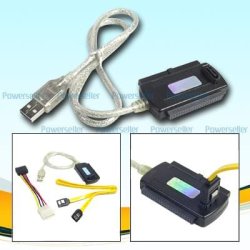
Thanks for the +rep :D
 

Attachments

  • Tri_Head_tb24611.jpg
    Tri_Head_tb24611.jpg
    19.7 KB · Views: 3

My Computer My Computer

At a glance

Win7 Enterprise, Win7 x86 (Ult 7600), Win7 x6...AMD fx8350 4ghz, AMD-32 2400mhz, AMD-64 3200m...2gb, 4gb on the Ult 7600, 4gb on Technet RTM,...Draw my own Graphics, several nVidia cards
Computer type
PC/Desktop
Computer Manufacturer/Model Number
Built them myself, Science Experiments !
OS
Win7 Enterprise, Win7 x86 (Ult 7600), Win7 x64 Ult 7600, TechNet RTM on AMD x64 (2.8Ghz)
CPU
AMD fx8350 4ghz, AMD-32 2400mhz, AMD-64 3200mhz, AMDx64 2.8G
Motherboard
SIS 755, ECS-K8M890M-M (Ult 7600), GigaByte & others
Memory
2gb, 4gb on the Ult 7600, 4gb on Technet RTM, 32gb on FX8350
Graphics Card(s)
Draw my own Graphics, several nVidia cards
Sound Card
on motherboard
Monitor(s) Displays
19" flat scr, 28" I-Inc widescr,22" Emprex Widescr, 23" Acer
Screen Resolution
1280 x 1024, 1440 x 900, 1920 x 1080
Hard Drives
6 pata Ide HD's & 2 Sata HD's
added 80gb external on Ult 7600 computer,
numerous extra 1tb, 2TB, 3Tb SATA HD's
A collection of ext HD Docks w/ HDs
PSU
430w, 550w, 600w, 700, 800, etc
Case
All Generic Full Towers
Cooling
Open Air & a few fans, some w/ colored LEDs
Keyboard
Compaq & Dell recycled from GoodWill
Mouse
Made in China Optical Wired Mouse
Internet Speed
Fast Cable InterNet
Antivirus
AVG Free on 24 different Desktops, NO Problems!
Browser
IE 8 is preferred, but use FireFox sometimes
Other Info
Linksys Routers, switches, & Hubs
Too Many USB Flash Drives to count, Biggest is 64GB !
Eight computers in my home network.
Sixteen computers at my business network.
Linked via TeamViewer !
Lots of old used spare computer parts everywhere!
Back
Top