My Computer
- Computer type
- PC/Desktop
- Computer Manufacturer/Model Number
- Dell Inspiron 5721
- OS
- Windows 7 Home Premium 64-Bit
- CPU
- Intel Core i7
- Memory
- 8 GB
- Hard Drives
- 1 TB
- Internet Speed
- 20 Mbps
- Antivirus
- McAfee Internet Security



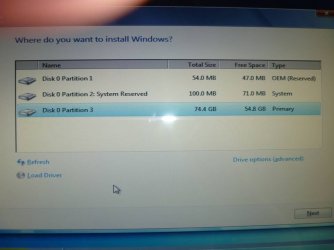
i just did a fresh reinstall. i know for a fact you cant delete the partition during setup and the install will go fine!
i just did a fresh reinstall. i know for a fact you cant delete the partition during setup and the install will go fine!
And you no longer have the 100MB "System Reserved" partition?

i just did a fresh reinstall. i know for a fact you cant delete the partition during setup and the install will go fine!
And you no longer have the 100MB "System Reserved" partition?
I know the OP question, I wanted to know if it will still create the "System Reserved" partition once it's been deleted during install; will you please answer my question, do you still have the 100MB "System Reserved" partition now.
Is there really a need to delete that partition, it's only 100mb, which is mynute in comparison to the harddrives we have now. Would there ever be a need for that partition
sorry mate, i deleted all partions during install and yes its back, sorry i didnt get back to you sooner!


Is there really a need to delete that partition, it's only 100mb, which is mynute in comparison to the harddrives we have now. Would there ever be a need for that partition
The reason for "some" of us it because the existence of that partition and it being a "Primary" is it limits the number of additional primaries that can be created.
sorry mate, i deleted all partions during install and yes its back, sorry i didnt get back to you sooner!
Thank you for the reply, that's what I thought; my apologies for being short with you.

Thanks for the info BareFootKid since your only allowed 4 primary partitions i can see where that might affect you. Thanks again
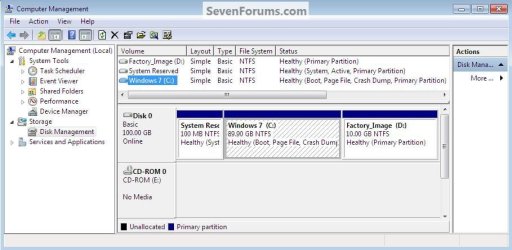

That is even a "mild" case. I have seen brand new PCs off the shelf with 4 primary partitions. The additional one was for some OEM tools. That is getting ridiculous as long as there is the 4 primary limit in NTFS.Thanks for the info BareFootKid since your only allowed 4 primary partitions i can see where that might affect you. Thanks again
Hello Smitty.
Here's a prime example of what some are getting with their OEM built PCs now and if you want/need another "Primary" Windows won't do it, Windows will only create a "Logical" for a 4th, or you need a third party program to do it.
Have alook at this tutorial.
Partition Wizard : Use the Bootable CD
That is a good point indeed. But when you have 4 primaries out of the box, that is a real problem too.On the other hand, with the 100MB "System Reserved" partition in place, you can install ALL of your Operating Systems in Logical Partitions. So if your first OS is C: drive and you have one optical drive set as D:, that leaves 19 drive letters to assign to additional OSs, data partitions, and external drives.
Wow, giving up 100MB of space allowing for 20 partitions ... anybody need that many partitions?
Plus you have access to "System Repair" utilities from the "Safe Mode" menu.
Cheers!
Robert
On the other hand, with the 100MB "System Reserved" partition in place, you can install ALL of your Operating Systems in Logical Partitions. So if your first OS is C: drive and you have one optical drive set as D:, that leaves 19 drive letters to assign to additional OSs, data partitions, and external drives.
Wow, giving up 100MB of space allowing for 20 partitions ... anybody need that many partitions?
Plus you have access to "System Repair" utilities from the "Safe Mode" menu.
Cheers!
Robert


