1 desktop dual monitors 2 different audio output ?

Only614

New member
Local time
6:48 AM
Messages
4
Hey guys,

As topic. Is it possible? Very irritating to play games without audio.

Reason, my girlfriend is watching movie on the another screen.

2 monitors 2 different audio, so my GF can watch movie on 1 monitor using my surround sound that i plugged onto the back and i can play games with my other monitor using my headphones that is plugged in front of the case. If this is possible, please explain or give me a link to do it.

Thank you!!
 
Last edited:

My Computer My Computer

At a glance

WIndows 7 Enterprise 64-bitq6600Kingston 4GBDDR3 1066 (PC3 8500)EVGA GeForce GTX460 Superclocked 1024 MB DDR5
OS
WIndows 7 Enterprise 64-bit
CPU
q6600
Motherboard
Asus p5qPRO
Memory
Kingston 4GBDDR3 1066 (PC3 8500)
Graphics Card(s)
EVGA GeForce GTX460 Superclocked 1024 MB DDR5
Sound Card
NONE
Monitor(s) Displays
Samsung Syncmaster 2253bw DUAL
Hard Drives
2x 2TB
2x 1Tb
1x 500GB
PSU
500-550Watt? OCZ
Case
ANtec 900
Download Media Player Classic - Go to options/internal filters/audio switcher and tick "enable custom channel mapping" Play a movie (preferrably with surround sound to have as many input channels as needed), plug your girlfriends audio into the surround output on the back and fiddle around with the channels holding shift (instant change) until sound appears using any output besides Front Left/Right which are your headphone channels. Apply when satisfied and MPC will use this mapping every time.

As far as I know on a integrated soundcard this is the only way.. I don't think any other media player has this option built in either, WMP surely does not.
 

My Computer My Computer

At a glance

Windows 7 Ultimate x64Intel Core i7 96012GB Mushkin DDR3 Triple ChannelZOTAC GeForce GTX 560Ti 1GB PhysX CUDA
Computer Manufacturer/Model Number
-
OS
Windows 7 Ultimate x64
CPU
Intel Core i7 960
Motherboard
Gigabyte X58A-UD3R r13
Memory
12GB Mushkin DDR3 Triple Channel
Graphics Card(s)
ZOTAC GeForce GTX 560Ti 1GB PhysX CUDA
Sound Card
M-Audio ProFire 610
Monitor(s) Displays
Samsung SyncMaster 226BW + Benq FP222Wa
Screen Resolution
3360x1024
Hard Drives
RAID 2x OCZ 120GB SSD S-ATA III (System)
RAID 2x Seagate 1TB S-ATA III (Recording)
1x WD Black Edition 7200 2TB
2x WD Black Edition 7200 1TB (Sample archive)
2x WD Caviar 7200 500GB
1x Cavalry Caum 7200 2TB
PSU
Thermaltake Toughpower XT
Case
CoolerMaster Stacker v2.0
Cooling
Antec KÜHLER H2O 620
Keyboard
Logitech diNivo Laser Desktop
Mouse
Logitech MX-900
Internet Speed
VDSL 40/10
Other Info
It is a DAW. Mostly.
I am trying it, but still dont get it. I cant get them on different audio. Could you do a print screen and show me it step by step?
 

My Computer My Computer

At a glance

WIndows 7 Enterprise 64-bitq6600Kingston 4GBDDR3 1066 (PC3 8500)EVGA GeForce GTX460 Superclocked 1024 MB DDR5
OS
WIndows 7 Enterprise 64-bit
CPU
q6600
Motherboard
Asus p5qPRO
Memory
Kingston 4GBDDR3 1066 (PC3 8500)
Graphics Card(s)
EVGA GeForce GTX460 Superclocked 1024 MB DDR5
Sound Card
NONE
Monitor(s) Displays
Samsung Syncmaster 2253bw DUAL
Hard Drives
2x 2TB
2x 1Tb
1x 500GB
PSU
500-550Watt? OCZ
Case
ANtec 900
I am trying it, but still dont get it. I cant get them on different audio. Could you do a print screen and show me it step by step?

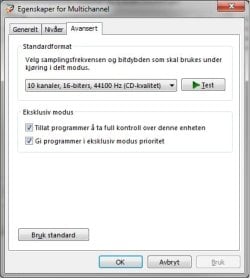
First you check that you have set up W7 to actually play surround: Rclick speaker icon -> playback devs -> select default dev -> properties -> advanced. Set to at least 5ch to make sure rear surround is enabled, usually your default should be 6 or 8 for surround (Top left picture).

Next, consult manual or helpfile for mainboard/soundcard to find exactly what outputs you have at the back and connect L+R surround (or L+R Back/rear surround) to her sound system's L+R Front or Stereo input. Add sub and center as they should be if you have this. Do not connect anything to stereo/front speakers out from your comp., this is identical to your your headset output.

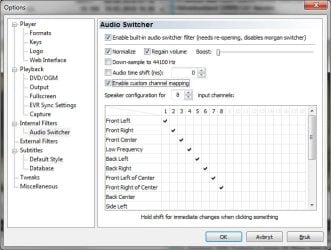
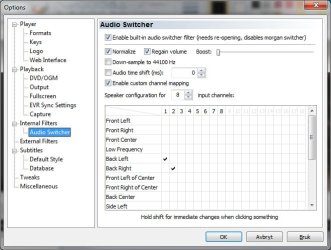
Now, in options for Media Player, the default mapping for 7.1 looks like the top right picture. Input channels here means whatever channels the movie you are watching are using. For regular stereo out you need to set every configuration from 2 and up to 8 input channels exactly as the bottom right picture shows, if not she won't be able to hear sound if the movie has more than 2ch stereo (e.g. a DVD or file encoded with surround channels).

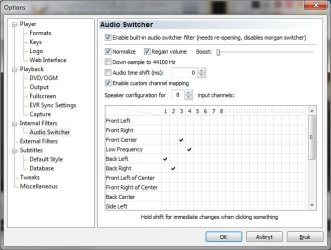
If your GF also have center/sub speakers you set the config for 2 inputs like before, 3 inputs the same, adding Front Center on 3 and finally 4-8 inputs like the bottom left picture.

PS!: You won't hear the result without reopening MP if you don't hold SHIFT while toggling/selecting channels.

Hope this helps :)
 

Attachments

  • W7_cannelqualset.jpg
    W7_cannelqualset.jpg
    22.8 KB · Views: 402
  • MP_defmapping7-1.jpg
    MP_defmapping7-1.jpg
    52.1 KB · Views: 442
  • MP_mapping+centersub.jpg
    MP_mapping+centersub.jpg
    51.3 KB · Views: 358
  • MP_mappingstereo.jpg
    MP_mappingstereo.jpg
    51.4 KB · Views: 276
Last edited:

My Computer My Computer

At a glance

Windows 7 Ultimate x64Intel Core i7 96012GB Mushkin DDR3 Triple ChannelZOTAC GeForce GTX 560Ti 1GB PhysX CUDA
Computer Manufacturer/Model Number
-
OS
Windows 7 Ultimate x64
CPU
Intel Core i7 960
Motherboard
Gigabyte X58A-UD3R r13
Memory
12GB Mushkin DDR3 Triple Channel
Graphics Card(s)
ZOTAC GeForce GTX 560Ti 1GB PhysX CUDA
Sound Card
M-Audio ProFire 610
Monitor(s) Displays
Samsung SyncMaster 226BW + Benq FP222Wa
Screen Resolution
3360x1024
Hard Drives
RAID 2x OCZ 120GB SSD S-ATA III (System)
RAID 2x Seagate 1TB S-ATA III (Recording)
1x WD Black Edition 7200 2TB
2x WD Black Edition 7200 1TB (Sample archive)
2x WD Caviar 7200 500GB
1x Cavalry Caum 7200 2TB
PSU
Thermaltake Toughpower XT
Case
CoolerMaster Stacker v2.0
Cooling
Antec KÜHLER H2O 620
Keyboard
Logitech diNivo Laser Desktop
Mouse
Logitech MX-900
Internet Speed
VDSL 40/10
Other Info
It is a DAW. Mostly.
Back
Top