Stability Question

With the AM3 memory controller, you need to be very aware of the RAM and Northbridge voltage, and you need to run your RAM at their specified voltage to get them to work properly. Overvolting DDR3 RAM can kill the CPU quite fast, because the memory controller is on the CPU's die along with the core and just adds to the excess heat.

And you should never run your AMD board's RAM voltage at the motherboard's "Auto" setting, other than when the sticks are first installed. Set the speed, voltage, and timings manually for the best results.

So I should change the timings to the manufacturer-specificed ones (it was set to AUTO and the timings ended up different)? Earlier on in the thread, someone said I shouldnt mess with the timings....

Good advice from both the above posts.

What were the timings set to, when on Auto?

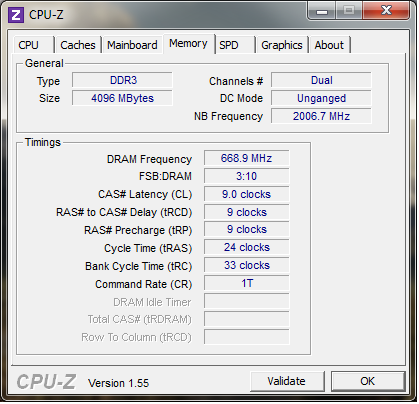
If you don't have CPUZ, you should D/L it and post the memory and SPD tabs.

Sometimes AMD boards will lower settings in order to have better stability.
They sometimes don't run well at 1600MHz, it will be more stable at 1333MHz.
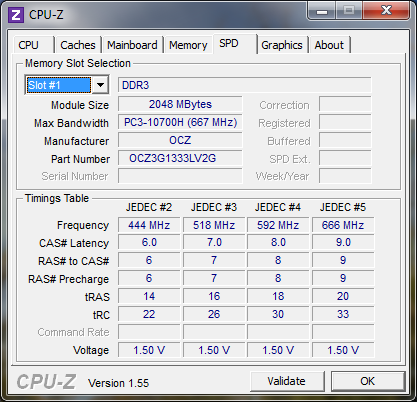
They will have a JEDEC setting for 1333MHZ on the CPUZ SPD tab.

If that is what your referring to, you should leave it at 1333MHz.

From the previously posted link.

Some of the Athlon CPU's have a memory speed rating of 1066 Mhz and will pull back RAM above this speed to the default setting. This is again to protect the CPU's Memory Controller and is not a fault with the Motherboard, BIOS or RAM.
So it may need to be at 1066 MHz.

Did you check if it is in unganged mode?

I can verify two AM3 systems (Phenom II 925 2.8 and Phenom II 965 3.4) running 8GB DDR3 1333, however: By default, with the 925 the memory runs at 1066 unless changed, the 965, the memory by default go's straight to 1333 where it should. Both always "unganged".

Edit: I should have noticed your post Dave76, having read that, it's now clear to me the reason is the 965 is Stepping 3, newer, and the bug is no longer there.
 
Last edited:

My Computer My Computer

At a glance

HP Win7 Pro x64 | Custom Win7 Pro x64HP PhII X4 965 Black Ed. 3.4Ghz | PhII X6 110...8GB DDR3 1333 OC Black Edition x2HP XFX Radeon HD4890 1GB | AMD Radeon HD 6990
Computer Manufacturer/Model Number
HPE-112y Custom + Custom Build
OS
HP Win7 Pro x64 | Custom Win7 Pro x64
CPU
HP PhII X4 965 Black Ed. 3.4Ghz | PhII X6 1100T 3.3/3.7
Motherboard
OEM HP | ASUS Crosshair IV Extreme 890FX
Memory
8GB DDR3 1333 OC Black Edition x2
Graphics Card(s)
HP XFX Radeon HD4890 1GB | AMD Radeon HD 6990
Sound Card
Realtek 7.1 Digital HDMI x2
Monitor(s) Displays
HP 20" 1680x1050 LCD | Samsung 23" 2ms 1920x1200 LED
Screen Resolution
1680x1050 + 1920x1200 & HDTV for Gaming/TV
Hard Drives
1TB WD "Green" 5,400 RPM SCSI W/ AMD RAID/Xpert
Custom 2x 128GB OCZ Enyo SSD
PSU
Thermaltake Black Widow 850watt Modular x2
Case
HP HPE- 112y OEM Modded | Custom Xclio A380S
Cooling
HP Antec120mm | Custom Antec 360mm/250mm/200mm/120mm
Keyboard
HP G15 | G19
Mouse
G500 x2
Internet Speed
15mb down, 2mb up
Other Info
2x DVD-RAM | 2x BD-ROM
Let us know if you have any info on this issue.


Edit:

Rhammstein, thanks for the clarification.

The above post is good info, thanks for the help.

I've been seeing several similar issues lately.
 
Last edited:

My Computer My Computer

At a glance

Windows 7 Ult x64 - SP1/ Windows 8 Pro x64Intel Core i5-3570K 4.6GHz8GB (2X4GB) DDR3 1600 Corsair Vengeance CL8 1.5vSapphire HD 7770 Vapor-X OC 1GB DDR5
Computer type
PC/Desktop
Computer Manufacturer/Model Number
76~2.0
OS
Windows 7 Ult x64 - SP1/ Windows 8 Pro x64
CPU
Intel Core i5-3570K 4.6GHz
Motherboard
Gigabyte GA-Z77X UD3H, f18
Memory
8GB (2X4GB) DDR3 1600 Corsair Vengeance CL8 1.5v
Graphics Card(s)
Sapphire HD 7770 Vapor-X OC 1GB DDR5
Sound Card
Onboard VIA VT2021
Monitor(s) Displays
22" LCD Dell
Screen Resolution
1680x1050
Hard Drives
Samsung 840Pro 128GB SSD,
Seagate Barracuda 500GB SATA2 7200rpm 32MB cache, Seagate Barracuda 1TB SATA2 7200rpm 32MB cache,
PSU
Corsair HX650W
Case
Cooler Master Storm Scout
Cooling
Corsair H80 2x12cm Noctua NF P12 , 2x14cm case fans
Keyboard
Logitech Wave
Mouse
CM Sentinel
Internet Speed
Dismal
Antivirus
Avast
Browser
Opera Next
Other Info
Haswell laptop: HP Envy 17t-j, i7-4700MQ, GeForce 740M 2GB DDR3, 17.3" Full HD 1920x1080, 16GB RAM, Samsung 840 Pro 128GB, 1TB Hitachi 7200 HDD,
Desktop: eSATA ports,
External eSATA Seagate 500GB SATA2 7200rpm,
External WD USB 500GB
Do you have another power supply around, or any other memory?
 

My Computer My Computer

At a glance

HP Win7 Pro x64 | Custom Win7 Pro x64HP PhII X4 965 Black Ed. 3.4Ghz | PhII X6 110...8GB DDR3 1333 OC Black Edition x2HP XFX Radeon HD4890 1GB | AMD Radeon HD 6990
Computer Manufacturer/Model Number
HPE-112y Custom + Custom Build
OS
HP Win7 Pro x64 | Custom Win7 Pro x64
CPU
HP PhII X4 965 Black Ed. 3.4Ghz | PhII X6 1100T 3.3/3.7
Motherboard
OEM HP | ASUS Crosshair IV Extreme 890FX
Memory
8GB DDR3 1333 OC Black Edition x2
Graphics Card(s)
HP XFX Radeon HD4890 1GB | AMD Radeon HD 6990
Sound Card
Realtek 7.1 Digital HDMI x2
Monitor(s) Displays
HP 20" 1680x1050 LCD | Samsung 23" 2ms 1920x1200 LED
Screen Resolution
1680x1050 + 1920x1200 & HDTV for Gaming/TV
Hard Drives
1TB WD "Green" 5,400 RPM SCSI W/ AMD RAID/Xpert
Custom 2x 128GB OCZ Enyo SSD
PSU
Thermaltake Black Widow 850watt Modular x2
Case
HP HPE- 112y OEM Modded | Custom Xclio A380S
Cooling
HP Antec120mm | Custom Antec 360mm/250mm/200mm/120mm
Keyboard
HP G15 | G19
Mouse
G500 x2
Internet Speed
15mb down, 2mb up
Other Info
2x DVD-RAM | 2x BD-ROM
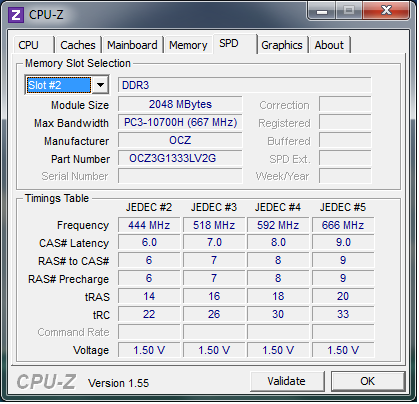
Here are the Memory and SPD data

PFpAi.png

dsB6e.png

P8mdi.png


The memory has been tested and its fine. I do have other memory though, in case I really do need to try it out.

The power supply has been tested with another PC and it is fine.
 

My Computer My Computer

At a glance

Windows 7 x64 ProfessionalAMD Athlon II X3 440 3.00ghz4gb (2x2gb) OCZ Gold DDR3 1333mhzATI Radeon HD 4850
OS
Windows 7 x64 Professional
CPU
AMD Athlon II X3 440 3.00ghz
Motherboard
ASUS M4A87TD/USB3
Memory
4gb (2x2gb) OCZ Gold DDR3 1333mhz
Graphics Card(s)
ATI Radeon HD 4850
Hard Drives
Samsung Spinpoint F3
PSU
OCZ Stealth Xtreme 500W
Case
NZXT Hades
The power supply has been tested with another PC and it is fine.
That may not be an accurate test of the PSU. That other computer may have a lower total power draw than your current system, even under a load, so it may not be stressing the PSU to the point of failure.
 

My Computer My Computer

At a glance

Windows 7 Ultimate x64 SP1Intel Core i7-260012 GB Patriot Extreme DDR3-1333Nvidia GTX 470
OS
Windows 7 Ultimate x64 SP1
CPU
Intel Core i7-2600
Motherboard
Gigabyte GA-P67A-UD3P-B3
Memory
12 GB Patriot Extreme DDR3-1333
Graphics Card(s)
Nvidia GTX 470
Monitor(s) Displays
Dell UltraSharp 2209WA
Hard Drives
OCZ Agility3 240 GB, WD5001AALS, WD7501AALS
PSU
OCZ ModStream 700W
Case
CoolerMaster HAF 912 Advanced
Cooling
CoolerMaster Hyper 212 Plus
Deacon is right... Unless you are testing that PSU under the same conditions, its like testing a 4 cylinder engine in a 1960s VW Bug and thinking it is good enough to work in a 2010 Ford Mustang.
 

My Computer My Computer

At a glance

Windows 7 Ultimate x64 and Home Premium x64Intel i7 960 (3.2 GHz Quad Core)12 Gigs (Triple Channel)Alienware OEM nVidia GTX 560 Ti (1.25 Gig)
Computer Manufacturer/Model Number
Alienware Area 51 Desktop and Dell Inspirion 17R (N7010)
OS
Windows 7 Ultimate x64 and Home Premium x64
CPU
Intel i7 960 (3.2 GHz Quad Core)
Motherboard
Alienware Intel based X58
Memory
12 Gigs (Triple Channel)
Graphics Card(s)
Alienware OEM nVidia GTX 560 Ti (1.25 Gig)
Sound Card
Creative Labs X-Fi Titanium
Monitor(s) Displays
Samsung PX2370 LED 23" Monitor
Screen Resolution
1920x1080
Hard Drives
2 320 Gig SATA in Raid 1 Configuration (System/App)
1 1 Tera SATA (Games)
1 1 Tera SATA (Data/Music/Videos)
PSU
750 Watt Power Supply
Case
Alienware Area 51 Desktop
Cooling
Liquid Cooled
Keyboard
Logitech G510
Mouse
Microsoft Trackball Explorer
Internet Speed
Cable
Deacon is right... Unless you are testing that PSU under the same conditions, its like testing a 4 cylinder engine in a 1960s VW Bug and thinking it is good enough to work in a 2010 Ford Mustang.

It's an identical computer so I think it's a fair test.

Things have been working well recently, no BSODs in the last couple of days. Should I still go ahead and change the CAS timings or leave them be until I have a problem?
 

My Computer My Computer

At a glance

Windows 7 x64 ProfessionalAMD Athlon II X3 440 3.00ghz4gb (2x2gb) OCZ Gold DDR3 1333mhzATI Radeon HD 4850
OS
Windows 7 x64 Professional
CPU
AMD Athlon II X3 440 3.00ghz
Motherboard
ASUS M4A87TD/USB3
Memory
4gb (2x2gb) OCZ Gold DDR3 1333mhz
Graphics Card(s)
ATI Radeon HD 4850
Hard Drives
Samsung Spinpoint F3
PSU
OCZ Stealth Xtreme 500W
Case
NZXT Hades
Deacon is right... Unless you are testing that PSU under the same conditions, its like testing a 4 cylinder engine in a 1960s VW Bug and thinking it is good enough to work in a 2010 Ford Mustang.

It's an identical computer so I think it's a fair test.

Things have been working well recently, no BSODs in the last couple of days. Should I still go ahead and change the CAS timings or leave them be until I have a problem?

Leave them alone for now. Unless you REALLY need them to be tweaked for a reason or want to spend time fooling around trying to get more out of it, stability generally works better at the norm.
 

My Computer My Computer

At a glance

Windows 7 Ultimate x64 and Home Premium x64Intel i7 960 (3.2 GHz Quad Core)12 Gigs (Triple Channel)Alienware OEM nVidia GTX 560 Ti (1.25 Gig)
Computer Manufacturer/Model Number
Alienware Area 51 Desktop and Dell Inspirion 17R (N7010)
OS
Windows 7 Ultimate x64 and Home Premium x64
CPU
Intel i7 960 (3.2 GHz Quad Core)
Motherboard
Alienware Intel based X58
Memory
12 Gigs (Triple Channel)
Graphics Card(s)
Alienware OEM nVidia GTX 560 Ti (1.25 Gig)
Sound Card
Creative Labs X-Fi Titanium
Monitor(s) Displays
Samsung PX2370 LED 23" Monitor
Screen Resolution
1920x1080
Hard Drives
2 320 Gig SATA in Raid 1 Configuration (System/App)
1 1 Tera SATA (Games)
1 1 Tera SATA (Data/Music/Videos)
PSU
750 Watt Power Supply
Case
Alienware Area 51 Desktop
Cooling
Liquid Cooled
Keyboard
Logitech G510
Mouse
Microsoft Trackball Explorer
Internet Speed
Cable
There is one problem that persists. The audio drivers do not install without causing a BSOD ("this driver is mismanaging PTEs"). The odd thing is that they worked on my previous Windows 7 Ultimate install and work on the identical computer I mentioned earlier. The hardware is the same so I wonder what could cause this...
 

My Computer My Computer

At a glance

Windows 7 x64 ProfessionalAMD Athlon II X3 440 3.00ghz4gb (2x2gb) OCZ Gold DDR3 1333mhzATI Radeon HD 4850
OS
Windows 7 x64 Professional
CPU
AMD Athlon II X3 440 3.00ghz
Motherboard
ASUS M4A87TD/USB3
Memory
4gb (2x2gb) OCZ Gold DDR3 1333mhz
Graphics Card(s)
ATI Radeon HD 4850
Hard Drives
Samsung Spinpoint F3
PSU
OCZ Stealth Xtreme 500W
Case
NZXT Hades
There is one problem that persists. The audio drivers do not install without causing a BSOD ("this driver is mismanaging PTEs"). The odd thing is that they worked on my previous Windows 7 Ultimate install and work on the identical computer I mentioned earlier. The hardware is the same so I wonder what could cause this...


What sound card are you using? Try uninstalling sound card drivers, use
Driver Cleaner, then allow system to load windows stock drivers. See what happens? Your current download could be corrupted, download it again??

I once had a corrupted sound driver, I chased the video card and its drivers to hell and back. OOPs

Put your ram settings, in bios, too manufacturers specs if you know them. Both voltage and timings.! Auto good if your playing too see what your mobo will do, your not, so set them to specs. Use only one stick in the lead slot to enter bios and set specs, then after it takes you can put the rest in.

I only know Intel mobos, and I'm just relating what worked for me.
 

My Computer My Computer

At a glance

W7 Ulti/64, XP Pro/32INTEL i7 920 DO, Core2 Duo 6400KINGSTON DDR3 1333MHz, CORSAIR DDR2 800MHzEVGA GTX 260 x2, 8800 GTX
Computer Manufacturer/Model Number
DIY #3, #2
OS
W7 Ulti/64, XP Pro/32
CPU
INTEL i7 920 DO, Core2 Duo 6400
Motherboard
GIGABYTE EX58 UD3R-SLI, EP45-UD3R
Memory
KINGSTON DDR3 1333MHz, CORSAIR DDR2 800MHz
Graphics Card(s)
EVGA GTX 260 x2, 8800 GTX
Sound Card
REALTEK HD onboard, ditto
Monitor(s) Displays
SONY 40" BRAVIA LCD
Screen Resolution
1360 X 768
Hard Drives
OCZ VERTEX/RAID0 -3, Vertex 30GB
PSU
COOLERMASTER 900W, ENERMAX 850W
Case
COOLERMASTER HAF 932 x2
Cooling
stock
Keyboard
MS
Mouse
MS
Internet Speed
ADSL 3MB/768KBs
Other Info
amateur enthusiast
When people were saying don't mess with the settings, it was more of don't tweak them if you don't know what you are doing or trying to eek out more performance.
I suggested that the OP not change the timings at the moment because it would introduce new variables into the troubleshooting process. Until he solves his current issues, I would advise not changing anything that is currently set up correctly and is within spec.

Once the problem you're trying to troubleshoot is corrected, then yeah, tweak to your heart's content. Go nuts if you want to, but until it's running properly at spec, leave it alone.
 

My Computer My Computer

At a glance

Win 7 Pro x64/Win 10 Pro x64 dual bootAMD FX 8350 Vishera @ 420016 GB Mushkin Blackline DDR3-2400 @ 1866 (9-1...XFX Radeon R9 280 Double D Black Edition
Computer type
PC/Desktop
Computer Manufacturer/Model Number
Mellon Labs (custom build)
OS
Win 7 Pro x64/Win 10 Pro x64 dual boot
CPU
AMD FX 8350 Vishera @ 4200
Motherboard
ASUS M5A97 R2.0
Memory
16 GB Mushkin Blackline DDR3-2400 @ 1866 (9-10-10-10-31)
Graphics Card(s)
XFX Radeon R9 280 Double D Black Edition
Sound Card
Realtek HD Audio on MB. Sounds great.
Monitor(s) Displays
Acer 24", Acer 22"
Screen Resolution
3840 x 1080
Hard Drives
1 x Mushkin Chronos 120 GB SSD (Win 10)
1 x Samsung 850 EVO 250 GB SSD (Win 7)
1 x WD 1TB SATA Blue
1 x WD 1TB SATA Green
PSU
Corsair TX-750
Case
CoolerMaster HAF 912+
Cooling
Coolermaster Seidon 240M Liquid AIO. 6 case fans
Keyboard
Logitech G710+
Mouse
Logitech G500s
Internet Speed
Much better since I got fiber, but still way overpriced.
Antivirus
MSE, Malware Bytes for scanning
Browser
Firefox
Other Info
Corsair VOID USB headphones.

A Mellon Labs X-1 - LCD Smartie driven system status display.

Brought to you by the letter E
Win7 doesn't require any tweaking other than normal system settings. It will work against you over time.

It is perfectly balanced so that tweaks introduce incremental instability which can subtract from it being feather-light and instantaneous

What more could you want?
 
My first suggestion would be to start a thread in the Crashes and Debugging forum.


EDIT:
You should go back to this thread you started and follow the recommendations given in the Crashes and Debugging forum.

Bad_pool_header


I see you have already updated your drivers and most importantly the chipset drivers in this thread in the Drivers Forum.

Driver causes BSOD

This information would have been useful for all the people trying to help you here.


I see that the information given here was confirmed in your post in the Hardware & Devices forum.

RAM Timings


Your Driver Verifier issue was explained and discussed here.

Page fault in non paged area


And another in Crashes & Debugging where you were getting BSoDs analysed and suddenly stopped saying you would live 'with 2.1 audio till I reinstall again' !! What does that mean?

BSOD after reinstall

You should stay with one thread until you get the issues resolved instead of starting several and not completing them.

Not giving the things that you have already tried when you post a new thread is not being honest with the people that are trying to help you.

These methods will get you less help from the members here, instead of getting the answer you want to hear.

End/EDIT


Mention or include a link to this thread for reference.

You need to have the BSoDs analysed, the people there are good at this.
Once the causes are narrowed down, this will help to get to the source of the BSoDs.

This may or may not be the cause but, there is a known AMD integrated memory controller issue that has been fixed by setting the RAM timings manually and bump the RAM voltage if necessary.

VERY IMPORTANT INFORMATION REGARDING AMD AM3 CPU's and RAM SPEEDS

Be sure to read the first post on page two, it clarifies ganged and unganged.


The first step needs to be analyse the BSoDs to determine the causes.

I have seen that setting the RAM timings and voltages to the appropriate JEDEC settings mentioned in this thread and many others in several different forums.
The does help issues with both Intel and AMD boards.
This AMD CPU memory controller issue suggested fix has shown positive results here in Seven Forums as well as other forums.

Overclocking or tweaking anything for performance gain at this stage is, of coarse, not recommended.
Manually setting the RAM timings to JEDEC specs, first four are usually sufficient leave the rest on Auto, and voltage will help the system stability.

We need to keep in mind that AMD and Intel CPU/boards are different and may need other methods to troubleshoot issues.

Search this issue with AMD CPU integrated memory controllers, you will find many, some with no resolution except RMA until the problem goes away, this above link's recommendation has helped.

My second suggestion, after starting a thread in Crashes and Debugging, is to use JEDEC specs and manually set the first four RAM settings, the voltage and insure it is in unganged mode. This will eliminate this variable and allow further troubleshooting to be more accurate.


@jalebi the OP,

What setting information is on the RAM cards?

You are in unganged mode, as is standard with default settings on AM3 AMD boards.

If your RAM cards show higher than 1333 MHz, the AMD board BIOS will set it to 1333 MHz or lower, this is for stability with the CPU integrated controller. It is not recommended to raise this as it can cause BSoDs.

Having 2X2GB RAM cards has been mentioned as being more susceptible to this known issue.

Also have noticed that previously you said that you changed the RAM voltage to 1.7v, Your JEDEC recommends 1.5v.
I would recommend to set it back to 1.5v for now.
Where did you get the information that 'it should have been 1.7v'?

Edit: Just found the recommendation for 1.7v is for Intel CPU/motherboards. More info below.
You should follow the JEDEC settings listed in CPUZ.

Too much RAM voltage can damage your CPU and integrated memory controller.

If it later is necessary to bump the RAM voltage you should do it in small steps and test each step with Memtest86+ and then Prime95.


I've performed a memtest for 10 hours overnight and it passed the test 10 times with no errors. I don't think the RAM is a problem.

One thing I did find curious was that the timings were 9-9-9-24 instead of the 9-9-9-20 detailed on the website. Should I change it?

Also, memtest clocked the speed at 667mhz instead of 1333mhz. The BIOS lists the setting at AUTO - should I change it to 1333mhz manually?

This RAM link states the RAM is optimized for Intel boards.

There is known problems with using Intel optimized RAM in AMD boards.
AMD AM3 boards can have problems with RAM not made for AMD, mentioned previously as being finicky.

Your best bet will be to return this RAM and get OCZ DDR3 PC3-10666 / 1333MHz / Gold Edition / AMD Edition.

This RAM is optimized for AMD AM3 CPU integrated memory controller and boards.
It does state 1.65v, I would try to find RAM that will run with 1.5v.

RAM can pass these tests and still cause BSoDs, it's possible to have the same RAM fail the same tests if ran again. This is the same as your system not crashing every time you play games.
It's not a 100% indication that the RAM is OK.

As mentioned previously, the RAM will show 667MHz in BIOS but is actually running at 1333MHz, DDR means Double Date Rate, so you have to double the 667MHz to get the actual speed of 1333Mhz.
 
Last edited:

My Computer My Computer

At a glance

Windows 7 Ult x64 - SP1/ Windows 8 Pro x64Intel Core i5-3570K 4.6GHz8GB (2X4GB) DDR3 1600 Corsair Vengeance CL8 1.5vSapphire HD 7770 Vapor-X OC 1GB DDR5
Computer type
PC/Desktop
Computer Manufacturer/Model Number
76~2.0
OS
Windows 7 Ult x64 - SP1/ Windows 8 Pro x64
CPU
Intel Core i5-3570K 4.6GHz
Motherboard
Gigabyte GA-Z77X UD3H, f18
Memory
8GB (2X4GB) DDR3 1600 Corsair Vengeance CL8 1.5v
Graphics Card(s)
Sapphire HD 7770 Vapor-X OC 1GB DDR5
Sound Card
Onboard VIA VT2021
Monitor(s) Displays
22" LCD Dell
Screen Resolution
1680x1050
Hard Drives
Samsung 840Pro 128GB SSD,
Seagate Barracuda 500GB SATA2 7200rpm 32MB cache, Seagate Barracuda 1TB SATA2 7200rpm 32MB cache,
PSU
Corsair HX650W
Case
Cooler Master Storm Scout
Cooling
Corsair H80 2x12cm Noctua NF P12 , 2x14cm case fans
Keyboard
Logitech Wave
Mouse
CM Sentinel
Internet Speed
Dismal
Antivirus
Avast
Browser
Opera Next
Other Info
Haswell laptop: HP Envy 17t-j, i7-4700MQ, GeForce 740M 2GB DDR3, 17.3" Full HD 1920x1080, 16GB RAM, Samsung 840 Pro 128GB, 1TB Hitachi 7200 HDD,
Desktop: eSATA ports,
External eSATA Seagate 500GB SATA2 7200rpm,
External WD USB 500GB
I suppose attacking the OS for my problems was a bit rash, but isn't it possible that the drivers would just work better with XP or Win 7 32bit? (assuming it is even somewhat software related).

Another strange thing is that I had some issues/BSODs with my first install (Win 7 ultimate x64) but different ones with my second (Win 7 Pro). Wouldn't faulty hardware cause the same problems across the two installs?

If you are running old software and hardware designed for XP and not updated for Win 7, you are going to have problems. (Almost) all of your 3rd party drivers (non-MS drivers) should be dated July 13, 2009 or later. Older drivers will cause problems on both the 32 bit and the 64 bit versions. Have you checked the compatibility of your hardware and software with Windows 7?

Windows 7 Compatibility: Software Programs & Hardware Devices: Find Updates, Drivers, & Downloads[FONT=&quot]

[/FONT]
Win7 doesn't require any tweaking other than normal system settings. It will work against you over time.

It is perfectly balanced so that tweaks introduce incremental instability which can subtract from it being feather-light and instantaneous

What more could you want?

Greg is spot on.

My first suggestion would be to start a thread in the Crashes and Debugging forum.

Mention or include a link to this thread for reference.

You need to have the BSoDs analysed, the people there are good at this.
Once the causes are narrowed down, this will help to get to the source of the BSoDs.

This may or may not be the cause but, there is a known AMD integrated memory controller issue that has been fixed by setting the RAM timings manually and bump the RAM voltage if necessary.

VERY IMPORTANT INFORMATION REGARDING AMD AM3 CPU's and RAM SPEEDS

Be sure to read the first post on page two, it clarifies ganged and unganged.

The first step needs to be analyse the BSoDs to determine the causes...

Please start a thread in Crashes and Debugging. We would be glad to try and help you.

By the way, what antivirus and firewall are you running?
 

My Computer My Computer

At a glance

Windows 7 Ultimate 32 bitIntel(R) Pentium(R) 4 CPU 3.00GHz2.50 GB RAMNVIDIA GeForce 7600 GS
Computer Manufacturer/Model Number
Home built
OS
Windows 7 Ultimate 32 bit
CPU
Intel(R) Pentium(R) 4 CPU 3.00GHz
Motherboard
ASUS P4P800-VM Motherboard Chipset: Intel 865G + ICH5
Memory
2.50 GB RAM
Graphics Card(s)
NVIDIA GeForce 7600 GS
Sound Card
SoundMax Integrated Digital Audio (Chip)
Monitor(s) Displays
ViewSonic VX 1962 wm
Screen Resolution
1680 X 1050
Hard Drives
Seagate Barracuda 7200.10 80 GB
ST380215A ATA Device 18.6 GB
Western Digital "My Book" external hard drive 750 GB
Cooling
Fan based
Keyboard
Microsoft Comfort Curve Keyboard 2000 v10 USB
Mouse
Logitec optic USB
Internet Speed
3.01 Mb/s download 0.64 Mb/s upload
FYI, I am running on stock settings myself... I never really suggest messing with the system myself. Well, other than making sure certain drivers were in place.

One thing I do know, is there are some people who want more out of their system... Often times will try to mess with the stock settings to 'eek out more' from it, which is where the tweaking of memory settings and other things come into play.

The important thing to note... As many of us have stated... You really don't want to be messing with the settings unless you know what you are doing. It is a nightmare to tweak unless you have the patience and will power to go through all that.
 

My Computer My Computer

At a glance

Windows 7 Ultimate x64 and Home Premium x64Intel i7 960 (3.2 GHz Quad Core)12 Gigs (Triple Channel)Alienware OEM nVidia GTX 560 Ti (1.25 Gig)
Computer Manufacturer/Model Number
Alienware Area 51 Desktop and Dell Inspirion 17R (N7010)
OS
Windows 7 Ultimate x64 and Home Premium x64
CPU
Intel i7 960 (3.2 GHz Quad Core)
Motherboard
Alienware Intel based X58
Memory
12 Gigs (Triple Channel)
Graphics Card(s)
Alienware OEM nVidia GTX 560 Ti (1.25 Gig)
Sound Card
Creative Labs X-Fi Titanium
Monitor(s) Displays
Samsung PX2370 LED 23" Monitor
Screen Resolution
1920x1080
Hard Drives
2 320 Gig SATA in Raid 1 Configuration (System/App)
1 1 Tera SATA (Games)
1 1 Tera SATA (Data/Music/Videos)
PSU
750 Watt Power Supply
Case
Alienware Area 51 Desktop
Cooling
Liquid Cooled
Keyboard
Logitech G510
Mouse
Microsoft Trackball Explorer
Internet Speed
Cable
EDIT:
You should go back to this thread you started and follow the recommendations given in the Crashes and Debugging forum.

Bad_pool_header


This is no longer a problem since I reinstalled.


And another in Crashes & Debugging where you were getting BSoDs analysed and suddenly stopped saying you would live 'with 2.1 audio till I reinstall again' !! What does that mean?


My audio drivers will not work without causing BSODs. Without them I can only use my speakers in a 2.1 configuration instead of 5.1


I'm sorry I did not mention those other threads but in most cases the problem has either gone away or is no longer relavant (i.e. I reinstalled).


My second suggestion, after starting a thread in Crashes and Debugging, is to use JEDEC specs and manually set the first four RAM settings, the voltage and insure it is in unganged mode. This will eliminate this variable and allow further troubleshooting to be more accurate.

@jalebi the OP,

What setting information is on the RAM cards?

You are in unganged mode, as is standard with default settings on AM3 AMD boards.

If your RAM cards show higher than 1333 MHz, the AMD board BIOS will set it to 1333 MHz or lower, this is for stability with the CPU integrated controller. It is not recommended to raise this as it can cause BSoDs.

Having 2X2GB RAM cards has been mentioned as being more susceptible to this known issue.

Also have noticed that previously you said that you changed the RAM voltage to 1.7v, Your JEDEC recommends 1.5v.
I would recommend to set it back to 1.5v for now.
Where did you get the information that 'it should have been 1.7v'?

Edit: Just found the recommendation for 1.7v is for Intel CPU/motherboards. More info below.
You should follow the JEDEC settings listed in CPUZ.

Too much RAM voltage can damage your CPU and integrated memory controller.

If it later is necessary to bump the RAM voltage you should do it in small steps and test each step with Memtest86+ and then Prime95.


I've performed a memtest for 10 hours overnight and it passed the test 10 times with no errors. I don't think the RAM is a problem.

One thing I did find curious was that the timings were 9-9-9-24 instead of the 9-9-9-20 detailed on the website. Should I change it?

Also, memtest clocked the speed at 667mhz instead of 1333mhz. The BIOS lists the setting at AUTO - should I change it to 1333mhz manually?

This RAM link states the RAM is optimized for Intel boards.

There is known problems with using Intel optimized RAM in AMD boards.
AMD AM3 boards can have problems with RAM not made for AMD, mentioned previously as being finicky.

Your best bet will be to return this RAM and get OCZ DDR3 PC3-10666 / 1333MHz / Gold Edition / AMD Edition.

This RAM is optimized for AMD AM3 CPU integrated memory controller and boards.
It does state 1.65v, I would try to find RAM that will run with 1.5v.

RAM can pass these tests and still cause BSoDs, it's possible to have the same RAM fail the same tests if ran again. This is the same as your system not crashing every time you play games.
It's not a 100% indication that the RAM is OK.

As mentioned previously, the RAM will show 667MHz in BIOS but is actually running at 1333MHz, DDR means Double Date Rate, so you have to double the 667MHz to get the actual speed of 1333Mhz.

It seems I have linked to the wrong page for the RAM (I didnt know RAM was different for AMD and Intel mobos). This is the one I bought - its voltage spec seems to match the AMD edition but the link says its optimized for Intel...

Should I set it to the manufacturer recommended 1.65V or the SPD/JEDEC recommended 1.5V?


EDIT:
I've just done some research (e.g. source 1, source 2) and it seems that when using "Intel optimized" RAM in an AMD system, you should manually input the voltage and timings because the BIOS wont recognize them correctly by itself. Is this what I should do?
 
Last edited:

My Computer My Computer

At a glance

Windows 7 x64 ProfessionalAMD Athlon II X3 440 3.00ghz4gb (2x2gb) OCZ Gold DDR3 1333mhzATI Radeon HD 4850
OS
Windows 7 x64 Professional
CPU
AMD Athlon II X3 440 3.00ghz
Motherboard
ASUS M4A87TD/USB3
Memory
4gb (2x2gb) OCZ Gold DDR3 1333mhz
Graphics Card(s)
ATI Radeon HD 4850
Hard Drives
Samsung Spinpoint F3
PSU
OCZ Stealth Xtreme 500W
Case
NZXT Hades
You should use ONLY what the ram's manufacturer specifies, when it comes to voltage and timings. You keep asking, I keep saying same thing reguarding ram. Use manufacturers specs! Put 1 stick in, enter bios and configure ram, exit , add other sticks.
 

My Computer My Computer

At a glance

W7 Ulti/64, XP Pro/32INTEL i7 920 DO, Core2 Duo 6400KINGSTON DDR3 1333MHz, CORSAIR DDR2 800MHzEVGA GTX 260 x2, 8800 GTX
Computer Manufacturer/Model Number
DIY #3, #2
OS
W7 Ulti/64, XP Pro/32
CPU
INTEL i7 920 DO, Core2 Duo 6400
Motherboard
GIGABYTE EX58 UD3R-SLI, EP45-UD3R
Memory
KINGSTON DDR3 1333MHz, CORSAIR DDR2 800MHz
Graphics Card(s)
EVGA GTX 260 x2, 8800 GTX
Sound Card
REALTEK HD onboard, ditto
Monitor(s) Displays
SONY 40" BRAVIA LCD
Screen Resolution
1360 X 768
Hard Drives
OCZ VERTEX/RAID0 -3, Vertex 30GB
PSU
COOLERMASTER 900W, ENERMAX 850W
Case
COOLERMASTER HAF 932 x2
Cooling
stock
Keyboard
MS
Mouse
MS
Internet Speed
ADSL 3MB/768KBs
Other Info
amateur enthusiast
You should use ONLY what the ram's manufacturer specifies, when it comes to voltage and timings. You keep asking, I keep saying same thing reguarding ram. Use manufacturers specs! Put 1 stick in, enter bios and configure ram, exit , add other sticks.

I'm sorry, but other are saying don't touch the voltage/timing so I wanted a definite answer. I'm going to change the voltage and timing to the manufacturer specified numbers and run a memtest to see if it holds up.
 

My Computer My Computer

At a glance

Windows 7 x64 ProfessionalAMD Athlon II X3 440 3.00ghz4gb (2x2gb) OCZ Gold DDR3 1333mhzATI Radeon HD 4850
OS
Windows 7 x64 Professional
CPU
AMD Athlon II X3 440 3.00ghz
Motherboard
ASUS M4A87TD/USB3
Memory
4gb (2x2gb) OCZ Gold DDR3 1333mhz
Graphics Card(s)
ATI Radeon HD 4850
Hard Drives
Samsung Spinpoint F3
PSU
OCZ Stealth Xtreme 500W
Case
NZXT Hades
You should use ONLY what the ram's manufacturer specifies, when it comes to voltage and timings. You keep asking, I keep saying same thing reguarding ram. Use manufacturers specs! Put 1 stick in, enter bios and configure ram, exit , add other sticks.

I'm sorry, but other are saying don't touch the voltage/timing so I wanted a definite answer. I'm going to change the voltage and timing to the manufacturer specified numbers and run a memtest to see if it holds up.

They said, my friend, not to overclock your ram settings in bios. Every ram manufacturer has its own specs. Thats why mobos have choices. The auto setting is a default setting. It allows you to get a POST so you can go in and configure bios.

Your cpu should be at specs as well. All that you can configure manually should be. Think of it as removing a trains track switching, one track, one path, no decisions, better performance.
 
Last edited:

My Computer My Computer

At a glance

W7 Ulti/64, XP Pro/32INTEL i7 920 DO, Core2 Duo 6400KINGSTON DDR3 1333MHz, CORSAIR DDR2 800MHzEVGA GTX 260 x2, 8800 GTX
Computer Manufacturer/Model Number
DIY #3, #2
OS
W7 Ulti/64, XP Pro/32
CPU
INTEL i7 920 DO, Core2 Duo 6400
Motherboard
GIGABYTE EX58 UD3R-SLI, EP45-UD3R
Memory
KINGSTON DDR3 1333MHz, CORSAIR DDR2 800MHz
Graphics Card(s)
EVGA GTX 260 x2, 8800 GTX
Sound Card
REALTEK HD onboard, ditto
Monitor(s) Displays
SONY 40" BRAVIA LCD
Screen Resolution
1360 X 768
Hard Drives
OCZ VERTEX/RAID0 -3, Vertex 30GB
PSU
COOLERMASTER 900W, ENERMAX 850W
Case
COOLERMASTER HAF 932 x2
Cooling
stock
Keyboard
MS
Mouse
MS
Internet Speed
ADSL 3MB/768KBs
Other Info
amateur enthusiast
Yes, we said not to touch the settings as in not try and change them beyond the factory specs, Jalebi. In majority of your questions you kept asking us if you should change the RAM settings. Each time we told you not to because you gave us the impression you wanted to change them to something other than the base settings.

By all technicality... Auto should not be setting the ram settings to something questionable. If everything was set to default spec settings for the processor, everything else should be in proper settings.
 

My Computer My Computer

At a glance

Windows 7 Ultimate x64 and Home Premium x64Intel i7 960 (3.2 GHz Quad Core)12 Gigs (Triple Channel)Alienware OEM nVidia GTX 560 Ti (1.25 Gig)
Computer Manufacturer/Model Number
Alienware Area 51 Desktop and Dell Inspirion 17R (N7010)
OS
Windows 7 Ultimate x64 and Home Premium x64
CPU
Intel i7 960 (3.2 GHz Quad Core)
Motherboard
Alienware Intel based X58
Memory
12 Gigs (Triple Channel)
Graphics Card(s)
Alienware OEM nVidia GTX 560 Ti (1.25 Gig)
Sound Card
Creative Labs X-Fi Titanium
Monitor(s) Displays
Samsung PX2370 LED 23" Monitor
Screen Resolution
1920x1080
Hard Drives
2 320 Gig SATA in Raid 1 Configuration (System/App)
1 1 Tera SATA (Games)
1 1 Tera SATA (Data/Music/Videos)
PSU
750 Watt Power Supply
Case
Alienware Area 51 Desktop
Cooling
Liquid Cooled
Keyboard
Logitech G510
Mouse
Microsoft Trackball Explorer
Internet Speed
Cable
Back
Top