Rhammstein
Banned
- Local time
- 9:24 AM
- Messages
- 275
With the AM3 memory controller, you need to be very aware of the RAM and Northbridge voltage, and you need to run your RAM at their specified voltage to get them to work properly. Overvolting DDR3 RAM can kill the CPU quite fast, because the memory controller is on the CPU's die along with the core and just adds to the excess heat.
And you should never run your AMD board's RAM voltage at the motherboard's "Auto" setting, other than when the sticks are first installed. Set the speed, voltage, and timings manually for the best results.
So I should change the timings to the manufacturer-specificed ones (it was set to AUTO and the timings ended up different)? Earlier on in the thread, someone said I shouldnt mess with the timings....
Good advice from both the above posts.
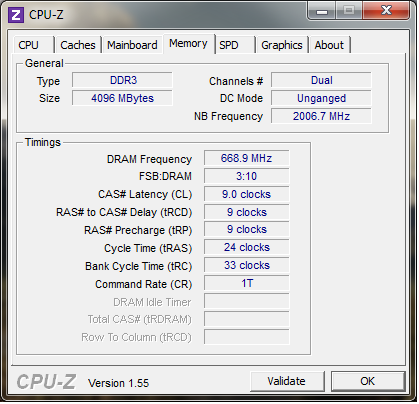
What were the timings set to, when on Auto?
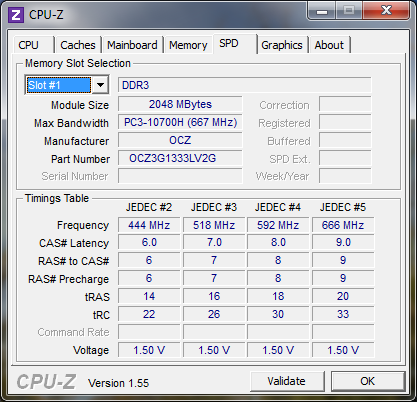
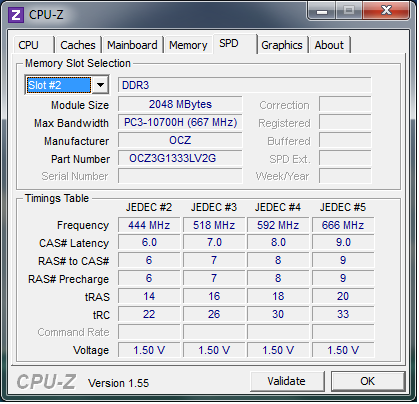
If you don't have CPUZ, you should D/L it and post the memory and SPD tabs.
Sometimes AMD boards will lower settings in order to have better stability.
They sometimes don't run well at 1600MHz, it will be more stable at 1333MHz.
They will have a JEDEC setting for 1333MHZ on the CPUZ SPD tab.
If that is what your referring to, you should leave it at 1333MHz.
From the previously posted link.
So it may need to be at 1066 MHz.Some of the Athlon CPU's have a memory speed rating of 1066 Mhz and will pull back RAM above this speed to the default setting. This is again to protect the CPU's Memory Controller and is not a fault with the Motherboard, BIOS or RAM.
Did you check if it is in unganged mode?
I can verify two AM3 systems (Phenom II 925 2.8 and Phenom II 965 3.4) running 8GB DDR3 1333, however: By default, with the 925 the memory runs at 1066 unless changed, the 965, the memory by default go's straight to 1333 where it should. Both always "unganged".
Edit: I should have noticed your post Dave76, having read that, it's now clear to me the reason is the 965 is Stepping 3, newer, and the bug is no longer there.
Last edited:
My Computer
At a glance
HP Win7 Pro x64 | Custom Win7 Pro x64HP PhII X4 965 Black Ed. 3.4Ghz | PhII X6 110...8GB DDR3 1333 OC Black Edition x2HP XFX Radeon HD4890 1GB | AMD Radeon HD 6990
- Computer Manufacturer/Model Number
- HPE-112y Custom + Custom Build
- OS
- HP Win7 Pro x64 | Custom Win7 Pro x64
- CPU
- HP PhII X4 965 Black Ed. 3.4Ghz | PhII X6 1100T 3.3/3.7
- Motherboard
- OEM HP | ASUS Crosshair IV Extreme 890FX
- Memory
- 8GB DDR3 1333 OC Black Edition x2
- Graphics Card(s)
- HP XFX Radeon HD4890 1GB | AMD Radeon HD 6990
- Sound Card
- Realtek 7.1 Digital HDMI x2
- Monitor(s) Displays
- HP 20" 1680x1050 LCD | Samsung 23" 2ms 1920x1200 LED
- Screen Resolution
- 1680x1050 + 1920x1200 & HDTV for Gaming/TV
- Hard Drives
- 1TB WD "Green" 5,400 RPM SCSI W/ AMD RAID/Xpert
Custom 2x 128GB OCZ Enyo SSD
- PSU
- Thermaltake Black Widow 850watt Modular x2
- Case
- HP HPE- 112y OEM Modded | Custom Xclio A380S
- Cooling
- HP Antec120mm | Custom Antec 360mm/250mm/200mm/120mm
- Keyboard
- HP G15 | G19
- Mouse
- G500 x2
- Internet Speed
- 15mb down, 2mb up
- Other Info
- 2x DVD-RAM | 2x BD-ROM