
System Repair Disc - Create

How to Create a Windows 7 System Repair Disc

   Information
This will show you how to create a Windows 7 system repair disc to be able to use to boot to system recovery options to help recover your Windows 7 installation if you don't have a Windows installation disc, can't find your Windows installation disc, or can't access the recovery options provided by your computer manufacturer.

A system repair disc is not able to install Windows 7.

   Note
If you are unable to boot your Windows 7 to create a Windows 7 System Repair Disc, then you could create it on another computer to use on your computer.

   Warning

  • A system repair disc is not the same as a OEM factory recovery/restore disc.
  • A system repair disc is not an installation disc. You cannot do a repair install or install Windows 7 with a system repair disc.
  • A system repair disc can only be used to repair Windows 7 through the system recovery options.
  • 32-bit System Repair Disc can only be created on a 32-bit Windows 7.
  • 64-bit System Repair Disc can only be created on a 64-bit Windows 7.
  • 32-bit System Repair Disc can only be used to repair a 32-bit Windows 7.
  • 64-bit System Repair Disc can only be used to repair a 64-bit Windows 7.

:note: For Windows 10, see the following link - System Repair Disc - Create in Windows 10 - Windows 10 Tutorials

EXAMPLE: System Recovery Options
NOTE: Using the System Repair Disc that you have created below, you can boot to the system recovery options screen below.
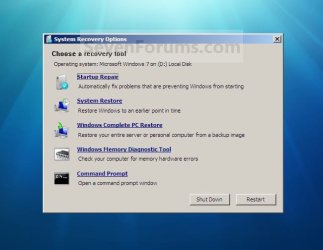
System_Recovery_Options.jpg


Here's How:
1. Open the Start Menu, then type recdisc.exe in the search box and press Enter.
A) Go to step 3.
OR

2. Open the Control Panel (icons view), and click on the Backup and Restore icon.
A) Click on the Create a System repair disc link in the left blue pane. (See screenshot below)
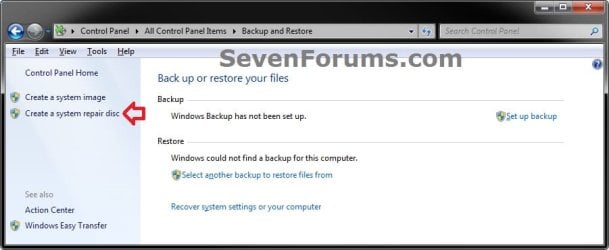
Backup_and_Restore.jpg
3. Insert a blank unformatted CD or DVD into your CD/DVD drive and click on the Create disc button. (See screenshot below)
NOTE: If you are prompted to insert a Windows installation disc, it means that the files needed to create the system repair disc cannot be found on your computer. Insert a Windows 7 installation disc.
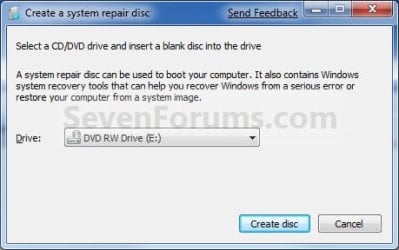
Step1.jpg
4. It will now start creating the System Repair Disc. (See screenshot below)
NOTE: If a AutoPlay window pops up, just close it.
Step2.jpg
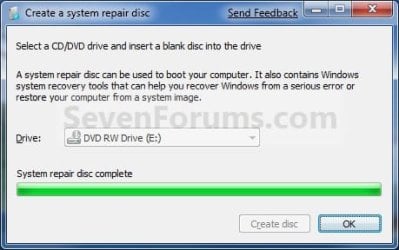
5. When it's finished, click on the Close button. (See screenshot below)
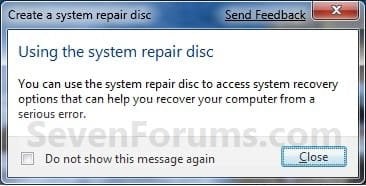
Step3.jpg
6. Click on OK. (See screenshot below)
Step4.jpg
7. Remove and label your new Windows 7 System Repair Disc from the CD/DVD drive.

   Tip
If you would like to create a bootable System Repair USB flash drive, then you could use the free program ImgBurn to create an ISO file with this Windows 7 System Repair Disc (DVD), then use the Part 1 section in the tutorial below to extract the ISO file to a USB flash drive.

Windows 7 USB/DVD Download Tool


That's it,
Shawn


Last edited:
LOL, yeah there are a few. ;)
 

My Computer

Computer type
PC/Desktop
Computer Manufacturer/Model Number
Self built custom
OS
64-bit Windows 11 Pro for Workstations
CPU
Intel i7-8700K OC'd to 5 GHz
Motherboard
ASUS ROG Maximus XI Formula Z390
Memory
64 GB (4x16GB) G.SKILL TridentZ RGB DDR4 3600 MHz
Graphics Card(s)
ASUS ROG-STRIX-GTX1080TI-O11G-GAMING
Sound Card
Integrated
Monitor(s) Displays
2 x Samsung Odyssey G7 27"
Screen Resolution
2560x1440
Hard Drives
1TB Samsung 990 PRO M.2,
4TB Samsung 990 PRO PRO M.2,
TerraMaster F8 SSD Plus NAS
PSU
Seasonic Prime Titanium 850W
Case
Thermaltake Core P3
Cooling
Corsair Hydro H115i
Keyboard
Logitech wireless K800
Mouse
Logitech MX Master 4
Internet Speed
2 Gb/s Download and 100 Mb/s Upload
Antivirus
Malwarebyte Anti-Malware Premium
Browser
Google Chrome
Other Info
Logitech Z625 speaker system,
Logitech BRIO 4K Pro webcam,
HP Color LaserJet Pro MFP M477fdn,
APC SMART-UPS RT 1000 XL - SURT1000XLI,
Galaxy S23 Plus phone
hi why is the burning of a iso file to a dvd disc in vista, would it make a difference whether window 7 or vista and how many dvd discs would you need to complete the burning. also i'd like to ask is there a tutorial on how to use the discs?
 

My Computer

OS
windows 7 home premium 64bit
hi why is the burning of a iso file to a dvd disc in vista, would it make a difference whether window 7 or vista and how many dvd discs would you need to complete the burning. also i'd like to ask is there a tutorial on how to use the discs?
Hello battosai, and welcome to Windows Seven Forums.

The "System Repair" disc just has some tools to use in repairing a damaged OS. The files are less than 200 MB and so will all fit on one CD. A DVD is not needed.

Here are 2 links to some of what the disk will do:

http://www.sevenforums.com/performance-maintenance/51100-repair-cd-system-repair-disk.html

and

http://www.sevenforums.com/tutorials/668-system-recovery-options.html

Windows 7 and Vista are similar but they are not exactly the same so there is no guarantee the utilities written for Vista will work the same for 7. Since Windows will create and burn the "Repair CD" for you, it might be a good idea to have both the Vista and 7 versions?

Cheers!
Robert
 
Last edited by a moderator:

My Computer

OS
...
Hello Battosai, and welcome to Windows Seven Forums.

In addition, for Vista, you would want to use the tutorial below instead.

Create a Recovery Disc - Vista Forums

Hope this helps,
Shawn
 

My Computer

Computer type
PC/Desktop
Computer Manufacturer/Model Number
Self built custom
OS
64-bit Windows 11 Pro for Workstations
CPU
Intel i7-8700K OC'd to 5 GHz
Motherboard
ASUS ROG Maximus XI Formula Z390
Memory
64 GB (4x16GB) G.SKILL TridentZ RGB DDR4 3600 MHz
Graphics Card(s)
ASUS ROG-STRIX-GTX1080TI-O11G-GAMING
Sound Card
Integrated
Monitor(s) Displays
2 x Samsung Odyssey G7 27"
Screen Resolution
2560x1440
Hard Drives
1TB Samsung 990 PRO M.2,
4TB Samsung 990 PRO PRO M.2,
TerraMaster F8 SSD Plus NAS
PSU
Seasonic Prime Titanium 850W
Case
Thermaltake Core P3
Cooling
Corsair Hydro H115i
Keyboard
Logitech wireless K800
Mouse
Logitech MX Master 4
Internet Speed
2 Gb/s Download and 100 Mb/s Upload
Antivirus
Malwarebyte Anti-Malware Premium
Browser
Google Chrome
Other Info
Logitech Z625 speaker system,
Logitech BRIO 4K Pro webcam,
HP Color LaserJet Pro MFP M477fdn,
APC SMART-UPS RT 1000 XL - SURT1000XLI,
Galaxy S23 Plus phone
hello thanks for this reply but what i meant was could i burn the information on a dvd disc, and would it fit in one disc? i have a windows 7 not a vista.
 

My Computer

OS
windows 7 home premium 64bit
Battosai,

Yes, it will only use 1 DVD to create a System Repair disk with as outlined in the tutorial.
 

My Computer

Computer type
PC/Desktop
Computer Manufacturer/Model Number
Self built custom
OS
64-bit Windows 11 Pro for Workstations
CPU
Intel i7-8700K OC'd to 5 GHz
Motherboard
ASUS ROG Maximus XI Formula Z390
Memory
64 GB (4x16GB) G.SKILL TridentZ RGB DDR4 3600 MHz
Graphics Card(s)
ASUS ROG-STRIX-GTX1080TI-O11G-GAMING
Sound Card
Integrated
Monitor(s) Displays
2 x Samsung Odyssey G7 27"
Screen Resolution
2560x1440
Hard Drives
1TB Samsung 990 PRO M.2,
4TB Samsung 990 PRO PRO M.2,
TerraMaster F8 SSD Plus NAS
PSU
Seasonic Prime Titanium 850W
Case
Thermaltake Core P3
Cooling
Corsair Hydro H115i
Keyboard
Logitech wireless K800
Mouse
Logitech MX Master 4
Internet Speed
2 Gb/s Download and 100 Mb/s Upload
Antivirus
Malwarebyte Anti-Malware Premium
Browser
Google Chrome
Other Info
Logitech Z625 speaker system,
Logitech BRIO 4K Pro webcam,
HP Color LaserJet Pro MFP M477fdn,
APC SMART-UPS RT 1000 XL - SURT1000XLI,
Galaxy S23 Plus phone
A shortcut (as in step 1) with this for the location/target will launch 'Create a system repair disc': %systemroot%\system32\recdisc.exe

But does anyone know how to create a shortcut to launch 'Create a system image'?
 

My Computer

Computer type
Laptop
OS
Windows 7 Home Premium 64bit

My Computer

Computer type
PC/Desktop
Computer Manufacturer/Model Number
Self built custom
OS
64-bit Windows 11 Pro for Workstations
CPU
Intel i7-8700K OC'd to 5 GHz
Motherboard
ASUS ROG Maximus XI Formula Z390
Memory
64 GB (4x16GB) G.SKILL TridentZ RGB DDR4 3600 MHz
Graphics Card(s)
ASUS ROG-STRIX-GTX1080TI-O11G-GAMING
Sound Card
Integrated
Monitor(s) Displays
2 x Samsung Odyssey G7 27"
Screen Resolution
2560x1440
Hard Drives
1TB Samsung 990 PRO M.2,
4TB Samsung 990 PRO PRO M.2,
TerraMaster F8 SSD Plus NAS
PSU
Seasonic Prime Titanium 850W
Case
Thermaltake Core P3
Cooling
Corsair Hydro H115i
Keyboard
Logitech wireless K800
Mouse
Logitech MX Master 4
Internet Speed
2 Gb/s Download and 100 Mb/s Upload
Antivirus
Malwarebyte Anti-Malware Premium
Browser
Google Chrome
Other Info
Logitech Z625 speaker system,
Logitech BRIO 4K Pro webcam,
HP Color LaserJet Pro MFP M477fdn,
APC SMART-UPS RT 1000 XL - SURT1000XLI,
Galaxy S23 Plus phone
Hi Shawn,

Thanks for that but it's not I'm looking for. That, for me, opens the 'Backup and Restore' window. I want a shortcut that will open 'Create a system image' window (like the link above 'Create a system repair disc' in that window's left pane).
 

My Computer

Computer type
Laptop
OS
Windows 7 Home Premium 64bit
Selvan,

I have not found one yet that will open directly to "Create a System Image". I shall post back if I find one though for you. :)
 

My Computer

Computer type
PC/Desktop
Computer Manufacturer/Model Number
Self built custom
OS
64-bit Windows 11 Pro for Workstations
CPU
Intel i7-8700K OC'd to 5 GHz
Motherboard
ASUS ROG Maximus XI Formula Z390
Memory
64 GB (4x16GB) G.SKILL TridentZ RGB DDR4 3600 MHz
Graphics Card(s)
ASUS ROG-STRIX-GTX1080TI-O11G-GAMING
Sound Card
Integrated
Monitor(s) Displays
2 x Samsung Odyssey G7 27"
Screen Resolution
2560x1440
Hard Drives
1TB Samsung 990 PRO M.2,
4TB Samsung 990 PRO PRO M.2,
TerraMaster F8 SSD Plus NAS
PSU
Seasonic Prime Titanium 850W
Case
Thermaltake Core P3
Cooling
Corsair Hydro H115i
Keyboard
Logitech wireless K800
Mouse
Logitech MX Master 4
Internet Speed
2 Gb/s Download and 100 Mb/s Upload
Antivirus
Malwarebyte Anti-Malware Premium
Browser
Google Chrome
Other Info
Logitech Z625 speaker system,
Logitech BRIO 4K Pro webcam,
HP Color LaserJet Pro MFP M477fdn,
APC SMART-UPS RT 1000 XL - SURT1000XLI,
Galaxy S23 Plus phone
Thanks, much appreciated.
 

My Computer

Computer type
Laptop
OS
Windows 7 Home Premium 64bit
Hi Selvan,

Here. LOL.

View attachment CreateImage.zip

You will find that all the tutorials on all the forums are virtually identical - on every subject.


You can bet that there will be tutorials about making a "system image shortcut" springing up all over the place now.
 

My Computers

System One System Two

  • Computer type
    PC/Desktop
    OS
    7 X64
    CPU
    i5 8400
    Motherboard
    gigabyte b365m ds3h
    Memory
    2x8gb 3200mhz
    Hard Drives
    various
    PSU
    pure power 11 400w cm
    Case
    Coolermaster
    Cooling
    cryorig m9i
  • Computer type
    PC/Desktop
    OS
    7x64
    CPU
    g5400
    Motherboard
    ga b365m ds3h
    Memory
    8gb ddr4 2400
    PSU
    xfx pro 450w
Right on, SIW2, it works like a champ!
 

My Computer

Computer type
Laptop
OS
Windows 7 Home Premium 64bit

My Computer

Computer type
PC/Desktop
Computer Manufacturer/Model Number
Self built custom
OS
64-bit Windows 11 Pro for Workstations
CPU
Intel i7-8700K OC'd to 5 GHz
Motherboard
ASUS ROG Maximus XI Formula Z390
Memory
64 GB (4x16GB) G.SKILL TridentZ RGB DDR4 3600 MHz
Graphics Card(s)
ASUS ROG-STRIX-GTX1080TI-O11G-GAMING
Sound Card
Integrated
Monitor(s) Displays
2 x Samsung Odyssey G7 27"
Screen Resolution
2560x1440
Hard Drives
1TB Samsung 990 PRO M.2,
4TB Samsung 990 PRO PRO M.2,
TerraMaster F8 SSD Plus NAS
PSU
Seasonic Prime Titanium 850W
Case
Thermaltake Core P3
Cooling
Corsair Hydro H115i
Keyboard
Logitech wireless K800
Mouse
Logitech MX Master 4
Internet Speed
2 Gb/s Download and 100 Mb/s Upload
Antivirus
Malwarebyte Anti-Malware Premium
Browser
Google Chrome
Other Info
Logitech Z625 speaker system,
Logitech BRIO 4K Pro webcam,
HP Color LaserJet Pro MFP M477fdn,
APC SMART-UPS RT 1000 XL - SURT1000XLI,
Galaxy S23 Plus phone
I am wondering instead of downloading imgburn. I saved the file to a folder in my files. Then I put in a DVD in my DVD burner. I then went to the file right clicked selected open with. Then I selected windows disk image burner. and I burned it to my DVD. Does that work like that. Or do I have to download imgburn? The file size is 169,650. I am pretty sure it is the same thing they almost have the same name. I just would like to make sure.
 

My Computer

Computer Manufacturer/Model Number
HP Pavilion p6000 series/Model p6654y
OS
Windows 7 Ultimate x64
CPU
AMD Athlon(tm) II X4 630
Motherboard
Socket AM3 (938)
Memory
DDR3 2048 MB's/ PC3-10600 (1,333 MHz) (2 Cards)
Graphics Card(s)
ATI Radeon HD 4200
Sound Card
Realtek High definition Audio
Monitor(s) Displays
PnP-Monitor (Standard) (I am using my Emerson TV)
Screen Resolution
1024 x 768 pixels at 75 Hz in true colors (32-bit)
Hard Drives
750.05 Gigabytes Usable Hard Drive Capacity
692.61 Gigabytes Hard Drive Free Space

hp DVD-RAM GH60L SATA CdRom Device [Optical drive]
YMAX magicJack USB Device [Optical drive]

Generic- Compact Flash USB Device [Hard drive] -- drive 2
Generic
PSU
250 Watts
Case
HP
Cooling
Fan
Keyboard
Logitech wireless wave combo MK550 (Came with mouse)
Mouse
Logitech wireless wave combo MK550 (Came with keyboard)
Internet Speed
DSL Download speed 15.06-mb/s Upload .49-mb/s ping 45ms
Other Info
HP Wireless 802.11 b/g/n PCIe Card
I am wondering instead of downloading imgburn. I saved the file to a folder in my files. Then I put in a DVD in my DVD burner. I then went to the file right clicked selected open with. Then I selected windows disk image burner. and I burned it to my DVD. Does that work like that. Or do I have to download imgburn? The file size is 169,650. I am pretty sure it is the same thing they almost have the same name. I just would like to make sure.
Hello,

The Windows Disc Image Burner is a built-in program that does essentially the same thing as ImgBurn. ImgBurn supports a few more formats, and a few other things, but for burning ISOs to a CD, the method you used works great.
 

My Computer

Computer Manufacturer/Model Number
Custom
OS
Windows 7 Professional x64
CPU
Intel i7 2600K OC'd @ 4620 MHz
Motherboard
Asus P8Z68-V Pro
Memory
16GB GSkill Sniper 2133 Mhz (4x4GB)
Graphics Card(s)
EVGA GeForce GTX 480 SuperClocked+
Sound Card
Realtek High Definition Audio
Monitor(s) Displays
2x Acer S273HLbmii 27"
Screen Resolution
2 x 1920x1080
Hard Drives
64GB Crucial M4 SSD

Storage: Hitachi 1TB 5400RPM, Samsung 1.5TB 5400RPM
PSU
Corsair HW Series 750w (modular)
Case
Cooler Master HAF 932 Advanced Blue Edition
Cooling
CM Hyper 212+ CPU cooler, 3x 230mm + 1x 140mm case fans
Keyboard
Logitech MK320 (wireless)
Mouse
Logitech MK320 (wireless)
Internet Speed
30 Mb/s : 2 Mb/s
I am wondering instead of downloading imgburn. I saved the file to a folder in my files. Then I put in a DVD in my DVD burner. I then went to the file right clicked selected open with. Then I selected windows disk image burner. and I burned it to my DVD. Does that work like that. Or do I have to download imgburn? The file size is 169,650. I am pretty sure it is the same thing they almost have the same name. I just would like to make sure.
Hello,

The Windows Disc Image Burner is a built-in program that does essentially the same thing as ImgBurn. ImgBurn supports a few more formats, and a few other things, but for burning ISOs to a CD, the method you used works great.
Awesome thank you.

Now is there anything else I can download to a DVD to make sure if anything goes wrong with my PC I am all set to put it back to the way it was before. I have done the system back up also.
 
Last edited by a moderator:

My Computer

Computer Manufacturer/Model Number
HP Pavilion p6000 series/Model p6654y
OS
Windows 7 Ultimate x64
CPU
AMD Athlon(tm) II X4 630
Motherboard
Socket AM3 (938)
Memory
DDR3 2048 MB's/ PC3-10600 (1,333 MHz) (2 Cards)
Graphics Card(s)
ATI Radeon HD 4200
Sound Card
Realtek High definition Audio
Monitor(s) Displays
PnP-Monitor (Standard) (I am using my Emerson TV)
Screen Resolution
1024 x 768 pixels at 75 Hz in true colors (32-bit)
Hard Drives
750.05 Gigabytes Usable Hard Drive Capacity
692.61 Gigabytes Hard Drive Free Space

hp DVD-RAM GH60L SATA CdRom Device [Optical drive]
YMAX magicJack USB Device [Optical drive]

Generic- Compact Flash USB Device [Hard drive] -- drive 2
Generic
PSU
250 Watts
Case
HP
Cooling
Fan
Keyboard
Logitech wireless wave combo MK550 (Came with mouse)
Mouse
Logitech wireless wave combo MK550 (Came with keyboard)
Internet Speed
DSL Download speed 15.06-mb/s Upload .49-mb/s ping 45ms
Other Info
HP Wireless 802.11 b/g/n PCIe Card
Awesome thank you.

Now is there anything else I can download to a DVD to make sure if anything goes wrong with my PC I am all set to put it back to the way it was before. I have done the system back up also.

Without going into 3rd-party tools, the system repair disc is the best you'll get. You could always add a 3rd-party data recovery program, anti-virus program, etc, but chances are you'll have all you'll need, if you have a repair disc and backups.
 
Last edited by a moderator:

My Computer

Computer Manufacturer/Model Number
Custom
OS
Windows 7 Professional x64
CPU
Intel i7 2600K OC'd @ 4620 MHz
Motherboard
Asus P8Z68-V Pro
Memory
16GB GSkill Sniper 2133 Mhz (4x4GB)
Graphics Card(s)
EVGA GeForce GTX 480 SuperClocked+
Sound Card
Realtek High Definition Audio
Monitor(s) Displays
2x Acer S273HLbmii 27"
Screen Resolution
2 x 1920x1080
Hard Drives
64GB Crucial M4 SSD

Storage: Hitachi 1TB 5400RPM, Samsung 1.5TB 5400RPM
PSU
Corsair HW Series 750w (modular)
Case
Cooler Master HAF 932 Advanced Blue Edition
Cooling
CM Hyper 212+ CPU cooler, 3x 230mm + 1x 140mm case fans
Keyboard
Logitech MK320 (wireless)
Mouse
Logitech MK320 (wireless)
Internet Speed
30 Mb/s : 2 Mb/s
Can I do this with Daemon tools? and mount the ISO instead of burning it?

Thanks,
The Unofficial
 

My Computer

Computer Manufacturer/Model Number
ASUS G60JX Republic of Gamers
OS
Windows 7 Professional 64-bit
CPU
Intel i5 430m
Memory
4 GB DDR3
Graphics Card(s)
nvidia Geforce GTS 360M Cuda 1GB
Sound Card
EAX Advanced HD 4.0
Screen Resolution
1366 x 768
Hard Drives
460 GB 7200 RPM built in
Internet Speed
Too slow :-( 160kbs
Can I do this with Daemon tools? and mount the ISO instead of burning it?

Thanks,
The Unofficial
No, you'll have to burn it to a CD, and then boot from it. It won't run under Windows.
 

My Computer

Computer Manufacturer/Model Number
Custom
OS
Windows 7 Professional x64
CPU
Intel i7 2600K OC'd @ 4620 MHz
Motherboard
Asus P8Z68-V Pro
Memory
16GB GSkill Sniper 2133 Mhz (4x4GB)
Graphics Card(s)
EVGA GeForce GTX 480 SuperClocked+
Sound Card
Realtek High Definition Audio
Monitor(s) Displays
2x Acer S273HLbmii 27"
Screen Resolution
2 x 1920x1080
Hard Drives
64GB Crucial M4 SSD

Storage: Hitachi 1TB 5400RPM, Samsung 1.5TB 5400RPM
PSU
Corsair HW Series 750w (modular)
Case
Cooler Master HAF 932 Advanced Blue Edition
Cooling
CM Hyper 212+ CPU cooler, 3x 230mm + 1x 140mm case fans
Keyboard
Logitech MK320 (wireless)
Mouse
Logitech MK320 (wireless)
Internet Speed
30 Mb/s : 2 Mb/s
Back
Top