
System Repair Disc - Create

How to Create a Windows 7 System Repair Disc

   Information
This will show you how to create a Windows 7 system repair disc to be able to use to boot to system recovery options to help recover your Windows 7 installation if you don't have a Windows installation disc, can't find your Windows installation disc, or can't access the recovery options provided by your computer manufacturer.

A system repair disc is not able to install Windows 7.

   Note
If you are unable to boot your Windows 7 to create a Windows 7 System Repair Disc, then you could create it on another computer to use on your computer.

   Warning

  • A system repair disc is not the same as a OEM factory recovery/restore disc.
  • A system repair disc is not an installation disc. You cannot do a repair install or install Windows 7 with a system repair disc.
  • A system repair disc can only be used to repair Windows 7 through the system recovery options.
  • 32-bit System Repair Disc can only be created on a 32-bit Windows 7.
  • 64-bit System Repair Disc can only be created on a 64-bit Windows 7.
  • 32-bit System Repair Disc can only be used to repair a 32-bit Windows 7.
  • 64-bit System Repair Disc can only be used to repair a 64-bit Windows 7.

:note: For Windows 10, see the following link - System Repair Disc - Create in Windows 10 - Windows 10 Tutorials

EXAMPLE: System Recovery Options
NOTE: Using the System Repair Disc that you have created below, you can boot to the system recovery options screen below.
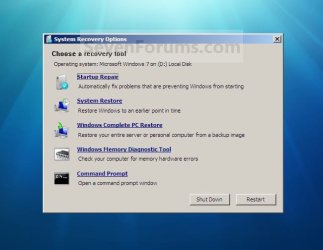
System_Recovery_Options.jpg


Here's How:
1. Open the Start Menu, then type recdisc.exe in the search box and press Enter.
A) Go to step 3.
OR

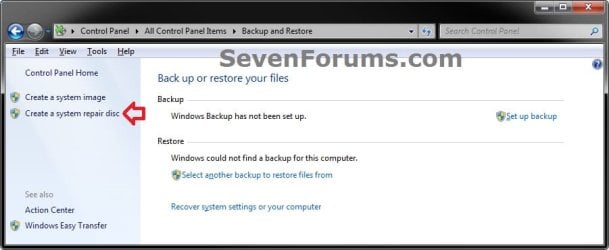
2. Open the Control Panel (icons view), and click on the Backup and Restore icon.
A) Click on the Create a System repair disc link in the left blue pane. (See screenshot below)
Backup_and_Restore.jpg
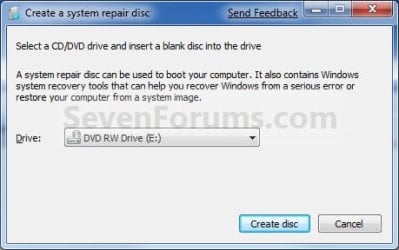
3. Insert a blank unformatted CD or DVD into your CD/DVD drive and click on the Create disc button. (See screenshot below)
NOTE: If you are prompted to insert a Windows installation disc, it means that the files needed to create the system repair disc cannot be found on your computer. Insert a Windows 7 installation disc.
Step1.jpg
4. It will now start creating the System Repair Disc. (See screenshot below)
NOTE: If a AutoPlay window pops up, just close it.
Step2.jpg
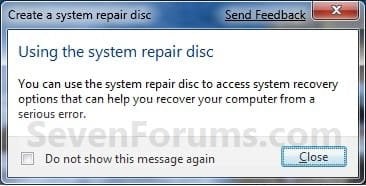
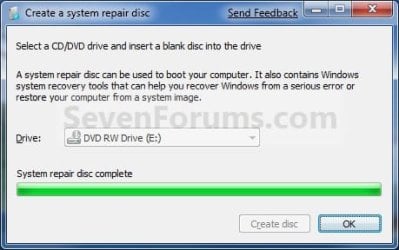
5. When it's finished, click on the Close button. (See screenshot below)
Step3.jpg
6. Click on OK. (See screenshot below)
Step4.jpg
7. Remove and label your new Windows 7 System Repair Disc from the CD/DVD drive.

   Tip
If you would like to create a bootable System Repair USB flash drive, then you could use the free program ImgBurn to create an ISO file with this Windows 7 System Repair Disc (DVD), then use the Part 1 section in the tutorial below to extract the ISO file to a USB flash drive.

Windows 7 USB/DVD Download Tool


That's it,
Shawn


Last edited:
Created my System Repair Disk ... thank you for the Tutorial :)

Ciara ... X
 

My Computer

Computer Manufacturer/Model Number
Home Built
OS
Windows 7 Professional 64-bit SP1
CPU
Intel E8400
Motherboard
MSI P35 Neo
Memory
4GB Crucial Ballistix
Graphics Card(s)
ATI ASUS Radeon HD 4830
Sound Card
Realtek ALC888 on Board
Monitor(s) Displays
Asus 22-inch VH226H Widescreen
Screen Resolution
1920 x 1080
Hard Drives
Two Western Digital 500GB
PSU
Hiper HPU-4M 530W
Case
Thermaltake Tsunami Dream Black
Cooling
Air/Fans
Keyboard
Saitek Eclipse
Mouse
Razer
Internet Speed
Sky Broadband
Other Info
USB Hub/Card Reader - 2 Pen Drives, 1 Phone Dock
You're most welcome Ciara. Thank you. :)
 

My Computer

Computer type
PC/Desktop
Computer Manufacturer/Model Number
Self built custom
OS
64-bit Windows 11 Pro for Workstations
CPU
Intel i7-8700K OC'd to 5 GHz
Motherboard
ASUS ROG Maximus XI Formula Z390
Memory
64 GB (4x16GB) G.SKILL TridentZ RGB DDR4 3600 MHz
Graphics Card(s)
ASUS ROG-STRIX-GTX1080TI-O11G-GAMING
Sound Card
Integrated
Monitor(s) Displays
2 x Samsung Odyssey G7 27"
Screen Resolution
2560x1440
Hard Drives
1TB Samsung 990 PRO M.2,
4TB Samsung 990 PRO PRO M.2,
TerraMaster F8 SSD Plus NAS
PSU
Seasonic Prime Titanium 850W
Case
Thermaltake Core P3
Cooling
Corsair Hydro H115i
Keyboard
Logitech wireless K800
Mouse
Logitech MX Master 4
Internet Speed
2 Gb/s Download and 100 Mb/s Upload
Antivirus
Malwarebyte Anti-Malware Premium
Browser
Google Chrome
Other Info
Logitech Z625 speaker system,
Logitech BRIO 4K Pro webcam,
HP Color LaserJet Pro MFP M477fdn,
APC SMART-UPS RT 1000 XL - SURT1000XLI,
Galaxy S23 Plus phone
Brink

Single post please read.
http://www.sevenforums.com/installa...t-down-during-windows-update.html#post1282865

Posting here because I didn't want to hijack the above thread
So is my non SP1 repair disk useless?
Not a problem if needed to burn a new one but it seems not to be widely known issue if true.

1) Do I need to make a new one since installing SP1?
2) May need to be added to tutorial if true.

Mike
 

My Computer

Computer Manufacturer/Model Number
Hopalong/ Godzilla
OS
Windows7 Pro 64bit SP-1; Windows XP Pro 32bit
CPU
Intel Core i7-870 Lynnfield 2.93GHz LGA 1156 95W Quad-Core
Motherboard
ASUS P7P55D-E PRO
Memory
8GB@1400MHz Crucial Ballistix DDR3-1600 4x2GB
Graphics Card(s)
ASUS ENGTX460 DirectCU/2DI/1GD5 1GB 256-bit GDDR5
Sound Card
VIA Onboard
Monitor(s) Displays
Asus VS248H-P 24"; Samsung SyncMaster 941BW 19"ws
Screen Resolution
1920x1080; 1440x900
Hard Drives
Samsung 830 120GB SSD
Intel 320 120GB SSD
Western Digital Caviar Black WD7501AALS 750GB 7200 RPM SATA 3.0Gb/s
Western Digital Caviar Black WD6401AALS 640GB 7200 RPM SATA 3.0Gb/s
PSU
COOLER MASTER Silent Pro RS850-AMBAJ3-US 850W Modular
Case
COOLER MASTER HAF 932 RC-932-KKN5-GP Black
Cooling
Scythe "Mugen-2 Rev.B" (2 ScytheKaze-Jyuni PWM fans)
Keyboard
Logitech K-320
Mouse
Kensington
Antivirus
Avast Inernet Suite
Browser
IE 9 ; Chrome
Hello Mike,

You could still use a non SP1 Windows 7 disc to use the command prompt at boot on a Windows 7 SP1 installation. However, if you wanted to use the other options at "System Recovery", you would need to have a Windows 7 SP1 disc for a Windows 7 SP1 installation.
 

My Computer

Computer type
PC/Desktop
Computer Manufacturer/Model Number
Self built custom
OS
64-bit Windows 11 Pro for Workstations
CPU
Intel i7-8700K OC'd to 5 GHz
Motherboard
ASUS ROG Maximus XI Formula Z390
Memory
64 GB (4x16GB) G.SKILL TridentZ RGB DDR4 3600 MHz
Graphics Card(s)
ASUS ROG-STRIX-GTX1080TI-O11G-GAMING
Sound Card
Integrated
Monitor(s) Displays
2 x Samsung Odyssey G7 27"
Screen Resolution
2560x1440
Hard Drives
1TB Samsung 990 PRO M.2,
4TB Samsung 990 PRO PRO M.2,
TerraMaster F8 SSD Plus NAS
PSU
Seasonic Prime Titanium 850W
Case
Thermaltake Core P3
Cooling
Corsair Hydro H115i
Keyboard
Logitech wireless K800
Mouse
Logitech MX Master 4
Internet Speed
2 Gb/s Download and 100 Mb/s Upload
Antivirus
Malwarebyte Anti-Malware Premium
Browser
Google Chrome
Other Info
Logitech Z625 speaker system,
Logitech BRIO 4K Pro webcam,
HP Color LaserJet Pro MFP M477fdn,
APC SMART-UPS RT 1000 XL - SURT1000XLI,
Galaxy S23 Plus phone
Thanks Brink.

I'll burn a new one and mark it SP1 version. ;)

I figured BFK would not be wrong!!
Mike
 

My Computer

Computer Manufacturer/Model Number
Hopalong/ Godzilla
OS
Windows7 Pro 64bit SP-1; Windows XP Pro 32bit
CPU
Intel Core i7-870 Lynnfield 2.93GHz LGA 1156 95W Quad-Core
Motherboard
ASUS P7P55D-E PRO
Memory
8GB@1400MHz Crucial Ballistix DDR3-1600 4x2GB
Graphics Card(s)
ASUS ENGTX460 DirectCU/2DI/1GD5 1GB 256-bit GDDR5
Sound Card
VIA Onboard
Monitor(s) Displays
Asus VS248H-P 24"; Samsung SyncMaster 941BW 19"ws
Screen Resolution
1920x1080; 1440x900
Hard Drives
Samsung 830 120GB SSD
Intel 320 120GB SSD
Western Digital Caviar Black WD7501AALS 750GB 7200 RPM SATA 3.0Gb/s
Western Digital Caviar Black WD6401AALS 640GB 7200 RPM SATA 3.0Gb/s
PSU
COOLER MASTER Silent Pro RS850-AMBAJ3-US 850W Modular
Case
COOLER MASTER HAF 932 RC-932-KKN5-GP Black
Cooling
Scythe "Mugen-2 Rev.B" (2 ScytheKaze-Jyuni PWM fans)
Keyboard
Logitech K-320
Mouse
Kensington
Antivirus
Avast Inernet Suite
Browser
IE 9 ; Chrome
Outside of the fact that a repair disc would save wear and tear on the original W7 DVD, does a repair disc offer any additional advantage(s)?
 

My Computer

Computer Manufacturer/Model Number
DIY
OS
W7x64 Pro, SuSe 12.1/** W7 x64 Pro, XP MCE
CPU
Phenom II 1090T w/Noctua NH-D14 /**4400+ X2 w/CM Hyper TX 3
Motherboard
ASRock 890FX Deluxe 4/**A8N-SLI
Memory
2 x 2GB Patriot PGS34g1600LLKA/**4x1GB Corsair VS
Graphics Card(s)
EVGA GTX460 SC/**EVGA 8800GTS
Sound Card
Asus Xonar D2X/**Xonar D1
Monitor(s) Displays
Acer X233H, Dell E152FPc /**LG M237-WD
Screen Resolution
1920x1080 & 1024x768/**1980x1080
Hard Drives
WDC 2TB, 1.5TB, 1TB, 500GB,Seagate 500GB , Maxtor 80GB /**500GB Seagate & WDC 1TB Black
PSU
CM RS600 w/ APC BX1000G/**Antec 500 TP w/ APC BX1000
Case
HAF922/**Antec 1040IIB
Cooling
3x200mm, 1x140 and 1x120mm/**5x80mm fans
Keyboard
Logitech Media USB/**Saitek Eclipse
Mouse
Cordless Trackman Wheel/**Ditto
Internet Speed
3.3Mbps
Other Info
SB 560 5.1 w/ Sennheiser RS140/**Creative T20 speakers, Dvico FusionHDTV7 Gold RT, Cisco E3000, HP 5510V AIO, Linksys E3000, Belkin F5U237 hub and **F5D8055 adapter
(** = 2nd rig)
Hello Seekermeister,

Other than that, creating a system repair disc after installing SP1 would be better since you would no longer be able to use a non SP1 Windows 7 installation DVD for any of the "System Recovery Options" other than "Command Prompt" and maybe "Windows Memory Diagnostic Tool".
 

My Computer

Computer type
PC/Desktop
Computer Manufacturer/Model Number
Self built custom
OS
64-bit Windows 11 Pro for Workstations
CPU
Intel i7-8700K OC'd to 5 GHz
Motherboard
ASUS ROG Maximus XI Formula Z390
Memory
64 GB (4x16GB) G.SKILL TridentZ RGB DDR4 3600 MHz
Graphics Card(s)
ASUS ROG-STRIX-GTX1080TI-O11G-GAMING
Sound Card
Integrated
Monitor(s) Displays
2 x Samsung Odyssey G7 27"
Screen Resolution
2560x1440
Hard Drives
1TB Samsung 990 PRO M.2,
4TB Samsung 990 PRO PRO M.2,
TerraMaster F8 SSD Plus NAS
PSU
Seasonic Prime Titanium 850W
Case
Thermaltake Core P3
Cooling
Corsair Hydro H115i
Keyboard
Logitech wireless K800
Mouse
Logitech MX Master 4
Internet Speed
2 Gb/s Download and 100 Mb/s Upload
Antivirus
Malwarebyte Anti-Malware Premium
Browser
Google Chrome
Other Info
Logitech Z625 speaker system,
Logitech BRIO 4K Pro webcam,
HP Color LaserJet Pro MFP M477fdn,
APC SMART-UPS RT 1000 XL - SURT1000XLI,
Galaxy S23 Plus phone
Outside of the fact that a repair disc would save wear and tear on the original W7 DVD, does a repair disc offer any additional advantage(s)?
A large no. of PC users have OEM machines and never got a win7 dvd for their hefty purchase! A repair disk is invaluable for them.
 

My Computer

Computer Manufacturer/Model Number
Too many to describe...
OS
Windows 7 x64 pro/ Windows 7 x86 Pro/ XP SP3 x86
what if i create a repair disk in my laptop(32bit) will it work with my computer(32bit)?
 

My Computer

OS
Windows 7 x32
Screen Resolution
1024x768
Last edited by a moderator:

My Computers

System One System Two

  • Computer type
    PC/Desktop
    OS
    7 X64
    CPU
    i5 8400
    Motherboard
    gigabyte b365m ds3h
    Memory
    2x8gb 3200mhz
    Hard Drives
    various
    PSU
    pure power 11 400w cm
    Case
    Coolermaster
    Cooling
    cryorig m9i
  • Computer type
    PC/Desktop
    OS
    7x64
    CPU
    g5400
    Motherboard
    ga b365m ds3h
    Memory
    8gb ddr4 2400
    PSU
    xfx pro 450w
Right but I can not access the start menu or the control panel. Windows will not start up. All I can get to is the boot menu and and the screen with the start up options like start in safe mode and the like. That's all I can get it to do.

Jeremy
 

My Computer

Computer Manufacturer/Model Number
Toshiba Satellite L455-S5009
OS
winodws 7
Hello Jeremy,

If you have your BIOS settings set to boot from a DVD (most are), then you will be able to boot directly from the created "System Repair Disc" in this tutorial to then be able to select from the System Recovery Options. Since you can't boot, I would recommend running Startup Repair.
 

My Computer

Computer type
PC/Desktop
Computer Manufacturer/Model Number
Self built custom
OS
64-bit Windows 11 Pro for Workstations
CPU
Intel i7-8700K OC'd to 5 GHz
Motherboard
ASUS ROG Maximus XI Formula Z390
Memory
64 GB (4x16GB) G.SKILL TridentZ RGB DDR4 3600 MHz
Graphics Card(s)
ASUS ROG-STRIX-GTX1080TI-O11G-GAMING
Sound Card
Integrated
Monitor(s) Displays
2 x Samsung Odyssey G7 27"
Screen Resolution
2560x1440
Hard Drives
1TB Samsung 990 PRO M.2,
4TB Samsung 990 PRO PRO M.2,
TerraMaster F8 SSD Plus NAS
PSU
Seasonic Prime Titanium 850W
Case
Thermaltake Core P3
Cooling
Corsair Hydro H115i
Keyboard
Logitech wireless K800
Mouse
Logitech MX Master 4
Internet Speed
2 Gb/s Download and 100 Mb/s Upload
Antivirus
Malwarebyte Anti-Malware Premium
Browser
Google Chrome
Other Info
Logitech Z625 speaker system,
Logitech BRIO 4K Pro webcam,
HP Color LaserJet Pro MFP M477fdn,
APC SMART-UPS RT 1000 XL - SURT1000XLI,
Galaxy S23 Plus phone
It would be nice with a howto explaining how to copy this repair disk onto a usb drive and make it bootable.
 

My Computer

OS
Windows 7 Ultimate x64

My Computer

Computer Manufacturer/Model Number
Custom
OS
Windows 7 Professional x64
CPU
Intel i7 2600K OC'd @ 4620 MHz
Motherboard
Asus P8Z68-V Pro
Memory
16GB GSkill Sniper 2133 Mhz (4x4GB)
Graphics Card(s)
EVGA GeForce GTX 480 SuperClocked+
Sound Card
Realtek High Definition Audio
Monitor(s) Displays
2x Acer S273HLbmii 27"
Screen Resolution
2 x 1920x1080
Hard Drives
64GB Crucial M4 SSD

Storage: Hitachi 1TB 5400RPM, Samsung 1.5TB 5400RPM
PSU
Corsair HW Series 750w (modular)
Case
Cooler Master HAF 932 Advanced Blue Edition
Cooling
CM Hyper 212+ CPU cooler, 3x 230mm + 1x 140mm case fans
Keyboard
Logitech MK320 (wireless)
Mouse
Logitech MK320 (wireless)
Internet Speed
30 Mb/s : 2 Mb/s
thanks :3 Picked up a 5pk of CD-r's and made one today :3
 

My Computer

Computer type
PC/Desktop
Computer Manufacturer/Model Number
Custom Build
OS
Windows 7 Ultimate x64
CPU
AMD FX 4100
Motherboard
Gigabyte 990FXA-UD3 USB 3.0
Memory
8GB DDR3-1333
Graphics Card(s)
ATI HD Radeon 5750
Sound Card
Realtek HD Audio
Monitor(s) Displays
AOC LM-500 & Curtis HDTV 19'
Screen Resolution
1024x768 & 1360x768
Hard Drives
Main: SATAII 500GB WD Blue
Secondary: 200GB Maxtor SataII
PSU
700Watt OCZ 80+
Case
Xion II
Cooling
standard Stock CPU heatsink and fan
Keyboard
standard PS/2 keyboard
Mouse
Gearhead Lighted Optical Mouse
Internet Speed
WideOpenWest (Cable) 15Mbps/1Mbps
Antivirus
Comodo
Browser
Firefox/Chrome
Other Info
Updated Specs as of 4/4/2013
(refelect new build as of mid 2012)
Just made a disk, first time.
Thanks a lot. :-)
 

My Computer

Computer Manufacturer/Model Number
Self Build
OS
Windows 7 ultimate 32bit
CPU
i3-540
Motherboard
MSI H55M-ED55
Memory
4gig
Graphics Card(s)
o/b
Sound Card
o/b
Monitor(s) Displays
HG216D
Hard Drives
Samsung 500 gig sata
PSU
Hiper Type-R 480W
Case
Cooler Master
Cooling
Rear 120cm -- CPU Frezer Pro rev2
You're welcome Cael, and Spud. Welcome to Seven Forums Spud. :)
 

My Computer

Computer type
PC/Desktop
Computer Manufacturer/Model Number
Self built custom
OS
64-bit Windows 11 Pro for Workstations
CPU
Intel i7-8700K OC'd to 5 GHz
Motherboard
ASUS ROG Maximus XI Formula Z390
Memory
64 GB (4x16GB) G.SKILL TridentZ RGB DDR4 3600 MHz
Graphics Card(s)
ASUS ROG-STRIX-GTX1080TI-O11G-GAMING
Sound Card
Integrated
Monitor(s) Displays
2 x Samsung Odyssey G7 27"
Screen Resolution
2560x1440
Hard Drives
1TB Samsung 990 PRO M.2,
4TB Samsung 990 PRO PRO M.2,
TerraMaster F8 SSD Plus NAS
PSU
Seasonic Prime Titanium 850W
Case
Thermaltake Core P3
Cooling
Corsair Hydro H115i
Keyboard
Logitech wireless K800
Mouse
Logitech MX Master 4
Internet Speed
2 Gb/s Download and 100 Mb/s Upload
Antivirus
Malwarebyte Anti-Malware Premium
Browser
Google Chrome
Other Info
Logitech Z625 speaker system,
Logitech BRIO 4K Pro webcam,
HP Color LaserJet Pro MFP M477fdn,
APC SMART-UPS RT 1000 XL - SURT1000XLI,
Galaxy S23 Plus phone
the download links are removed !!! what can we do now?
 

My Computer

OS
Windows XP 32bit, Windows 7 Home Premium 32bit & 64bit
CPU
Intel Core2Duo E7500 @ 2.93 Ghz
Memory
4gb DDR2
Graphics Card(s)
ATI Radeon 4670 1gb
Monitor(s) Displays
1360x768
Hard Drives
Hitachi 500gb
Hello Sayem,

You could create the System Repair Disc on another Windows 7 computer, and be able to use it on yours. :)
 

My Computer

Computer type
PC/Desktop
Computer Manufacturer/Model Number
Self built custom
OS
64-bit Windows 11 Pro for Workstations
CPU
Intel i7-8700K OC'd to 5 GHz
Motherboard
ASUS ROG Maximus XI Formula Z390
Memory
64 GB (4x16GB) G.SKILL TridentZ RGB DDR4 3600 MHz
Graphics Card(s)
ASUS ROG-STRIX-GTX1080TI-O11G-GAMING
Sound Card
Integrated
Monitor(s) Displays
2 x Samsung Odyssey G7 27"
Screen Resolution
2560x1440
Hard Drives
1TB Samsung 990 PRO M.2,
4TB Samsung 990 PRO PRO M.2,
TerraMaster F8 SSD Plus NAS
PSU
Seasonic Prime Titanium 850W
Case
Thermaltake Core P3
Cooling
Corsair Hydro H115i
Keyboard
Logitech wireless K800
Mouse
Logitech MX Master 4
Internet Speed
2 Gb/s Download and 100 Mb/s Upload
Antivirus
Malwarebyte Anti-Malware Premium
Browser
Google Chrome
Other Info
Logitech Z625 speaker system,
Logitech BRIO 4K Pro webcam,
HP Color LaserJet Pro MFP M477fdn,
APC SMART-UPS RT 1000 XL - SURT1000XLI,
Galaxy S23 Plus phone
Brink, can you confirm the following is true:

1. Win7 setup or repair disc can repair win7 installation only.
2. Win7 sp1 setup or repair disc can repair win7 sp1 installation only.
3. Win7 32bit can repair win7 32bit only.
4. Win7 64bit can repair win7 64bit only.
 

My Computer

OS
Windows 7 Professional 64bit
Back
Top