5.1 sound system setup

Ineedzhelpz

New member
Hi, I've just plugged in a Creative Inspire 5.1 speaker system, but only the 2.0 speakers seem to be working. I configured the speakers in playback devices window as 5.1 and have tested them within that windows test feature, they all work.

I've tried playback in winamp and a dvd (old dvd, played in vlc), but only the front 2 speakers are playing.

I am using the Supreme FX X-FI Audio Card that came with my Asus Crosshair III Formula motherboard.

Thank you
 

My Computer

OS
Windows 7 Pro 64bit
CPU
AMD Phenom II X4 965 3.41GHz
Motherboard
Asus Crosshair III Formula, Republic of Gamers
Memory
6GB
Graphics Card(s)
9800 GT
Monitor(s) Displays
30" Dell, 28" Hanns.g
Mouse
Logitech M705 Marathon
Hi,

Normal music is only recorded in stereo (2 channels), so if you want to hear it on 5 speakers you have to set some sort of effect/emulation like virtual surround or 5 channel stereo in your audio configuration panel.

If that's not available you could download and install a surround sound plug-in for Winamp, there are several on the Winamp site in the plug-in section.

If you try a dvd be sure it has 5.1 surround sound or you have to do the same procedure as I described for stereo music.

MK2
 

My Computer

OS
7
I don't appear to have an audio control panel, just the windows built-in stuff which is already set for 5.1, read a guide on winamp, besides a plugin it appears to be setup for 5.1 already.

I have audio drivers installed, tho not control options with them.
 

My Computer

OS
Windows 7 Pro 64bit
CPU
AMD Phenom II X4 965 3.41GHz
Motherboard
Asus Crosshair III Formula, Republic of Gamers
Memory
6GB
Graphics Card(s)
9800 GT
Monitor(s) Displays
30" Dell, 28" Hanns.g
Mouse
Logitech M705 Marathon
Since I installed Windows 7 a year ago I've had problems with my cheap SB Audigy.

What I've had to do is go into the Creative Soundblaster Tab and enable CMSS; then I pull the sliders down towards the rear speakers until I like it.
Click the speaker icon (Volume Control) in the System Tray
Click the speaker Icon at the top of the volume adjustment window that pops up
If you have installed the SB drivers, there should be a Soundblaster Tab; click that and do the CMSS thing.

Note: Even though I only have 4 speakers plus a woofer, my system is set up as a 7.1 speaker system.
Windows doesn't seem to care and it all works.

Another problem I had for quite a while was that I wasn't getting any voices from DVD's and some games.
My solution was to install FFDShow (part of the K-Lite Codec Pack) and redirect the output for the center speaker.
I don't have a center speaker and that is where many voice tracks are sent.
 
Last edited:

My Computer

Computer Manufacturer/Model Number
OEM - Me
OS
Windows 7 Home Premium x64
CPU
AMD Phenom II X6 1600T
Motherboard
GigaByte GZ-990FXA-UD3
Memory
16GB PC3-10700 (1342MHz)
Graphics Card(s)
ATI Radeon 5770 HD (x2) CrossFire
Sound Card
On-board RealTek chipset
Monitor(s) Displays
3x Hanns-G 1920x1080 Monitors
Screen Resolution
3x Hanns-G 1920x1080 Monitors
Hard Drives
Intel 25-V SSD 40GB: 218 MB/s AT: 0.1ms
Intel X-25M SSD 80GB: 230MB/s AT: 0.1ms
Seagate 750GB: 133 MB/s AT: 13ms (perpendicular storage)
Buffalo HD-PCTU3 1TB External drive
PSU
OCZ Stealth X Stream 750W
Case
Cheap (unknown)
Cooling
Stock
Keyboard
HP USB
Mouse
LogiTech USB
Internet Speed
1.5 Mbps - Slow - At the tail-end of a rural network
Other Info
Printer: Epson Stylus C-84
Scanner: HP 3500C Flatbed
DVD-RW: Plextor
DVD-ROM: Unknown
WEI: 7.4
Is it the player itself?

WMP should support DVD & 5.1 out of the box.
Try playing a DVD throught WMP.
If it has a 5.1 AC3 track, you should get 5.1 sound.

If you, you may need to look through option in VLC and set it appropriatly. It could just be set to output stero. if this is the case, all playback will be in stereo regardless what the system setup is.
Im not that familiar with VLC, but many playback software works similar.


As far as Music goes, since it is Stereo Sound, it will playback as stereo.
If you want to emulate a "surround" type atmosphere, open your control panel.
Click on the 3D Section and click the Surround button.

You will have 2 Choices of a stereo effect.
Stereo Surround and Stereo Expand. On the Right you can adjust the intesity or value of that effect.

Xpand makes the stereo signal sound wider.
Surround expands the Stereo to the rear speakers.
Ultimatley, its totally your preference as to what sounds better.
 

My Computer

Computer Manufacturer/Model Number
Custom (Self Build)
OS
Windows 7 Home Premium 64bit
CPU
Intel Core i7 2700k
Motherboard
eVGA P67 SLI
Memory
8GB Mushkin Redline Ridgebacks @1866
Graphics Card(s)
EVGA GTX570 SC
Sound Card
XiFi Titanium HD
Monitor(s) Displays
LG W2453V
Screen Resolution
1920x1080
Hard Drives
Intel 320 80GB -- Intel X25-V 40GB --WD Black 1TB x2 -- WD Blue 640GB
PSU
Seasonic x750
Case
Corsair 600T SE White
Cooling
eVGA Superclocked CPU Cooler
Keyboard
Saitek Cyborg
Antivirus
Kaspersky
Browser
IE
Other Info
LG BD/DVD
Which control panel do you mean, doesn't seem to buy an option for "3d" in windows control panel???
 

My Computer

OS
Windows 7 Pro 64bit
CPU
AMD Phenom II X4 965 3.41GHz
Motherboard
Asus Crosshair III Formula, Republic of Gamers
Memory
6GB
Graphics Card(s)
9800 GT
Monitor(s) Displays
30" Dell, 28" Hanns.g
Mouse
Logitech M705 Marathon
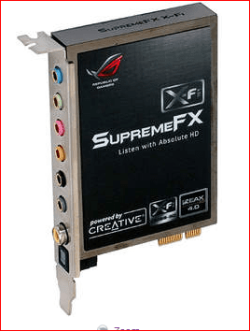
I am using the Supreme FX X-FI Audio Card that came with my Asus Crosshair III Formula motherboard.
That right there more than anything. If you haven't installed the driver for it yet go here,

ASUSTeK Computer Inc.

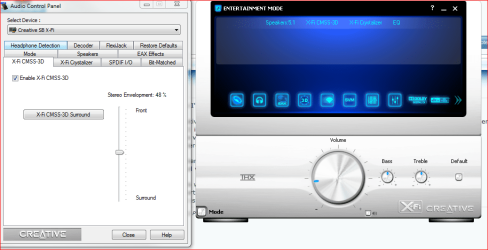
in Downloads (select your OS), then under Audio download the SoundMAX Audio Driver V5.10.1.6605. Next under Utilities download "Sound Blaster X-Fi Utility V1.0(R19)". Once the driver and the X-Fi software is installed (and no you do not have a X-Fi, you have onboard Soundmax that uses some of the X-Fi software), you should then have one, the other or both of these,

audioconsole.PNG

and have the CMSS3D setting.
 

My Computer

Computer type
PC/Desktop
Computer Manufacturer/Model Number
Me
OS
Win 7 Ultimate x64
CPU
FX-8350 @ 4.6 GHz so far
Motherboard
Asus M5A97 EVO
Memory
ADATA XPG V1 Series Black 8GB DDR3 1600
Graphics Card(s)
Sapphire R9 270x Dual-X
Sound Card
Xonar DGX w/ Corsair Vengence 1300
Monitor(s) Displays
Acer S232HL Abid
Screen Resolution
1920x1080
Hard Drives
120 GB OCZ Vertex 3
500 GB Seagate 7200.12
PSU
Antec Earthwatts 650W Green
Case
Antec Three Hundred
Cooling
Cooler Master 212 EVO
Keyboard
Logitech G510
Mouse
Logitech G500s
Internet Speed
35000/3000
Testing with a DVD supporting 5.1 now, the rear speakers seem very quiet so far, but do appear to be working.

Are there music formats that support surroad sound natively without me having to mod my app's to get them to work?
 

My Computer

OS
Windows 7 Pro 64bit
CPU
AMD Phenom II X4 965 3.41GHz
Motherboard
Asus Crosshair III Formula, Republic of Gamers
Memory
6GB
Graphics Card(s)
9800 GT
Monitor(s) Displays
30" Dell, 28" Hanns.g
Mouse
Logitech M705 Marathon
(and no you do not have a X-Fi, you have onboard Soundmax that uses some of the X-Fi software)

The motherboard manual say's I do, the the rise card is labeled as such.
 

My Computer

OS
Windows 7 Pro 64bit
CPU
AMD Phenom II X4 965 3.41GHz
Motherboard
Asus Crosshair III Formula, Republic of Gamers
Memory
6GB
Graphics Card(s)
9800 GT
Monitor(s) Displays
30" Dell, 28" Hanns.g
Mouse
Logitech M705 Marathon
Why yes it does,

supremefx.PNG

Doesn't change the fact that it is not a X-Fi in any way, shape or form. It is nothing more than a riser card (you got that part correct) for the onboard audio, in place of having the audio chip on the motherboard. It is nothing more than a Soundmax based "card" that uses some of the X-Fi software (also known as "X-Fi MB). It does not and will not work with any drivers or software from Creative, they leave support for it up to whoever it was that sold/included it with thie product (in this case Asus).

Still going to need the driver and X-Fi software for it to work properly.
 

My Computer

Computer type
PC/Desktop
Computer Manufacturer/Model Number
Me
OS
Win 7 Ultimate x64
CPU
FX-8350 @ 4.6 GHz so far
Motherboard
Asus M5A97 EVO
Memory
ADATA XPG V1 Series Black 8GB DDR3 1600
Graphics Card(s)
Sapphire R9 270x Dual-X
Sound Card
Xonar DGX w/ Corsair Vengence 1300
Monitor(s) Displays
Acer S232HL Abid
Screen Resolution
1920x1080
Hard Drives
120 GB OCZ Vertex 3
500 GB Seagate 7200.12
PSU
Antec Earthwatts 650W Green
Case
Antec Three Hundred
Cooling
Cooler Master 212 EVO
Keyboard
Logitech G510
Mouse
Logitech G500s
Internet Speed
35000/3000
Its working now, that audio software did it, thanks.
 

My Computer

OS
Windows 7 Pro 64bit
CPU
AMD Phenom II X4 965 3.41GHz
Motherboard
Asus Crosshair III Formula, Republic of Gamers
Memory
6GB
Graphics Card(s)
9800 GT
Monitor(s) Displays
30" Dell, 28" Hanns.g
Mouse
Logitech M705 Marathon
Back
Top