>50% CPU utilisation with gadgets

CJ2006

New member
Local time
3:30 PM
Messages
4
any desktop gadgets cause the sidebar.exe process to go to 50% CPU utilization and more..

I found this but it doesn't help me, however I have the same problem...

can anyone help me out?

Sy CJ
 

My Computer

OS
Windows 7 Ultimate x64
any desktop gadgets cause the sidebar.exe process to go to 50% CPU utilization and more..

I found this but it doesn't help me, however I have the same problem...

can anyone help me out?

Sy CJ

We could use you system specs to find out what hardware we are dealing with.
 

My Computer

Computer Manufacturer/Model Number
HP Pavillion dv-7 1005 Tx
OS
Win 8 Release candidate 8400
CPU
[email protected]
Memory
4 gigs
Graphics Card(s)
Nvidia 9600M
Sound Card
HD built-in
Monitor(s) Displays
17" Wxga
Screen Resolution
1440x900
Cooling
none
Internet Speed
45Mb down 5Mb up
I have a Notebook:

model : HP 625
CPU: AMD Athlon IIP320 Dual-Core 2.1GHz
RAM : 4GB
OS: Win 7 Ultimate 64-bit
graphic card: ATI Mobility Radeon HD 4200 Series

Thanks in advance for the reply and your help :)

sy CJ
 

My Computer

OS
Windows 7 Ultimate x64
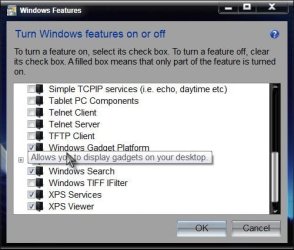
1st suggestion would be turn off the gadgets platform, then reboot. Then turn it back on again.

Start> In search box type Turn Windows Features On or Off and press enter> Uncheck box next to Windows Gadget Platform

Features.jpg

Rebooot and then reverse the process putting the check mark back next to Gadgets. See if that helps. A Guy
 

My Computer

Computer type
PC/Desktop
OS
Windows 10 Home x64
CPU
INTEL Core i5-750 Quad-Core 3.37GHz
Motherboard
ASUS P7P55D
Memory
HyperX Fury Black Series 8GB (2 x 4GB) 1866Mhz
Graphics Card(s)
EVGA GeForce GTX 750 Superclocked 1GB 128-Bit GDDR5
Monitor(s) Displays
LG 32MA68HY 32" IPS
Screen Resolution
1920 x 1080
Hard Drives
Samsung 840 Evo 120GB, SEAGATE 500GB Barracuda® 7200.12, SATA 3 Gb/s, 7200 RPM, 16MB cache
PSU
ANTEC TruePower New TP-550, 80 PLUS, 550W
Case
ANTEC Three Hundred Illusion
Cooling
COOLER MASTER Hyper 212 Plus, 4 x 120mm 1 x 140mm Noctua's
Internet Speed
85 + Mbps
Antivirus
Avast
Browser
Vivaldi
I never used the side Gadgets i actually don't like the look but my dad on the other hand he loves his big ole clock and calender on his rig via vista lmao and he has been useing vista problem free for like 3 years now

LoL and Vista still runs fine for him sorry guys i had to shout out to vista lmao :D
 

My Computer

Computer type
PC/Desktop
Computer Manufacturer/Model Number
CoreI7-6700K MrFingerIII Special Builds
OS
Windows 10 Home Premium 64bit sp1
CPU
Intel I7-6700K @ 4.6 Ghz 1.344 volts everyday OC
Motherboard
Asrock Fatality K6 Z170 Socket 1151
Memory
32GB G-Skill TridentZ 3200mhz 16-18-18-38 DDR4
Graphics Card(s)
Sli Gigabyte Windforce GTX 980 G1
Sound Card
AC97 Creative Rage Tactic 3D Headphones Bluetooth
Monitor(s) Displays
27" Asus ROG Swift PG278Q G-Sync 48" Vizio Smart HD TV
Screen Resolution
2560x1440p 27"- 48" Currently Gaming at 2560x1440p Res 2K
Hard Drives
250GB Samsung Evo840SSD Seagate baracuda 500 GB WD Mybook 500Gb 1TB Seagate Barracuda
PSU
HX1050w Corsair Silver 80plus certified crosfire/sli
Case
Enthod Pro Full Tower
Cooling
Corsair H110i GT 280 mm High Performance WaterBlock
Keyboard
Logitech wireless keyboard
Mouse
Logitech wireless mouse
Internet Speed
Cox Cable 100+ mb
Antivirus
WebRoot Spysweeper with Antivirus
Browser
IE-10, Chrome, Opera
Other Info
My Other Rig is a AMD FX8320E @4.6Ghz 16GB Ballistic Sport Ram
Mobo Asrock Fatality 990FX 120GB OCZ SSD 1TB Seagate Barracuda Corsair H75 Cooling PSU Corsair CX750
GPU GTX Gigabyte 970G1
I've tried .. it works only for a certain time. after a few days, the problem reappears...

sy
CJ
 

My Computer

OS
Windows 7 Ultimate x64
Well, my only one BSOD on Win7 was caused by HTC Home gadget (it's cool piece that simulates HTC's clock and weather app). So the system was ruined because HTC Home ate the CPU totally! And there was nothing but to uninstall it...
 

My Computer

Computer Manufacturer/Model Number
HP All-in-One 200-5120ru XH879EA
OS
Windows 7 me Premium 64-bit
CPU
Intel Pentium Dual-Core Mobile Processor E5400 2.70GHz
Memory
4096Mb, DDR3 1066MHz
Graphics Card(s)
Intel GMA X4500HD
Sound Card
Intel High Definition Audio
Monitor(s) Displays
WLED 16:9 21,5"
Hard Drives
Samsung HD502HJ
I only use the "GMail Counter"- and the "Remove Drive Safely"- gadget..

since my last post the sidebar.exe only use < 3% CPU^^ and I've changed nothing...
 

My Computer

OS
Windows 7 Ultimate x64
Back
Top