Abnormal RAM usage / reported usage

omaigadlol

New member
Local time
12:54 AM
Messages
15
Hi,

I have 8GB of RAM (7.90 usable) and I get "Your computer is running low on RAM" messages, up to the point where Windows asks me to close programs or even closes some. The problem is I don't see this reflected in the Task Manager -> Memory column for the running processes. Any idea what's eating up my RAM or why Windows is falsely reporting it's low on RAM?

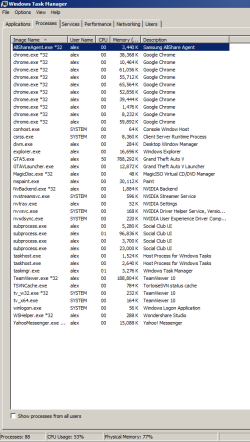
Screenshot: the reported RAM adds to around 2GB, but the reported 77% would mean 6GB are being used. What's up?!
 

Attachments
  • ram consumption.png
    ram consumption.png
    86 KB · Views: 0

My Computer

Computer type
PC/Desktop
OS
Win 7 Ultimate
CPU
i4690k
Motherboard
z97 pro4
Memory
HyperX Savage 16GB DDR3 1600MHz CL9 Dual Channel Kit
Graphics Card(s)
Gigabyte GTX 1080
Sound Card
-
Monitor(s) Displays
24" 144
Screen Resolution
1680x1050
Hard Drives
Samsung EVO 850 500gb
2x2TB
PSU
hiper hpu425
Case
-
Cooling
-
Keyboard
trust Power Plus Keyboard
Mouse
optical white
Internet Speed
50mbps
Post a screenshot of Task Manager - Performance tab when the problem occurs.

Adding up the items in the process memory usage column will never equal total usage. It was never intended that they would. There are major users of memory that are not processes, not all of which are shown in Task Manager. And in this case not all processes are shown. You must select "Show processes from all users" to see all processes.

The error message states that the computer was low on memory. The problem usually has nothing to do with RAM at all.
 

My Computer

Computer type
PC/Desktop
Computer Manufacturer/Model Number
HP
OS
Windows 7 Pro 64 bit
CPU
Xeon W3520
Memory
8 GB
Graphics Card(s)
Nvidia Geforce 210
Is it RAM or Virtual Memory? If the latter then check disk space.
 

My Computer

Computer type
PC/Desktop
Computer Manufacturer/Model Number
Lenovo IdeaCenter 450
OS
Windows 10 Pro X64
CPU
Intel Quad Core i7-4770 @ 3.4Ghz
Memory
16.0GB PC3-12800 DDR3 SDRAM 1600 MHz
Graphics Card(s)
Intel Integrated HD Graphics
Sound Card
Realtek HD Audio
Monitor(s) Displays
HP 22" LCD
Screen Resolution
1680 x 1050
Hard Drives
250GB Samsung EVO SATA-3 SSD
2TB Seagate ST2000DM001 SATA-2
1.5TB Seagate ST3150041AS SATA
Keyboard
Dell USB
Mouse
Lenovo USB
Internet Speed
Cable via Road Runner 3MB Upload, 30MB Download
Antivirus
Windows Defender, MBAM Pro, MBAE
Browser
Seamonkey
Other Info
UEFI/GPT
PLDS DVD-RW DH16AERSH
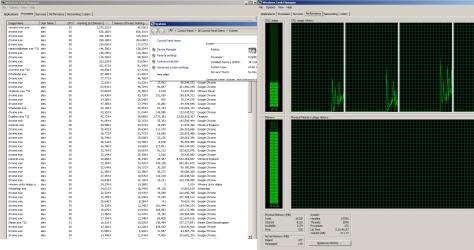
I added more RAM and I'm still affected by this. I only have a bunch of chrome tabs which add up to a couple gigs, not 10.

Any ideas?
 

Attachments

  • ram usage.png
    ram usage.png
    156.6 KB · Views: 32

My Computer

Computer type
PC/Desktop
OS
Win 7 Ultimate
CPU
i4690k
Motherboard
z97 pro4
Memory
HyperX Savage 16GB DDR3 1600MHz CL9 Dual Channel Kit
Graphics Card(s)
Gigabyte GTX 1080
Sound Card
-
Monitor(s) Displays
24" 144
Screen Resolution
1680x1050
Hard Drives
Samsung EVO 850 500gb
2x2TB
PSU
hiper hpu425
Case
-
Cooling
-
Keyboard
trust Power Plus Keyboard
Mouse
optical white
Internet Speed
50mbps
It seems a little higher than I would expect but within tolerance, Windows 7, Unlike older inefficient operating systems such as Windows XP, works on the principle that unused Memory is Wasted, so it takes control of the majority of available memory and will release it if any process requires it. The Windows 7 OS is a much better memory manager than was used in XP so there is no need for user intervention, windows 7 is better at this management than XP or any of us users.

Set your virtual memory to a few gigabytes, on the fastest drive you can spare it from, (the XP norm was 1.5 times the RAM total - which would be 24GB in your case ), you may be able to reduce this if you do not receive any memory errors, but do not remove the Virtual memory store to zero as some (badly written), games and programs will crash or throw an error if there is no virtual memory , even in a 32 or 64GB system
 

My Computers

System One System Two

  • Computer type
    PC/Desktop
    Computer Manufacturer/Model Number
    ChillBlast - Custom to my design
    OS
    Windows 11 Pro x64 [Latest Release and Release Preview]
    CPU
    Ryzen 9 5950X, 3.8 - 5.2 MHz
    Motherboard
    Asus Prime X570-Pro
    Memory
    64GB [2 x 32GB] DDR4 3200MHz
    Graphics Card(s)
    4GB NVIDIA GEFORCE GTX 1650 Ti
    Sound Card
    On-board SPDIF to 5.1 System + HDMI [5.1 system]
    Monitor(s) Displays
    32" UHD 32 Bit HDR Monitor + 43" UHD 4K 32Bit HDR TV
    Screen Resolution
    2 x 3840 x 2160 @60Hz
    Hard Drives
    1TB M2 SSD OS, 500GB Fast Access SSD, 2 x 8TB Data + Various Externals from 1TB to 4TB, 10TB NAS
    PSU
    NZXT C750 80 PLUS Gold 750W Modular PSU
    Case
    Workstation Case [Matt Black]
    Cooling
    NZXT Kraken X63 280mm CPU Cooler +2x Quiet Case fans
    Keyboard
    Logitech Wireless MX Keys & K400 + others
    Mouse
    Logitech Wireless MX Master 3S
    Internet Speed
    920 MB Down 50 MB Up
    Antivirus
    BitDefender Total Security Pro
    Browser
    Chrome (always run latest Non-Beta)
    Other Info
    Also run ...
    Laptop - Quad 8GB - Windows 10 Pro x64
    Nexus 7 Android tablet x2
    Samsung 10.2" tablet
    Blackview TAB 8 4G Android Tablet c/w Keyboard
    Wacom Intuos Pro Medium Pen Pad
    Wacom Intuos Pro Small Pen Pad
    Wacom Expresskeys Remote
    Loopdeck+ Graphics Controller
    Shuttle Pro v2 Control
  • Computer type
    Laptop
    System Manufacturer/Model Number
    Dell XPS 17 10750H
    OS
    Windows 11 Pro x64 Latest RP
    CPU
    Intel I7 10750H 5.0GHz
    Motherboard
    Dell XPS
    Memory
    32GB [2x16GB] DDR4 2933 MHz
    Graphics Card(s)
    nVidia GTX1650Ti 4 GB GDDR6
    Sound Card
    Stock [Realtek] 4 Speaker
    Monitor(s) Displays
    17" IPS UHD+ Infinity Edge Touchscreen
    Screen Resolution
    3840 x 2400
    Hard Drives
    2TB M2 NVMe, 4TB External + various 500GB & 1TB External NVMe (also have access to spinner HDD from
    PSU
    Stock
    Case
    Stock XPS Aluminium & Carbon Fibre
    Cooling
    Stock - Active Fan Control
    Keyboard
    Backlit + Various Logitech
    Mouse
    Stock Track Pad + Logitech MX Trackball
    Internet Speed
    72 MB Down 18MB Up
    Browser
    Chrome
    Other Info
    Also run ...
    Laptop - Quad 8GB - Windows 10 Pro x64
    Nexus 7 Android tablet x2
    10.2" tablet
    Sony Z3 Android Smartphone
    Wacom Intuos Pro Medium Pen Pad
    Wacom Intuos Pro Small Pen Pad
    Wacom Expresskeys Remote
    Loopdeck+ Graphics Controller
    Shuttle Pro v2 Control Pad
    10TB NAS
Well, the problem is there's nothing using the RAM. If I try to launch something memory consuming, I get an error or Windows just automatically closes the program consuming the most memory. It doesn't start using the missing 10GB. This is pretty frustrating and stupid even at work, on 32GB of RAM.

Can't I just disable this smart, super awesome RAM wasting feature?
 
Last edited:

My Computer

Computer type
PC/Desktop
OS
Win 7 Ultimate
CPU
i4690k
Motherboard
z97 pro4
Memory
HyperX Savage 16GB DDR3 1600MHz CL9 Dual Channel Kit
Graphics Card(s)
Gigabyte GTX 1080
Sound Card
-
Monitor(s) Displays
24" 144
Screen Resolution
1680x1050
Hard Drives
Samsung EVO 850 500gb
2x2TB
PSU
hiper hpu425
Case
-
Cooling
-
Keyboard
trust Power Plus Keyboard
Mouse
optical white
Internet Speed
50mbps
There are 38 instances of Chrome maybe due to a lot of add-ons which are a common cause of memory issues and a number of other high memory usage programs running in the part of the Task manager visible - I doubt all of these are needed at one time, add in other services and you may be using more memory than you think, also you need to give sufficient hard disk space to virtual ram.

I can't remember seeing any memory issue since old low memory XP machines
 

My Computers

System One System Two

  • Computer type
    PC/Desktop
    Computer Manufacturer/Model Number
    ChillBlast - Custom to my design
    OS
    Windows 11 Pro x64 [Latest Release and Release Preview]
    CPU
    Ryzen 9 5950X, 3.8 - 5.2 MHz
    Motherboard
    Asus Prime X570-Pro
    Memory
    64GB [2 x 32GB] DDR4 3200MHz
    Graphics Card(s)
    4GB NVIDIA GEFORCE GTX 1650 Ti
    Sound Card
    On-board SPDIF to 5.1 System + HDMI [5.1 system]
    Monitor(s) Displays
    32" UHD 32 Bit HDR Monitor + 43" UHD 4K 32Bit HDR TV
    Screen Resolution
    2 x 3840 x 2160 @60Hz
    Hard Drives
    1TB M2 SSD OS, 500GB Fast Access SSD, 2 x 8TB Data + Various Externals from 1TB to 4TB, 10TB NAS
    PSU
    NZXT C750 80 PLUS Gold 750W Modular PSU
    Case
    Workstation Case [Matt Black]
    Cooling
    NZXT Kraken X63 280mm CPU Cooler +2x Quiet Case fans
    Keyboard
    Logitech Wireless MX Keys & K400 + others
    Mouse
    Logitech Wireless MX Master 3S
    Internet Speed
    920 MB Down 50 MB Up
    Antivirus
    BitDefender Total Security Pro
    Browser
    Chrome (always run latest Non-Beta)
    Other Info
    Also run ...
    Laptop - Quad 8GB - Windows 10 Pro x64
    Nexus 7 Android tablet x2
    Samsung 10.2" tablet
    Blackview TAB 8 4G Android Tablet c/w Keyboard
    Wacom Intuos Pro Medium Pen Pad
    Wacom Intuos Pro Small Pen Pad
    Wacom Expresskeys Remote
    Loopdeck+ Graphics Controller
    Shuttle Pro v2 Control
  • Computer type
    Laptop
    System Manufacturer/Model Number
    Dell XPS 17 10750H
    OS
    Windows 11 Pro x64 Latest RP
    CPU
    Intel I7 10750H 5.0GHz
    Motherboard
    Dell XPS
    Memory
    32GB [2x16GB] DDR4 2933 MHz
    Graphics Card(s)
    nVidia GTX1650Ti 4 GB GDDR6
    Sound Card
    Stock [Realtek] 4 Speaker
    Monitor(s) Displays
    17" IPS UHD+ Infinity Edge Touchscreen
    Screen Resolution
    3840 x 2400
    Hard Drives
    2TB M2 NVMe, 4TB External + various 500GB & 1TB External NVMe (also have access to spinner HDD from
    PSU
    Stock
    Case
    Stock XPS Aluminium & Carbon Fibre
    Cooling
    Stock - Active Fan Control
    Keyboard
    Backlit + Various Logitech
    Mouse
    Stock Track Pad + Logitech MX Trackball
    Internet Speed
    72 MB Down 18MB Up
    Browser
    Chrome
    Other Info
    Also run ...
    Laptop - Quad 8GB - Windows 10 Pro x64
    Nexus 7 Android tablet x2
    10.2" tablet
    Sony Z3 Android Smartphone
    Wacom Intuos Pro Medium Pen Pad
    Wacom Intuos Pro Small Pen Pad
    Wacom Expresskeys Remote
    Loopdeck+ Graphics Controller
    Shuttle Pro v2 Control Pad
    10TB NAS
You have a commit limit of 17 GB and 16 GB RAM. As the commit limit is Pagefile size + RAM size (minus a small overhead) this shows that you have a very small pagefile. Out of memory warnings and errors mean the commit charge is approaching or would exceed the commit limit. They have nothing to do with a shortage of available memory and Windows doesn't even have a warning or error for that.

You have 8110 MB of Cached memory with only 2174 available. This means the majority of the Cached value is on the Modified list. This will be shown in the Resource Monitor. The memory manager would like to write this to the pagefile and make the memory available for other purposes. But with a too small pagefile that cannot happen.

There are 2 problems caused by the small pagefile. Set a reasonable pagefile size, preferably system managed, and see what the results are. The pagefile does not work like most people think it does. There are very many misinformed Internet articles about this.
 

My Computer

Computer type
PC/Desktop
Computer Manufacturer/Model Number
HP
OS
Windows 7 Pro 64 bit
CPU
Xeon W3520
Memory
8 GB
Graphics Card(s)
Nvidia Geforce 210
Alright. Set up a recommended-size pagefile and it's much better now. Not sure how all my RAM gets wasted, but it's bearable now, aside from the random times it dumps data to disk and I can't use it :D. Thanks!
 

My Computer

Computer type
PC/Desktop
OS
Win 7 Ultimate
CPU
i4690k
Motherboard
z97 pro4
Memory
HyperX Savage 16GB DDR3 1600MHz CL9 Dual Channel Kit
Graphics Card(s)
Gigabyte GTX 1080
Sound Card
-
Monitor(s) Displays
24" 144
Screen Resolution
1680x1050
Hard Drives
Samsung EVO 850 500gb
2x2TB
PSU
hiper hpu425
Case
-
Cooling
-
Keyboard
trust Power Plus Keyboard
Mouse
optical white
Internet Speed
50mbps
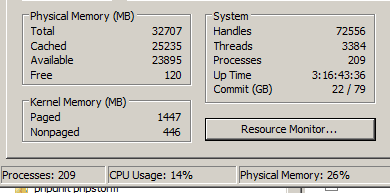
Looking good on my work machine :D
Thanks, guys!
 

Attachments

  • 32gig.png
    32gig.png
    7.8 KB · Views: 8

My Computer

Computer type
PC/Desktop
OS
Win 7 Ultimate
CPU
i4690k
Motherboard
z97 pro4
Memory
HyperX Savage 16GB DDR3 1600MHz CL9 Dual Channel Kit
Graphics Card(s)
Gigabyte GTX 1080
Sound Card
-
Monitor(s) Displays
24" 144
Screen Resolution
1680x1050
Hard Drives
Samsung EVO 850 500gb
2x2TB
PSU
hiper hpu425
Case
-
Cooling
-
Keyboard
trust Power Plus Keyboard
Mouse
optical white
Internet Speed
50mbps
Back
Top