omaigadlol
New member
- Local time
- 3:35 AM
- Messages
- 15
Hi,
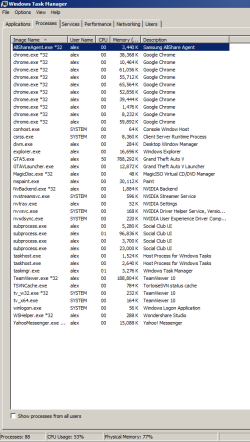
I have 8GB of RAM (7.90 usable) and I get "Your computer is running low on RAM" messages, up to the point where Windows asks me to close programs or even closes some. The problem is I don't see this reflected in the Task Manager -> Memory column for the running processes. Any idea what's eating up my RAM or why Windows is falsely reporting it's low on RAM?
Screenshot: the reported RAM adds to around 2GB, but the reported 77% would mean 6GB are being used. What's up?!
I have 8GB of RAM (7.90 usable) and I get "Your computer is running low on RAM" messages, up to the point where Windows asks me to close programs or even closes some. The problem is I don't see this reflected in the Task Manager -> Memory column for the running processes. Any idea what's eating up my RAM or why Windows is falsely reporting it's low on RAM?
Screenshot: the reported RAM adds to around 2GB, but the reported 77% would mean 6GB are being used. What's up?!
Attachments
My Computer
At a glance
Win 7 Ultimatei4690kHyperX Savage 16GB DDR3 1600MHz CL9 Dual Chan...Gigabyte GTX 1080
- Computer type
- PC/Desktop
- OS
- Win 7 Ultimate
- CPU
- i4690k
- Motherboard
- z97 pro4
- Memory
- HyperX Savage 16GB DDR3 1600MHz CL9 Dual Channel Kit
- Graphics Card(s)
- Gigabyte GTX 1080
- Sound Card
- -
- Monitor(s) Displays
- 24" 144
- Screen Resolution
- 1680x1050
- Hard Drives
- Samsung EVO 850 500gb
2x2TB
- PSU
- hiper hpu425
- Case
- -
- Cooling
- -
- Keyboard
- trust Power Plus Keyboard
- Mouse
- optical white
- Internet Speed
- 50mbps


 . Thanks!