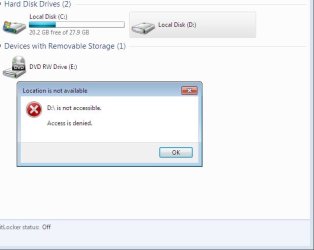
A abed87 New member Local time 6:27 PM Messages 13 Apr 22, 2010 #1 Dear all, I've installed windows 7 and I had XP, but I can't access my D:\ drive any more can you help me? I've attached a photo for that. My Computer My Computer OSXP
Dear all, I've installed windows 7 and I had XP, but I can't access my D:\ drive any more can you help me? I've attached a photo for that.
not so gray matter מעשוגע פ Guru Local time 7:27 PM Messages 1,506 Apr 22, 2010 #2 Try taking ownership of the drive if you can. Right Click > Properties > Security Tab > Advanced > Ownership Tab > Edit > Choose your username in the list Let us know if that helps. My Computer My Computer Computer Manufacturer/Model NumberApple Macbook Pro (April 2009)OSW7 Ult. x64 | OS XCPUIntel Mobile Core 2 Duo 2.93Ghz [T9800 Penryn]MotherboardNVIDIA nForce 730i Rev. B1 [Mac-F2268EC8 (U2E1)]Memory4096MB Samsung DDR3 Dual Channel [PC3-8500F 1066Mhz]Graphics Card(s)NVIDIA GeForce 9600M GT 512MB [G96M Rev. C1]Sound CardSB X-Fi Surround 5.1 USB | Onboard Realtek (Disabled)Monitor(s) DisplaysAcer x223wbd 22" | Apple Anti-Glare 17" (Disabled)Screen Resolution{Current} 1440x900 {Acer} 1680x1050 {Apple} 1920x1200Hard Drives{Internal} Seagate Momentus 320GB 2.5" 7200RPM [ST9320421AS] {Externals} LaCie 320GB USB 2.0 HDD [301284UR] LaCie 750GB USB 2.0 FW400 eSATA HDD [301314U] LaCie 1TB USB 2.0 HDD [301304UR]PSUMagsafeCaseAluminum/Unibody (MBP52)Cooling2 x 6000 RPM FansKeyboardLogitech G-15v2 [PN 920-000379]MouseLogitech G-9 [PN 910-000338]Internet Speed12Mbps/2.5Mbps w/ 24Mbps Speed Boost [Comcast]Other InfoLogitech X-540 Speakers [PN 970223-0122] Sennheiser PC-151 Headset
Try taking ownership of the drive if you can. Right Click > Properties > Security Tab > Advanced > Ownership Tab > Edit > Choose your username in the list Let us know if that helps.
A abed87 New member Thread Starter Local time 6:27 PM Messages 13 Apr 23, 2010 #3 Solved Hello notsogramatter, thanks for the help, but I already did similar to what you said, I used the permissions and its solved now THANK YOU My Computer My Computer OSXP
Solved Hello notsogramatter, thanks for the help, but I already did similar to what you said, I used the permissions and its solved now THANK YOU