aero transparency

Yes i installed the video driver also..... Is there any software i need to download to check for malwares
 

My Computer My Computer

OS
Windows 7 Ultimate build 7600
CPU
AMD Athlon Dual Core
Motherboard
ASUS
Memory
1 GB
Graphics Card(s)
Nvdia Geforce 6150 SE
Hard Drives
80 GB
Internet Speed
2 MBPS

My Computer My Computer

Computer Manufacturer/Model Number
Self Built
OS
Windows 7 ultimate 64 bit / XP Home sp3
CPU
intel Core 2 Duo E8400 3.0ghz
Motherboard
Asus P5ND bios 1401
Memory
8 gigs 1066 OCZ Fata1ty
Graphics Card(s)
EVGA GTX 580 Call of Duty Black Ops Edition
Sound Card
Creative Soundblaster Audigy 2zs
Monitor(s) Displays
Asus 24in LCD's 2MS X2
Screen Resolution
1920x1080p @60Hz
Hard Drives
WD Caviar 500 Black/ WD Caviar 200 Blue
PSU
OCZ 700W GameXtreme
Case
NZXT Apollo
Cooling
Corsair H50 CPU/120mm x3 /60mm x2 /Corsair Dominator Ram
Keyboard
Logitech Bluetooth Wireless MX5000
Mouse
Logitech Bluetooth Wireless MX1000
Internet Speed
Download 19.83 Upload 0.97
Other Info
Logitech Z2300 Speakers/ Bose Noise Cancelling Headphones/Avermedia PCI-e Hybrid TV Bravo/Epson NX415 all in one/ 4 Port Powered USB Hub/ LG 10x Bluray Burner /TSST Corp DVDRW External
I downloaded malwarebytes and its scanning now..... if it does not detect anything then?????? What can be the possible problems?
 

My Computer My Computer

OS
Windows 7 Ultimate build 7600
CPU
AMD Athlon Dual Core
Motherboard
ASUS
Memory
1 GB
Graphics Card(s)
Nvdia Geforce 6150 SE
Hard Drives
80 GB
Internet Speed
2 MBPS
It din yet show the aero option.... but when troubleshooted it says desktop window manager is disabled...... can u pls tell how to enable it.....?

Thanks

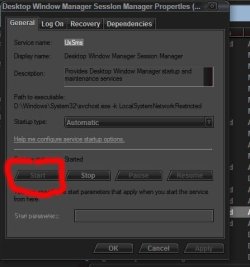
Type services.msc into the start menu, hit enter. You can set it to automatic and start it there too.
I did as u said, but still it says the same thing..... Desktop window manager is disabled.... I dont kno what to do.

Are you clicking the thing to start it?
 

Attachments

  • Capture.JPG
    Capture.JPG
    45.2 KB · Views: 5

My Computer My Computer

Computer Manufacturer/Model Number
self built
OS
7600.20510 x86
CPU
P4 550 3.4 GHz HT running at 3.5 GHz
Motherboard
MSI PM8M3-V (MS-7211 v1.x) Micro-ATX mainboard
Memory
OCZ 2 GB(2x1GB) DDR400mHz running @ 414 mHz
Graphics Card(s)
HIS Radeon HD 3850 IceQ 3 Turbo HDMI Dual DL-DVI AGP
Sound Card
MOTU Traveler firewire studio interface 192 kHz 24 bit
Monitor(s) Displays
22" widescreen Acer X223W LCD, 17" Compaq P75 CRT
Screen Resolution
1680x1050 and 1280x1024
Hard Drives
SATA I x2 WD, 400 GB and 120 GB, SATA 2 WD Caviar Black 1 TB
PSU
350W generic
Case
Cybertronpc, it glows blue
Cooling
stock cpu fan, Ice-Q 3 gpu and system, many case fans
Keyboard
Logitch Classical Keyboard 200
Mouse
Logitech Mediaplay cordless
Internet Speed
1792/448 kbits/sec
Other Info
SATA II PCI fake RAID adapter, 1 GB Readyboost, original ATI Remote Wonder (even works with WMC perfectly), Logitech Rumblepad 2 game controller x2
the service status is already started.... start option is disabled and stop button is enebled whic means service is started..... and the start up type is set to automatic also
 

My Computer My Computer

OS
Windows 7 Ultimate build 7600
CPU
AMD Athlon Dual Core
Motherboard
ASUS
Memory
1 GB
Graphics Card(s)
Nvdia Geforce 6150 SE
Hard Drives
80 GB
Internet Speed
2 MBPS
doesnt my system configuration support aero???? is it because of that?
 

My Computer My Computer

OS
Windows 7 Ultimate build 7600
CPU
AMD Athlon Dual Core
Motherboard
ASUS
Memory
1 GB
Graphics Card(s)
Nvdia Geforce 6150 SE
Hard Drives
80 GB
Internet Speed
2 MBPS
Hello..... anybody there to help me!!!!!!!!!!
 

My Computer My Computer

OS
Windows 7 Ultimate build 7600
CPU
AMD Athlon Dual Core
Motherboard
ASUS
Memory
1 GB
Graphics Card(s)
Nvdia Geforce 6150 SE
Hard Drives
80 GB
Internet Speed
2 MBPS
Microsoft has listed the following requirements for what they call a Vista Premium Ready PC. A PC that meets or exceeds these requirements will be able to use the new Aero technologies.[7]
  • Windows 7 Home Premium, Windows 7 Professional, Windows 7 Ultimate, Windows Vista Home Premium, Windows Vista Business, Windows Vista Ultimate, Windows Vista Enterprise (Aero is not available in Windows Vista Home Basic / Windows 7 starter. Windows 7 Home Basic's Aero doesn't have the glass effects)
  • a 1 GHz 32-bit (x86) or 64-bit (x64) processor
  • 1 GB of system memory (512MB sometimes works)
  • a DirectX 9 compatible graphics processor with a Windows Display Driver Model (WDDM) driver, Pixel shader 2.0 in hardware, and a minimum of 128 MB of Video RAM
  • 32 bits per pixel
  • 40 GB hard drive with 15 GB free space
  • DVD-ROM Drive
  • Audio output and Internet access (preferably broadband)
The minimum requirements for graphics cards from the major vendors include the Radeon 9500 from ATI Technologies, the GeForce FX series from NVIDIA, and even the Intel GMA 950. Intel GMA 900 theoretically supports Aero as it fulfills all hardware requirements but Intel does not offer a WDDM driver, therefore making it incompatible. Though the last driver from NVIDIA to support the GeForce FX series on Vista was 96.85 [1],[8] Microsoft's WDDM drivers for NVIDIA graphics continue to support the GeForce FX series;[9] NVIDIA's current WDDM drivers support the GeForce 6 and later series. Though some of XGI Technology's Volari GPUs supported DirectX 9, no Microsoft WDDM drivers shipped with Vista and XGI has exited the graphics card business, so Volari cards apparently will not work with Windows Aero.
Note that though Microsoft has listed 128 MB of Video RAM as a requirement for "Premium Ready" PCs, it does not mean a 128 MB integrated graphics processor is required to run the Aero glass theme. A 64 MB integrated graphics processor, combined with at least 1 GB of system memory, will be able to run Aero at certain resolutions, however, the visual effects will be slower and less smooth.[10] However, a Vista-specific WDDM driver for any given graphics processor is also required to run the Aero glass theme;[11] these drivers may or may not be available. Users who believe their hardware meets Aero's minimum graphics requirements are encouraged to check their graphics processor manufacturer's website for a Vista-specific driver if they are unable to run the theme. More Windows Aero - Wikipedia, the free encyclopedia

 

My Computer My Computer

Computer Manufacturer/Model Number
Self Built
OS
Windows 7 ultimate 64 bit / XP Home sp3
CPU
intel Core 2 Duo E8400 3.0ghz
Motherboard
Asus P5ND bios 1401
Memory
8 gigs 1066 OCZ Fata1ty
Graphics Card(s)
EVGA GTX 580 Call of Duty Black Ops Edition
Sound Card
Creative Soundblaster Audigy 2zs
Monitor(s) Displays
Asus 24in LCD's 2MS X2
Screen Resolution
1920x1080p @60Hz
Hard Drives
WD Caviar 500 Black/ WD Caviar 200 Blue
PSU
OCZ 700W GameXtreme
Case
NZXT Apollo
Cooling
Corsair H50 CPU/120mm x3 /60mm x2 /Corsair Dominator Ram
Keyboard
Logitech Bluetooth Wireless MX5000
Mouse
Logitech Bluetooth Wireless MX1000
Internet Speed
Download 19.83 Upload 0.97
Other Info
Logitech Z2300 Speakers/ Bose Noise Cancelling Headphones/Avermedia PCI-e Hybrid TV Bravo/Epson NX415 all in one/ 4 Port Powered USB Hub/ LG 10x Bluray Burner /TSST Corp DVDRW External
Mine is Nvdia 6150 SE.... so it should work right..... But why is it not working.... its always saying windows desktop manager is disabled...... tried to solve it but in vain
 

My Computer My Computer

OS
Windows 7 Ultimate build 7600
CPU
AMD Athlon Dual Core
Motherboard
ASUS
Memory
1 GB
Graphics Card(s)
Nvdia Geforce 6150 SE
Hard Drives
80 GB
Internet Speed
2 MBPS
Even malwarebytes did not detect any malwares
 

My Computer My Computer

OS
Windows 7 Ultimate build 7600
CPU
AMD Athlon Dual Core
Motherboard
ASUS
Memory
1 GB
Graphics Card(s)
Nvdia Geforce 6150 SE
Hard Drives
80 GB
Internet Speed
2 MBPS
Click the Troubleshoot Aero link at the bottom when you right click desktop and choose Personalize.
 

My Computer My Computer

Computer Manufacturer/Model Number
self built
OS
7600.20510 x86
CPU
P4 550 3.4 GHz HT running at 3.5 GHz
Motherboard
MSI PM8M3-V (MS-7211 v1.x) Micro-ATX mainboard
Memory
OCZ 2 GB(2x1GB) DDR400mHz running @ 414 mHz
Graphics Card(s)
HIS Radeon HD 3850 IceQ 3 Turbo HDMI Dual DL-DVI AGP
Sound Card
MOTU Traveler firewire studio interface 192 kHz 24 bit
Monitor(s) Displays
22" widescreen Acer X223W LCD, 17" Compaq P75 CRT
Screen Resolution
1680x1050 and 1280x1024
Hard Drives
SATA I x2 WD, 400 GB and 120 GB, SATA 2 WD Caviar Black 1 TB
PSU
350W generic
Case
Cybertronpc, it glows blue
Cooling
stock cpu fan, Ice-Q 3 gpu and system, many case fans
Keyboard
Logitch Classical Keyboard 200
Mouse
Logitech Mediaplay cordless
Internet Speed
1792/448 kbits/sec
Other Info
SATA II PCI fake RAID adapter, 1 GB Readyboost, original ATI Remote Wonder (even works with WMC perfectly), Logitech Rumblepad 2 game controller x2
I have done it many times... everytime it says windows desktop manager is disabled inspite of starting that service by running services.msc.
 

My Computer My Computer

OS
Windows 7 Ultimate build 7600
CPU
AMD Athlon Dual Core
Motherboard
ASUS
Memory
1 GB
Graphics Card(s)
Nvdia Geforce 6150 SE
Hard Drives
80 GB
Internet Speed
2 MBPS
pls help
 

My Computer My Computer

OS
Windows 7 Ultimate build 7600
CPU
AMD Athlon Dual Core
Motherboard
ASUS
Memory
1 GB
Graphics Card(s)
Nvdia Geforce 6150 SE
Hard Drives
80 GB
Internet Speed
2 MBPS
Not really much else we can do.

We can perhaps look at the motherboard? Which is it?

Maybe a bios and/or chipset driver updates will help.

Also, are you using the official disk from Microsoft to install? Maybe you downloaded a bad version of Windows 7. This is very likely the cause.
 

My Computer My Computer

Computer Manufacturer/Model Number
self built
OS
7600.20510 x86
CPU
P4 550 3.4 GHz HT running at 3.5 GHz
Motherboard
MSI PM8M3-V (MS-7211 v1.x) Micro-ATX mainboard
Memory
OCZ 2 GB(2x1GB) DDR400mHz running @ 414 mHz
Graphics Card(s)
HIS Radeon HD 3850 IceQ 3 Turbo HDMI Dual DL-DVI AGP
Sound Card
MOTU Traveler firewire studio interface 192 kHz 24 bit
Monitor(s) Displays
22" widescreen Acer X223W LCD, 17" Compaq P75 CRT
Screen Resolution
1680x1050 and 1280x1024
Hard Drives
SATA I x2 WD, 400 GB and 120 GB, SATA 2 WD Caviar Black 1 TB
PSU
350W generic
Case
Cybertronpc, it glows blue
Cooling
stock cpu fan, Ice-Q 3 gpu and system, many case fans
Keyboard
Logitch Classical Keyboard 200
Mouse
Logitech Mediaplay cordless
Internet Speed
1792/448 kbits/sec
Other Info
SATA II PCI fake RAID adapter, 1 GB Readyboost, original ATI Remote Wonder (even works with WMC perfectly), Logitech Rumblepad 2 game controller x2
Hmmmm..... may be u r right. This might be a bad version of windows i downloaded... wil download another version and check...

Anyways thanks for thr help
 

My Computer My Computer

OS
Windows 7 Ultimate build 7600
CPU
AMD Athlon Dual Core
Motherboard
ASUS
Memory
1 GB
Graphics Card(s)
Nvdia Geforce 6150 SE
Hard Drives
80 GB
Internet Speed
2 MBPS
Aero theme is enabled when i set to low resolution. ie 800X600. But in 1024X768 it does nor work.. Why?
 

My Computer My Computer

OS
Windows 7 Ultimate build 7600
CPU
AMD Athlon Dual Core
Motherboard
ASUS
Memory
1 GB
Graphics Card(s)
Nvdia Geforce 6150 SE
Hard Drives
80 GB
Internet Speed
2 MBPS
Back
Top