Solved AHCI Not found in Bios

N2Abyss

New member
Member
VIP
Local time
9:59 PM
Messages
172
Location
Central Wyoming
Good day,
I recently installed a Samsung 850 EVO SSD drive to my old Gateway GT 5676.
OS Windows 7 Home premium 64bit SP 1.
CPU AMD Phenom Quad Core 9600 2.3 GHz.
Motherboard 4006272R - Foxconn (Bengal) RS780 Motherboard.
Memory 8GB of DDR2.
Graphics Card(s) Integrated ATI Radeon HD 3200 video /Sapphire Radeon HD 3470.
Sound Card Integrated ALC888S HD codec 7.1.
Monitor 19" Samsung SyncMaster.
Hard Drives One Internal Samsung SSD 850 EVO.
One Internal 320 GB 7200 RPM SATA II hard drive.
PSU Ultra LSP 650W
Case Gateway 5-Bay uATX Computer Case.
Cooling CPU - Arctic Cooler Freezer 64.
Keyboard HP.
Mouse Logitech Laser.
Before Installing Windows 7 HP and wanting to take advantage of the drives "Trim" function, I checked the bios settings in "Integrated Peripherals"
I was hoping to change the on-board sata mode to AHCI.
I couldn't find the AHCI setting anywhere! This board is SATA II only, Would this board (foxconn (bengal) rs780 Rev 1.0) be to old to be able to select the AHCI mode?

The drive did come with software, which I did not install.

Thanks
N2
 
Last edited:

My Computer My Computer

Computer type
PC/Desktop
Computer Manufacturer/Model Number
Gateway GT 5676
OS
Windows 7 Home premium 64bit SP 1
CPU
AMD Phenom Quad Core 9600 2.3 GHz
Motherboard
4006272R - Foxconn (Bengal) RS780 Motherboard
Memory
8GB of DDR2
Graphics Card(s)
Integrated ATI Radeon HD 3200 video /Sapphire Radeon HD 3470
Sound Card
Integrated ALC888S HD codec 7.1
Monitor(s) Displays
19" Samsung SyncMaster
Screen Resolution
1440x900
Hard Drives
One Internal Samsung 500GB SSD 850EVO
One Internal 320 GB 7200 RPM SATA II hard drives
One Toshiba 1TB External
PSU
Ultra LSP 650W
Case
Gateway 5-Bay uATX Computer Case (Carbon Fiber)
Cooling
CPU - Arctic Cooler Freezer 64
Keyboard
HP
Mouse
Logitech Laser
Internet Speed
Down 54.0Mbps Up 5.8Mbps Charter (Spectrum)
Antivirus
avast Pro
Browser
FireFox 40.02
Hi,
I doubt it has it
I would imagine an old computer would have old legacy bios.

Why do you need it ahci ?
 

My Computer My Computer

Computer type
PC/Desktop
Computer Manufacturer/Model Number
Custom assembled by me :}
OS
Win-7-Pro64bit 7-H-Prem-64bit
CPU
i7-5930K 2nd i9-9940x both water blocked VRM's too
Motherboard
ASUS SABERTOOTH X99 2nd ASUS x299 Apex
Memory
Trident-z 3200C14 2nd Trident-z 3600C16
Graphics Card(s)
EVGA 1080ti ftw3 2nd Titan Xp both water blocked
Sound Card
Built-in Realtek
Monitor(s) Displays
1-AOC G2460PG 24"G-Sync 144Hz/ 2nd 1-ASUS VG248QE 24" 144Hz
Screen Resolution
1920 x 1080 144Hz
Hard Drives
2-Samsung M.2 Evo & Evo Plus
2-Samsung 850 EVO 500GB SSD's/ 3-2.5 W.D. Black 1tb-&3-1tb/3-3.5 WD Black 1tb hdd's
PSU
EVGA SuperNOVA 1000-P2 2nd 1200-P2
Case
2-Corsair Obsidian Series 450D Black ATX Mid Tower
Cooling
Custom water loops
Keyboard
Logitech G710+/ 2nd Logitech G910
Mouse
2-RedDragon M901 Perdition 16400 dpi Gaming mouse = wired
Internet Speed
Comcast Ping 19ms 89.31mbps download speed 6.12mbps upload
Antivirus
Malwarebytes Pro/ Superantispyware Pro
Browser
FireFox & Pale moon
Other Info
2nd ASUS X299 Apex/Intel i9-9940x with Custom water loop/7H-Prem-x64/Corsair 450D case/Ram Trident-z 3600C16 4x8gb / Samsung970Evo plus 500gb SSD/Dual ssd EZ swap evo/PSU EVGA SuperNova 1200w-P2 80+Platinum/GPU Titan Xp /8-ML-140 on push-pull on 2-280GTX rads

My Computer My Computer

Computer type
PC/Desktop
Computer Manufacturer/Model Number
Custom assembled by me :}
OS
Win-7-Pro64bit 7-H-Prem-64bit
CPU
i7-5930K 2nd i9-9940x both water blocked VRM's too
Motherboard
ASUS SABERTOOTH X99 2nd ASUS x299 Apex
Memory
Trident-z 3200C14 2nd Trident-z 3600C16
Graphics Card(s)
EVGA 1080ti ftw3 2nd Titan Xp both water blocked
Sound Card
Built-in Realtek
Monitor(s) Displays
1-AOC G2460PG 24"G-Sync 144Hz/ 2nd 1-ASUS VG248QE 24" 144Hz
Screen Resolution
1920 x 1080 144Hz
Hard Drives
2-Samsung M.2 Evo & Evo Plus
2-Samsung 850 EVO 500GB SSD's/ 3-2.5 W.D. Black 1tb-&3-1tb/3-3.5 WD Black 1tb hdd's
PSU
EVGA SuperNOVA 1000-P2 2nd 1200-P2
Case
2-Corsair Obsidian Series 450D Black ATX Mid Tower
Cooling
Custom water loops
Keyboard
Logitech G710+/ 2nd Logitech G910
Mouse
2-RedDragon M901 Perdition 16400 dpi Gaming mouse = wired
Internet Speed
Comcast Ping 19ms 89.31mbps download speed 6.12mbps upload
Antivirus
Malwarebytes Pro/ Superantispyware Pro
Browser
FireFox & Pale moon
Other Info
2nd ASUS X299 Apex/Intel i9-9940x with Custom water loop/7H-Prem-x64/Corsair 450D case/Ram Trident-z 3600C16 4x8gb / Samsung970Evo plus 500gb SSD/Dual ssd EZ swap evo/PSU EVGA SuperNova 1200w-P2 80+Platinum/GPU Titan Xp /8-ML-140 on push-pull on 2-280GTX rads
I read somewhere that the "trim command" was a function that automatically cleaned up old and expired cluster data on SSD cells.
Would there be anything on Samsung's software that would be beneficial?
I didn't load it since this is a fresh install and I don't want a bunch of junk loaded I don't need!
 

My Computer My Computer

Computer type
PC/Desktop
Computer Manufacturer/Model Number
Gateway GT 5676
OS
Windows 7 Home premium 64bit SP 1
CPU
AMD Phenom Quad Core 9600 2.3 GHz
Motherboard
4006272R - Foxconn (Bengal) RS780 Motherboard
Memory
8GB of DDR2
Graphics Card(s)
Integrated ATI Radeon HD 3200 video /Sapphire Radeon HD 3470
Sound Card
Integrated ALC888S HD codec 7.1
Monitor(s) Displays
19" Samsung SyncMaster
Screen Resolution
1440x900
Hard Drives
One Internal Samsung 500GB SSD 850EVO
One Internal 320 GB 7200 RPM SATA II hard drives
One Toshiba 1TB External
PSU
Ultra LSP 650W
Case
Gateway 5-Bay uATX Computer Case (Carbon Fiber)
Cooling
CPU - Arctic Cooler Freezer 64
Keyboard
HP
Mouse
Logitech Laser
Internet Speed
Down 54.0Mbps Up 5.8Mbps Charter (Spectrum)
Antivirus
avast Pro
Browser
FireFox 40.02

My Computer My Computer

Computer type
PC/Desktop
Computer Manufacturer/Model Number
Custom assembled by me :}
OS
Win-7-Pro64bit 7-H-Prem-64bit
CPU
i7-5930K 2nd i9-9940x both water blocked VRM's too
Motherboard
ASUS SABERTOOTH X99 2nd ASUS x299 Apex
Memory
Trident-z 3200C14 2nd Trident-z 3600C16
Graphics Card(s)
EVGA 1080ti ftw3 2nd Titan Xp both water blocked
Sound Card
Built-in Realtek
Monitor(s) Displays
1-AOC G2460PG 24"G-Sync 144Hz/ 2nd 1-ASUS VG248QE 24" 144Hz
Screen Resolution
1920 x 1080 144Hz
Hard Drives
2-Samsung M.2 Evo & Evo Plus
2-Samsung 850 EVO 500GB SSD's/ 3-2.5 W.D. Black 1tb-&3-1tb/3-3.5 WD Black 1tb hdd's
PSU
EVGA SuperNOVA 1000-P2 2nd 1200-P2
Case
2-Corsair Obsidian Series 450D Black ATX Mid Tower
Cooling
Custom water loops
Keyboard
Logitech G710+/ 2nd Logitech G910
Mouse
2-RedDragon M901 Perdition 16400 dpi Gaming mouse = wired
Internet Speed
Comcast Ping 19ms 89.31mbps download speed 6.12mbps upload
Antivirus
Malwarebytes Pro/ Superantispyware Pro
Browser
FireFox & Pale moon
Other Info
2nd ASUS X299 Apex/Intel i9-9940x with Custom water loop/7H-Prem-x64/Corsair 450D case/Ram Trident-z 3600C16 4x8gb / Samsung970Evo plus 500gb SSD/Dual ssd EZ swap evo/PSU EVGA SuperNova 1200w-P2 80+Platinum/GPU Titan Xp /8-ML-140 on push-pull on 2-280GTX rads
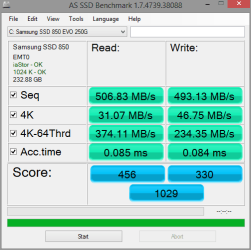
My laptop doesn't have it either, as long as you get an OK in the top left of this tool, (This doesn't install, you just run it from the unzipped folder)

Download AS SSD Benchmark - MajorGeeks

You should be good.

This is from my desktop but you can see the green OK's in the upper left,

4-26 test.PNG
 

My Computer My Computer

Computer type
PC/Desktop
Computer Manufacturer/Model Number
Self Built
OS
Win 10 Pro x64
CPU
Intel I5-2500K @3.3GHz
Motherboard
Asrock P67 Extreme4
Memory
16GB G.Skill Ripjaws X (4x4GB)
Graphics Card(s)
EVGA GeForce 750 Ti SC 2GB
Sound Card
ASUS Xonar DG 5.1 Channels 24-bit 96KHz PCI Interface Sound
Monitor(s) Displays
auria eq2367
Screen Resolution
1920 x 1080
Hard Drives
250GB Samsung 850 EVO SSD
1TB WD Blue
1TB Hitachi
PSU
SeaSonic X 650W 80 Plus Gold
Case
Corsair Obsidian 750D
Cooling
Corsair H60, Three 140mm case fans
Keyboard
Logitech Wireless Keyboard K520
Mouse
Logitech Wireless Mouse M310
Internet Speed
Wave Broadband ~ 100 dn 5 up
Antivirus
Windows Defender, Malwarebytes Premium
Browser
Edge, IE11, Chrome
Other Info
Laptop specs: HP g7-1365dx /
CPU: AMD A6-3420M APU with Radeon(tm) HD Graphics /
RAM: Crucial 8Gb (2x4Gb) /
SSD: Crucial M4-CT128M4SSD2 ATA Device/ FW 000F /
GFX: AMD Radeon HD 6520G /
OS: Windows 10 Pro x64
I don't like that bench test it seems to be full of it with sh in front :p

Very wild results from it on my older system :confused:

Might be good for the example Derek was referring to though but don't focus on the numbers too much ;)
The real test is actual usage which should knock your socks off now :)
 

My Computer My Computer

Computer type
PC/Desktop
Computer Manufacturer/Model Number
Custom assembled by me :}
OS
Win-7-Pro64bit 7-H-Prem-64bit
CPU
i7-5930K 2nd i9-9940x both water blocked VRM's too
Motherboard
ASUS SABERTOOTH X99 2nd ASUS x299 Apex
Memory
Trident-z 3200C14 2nd Trident-z 3600C16
Graphics Card(s)
EVGA 1080ti ftw3 2nd Titan Xp both water blocked
Sound Card
Built-in Realtek
Monitor(s) Displays
1-AOC G2460PG 24"G-Sync 144Hz/ 2nd 1-ASUS VG248QE 24" 144Hz
Screen Resolution
1920 x 1080 144Hz
Hard Drives
2-Samsung M.2 Evo & Evo Plus
2-Samsung 850 EVO 500GB SSD's/ 3-2.5 W.D. Black 1tb-&3-1tb/3-3.5 WD Black 1tb hdd's
PSU
EVGA SuperNOVA 1000-P2 2nd 1200-P2
Case
2-Corsair Obsidian Series 450D Black ATX Mid Tower
Cooling
Custom water loops
Keyboard
Logitech G710+/ 2nd Logitech G910
Mouse
2-RedDragon M901 Perdition 16400 dpi Gaming mouse = wired
Internet Speed
Comcast Ping 19ms 89.31mbps download speed 6.12mbps upload
Antivirus
Malwarebytes Pro/ Superantispyware Pro
Browser
FireFox & Pale moon
Other Info
2nd ASUS X299 Apex/Intel i9-9940x with Custom water loop/7H-Prem-x64/Corsair 450D case/Ram Trident-z 3600C16 4x8gb / Samsung970Evo plus 500gb SSD/Dual ssd EZ swap evo/PSU EVGA SuperNova 1200w-P2 80+Platinum/GPU Titan Xp /8-ML-140 on push-pull on 2-280GTX rads
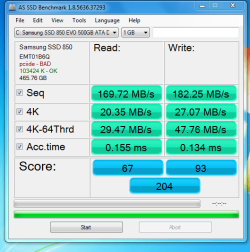
Here's what I came up with?
I don't know what pciide-Bad means?
 

Attachments

  • Samsung 850 EVO.PNG
    Samsung 850 EVO.PNG
    25.6 KB · Views: 32

My Computer My Computer

Computer type
PC/Desktop
Computer Manufacturer/Model Number
Gateway GT 5676
OS
Windows 7 Home premium 64bit SP 1
CPU
AMD Phenom Quad Core 9600 2.3 GHz
Motherboard
4006272R - Foxconn (Bengal) RS780 Motherboard
Memory
8GB of DDR2
Graphics Card(s)
Integrated ATI Radeon HD 3200 video /Sapphire Radeon HD 3470
Sound Card
Integrated ALC888S HD codec 7.1
Monitor(s) Displays
19" Samsung SyncMaster
Screen Resolution
1440x900
Hard Drives
One Internal Samsung 500GB SSD 850EVO
One Internal 320 GB 7200 RPM SATA II hard drives
One Toshiba 1TB External
PSU
Ultra LSP 650W
Case
Gateway 5-Bay uATX Computer Case (Carbon Fiber)
Cooling
CPU - Arctic Cooler Freezer 64
Keyboard
HP
Mouse
Logitech Laser
Internet Speed
Down 54.0Mbps Up 5.8Mbps Charter (Spectrum)
Antivirus
avast Pro
Browser
FireFox 40.02
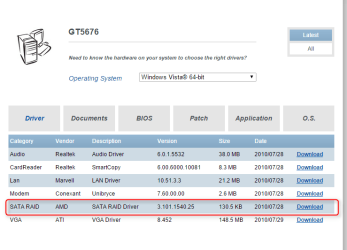
I only see Vista drivers for your computer but there is a SATA Raid driver, Raid drivers usually have the AHCI driver with it.

Drivers & Downloads

2015-08-14_15h29_24.png

Which this one does have an AHCI driver,

2015-08-14_15h35_28.png

I would give that driver a try myself, it should install fine. Most Vista drivers will.
 

My Computer My Computer

Computer type
PC/Desktop
Computer Manufacturer/Model Number
Self Built
OS
Win 10 Pro x64
CPU
Intel I5-2500K @3.3GHz
Motherboard
Asrock P67 Extreme4
Memory
16GB G.Skill Ripjaws X (4x4GB)
Graphics Card(s)
EVGA GeForce 750 Ti SC 2GB
Sound Card
ASUS Xonar DG 5.1 Channels 24-bit 96KHz PCI Interface Sound
Monitor(s) Displays
auria eq2367
Screen Resolution
1920 x 1080
Hard Drives
250GB Samsung 850 EVO SSD
1TB WD Blue
1TB Hitachi
PSU
SeaSonic X 650W 80 Plus Gold
Case
Corsair Obsidian 750D
Cooling
Corsair H60, Three 140mm case fans
Keyboard
Logitech Wireless Keyboard K520
Mouse
Logitech Wireless Mouse M310
Internet Speed
Wave Broadband ~ 100 dn 5 up
Antivirus
Windows Defender, Malwarebytes Premium
Browser
Edge, IE11, Chrome
Other Info
Laptop specs: HP g7-1365dx /
CPU: AMD A6-3420M APU with Radeon(tm) HD Graphics /
RAM: Crucial 8Gb (2x4Gb) /
SSD: Crucial M4-CT128M4SSD2 ATA Device/ FW 000F /
GFX: AMD Radeon HD 6520G /
OS: Windows 10 Pro x64
I'm running win 7 Home Premium, will that matter? As well, after the install will I need to go to the bios to make changes?
 

My Computer My Computer

Computer type
PC/Desktop
Computer Manufacturer/Model Number
Gateway GT 5676
OS
Windows 7 Home premium 64bit SP 1
CPU
AMD Phenom Quad Core 9600 2.3 GHz
Motherboard
4006272R - Foxconn (Bengal) RS780 Motherboard
Memory
8GB of DDR2
Graphics Card(s)
Integrated ATI Radeon HD 3200 video /Sapphire Radeon HD 3470
Sound Card
Integrated ALC888S HD codec 7.1
Monitor(s) Displays
19" Samsung SyncMaster
Screen Resolution
1440x900
Hard Drives
One Internal Samsung 500GB SSD 850EVO
One Internal 320 GB 7200 RPM SATA II hard drives
One Toshiba 1TB External
PSU
Ultra LSP 650W
Case
Gateway 5-Bay uATX Computer Case (Carbon Fiber)
Cooling
CPU - Arctic Cooler Freezer 64
Keyboard
HP
Mouse
Logitech Laser
Internet Speed
Down 54.0Mbps Up 5.8Mbps Charter (Spectrum)
Antivirus
avast Pro
Browser
FireFox 40.02

My Computer My Computer

Computer type
PC/Desktop
Computer Manufacturer/Model Number
Self Built
OS
Win 10 Pro x64
CPU
Intel I5-2500K @3.3GHz
Motherboard
Asrock P67 Extreme4
Memory
16GB G.Skill Ripjaws X (4x4GB)
Graphics Card(s)
EVGA GeForce 750 Ti SC 2GB
Sound Card
ASUS Xonar DG 5.1 Channels 24-bit 96KHz PCI Interface Sound
Monitor(s) Displays
auria eq2367
Screen Resolution
1920 x 1080
Hard Drives
250GB Samsung 850 EVO SSD
1TB WD Blue
1TB Hitachi
PSU
SeaSonic X 650W 80 Plus Gold
Case
Corsair Obsidian 750D
Cooling
Corsair H60, Three 140mm case fans
Keyboard
Logitech Wireless Keyboard K520
Mouse
Logitech Wireless Mouse M310
Internet Speed
Wave Broadband ~ 100 dn 5 up
Antivirus
Windows Defender, Malwarebytes Premium
Browser
Edge, IE11, Chrome
Other Info
Laptop specs: HP g7-1365dx /
CPU: AMD A6-3420M APU with Radeon(tm) HD Graphics /
RAM: Crucial 8Gb (2x4Gb) /
SSD: Crucial M4-CT128M4SSD2 ATA Device/ FW 000F /
GFX: AMD Radeon HD 6520G /
OS: Windows 10 Pro x64
I'll give this a go tomorrow, Thanks
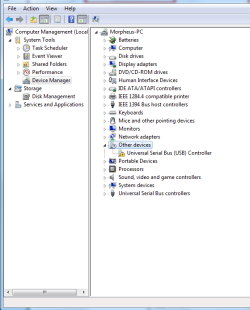
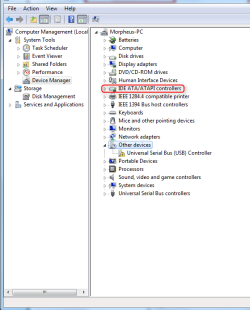
This is what's showing in device manager..
 

Attachments

  • PC Manage.PNG
    PC Manage.PNG
    19.5 KB · Views: 28

My Computer My Computer

Computer type
PC/Desktop
Computer Manufacturer/Model Number
Gateway GT 5676
OS
Windows 7 Home premium 64bit SP 1
CPU
AMD Phenom Quad Core 9600 2.3 GHz
Motherboard
4006272R - Foxconn (Bengal) RS780 Motherboard
Memory
8GB of DDR2
Graphics Card(s)
Integrated ATI Radeon HD 3200 video /Sapphire Radeon HD 3470
Sound Card
Integrated ALC888S HD codec 7.1
Monitor(s) Displays
19" Samsung SyncMaster
Screen Resolution
1440x900
Hard Drives
One Internal Samsung 500GB SSD 850EVO
One Internal 320 GB 7200 RPM SATA II hard drives
One Toshiba 1TB External
PSU
Ultra LSP 650W
Case
Gateway 5-Bay uATX Computer Case (Carbon Fiber)
Cooling
CPU - Arctic Cooler Freezer 64
Keyboard
HP
Mouse
Logitech Laser
Internet Speed
Down 54.0Mbps Up 5.8Mbps Charter (Spectrum)
Antivirus
avast Pro
Browser
FireFox 40.02
Looks like you need the usb drivers too, I don't see any of those on the gateway site.

Have you tried running the scan for drivers on the amd site?

Download Drivers

I'm just wondering if it shows a chipset driver available for you.

Also, your SSD controller will be under the IDE ATA/ATAPI controllers.
 

My Computer My Computer

Computer type
PC/Desktop
Computer Manufacturer/Model Number
Self Built
OS
Win 10 Pro x64
CPU
Intel I5-2500K @3.3GHz
Motherboard
Asrock P67 Extreme4
Memory
16GB G.Skill Ripjaws X (4x4GB)
Graphics Card(s)
EVGA GeForce 750 Ti SC 2GB
Sound Card
ASUS Xonar DG 5.1 Channels 24-bit 96KHz PCI Interface Sound
Monitor(s) Displays
auria eq2367
Screen Resolution
1920 x 1080
Hard Drives
250GB Samsung 850 EVO SSD
1TB WD Blue
1TB Hitachi
PSU
SeaSonic X 650W 80 Plus Gold
Case
Corsair Obsidian 750D
Cooling
Corsair H60, Three 140mm case fans
Keyboard
Logitech Wireless Keyboard K520
Mouse
Logitech Wireless Mouse M310
Internet Speed
Wave Broadband ~ 100 dn 5 up
Antivirus
Windows Defender, Malwarebytes Premium
Browser
Edge, IE11, Chrome
Other Info
Laptop specs: HP g7-1365dx /
CPU: AMD A6-3420M APU with Radeon(tm) HD Graphics /
RAM: Crucial 8Gb (2x4Gb) /
SSD: Crucial M4-CT128M4SSD2 ATA Device/ FW 000F /
GFX: AMD Radeon HD 6520G /
OS: Windows 10 Pro x64
Checked AMD's site for drivers, but the only thing the driver detector found was graphics drivers. I went ahead and loaded those.

I was going to try the SATA Raid AMD drivers found at Gateway's site, but don't understand where (what device) I should be installing them to?

As well I have spent a day looking for the "Universal Serial Bus (USB) controller" with no luck! any help with this would be greatly appreciated.
 

My Computer My Computer

Computer type
PC/Desktop
Computer Manufacturer/Model Number
Gateway GT 5676
OS
Windows 7 Home premium 64bit SP 1
CPU
AMD Phenom Quad Core 9600 2.3 GHz
Motherboard
4006272R - Foxconn (Bengal) RS780 Motherboard
Memory
8GB of DDR2
Graphics Card(s)
Integrated ATI Radeon HD 3200 video /Sapphire Radeon HD 3470
Sound Card
Integrated ALC888S HD codec 7.1
Monitor(s) Displays
19" Samsung SyncMaster
Screen Resolution
1440x900
Hard Drives
One Internal Samsung 500GB SSD 850EVO
One Internal 320 GB 7200 RPM SATA II hard drives
One Toshiba 1TB External
PSU
Ultra LSP 650W
Case
Gateway 5-Bay uATX Computer Case (Carbon Fiber)
Cooling
CPU - Arctic Cooler Freezer 64
Keyboard
HP
Mouse
Logitech Laser
Internet Speed
Down 54.0Mbps Up 5.8Mbps Charter (Spectrum)
Antivirus
avast Pro
Browser
FireFox 40.02
Checked AMD's site for drivers, but the only thing the driver detector found was graphics drivers. I went ahead and loaded those.

It was worth a shot.

I was going to try the SATA Raid AMD drivers found at Gateway's site, but don't understand where (what device) I should be installing them to?

You want to expand this area I outlined on your device manager pic you posted,

PC Manage.PNG

Then follow the instructions I posted in post #11.

http://www.sevenforums.com/tutorials/97061-driver-install-device-manager.html

As well I have spent a day looking for the "Universal Serial Bus (USB) controller" with no luck! any help with this would be greatly appreciated.

If you can post the hardware ID's we can help you find them, or just follow this tutorial,

http://www.sevenforums.com/tutorials/73420-hardware-identification.html
 

My Computer My Computer

Computer type
PC/Desktop
Computer Manufacturer/Model Number
Self Built
OS
Win 10 Pro x64
CPU
Intel I5-2500K @3.3GHz
Motherboard
Asrock P67 Extreme4
Memory
16GB G.Skill Ripjaws X (4x4GB)
Graphics Card(s)
EVGA GeForce 750 Ti SC 2GB
Sound Card
ASUS Xonar DG 5.1 Channels 24-bit 96KHz PCI Interface Sound
Monitor(s) Displays
auria eq2367
Screen Resolution
1920 x 1080
Hard Drives
250GB Samsung 850 EVO SSD
1TB WD Blue
1TB Hitachi
PSU
SeaSonic X 650W 80 Plus Gold
Case
Corsair Obsidian 750D
Cooling
Corsair H60, Three 140mm case fans
Keyboard
Logitech Wireless Keyboard K520
Mouse
Logitech Wireless Mouse M310
Internet Speed
Wave Broadband ~ 100 dn 5 up
Antivirus
Windows Defender, Malwarebytes Premium
Browser
Edge, IE11, Chrome
Other Info
Laptop specs: HP g7-1365dx /
CPU: AMD A6-3420M APU with Radeon(tm) HD Graphics /
RAM: Crucial 8Gb (2x4Gb) /
SSD: Crucial M4-CT128M4SSD2 ATA Device/ FW 000F /
GFX: AMD Radeon HD 6520G /
OS: Windows 10 Pro x64
My understanding is that you must have AHCI capability built in to your SATA controller on the motherboard in order to use it in the OS.
The fact that you do not have the option in BIOS means that the PC is so old the SATA controller does not have AHCI, or so new that AHCI is default and there is no option to choose IDE.

Even if you could install an AHCI driver if there is no AHCI capability in the hardware it will not do anything.

I do not believe you need AHCI to use TRIM. They are completely independent of each other.
An SSD will run better in AHCI mode, but it will also run just fine in IDE.

Hope that helps
 

My Computer My Computer

Computer type
PC/Desktop
Computer Manufacturer/Model Number
Home Built - Jan 2013
OS
Windows 7 64 Bit Home Premium SP1
CPU
i7-3820
Motherboard
Asus P9X79-PRO - Bios 4608
Memory
GSkill F3-14900CL9Q - 16GB
Graphics Card(s)
EVGA GeForce GTX660 - Driver 352.86
Sound Card
On board Realtek ALC898
Monitor(s) Displays
Acer S271HL
Screen Resolution
1920 x 1080
Hard Drives
#1- Samsung 840 Pro Series
#2- Western Digital WD1002FAEX Sata3 Black
#3- Western Digital WD1002FAEX Sata3 Black
PSU
Corsair CMPSU-850TX-V2 - 850 watt (by Seasonic)
Case
Corsair Obsidian 550D
Cooling
Standard 3 120mm case fans, Cooler Master Hyper 212 EVO
Keyboard
MS KC-0405
Mouse
Intellimouse 5-button
Internet Speed
56 Mbits/Sec (on a good day)
Antivirus
Avast & Malwarebytes
Browser
Firefox
Other Info
Asus DVD - DRW-24B1ST 24X
Not really windows is more than capable of using trim instead defragment on a ssd,
I believe there is a command prompt string to enter to confirm trim is enabled but I can't remember it

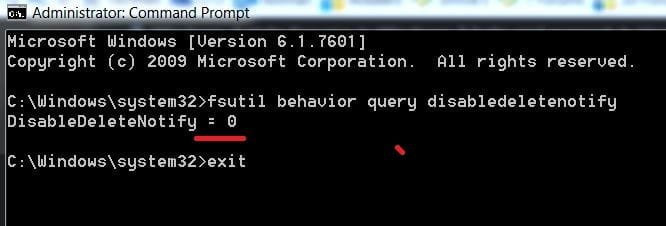
Here you go follow this,
http://www.sevenforums.com/performance-maintenance/275710-show-us-your-wei-4-a-162.html#post2915619

Hi you never posted this ?
Click start and all programs
Accessories folder and right click command prompt and click run as administrator
Paste or type this string and the enter key
Code:
[B]fsutil behavior query disabledeletenotify[/B]
cp ssd.JPG
Then type exit and enter
 

My Computer My Computer

Computer type
PC/Desktop
Computer Manufacturer/Model Number
Custom assembled by me :}
OS
Win-7-Pro64bit 7-H-Prem-64bit
CPU
i7-5930K 2nd i9-9940x both water blocked VRM's too
Motherboard
ASUS SABERTOOTH X99 2nd ASUS x299 Apex
Memory
Trident-z 3200C14 2nd Trident-z 3600C16
Graphics Card(s)
EVGA 1080ti ftw3 2nd Titan Xp both water blocked
Sound Card
Built-in Realtek
Monitor(s) Displays
1-AOC G2460PG 24"G-Sync 144Hz/ 2nd 1-ASUS VG248QE 24" 144Hz
Screen Resolution
1920 x 1080 144Hz
Hard Drives
2-Samsung M.2 Evo & Evo Plus
2-Samsung 850 EVO 500GB SSD's/ 3-2.5 W.D. Black 1tb-&3-1tb/3-3.5 WD Black 1tb hdd's
PSU
EVGA SuperNOVA 1000-P2 2nd 1200-P2
Case
2-Corsair Obsidian Series 450D Black ATX Mid Tower
Cooling
Custom water loops
Keyboard
Logitech G710+/ 2nd Logitech G910
Mouse
2-RedDragon M901 Perdition 16400 dpi Gaming mouse = wired
Internet Speed
Comcast Ping 19ms 89.31mbps download speed 6.12mbps upload
Antivirus
Malwarebytes Pro/ Superantispyware Pro
Browser
FireFox & Pale moon
Other Info
2nd ASUS X299 Apex/Intel i9-9940x with Custom water loop/7H-Prem-x64/Corsair 450D case/Ram Trident-z 3600C16 4x8gb / Samsung970Evo plus 500gb SSD/Dual ssd EZ swap evo/PSU EVGA SuperNova 1200w-P2 80+Platinum/GPU Titan Xp /8-ML-140 on push-pull on 2-280GTX rads
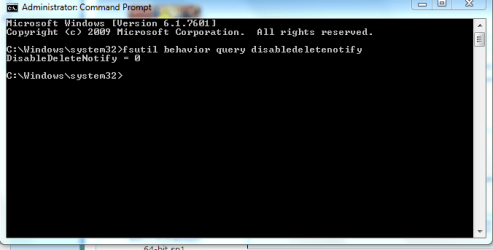
Just grtting started today! Here's the info you requested.
 

Attachments

  • IDE.PNG
    IDE.PNG
    12 KB · Views: 20
  • prompt.PNG
    prompt.PNG
    10.8 KB · Views: 20

My Computer My Computer

Computer type
PC/Desktop
Computer Manufacturer/Model Number
Gateway GT 5676
OS
Windows 7 Home premium 64bit SP 1
CPU
AMD Phenom Quad Core 9600 2.3 GHz
Motherboard
4006272R - Foxconn (Bengal) RS780 Motherboard
Memory
8GB of DDR2
Graphics Card(s)
Integrated ATI Radeon HD 3200 video /Sapphire Radeon HD 3470
Sound Card
Integrated ALC888S HD codec 7.1
Monitor(s) Displays
19" Samsung SyncMaster
Screen Resolution
1440x900
Hard Drives
One Internal Samsung 500GB SSD 850EVO
One Internal 320 GB 7200 RPM SATA II hard drives
One Toshiba 1TB External
PSU
Ultra LSP 650W
Case
Gateway 5-Bay uATX Computer Case (Carbon Fiber)
Cooling
CPU - Arctic Cooler Freezer 64
Keyboard
HP
Mouse
Logitech Laser
Internet Speed
Down 54.0Mbps Up 5.8Mbps Charter (Spectrum)
Antivirus
avast Pro
Browser
FireFox 40.02
You're all set with Trim, that's what you want to see.

I guess the AHCI driver I mentioned isn't necessary so that's another one you are set on.

If you post the hardware ID's for the USB controller, we can help you find that driver.

http://www.sevenforums.com/tutorials/73420-hardware-identification.html

Looking at the six available controllers in your above screenshot, I'm wondering if you have your SSD plugged into one of those two bottom ones (PCI IDE).

Can you post a screenshot of your disk management,

http://www.sevenforums.com/tutorials/274797-disk-management-post-screen-capture-image.html
 

My Computer My Computer

Computer type
PC/Desktop
Computer Manufacturer/Model Number
Self Built
OS
Win 10 Pro x64
CPU
Intel I5-2500K @3.3GHz
Motherboard
Asrock P67 Extreme4
Memory
16GB G.Skill Ripjaws X (4x4GB)
Graphics Card(s)
EVGA GeForce 750 Ti SC 2GB
Sound Card
ASUS Xonar DG 5.1 Channels 24-bit 96KHz PCI Interface Sound
Monitor(s) Displays
auria eq2367
Screen Resolution
1920 x 1080
Hard Drives
250GB Samsung 850 EVO SSD
1TB WD Blue
1TB Hitachi
PSU
SeaSonic X 650W 80 Plus Gold
Case
Corsair Obsidian 750D
Cooling
Corsair H60, Three 140mm case fans
Keyboard
Logitech Wireless Keyboard K520
Mouse
Logitech Wireless Mouse M310
Internet Speed
Wave Broadband ~ 100 dn 5 up
Antivirus
Windows Defender, Malwarebytes Premium
Browser
Edge, IE11, Chrome
Other Info
Laptop specs: HP g7-1365dx /
CPU: AMD A6-3420M APU with Radeon(tm) HD Graphics /
RAM: Crucial 8Gb (2x4Gb) /
SSD: Crucial M4-CT128M4SSD2 ATA Device/ FW 000F /
GFX: AMD Radeon HD 6520G /
OS: Windows 10 Pro x64
Or, if you would, can you clarify which one of these ports your SSD is plugged into.

4006272R_08.jpg


https://panam.gateway.com/s/MOTHERBD/Shared/4006272R/4006272Rmv.shtml
 

My Computer My Computer

Computer type
PC/Desktop
Computer Manufacturer/Model Number
Self Built
OS
Win 10 Pro x64
CPU
Intel I5-2500K @3.3GHz
Motherboard
Asrock P67 Extreme4
Memory
16GB G.Skill Ripjaws X (4x4GB)
Graphics Card(s)
EVGA GeForce 750 Ti SC 2GB
Sound Card
ASUS Xonar DG 5.1 Channels 24-bit 96KHz PCI Interface Sound
Monitor(s) Displays
auria eq2367
Screen Resolution
1920 x 1080
Hard Drives
250GB Samsung 850 EVO SSD
1TB WD Blue
1TB Hitachi
PSU
SeaSonic X 650W 80 Plus Gold
Case
Corsair Obsidian 750D
Cooling
Corsair H60, Three 140mm case fans
Keyboard
Logitech Wireless Keyboard K520
Mouse
Logitech Wireless Mouse M310
Internet Speed
Wave Broadband ~ 100 dn 5 up
Antivirus
Windows Defender, Malwarebytes Premium
Browser
Edge, IE11, Chrome
Other Info
Laptop specs: HP g7-1365dx /
CPU: AMD A6-3420M APU with Radeon(tm) HD Graphics /
RAM: Crucial 8Gb (2x4Gb) /
SSD: Crucial M4-CT128M4SSD2 ATA Device/ FW 000F /
GFX: AMD Radeon HD 6520G /
OS: Windows 10 Pro x64
Back
Top