Anytime upgrade choice

Ztruker

New member
Guru
Gold Member
VIP
Local time
3:18 PM
Messages
6,285
Location
Space Coast of Florida
I picked up a new (for me) computer that I installed a copy of Vista Business on. All was well after the install and for almost a month then today it went through Activation and said it's invalid. I thought it was a good copy of Vista but it must have a VLK that MS no longer allows.

Anyway, I want to upgrade to Windows 7 and when I tried it I was offered Windows 7 Home Premium for $79.95 and Ultimate for $129.95. I was going to go with the Home Premium version as that would be sufficient for what I want to use this computer for, but when I got to the page where I was going to buy it all it said was Valid Upgrade from Windows 7 Basic, didn't mention anything about any version of Vista, even though I was running this from the Vista computer.

So ... what are my options? What versions of Windows 7 can I do an Anytime Upgrade to from Vista Business?
 

My Computer

Computer type
PC/Desktop
Computer Manufacturer/Model Number
Lenovo IdeaCenter 450
OS
Windows 10 Pro X64
CPU
Intel Quad Core i7-4770 @ 3.4Ghz
Memory
16.0GB PC3-12800 DDR3 SDRAM 1600 MHz
Graphics Card(s)
Intel Integrated HD Graphics
Sound Card
Realtek HD Audio
Monitor(s) Displays
HP 22" LCD
Screen Resolution
1680 x 1050
Hard Drives
250GB Samsung EVO SATA-3 SSD
2TB Seagate ST2000DM001 SATA-2
1.5TB Seagate ST3150041AS SATA
Keyboard
Dell USB
Mouse
Lenovo USB
Internet Speed
Cable via Road Runner 3MB Upload, 30MB Download
Antivirus
Windows Defender, MBAM Pro, MBAE
Browser
Seamonkey
Other Info
UEFI/GPT
PLDS DVD-RW DH16AERSH
I picked up a new (for me) computer that I installed a copy of Vista Business on. All was well after the install and for almost a month then today it went through Activation and said it's invalid. I thought it was a good copy of Vista but it must have a VLK that MS no longer allows.

Anyway, I want to upgrade to Windows 7 and when I tried it I was offered Windows 7 Home Premium for $79.95 and Ultimate for $129.95. I was going to go with the Home Premium version as that would be sufficient for what I want to use this computer for, but when I got to the page where I was going to buy it all it said was Valid Upgrade from Windows 7 Basic, didn't mention anything about any version of Vista, even though I was running this from the Vista computer.

So ... what are my options? What versions of Windows 7 can I do an Anytime Upgrade to from Vista Business?

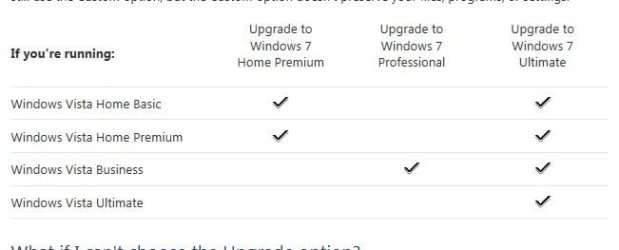
From Vista Business, you can upgrade to 7 Pro or Ultimate.

Upgrading from Windows Vista to Windows 7 - Help & How-to - Microsoft Windows
 

Attachments

  • Capture.JPG
    Capture.JPG
    23.4 KB · Views: 7

My Computer

Computer type
PC/Desktop
Computer Manufacturer/Model Number
Self Built
OS
Win 10 Pro x64
CPU
Intel I5-2500K @3.3GHz
Motherboard
Asrock P67 Extreme4
Memory
16GB G.Skill Ripjaws X (4x4GB)
Graphics Card(s)
EVGA GeForce 750 Ti SC 2GB
Sound Card
ASUS Xonar DG 5.1 Channels 24-bit 96KHz PCI Interface Sound
Monitor(s) Displays
auria eq2367
Screen Resolution
1920 x 1080
Hard Drives
250GB Samsung 850 EVO SSD
1TB WD Blue
1TB Hitachi
PSU
SeaSonic X 650W 80 Plus Gold
Case
Corsair Obsidian 750D
Cooling
Corsair H60, Three 140mm case fans
Keyboard
Logitech Wireless Keyboard K520
Mouse
Logitech Wireless Mouse M310
Internet Speed
Wave Broadband ~ 100 dn 5 up
Antivirus
Windows Defender, Malwarebytes Premium
Browser
Edge, IE11, Chrome
Other Info
Laptop specs: HP g7-1365dx /
CPU: AMD A6-3420M APU with Radeon(tm) HD Graphics /
RAM: Crucial 8Gb (2x4Gb) /
SSD: Crucial M4-CT128M4SSD2 ATA Device/ FW 000F /
GFX: AMD Radeon HD 6520G /
OS: Windows 10 Pro x64
Sorry Rich, Anytime Upgrade can only be used for upgrading Win7 to a greater version of itself.

To UPgrade Vista you'll need retail Win7 Upgrade version, however under the EULA there needs to be a valid Vista to qualify for Upgrade version.

What OS version do you really want on the machine? Have you considered going with OEM which is priced low because it doesn't include MS SUpport (which you don't need) and lives and dies with the mobo it is first installed upon.
 
Thanks to both of you.

I left off one small, important factor. I currently have 32 bit Vista Business and I want to go to a 64 bit Windows 7 so I will do what Greg suggested and get a OEM copy of Windows 7 Pro X64, which is also what I'm running on my current desktop.

This will be my new Web Server replacing a Dell 4100 933Mhz, 512MB ram. The new one is a Dell Workstation xw4400, 3.4Ghz, 4GB ram.
 

My Computer

Computer type
PC/Desktop
Computer Manufacturer/Model Number
Lenovo IdeaCenter 450
OS
Windows 10 Pro X64
CPU
Intel Quad Core i7-4770 @ 3.4Ghz
Memory
16.0GB PC3-12800 DDR3 SDRAM 1600 MHz
Graphics Card(s)
Intel Integrated HD Graphics
Sound Card
Realtek HD Audio
Monitor(s) Displays
HP 22" LCD
Screen Resolution
1680 x 1050
Hard Drives
250GB Samsung EVO SATA-3 SSD
2TB Seagate ST2000DM001 SATA-2
1.5TB Seagate ST3150041AS SATA
Keyboard
Dell USB
Mouse
Lenovo USB
Internet Speed
Cable via Road Runner 3MB Upload, 30MB Download
Antivirus
Windows Defender, MBAM Pro, MBAE
Browser
Seamonkey
Other Info
UEFI/GPT
PLDS DVD-RW DH16AERSH
Just got Windows 7 Pro x64 from TigerDirect for $139, no shipping. Should have it in 3-4 days. Could have bought Home Premuim for $99 but for $30 more I got Pro which I like very much.

Next I get to install Apache 2.2, PHP 5.3 and MySQL 5.1 and migrate my existing Web Server to it. Should be fun for weeks to come :D (already have it sort of running on this machine as a test). Lots of changes needed from the old Apache and PHP to this new, current level, yikes!!!
 

My Computer

Computer type
PC/Desktop
Computer Manufacturer/Model Number
Lenovo IdeaCenter 450
OS
Windows 10 Pro X64
CPU
Intel Quad Core i7-4770 @ 3.4Ghz
Memory
16.0GB PC3-12800 DDR3 SDRAM 1600 MHz
Graphics Card(s)
Intel Integrated HD Graphics
Sound Card
Realtek HD Audio
Monitor(s) Displays
HP 22" LCD
Screen Resolution
1680 x 1050
Hard Drives
250GB Samsung EVO SATA-3 SSD
2TB Seagate ST2000DM001 SATA-2
1.5TB Seagate ST3150041AS SATA
Keyboard
Dell USB
Mouse
Lenovo USB
Internet Speed
Cable via Road Runner 3MB Upload, 30MB Download
Antivirus
Windows Defender, MBAM Pro, MBAE
Browser
Seamonkey
Other Info
UEFI/GPT
PLDS DVD-RW DH16AERSH
I had a flash drive I had previously setup with all flavors of Win 7 on. I used it to Clean install Win 7 Pro X64 but deferred activation until I receive my copy from TigerDirect, then I use that key to activate with. Should work, right?
 

My Computer

Computer type
PC/Desktop
Computer Manufacturer/Model Number
Lenovo IdeaCenter 450
OS
Windows 10 Pro X64
CPU
Intel Quad Core i7-4770 @ 3.4Ghz
Memory
16.0GB PC3-12800 DDR3 SDRAM 1600 MHz
Graphics Card(s)
Intel Integrated HD Graphics
Sound Card
Realtek HD Audio
Monitor(s) Displays
HP 22" LCD
Screen Resolution
1680 x 1050
Hard Drives
250GB Samsung EVO SATA-3 SSD
2TB Seagate ST2000DM001 SATA-2
1.5TB Seagate ST3150041AS SATA
Keyboard
Dell USB
Mouse
Lenovo USB
Internet Speed
Cable via Road Runner 3MB Upload, 30MB Download
Antivirus
Windows Defender, MBAM Pro, MBAE
Browser
Seamonkey
Other Info
UEFI/GPT
PLDS DVD-RW DH16AERSH

My Computer

Computer type
PC/Desktop
Computer Manufacturer/Model Number
Lenovo IdeaCenter 450
OS
Windows 10 Pro X64
CPU
Intel Quad Core i7-4770 @ 3.4Ghz
Memory
16.0GB PC3-12800 DDR3 SDRAM 1600 MHz
Graphics Card(s)
Intel Integrated HD Graphics
Sound Card
Realtek HD Audio
Monitor(s) Displays
HP 22" LCD
Screen Resolution
1680 x 1050
Hard Drives
250GB Samsung EVO SATA-3 SSD
2TB Seagate ST2000DM001 SATA-2
1.5TB Seagate ST3150041AS SATA
Keyboard
Dell USB
Mouse
Lenovo USB
Internet Speed
Cable via Road Runner 3MB Upload, 30MB Download
Antivirus
Windows Defender, MBAM Pro, MBAE
Browser
Seamonkey
Other Info
UEFI/GPT
PLDS DVD-RW DH16AERSH
Got the OEM Win 7 Pro X64 today and it activated okay. I'm happy! Didn't even have to open the DVD case :D
 

My Computer

Computer type
PC/Desktop
Computer Manufacturer/Model Number
Lenovo IdeaCenter 450
OS
Windows 10 Pro X64
CPU
Intel Quad Core i7-4770 @ 3.4Ghz
Memory
16.0GB PC3-12800 DDR3 SDRAM 1600 MHz
Graphics Card(s)
Intel Integrated HD Graphics
Sound Card
Realtek HD Audio
Monitor(s) Displays
HP 22" LCD
Screen Resolution
1680 x 1050
Hard Drives
250GB Samsung EVO SATA-3 SSD
2TB Seagate ST2000DM001 SATA-2
1.5TB Seagate ST3150041AS SATA
Keyboard
Dell USB
Mouse
Lenovo USB
Internet Speed
Cable via Road Runner 3MB Upload, 30MB Download
Antivirus
Windows Defender, MBAM Pro, MBAE
Browser
Seamonkey
Other Info
UEFI/GPT
PLDS DVD-RW DH16AERSH
im very satisfied with this OS :)
 

My Computer

Computer Manufacturer/Model Number
Custom Box
OS
Windows 7 Professional x64
CPU
AMD Phenom II X4 980 Black Edition @ 4.1Ghz
Motherboard
ECS Elite Group IC780M-A V2.0
Memory
8GB Crucial DDR2 PC5300
Graphics Card(s)
Asus Radeon HD 5450
Sound Card
On Board
Monitor(s) Displays
Dual Monitor Setup
Hard Drives
60GB OCZ Vertex 3 SSD,
320GB, 250GB, & Dual 160GB HDD's
PSU
Cooler Master eXtreme Power Plus 500w
Case
Cooler Master Elite 310
Cooling
Dual 120mm Cooler Master Case Fans
Keyboard
Logitech...
Mouse
Microsoft Mouse 4000
Internet Speed
Super Fast
Turned into a fiasco when I upgraded my ram from 1GB to 5GB, all same specs.

System would not complete a boot. Finally had to pull the CMOS batter, disconnect the power cord then press the power button for a few seconds to drain the caps, put stuff back and power up. Got a CMS config error which I expected. Loaded defaults then set everything up again but Win 7 would n0t boot. I get the fireflies once then a reboot. Turned out to be a BSOD 0x00007B (I think, not exactly sure).

Doing a boot Repair didn't help, System Restore did not work. No idea what happened or why but it was painful.

Once again, Win 7 not allowing me to do a Repair Install unless I start it from a booted Win 7 killed me and I had to clean install. I still don't understand why this restriction is in place. Why not let me attempt a repair. If it doesn't work I've lost nothing but time and can then do a clean install.

At least I got to use my brand new shiny Win 7 Pro X64 with SP1 DVD :D

Current problem is hardware or BIOS as it takes 60 seconds when I power up before I see the first output from BIOS on the screen. Up until then all I have is a blinking cursor at top left of screen. Reboot works fine, no delay.

This is HP Workstation xw4400, 3.4Ghz P4 with two logical processors and (now) 5Gb of PC5300 ECC ram. I'll have to chat with HP and see if they have any idea. It's not a critical problem as this will be my new web server soon which never powers off but I'd like to fix it if I can.
 

My Computer

Computer type
PC/Desktop
Computer Manufacturer/Model Number
Lenovo IdeaCenter 450
OS
Windows 10 Pro X64
CPU
Intel Quad Core i7-4770 @ 3.4Ghz
Memory
16.0GB PC3-12800 DDR3 SDRAM 1600 MHz
Graphics Card(s)
Intel Integrated HD Graphics
Sound Card
Realtek HD Audio
Monitor(s) Displays
HP 22" LCD
Screen Resolution
1680 x 1050
Hard Drives
250GB Samsung EVO SATA-3 SSD
2TB Seagate ST2000DM001 SATA-2
1.5TB Seagate ST3150041AS SATA
Keyboard
Dell USB
Mouse
Lenovo USB
Internet Speed
Cable via Road Runner 3MB Upload, 30MB Download
Antivirus
Windows Defender, MBAM Pro, MBAE
Browser
Seamonkey
Other Info
UEFI/GPT
PLDS DVD-RW DH16AERSH
Turned into a fiasco when I upgraded my ram from 1GB to 5GB, all same specs.

For a test try with 4gb or 6gb of ram.
 

My Computer

OS
ME/XP/Vista/Win7
Greg, I ran Startup Repair twice with no results. I really wanted to do a Repair Install over the existing install without losing data or installed software as I used to be able to do with XP.

Theog, I tried it with 2GB, 4GB and back to the original 1GB. In all cases Win 7 would no longer boot. I had to reinstall to fix whatever the problem was. I figured since I was doing that I would try it with the max amount of ram I had and it installed okay with 5GB.

I've since had a couple BSODs when the computer went to sleep. Disabled sleep and hibernate and it's running very well now.
 

My Computer

Computer type
PC/Desktop
Computer Manufacturer/Model Number
Lenovo IdeaCenter 450
OS
Windows 10 Pro X64
CPU
Intel Quad Core i7-4770 @ 3.4Ghz
Memory
16.0GB PC3-12800 DDR3 SDRAM 1600 MHz
Graphics Card(s)
Intel Integrated HD Graphics
Sound Card
Realtek HD Audio
Monitor(s) Displays
HP 22" LCD
Screen Resolution
1680 x 1050
Hard Drives
250GB Samsung EVO SATA-3 SSD
2TB Seagate ST2000DM001 SATA-2
1.5TB Seagate ST3150041AS SATA
Keyboard
Dell USB
Mouse
Lenovo USB
Internet Speed
Cable via Road Runner 3MB Upload, 30MB Download
Antivirus
Windows Defender, MBAM Pro, MBAE
Browser
Seamonkey
Other Info
UEFI/GPT
PLDS DVD-RW DH16AERSH
Almost all sleep issues are resolved by updating or changing the display driver, which is worth trying since Sleep and Hibernate otherwise work really well in Win7 and make walking away from your work less of a concern whether for an afternoon or a week.
 
Thanks, I'll play with it. I'm using the built in ATI FireGL V3300, what ever that is. I'll see what I can find.

Edit: Just noticed I was running an unsupported resolution/frequency.

I had 1024x768 @ 70Hz.
Monitor/video card supports 1024X768 @ 60Hz.

Changed it and will try sleep again, see what happens, now that I have a good backup.
 

My Computer

Computer type
PC/Desktop
Computer Manufacturer/Model Number
Lenovo IdeaCenter 450
OS
Windows 10 Pro X64
CPU
Intel Quad Core i7-4770 @ 3.4Ghz
Memory
16.0GB PC3-12800 DDR3 SDRAM 1600 MHz
Graphics Card(s)
Intel Integrated HD Graphics
Sound Card
Realtek HD Audio
Monitor(s) Displays
HP 22" LCD
Screen Resolution
1680 x 1050
Hard Drives
250GB Samsung EVO SATA-3 SSD
2TB Seagate ST2000DM001 SATA-2
1.5TB Seagate ST3150041AS SATA
Keyboard
Dell USB
Mouse
Lenovo USB
Internet Speed
Cable via Road Runner 3MB Upload, 30MB Download
Antivirus
Windows Defender, MBAM Pro, MBAE
Browser
Seamonkey
Other Info
UEFI/GPT
PLDS DVD-RW DH16AERSH
Back
Top