
Applications - Run Only Specified Programs in Windows

How to Allow Users to Run Only Specified Programs in Windows

   Information
This tutorial will show you how to allow all or specific users on the computer to be able to run only a list of allowed programs you specify in Vista, Windows 7, or Windows 8.

You must be logged in as an administrator to be able to do the steps in this tutorial.

   Warning
This will not prevent users from being able to run a program through the command prompt unless you do not add cmd.exe to the list of allowed applications, or add cmd.exe to the list of disallowed applications.

Even if you have an .exe file of a program in the list of allowed applications and also in the list of disallowed applications, then users will not be able to run the .exe. Anything disallowed will always override anything allowed.

If an .exe file in the list of allowed programs was renamed by a user (if allowed), then the user will no longer be able to run that exe since that name wasn't in the list of allowed programs.

Renaming an .exe file will bypass the list of disallowed programs to let it run anyways, but not with the list of allowed programs. If the .exe file name is not on the list of allowed programs, then it can't run.

This does not apply to "Metro" Store apps in Windows 8.


EXAMPLE: Message
NOTE: This is a message that all users will get when they try to run a EXE file not on the list of allowed programs that you specified.
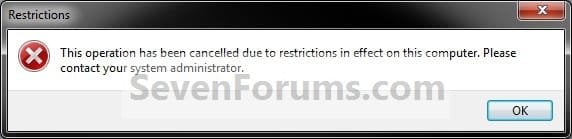

Message.jpg


OPTION ONE

Through the Local Group Policy Editor

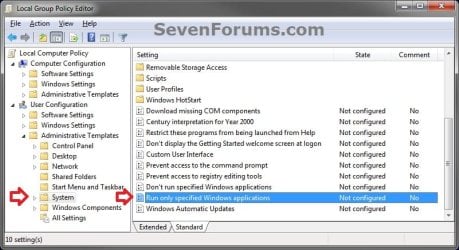
1. Open the all users, specific users or groups, or all users except administrators Local Group Policy Editor for how you want this policy applied.

2. In the left pane, click/tap on to expand User Configuration, Administrative Templates, and System. (see screenshot below)
GPEDIT-1.jpg

3. In the right pane of System, double click/tap on Run only specified Windows applications to edit it. (see screenshot above)

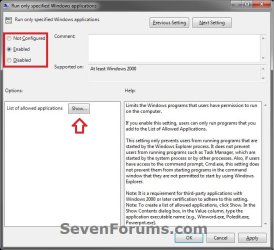
4. To Allow All Applications to Run A) Select (dot) either Not Configured or Disabled, and go to step 6 below. (see screenshot below)
NOTE: Not configured is the default setting.
GPEDIT-2.jpg
5. To Allow Only Specified Applications to Run A) Select (dot) Enabled, then click/tap on the Show button under Options. (see screenshot above)

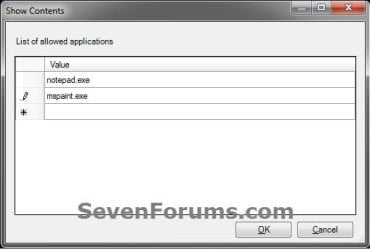
B) Under Value, double click/tap in a blank line and type in the name of the EXE file (ex: cmd.exe) with file extension that you want to prevent from running. (see screenshots below)


   Tip

  • To change or remove a listed exe file name, you can just type over it.
  • To clear or reset the list of allowed applications, you can select Not Configured (step 4), click/tap on Apply, select Enabled again, and click/tap on Apply.
GPEDIT-3.jpg

C) Repeat step 5B until you have added any other EXE files (ex: CCleaner) you want on the list of allowed applications as well. When finished, click/tap on OK. (see screenshots above)

D) Go to step 6 below.
6. Click/tap on OK. (see screenshot below step 4A)

7. If used, you may also wish to make changes to your list of disallowed programs to run.

8. When finished, you can close the Local Group Policy Editor window if you like.


OPTION TWO

Manually in Registry Editor


NOTE: This option affects all users on the computer.1. Press the Windows + R keys to open the Run dialog, type regedit, and click/tap on OK.

2. If prompted by UAC, click/tap on Yes (Windows 7/8) or Continue (Vista).

3. In regedit, navigate to the location below. (see screenshot below)HKEY_CURRENT_USER\Software\Microsoft\Windows\CurrentVersion\Policies\Explorer
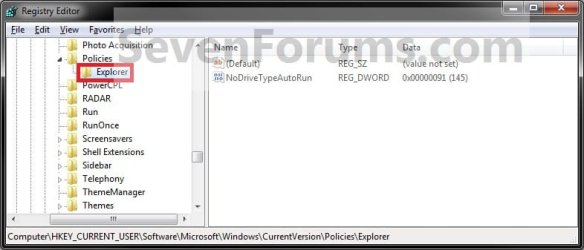
Reg1.jpg

4. To Allow Only Specified Applications to Run for Only Current UserA) In the right pane of Explorer, right click or press and hold on a empty space, and click/tap on New and DWORD (32-bit) Value. (see screenshot below)
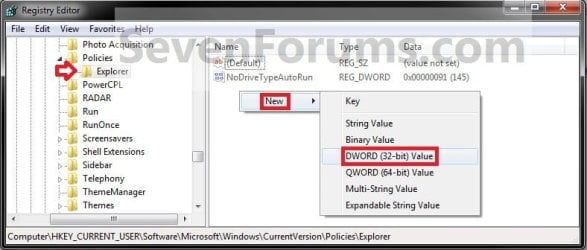
Enable-1.jpg

B) Type in RestrictRun and press Enter. Double click/tap on RestrictRun to modify it. (see screenshot below)
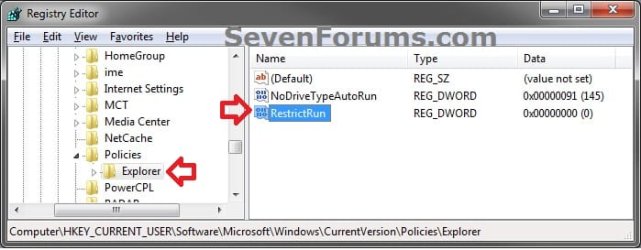
enable-2.jpg

C) Type in 1 and click/tap on OK. (see screenshot below)
enable-3.jpg

D) In the left pane, right click on Explorer, click/tap on New and Key, type in RestrictRun, and press Enter. (see screenshot below)
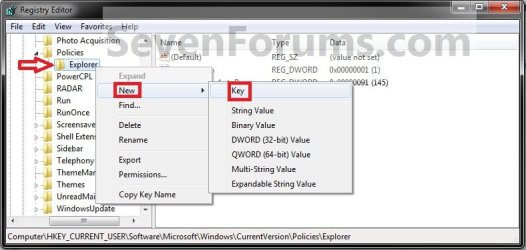
Enable-4.jpg

E) In the right pane of RestrictRun, right click or press and hold on a empty space, and click/tap on New and String Value. (see screenshot below)
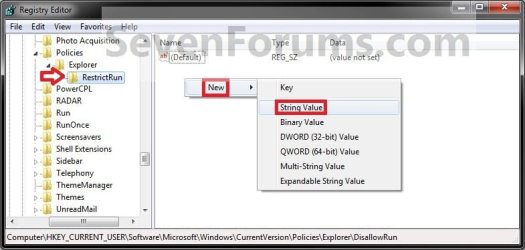
Enable-5.jpg

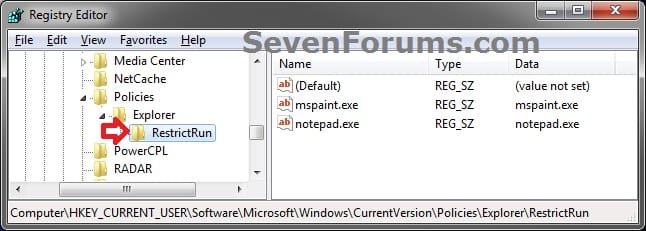
F) Type in the name of the .exe file (ex: mspaint.exe) with extension that you want to be added to the list of allowed applications, and press Enter. Double click/tap on this .exe file (ex: mspaint.exe) name to modify it. (see screenshot below)
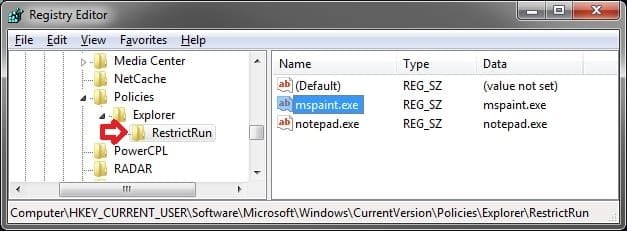
enable-6.jpg

G) Type in the name of the same .exe file (ex: mspaint.exe) again, and click/tap on OK. (see screenshot below)
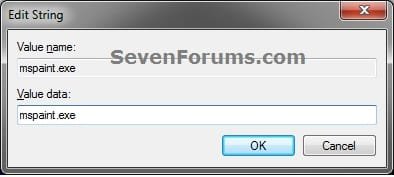
enable-7.jpg

   Tip

  • To change a listed EXE file name, double click/tap on the EXE to modify it (step 4F), type the new EXE name, and click/tap on OK.
  • To remove a listed EXE file name, right click or press and hold on the EXE, then click/tap on Delete and Yes.


H) Repeat steps 4F and 4G until you have added any other .exe files (ex: notepad.exe) you want on the list of allowed applications as well. (see screenshot below step 4F)

I) When finished, go to step 6 below.
5. To Allow All Applications to Run for Only Current User
NOTE: This is the default setting.A) In the right pane of Explorer, right click or press and hold on RestrictRun, and click/tap on Delete. (see screenshot below)
disable-1.jpg

B) Click/tap on Yes to approve. (see screenshot below)
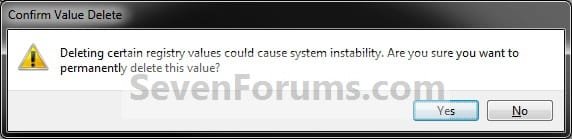
Disable-2.jpg

C) In the left pane, right click on RestrictRun, and click/tap on Delete. (see screenshot below)
disable-3.jpg

D) Click/tap on Yes to approve, go to step 6 below. (see screenshot below)
Disable-4.jpg

6. If used, you may also wish to make changes to your list of disallowed programs to run.

7. Close regedit.

8. Log off and log on, or restart the computer to apply.
That's it,
Shawn


Last edited:
Nice Brink! A few questions:

1. Is Local Group Policy available to all versions of Windows 7 (e.g. Starter, Home, Home Premium etc.)?
2. Can the message text in the restriction pop-up be customised?
 

My Computer

Computer type
PC/Desktop
Computer Manufacturer/Model Number
Golden Mk. I.4
OS
Windows 10 Pro x64 ; Xubuntu x64
CPU
Intel i7 860 @ 2.80 GHz O/C'ed to 4.0GHz
Motherboard
Gigabyte P55A-UD3R Rev.1. Award BIOS F13
Memory
16GB Corsair Vengance DDR3 @ 661 MHz Dual Channel (9-9-9-24)
Graphics Card(s)
EVGA NVidia GTX 560 1024MB
Sound Card
Realtek Integrated
Monitor(s) Displays
Dual Samsung SyncMaster 2494HS
Screen Resolution
1920*1080 and 1920*1080
Hard Drives
1*Samsung 840 EVO 120GB SSD;
1*OCZ Vertex 2 60GB SSD;
2*Samsung F3 SpinPoint 1TB in RAID0;
1*Samsung F1 SpinPoint 1TB;
2*Western Digital 1TB External USB 3.0
1*Western Digital 500GB External USB 3.0
1*Seagate 500GB External USB 2.0
PSU
Thermaltake ToughPower QFan 750W
Case
Thermaltake Element S VK60001W2Z
Cooling
Corsair H60 Water Cooling, 2*230mm and 2*80mm case fans
Keyboard
Logitech G110
Mouse
Logitech MX518
Is this name based... so if something is named mspaint.exe it works? So renamning something to mspaint.exe will fool this protection?

Is registry key HKEY_LOCAL_MACHINE\SOFTWARE\Microsoft\Windows\CurrentVersion\Policies\Explorer doing the same but only if no user specific entry has been defined?

Does it also prevent excution of progam if started from "command prompt"?
 

My Computer

Computer type
Laptop
Computer Manufacturer/Model Number
ACER ASPIRE 5742G
OS
Microsoft Windows 7 Home Premium 64-bits 7601 Multiprocessor Free Service Pack 1
CPU
Intel(R) Core(TM) i3 CPU M 370 @ 2.40GHz
Motherboard
Acer Aspire 5742G
Memory
4,00 GB
Graphics Card(s)
ATI Mobility Radeon HD 5400 Series
Sound Card
(1) AMD High Definition Audio Device (2) Realtek High Defi
Screen Resolution
1366 x 768 x 32 bits (4294967296 colors) @ 60 Hz
Hard Drives
WDC WD5000BEVT-22ZAT0
Nice Brink! A few questions:

1. Is Local Group Policy available to all versions of Windows 7 (e.g. Starter, Home, Home Premium etc.)?
2. Can the message text in the restriction pop-up be customised?

Hello Golden,

Q1) Correct, Group Policy (OPTION ONE) is not available in those editions, but those editions can use OPTION TWO with the registry instead.

Q2) Probably, but I haven't tried to yet. ;)
 

My Computer

Computer type
PC/Desktop
Computer Manufacturer/Model Number
Self built custom
OS
64-bit Windows 11 Pro for Workstations
CPU
Intel i7-8700K OC'd to 5 GHz
Motherboard
ASUS ROG Maximus XI Formula Z390
Memory
64 GB (4x16GB) G.SKILL TridentZ RGB DDR4 3600 MHz
Graphics Card(s)
ASUS ROG-STRIX-GTX1080TI-O11G-GAMING
Sound Card
Integrated
Monitor(s) Displays
2 x Samsung Odyssey G7 27"
Screen Resolution
2560x1440
Hard Drives
1TB Samsung 990 PRO M.2,
4TB Samsung 990 PRO PRO M.2,
TerraMaster F8 SSD Plus NAS
PSU
Seasonic Prime Titanium 850W
Case
Thermaltake Core P3
Cooling
Corsair Hydro H115i
Keyboard
Logitech wireless K800
Mouse
Logitech MX Master 4
Internet Speed
2 Gb/s Download and 100 Mb/s Upload
Antivirus
Malwarebyte Anti-Malware Premium
Browser
Google Chrome
Other Info
Logitech Z625 speaker system,
Logitech BRIO 4K Pro webcam,
HP Color LaserJet Pro MFP M477fdn,
APC SMART-UPS RT 1000 XL - SURT1000XLI,
Galaxy S23 Plus phone
Is this name based... so if something is named mspaint.exe it works? So renamning something to mspaint.exe will fool this protection?

Is registry key HKEY_LOCAL_MACHINE\SOFTWARE\Microsoft\Windows\CurrentVersion\Policies\Explorer doing the same but only if no user specific entry has been defined?

Does it also prevent excution of progam if started from "command prompt"?

Hello Ron,

Correct, it's file name specific. Renaming the .exe file would bypass the list of disallowed programs, but not the list of allowed programs from this tutorial.

If the .exe's file name is not on the list of allowed programs, then it can't run. Of course, you have to make sure you have every .exe file you want to be allowed to run listed though.


The registry location should be under HKEY_CURRENT_USER and not HKEY_LOCAL_MACHINE though. Since this is in the Policies key, only an administrator can modify it. This location will apply to all users on the computer.

If cmd.exe was "not added" to the list of allowed programs and/or added to the list of disallowed programs, then users will not be able to run anything from within a command prompt in Windows since cmd.exe is not allowed to be opened.
 

My Computer

Computer type
PC/Desktop
Computer Manufacturer/Model Number
Self built custom
OS
64-bit Windows 11 Pro for Workstations
CPU
Intel i7-8700K OC'd to 5 GHz
Motherboard
ASUS ROG Maximus XI Formula Z390
Memory
64 GB (4x16GB) G.SKILL TridentZ RGB DDR4 3600 MHz
Graphics Card(s)
ASUS ROG-STRIX-GTX1080TI-O11G-GAMING
Sound Card
Integrated
Monitor(s) Displays
2 x Samsung Odyssey G7 27"
Screen Resolution
2560x1440
Hard Drives
1TB Samsung 990 PRO M.2,
4TB Samsung 990 PRO PRO M.2,
TerraMaster F8 SSD Plus NAS
PSU
Seasonic Prime Titanium 850W
Case
Thermaltake Core P3
Cooling
Corsair Hydro H115i
Keyboard
Logitech wireless K800
Mouse
Logitech MX Master 4
Internet Speed
2 Gb/s Download and 100 Mb/s Upload
Antivirus
Malwarebyte Anti-Malware Premium
Browser
Google Chrome
Other Info
Logitech Z625 speaker system,
Logitech BRIO 4K Pro webcam,
HP Color LaserJet Pro MFP M477fdn,
APC SMART-UPS RT 1000 XL - SURT1000XLI,
Galaxy S23 Plus phone
Thanks Brink. Nothing get past you eh? :cool:
 

My Computer

Computer type
PC/Desktop
Computer Manufacturer/Model Number
Golden Mk. I.4
OS
Windows 10 Pro x64 ; Xubuntu x64
CPU
Intel i7 860 @ 2.80 GHz O/C'ed to 4.0GHz
Motherboard
Gigabyte P55A-UD3R Rev.1. Award BIOS F13
Memory
16GB Corsair Vengance DDR3 @ 661 MHz Dual Channel (9-9-9-24)
Graphics Card(s)
EVGA NVidia GTX 560 1024MB
Sound Card
Realtek Integrated
Monitor(s) Displays
Dual Samsung SyncMaster 2494HS
Screen Resolution
1920*1080 and 1920*1080
Hard Drives
1*Samsung 840 EVO 120GB SSD;
1*OCZ Vertex 2 60GB SSD;
2*Samsung F3 SpinPoint 1TB in RAID0;
1*Samsung F1 SpinPoint 1TB;
2*Western Digital 1TB External USB 3.0
1*Western Digital 500GB External USB 3.0
1*Seagate 500GB External USB 2.0
PSU
Thermaltake ToughPower QFan 750W
Case
Thermaltake Element S VK60001W2Z
Cooling
Corsair H60 Water Cooling, 2*230mm and 2*80mm case fans
Keyboard
Logitech G110
Mouse
Logitech MX518
LOL, your most welcome Golden. I'm sure a few things may have slipped by. :p
 

My Computer

Computer type
PC/Desktop
Computer Manufacturer/Model Number
Self built custom
OS
64-bit Windows 11 Pro for Workstations
CPU
Intel i7-8700K OC'd to 5 GHz
Motherboard
ASUS ROG Maximus XI Formula Z390
Memory
64 GB (4x16GB) G.SKILL TridentZ RGB DDR4 3600 MHz
Graphics Card(s)
ASUS ROG-STRIX-GTX1080TI-O11G-GAMING
Sound Card
Integrated
Monitor(s) Displays
2 x Samsung Odyssey G7 27"
Screen Resolution
2560x1440
Hard Drives
1TB Samsung 990 PRO M.2,
4TB Samsung 990 PRO PRO M.2,
TerraMaster F8 SSD Plus NAS
PSU
Seasonic Prime Titanium 850W
Case
Thermaltake Core P3
Cooling
Corsair Hydro H115i
Keyboard
Logitech wireless K800
Mouse
Logitech MX Master 4
Internet Speed
2 Gb/s Download and 100 Mb/s Upload
Antivirus
Malwarebyte Anti-Malware Premium
Browser
Google Chrome
Other Info
Logitech Z625 speaker system,
Logitech BRIO 4K Pro webcam,
HP Color LaserJet Pro MFP M477fdn,
APC SMART-UPS RT 1000 XL - SURT1000XLI,
Galaxy S23 Plus phone
The registry location should be under HKEY_CURRENT_USER and not HKEY_LOCAL_MACHINE though. Since this is in the Policies key, only an administrator can modify it. This location will apply to all users on the computer.
that's exactly the info I needed! So it's a registry key under HKCU but NOT changeable by user.

But what if a user renames unallowedprogam.exe to allowedprogam.exe? (assuming renaming is allowed). Or for example plug in an usb disk with allowedprogam.exe on it?
 

My Computer

Computer type
Laptop
Computer Manufacturer/Model Number
ACER ASPIRE 5742G
OS
Microsoft Windows 7 Home Premium 64-bits 7601 Multiprocessor Free Service Pack 1
CPU
Intel(R) Core(TM) i3 CPU M 370 @ 2.40GHz
Motherboard
Acer Aspire 5742G
Memory
4,00 GB
Graphics Card(s)
ATI Mobility Radeon HD 5400 Series
Sound Card
(1) AMD High Definition Audio Device (2) Realtek High Defi
Screen Resolution
1366 x 768 x 32 bits (4294967296 colors) @ 60 Hz
Hard Drives
WDC WD5000BEVT-22ZAT0
that's exactly the info I needed! So it's a registry key under HKCU but NOT changeable by user.
Correct, the Policy key under HKCU cannot be changed by a user. Only by and admin.

But what if a user renames unallowedprogam.exe to allowedprogam.exe? (assuming renaming is allowed). Or for example plug in an usb disk with allowedprogam.exe on it?
If unallowedprogam.exe is in the list of allowed programs and was renamed (if allowed) to allowedprogam.exe, then the user will no longer be able to run that exe since it's no longer an .exe in the list of allowed programs.


My Computer

Computer type
PC/Desktop
Computer Manufacturer/Model Number
Self built custom
OS
64-bit Windows 11 Pro for Workstations
CPU
Intel i7-8700K OC'd to 5 GHz
Motherboard
ASUS ROG Maximus XI Formula Z390
Memory
64 GB (4x16GB) G.SKILL TridentZ RGB DDR4 3600 MHz
Graphics Card(s)
ASUS ROG-STRIX-GTX1080TI-O11G-GAMING
Sound Card
Integrated
Monitor(s) Displays
2 x Samsung Odyssey G7 27"
Screen Resolution
2560x1440
Hard Drives
1TB Samsung 990 PRO M.2,
4TB Samsung 990 PRO PRO M.2,
TerraMaster F8 SSD Plus NAS
PSU
Seasonic Prime Titanium 850W
Case
Thermaltake Core P3
Cooling
Corsair Hydro H115i
Keyboard
Logitech wireless K800
Mouse
Logitech MX Master 4
Internet Speed
2 Gb/s Download and 100 Mb/s Upload
Antivirus
Malwarebyte Anti-Malware Premium
Browser
Google Chrome
Other Info
Logitech Z625 speaker system,
Logitech BRIO 4K Pro webcam,
HP Color LaserJet Pro MFP M477fdn,
APC SMART-UPS RT 1000 XL - SURT1000XLI,
Galaxy S23 Plus phone
So purely name based. If notepad.exe is allowed:
I put some nasty stuff on usb stick and call the exe notepad.exe. Then run notepad.exe from usb stick which runs some nasty stuff. Fake security in my opinion. Correct me if I'm wrong
 

My Computer

Computer type
Laptop
Computer Manufacturer/Model Number
ACER ASPIRE 5742G
OS
Microsoft Windows 7 Home Premium 64-bits 7601 Multiprocessor Free Service Pack 1
CPU
Intel(R) Core(TM) i3 CPU M 370 @ 2.40GHz
Motherboard
Acer Aspire 5742G
Memory
4,00 GB
Graphics Card(s)
ATI Mobility Radeon HD 5400 Series
Sound Card
(1) AMD High Definition Audio Device (2) Realtek High Defi
Screen Resolution
1366 x 768 x 32 bits (4294967296 colors) @ 60 Hz
Hard Drives
WDC WD5000BEVT-22ZAT0
So purely name based. If notepad.exe is allowed:
I put some nasty stuff on usb stick and call the exe notepad.exe. Then run notepad.exe from usb stick which runs some nasty stuff. Fake security in my opinion. Correct me if I'm wrong

Correct. If you add notepad.exe to the list of allowed programs, then anything named notepad.exe would be allowed to be run by the user(s) unless also on the list of disallowed programs.

If the .exe is in a Program Files or Windows type system folder, then a standard user will not be able to rename the .exe anyways.

This is not for malware protection though. It's only to help allow or prevent users from being able to run programs (.exe files) that you the administrator specify.
 

My Computer

Computer type
PC/Desktop
Computer Manufacturer/Model Number
Self built custom
OS
64-bit Windows 11 Pro for Workstations
CPU
Intel i7-8700K OC'd to 5 GHz
Motherboard
ASUS ROG Maximus XI Formula Z390
Memory
64 GB (4x16GB) G.SKILL TridentZ RGB DDR4 3600 MHz
Graphics Card(s)
ASUS ROG-STRIX-GTX1080TI-O11G-GAMING
Sound Card
Integrated
Monitor(s) Displays
2 x Samsung Odyssey G7 27"
Screen Resolution
2560x1440
Hard Drives
1TB Samsung 990 PRO M.2,
4TB Samsung 990 PRO PRO M.2,
TerraMaster F8 SSD Plus NAS
PSU
Seasonic Prime Titanium 850W
Case
Thermaltake Core P3
Cooling
Corsair Hydro H115i
Keyboard
Logitech wireless K800
Mouse
Logitech MX Master 4
Internet Speed
2 Gb/s Download and 100 Mb/s Upload
Antivirus
Malwarebyte Anti-Malware Premium
Browser
Google Chrome
Other Info
Logitech Z625 speaker system,
Logitech BRIO 4K Pro webcam,
HP Color LaserJet Pro MFP M477fdn,
APC SMART-UPS RT 1000 XL - SURT1000XLI,
Galaxy S23 Plus phone
How to EDIT list of allowed programs policy

hi guys,

im using gpedit.msc to whitelist but after that, i cannot edit the whitelist, how can i edit?
thanks.
 

My Computer

Computer type
PC/Desktop
OS
Windows 7 64 bit
Hello Kanoy,

You would be able to edit them by clicking on the Show button, then doing what's in the yellow tip box under step 5 in OPTION ONE to either type over or delete a listed program.

Hope this helps, :)
Shawn
 

My Computer

Computer type
PC/Desktop
Computer Manufacturer/Model Number
Self built custom
OS
64-bit Windows 11 Pro for Workstations
CPU
Intel i7-8700K OC'd to 5 GHz
Motherboard
ASUS ROG Maximus XI Formula Z390
Memory
64 GB (4x16GB) G.SKILL TridentZ RGB DDR4 3600 MHz
Graphics Card(s)
ASUS ROG-STRIX-GTX1080TI-O11G-GAMING
Sound Card
Integrated
Monitor(s) Displays
2 x Samsung Odyssey G7 27"
Screen Resolution
2560x1440
Hard Drives
1TB Samsung 990 PRO M.2,
4TB Samsung 990 PRO PRO M.2,
TerraMaster F8 SSD Plus NAS
PSU
Seasonic Prime Titanium 850W
Case
Thermaltake Core P3
Cooling
Corsair Hydro H115i
Keyboard
Logitech wireless K800
Mouse
Logitech MX Master 4
Internet Speed
2 Gb/s Download and 100 Mb/s Upload
Antivirus
Malwarebyte Anti-Malware Premium
Browser
Google Chrome
Other Info
Logitech Z625 speaker system,
Logitech BRIO 4K Pro webcam,
HP Color LaserJet Pro MFP M477fdn,
APC SMART-UPS RT 1000 XL - SURT1000XLI,
Galaxy S23 Plus phone
Hello Kanoy,

You would be able to edit them by clicking on the Show button, then doing what's in the yellow tip box under step 5 in OPTION ONE to either type over or delete a listed program.

Hope this helps, :)
Shawn

Hi Shawn,

How can I disable/edit this option? Now I can’t access Group Policy Editor or RegEdit ... :confused:
I specify that I have Admin rights on my laptop

Thanks.
 

My Computer

Computer type
PC/Desktop
OS
Windows 10
I found the answer here or here.

I think it might be Shawn solution from here, but I haven't tried it.
 

My Computer

Computer type
PC/Desktop
OS
Windows 10

My Computer

Computer type
PC/Desktop
Computer Manufacturer/Model Number
Self built custom
OS
64-bit Windows 11 Pro for Workstations
CPU
Intel i7-8700K OC'd to 5 GHz
Motherboard
ASUS ROG Maximus XI Formula Z390
Memory
64 GB (4x16GB) G.SKILL TridentZ RGB DDR4 3600 MHz
Graphics Card(s)
ASUS ROG-STRIX-GTX1080TI-O11G-GAMING
Sound Card
Integrated
Monitor(s) Displays
2 x Samsung Odyssey G7 27"
Screen Resolution
2560x1440
Hard Drives
1TB Samsung 990 PRO M.2,
4TB Samsung 990 PRO PRO M.2,
TerraMaster F8 SSD Plus NAS
PSU
Seasonic Prime Titanium 850W
Case
Thermaltake Core P3
Cooling
Corsair Hydro H115i
Keyboard
Logitech wireless K800
Mouse
Logitech MX Master 4
Internet Speed
2 Gb/s Download and 100 Mb/s Upload
Antivirus
Malwarebyte Anti-Malware Premium
Browser
Google Chrome
Other Info
Logitech Z625 speaker system,
Logitech BRIO 4K Pro webcam,
HP Color LaserJet Pro MFP M477fdn,
APC SMART-UPS RT 1000 XL - SURT1000XLI,
Galaxy S23 Plus phone
Back
Top