Audio Popping/Crackling

So1dier

New member
Local time
10:43 AM
Messages
54
I just bought windows 7 for the first time and after installation and installing all drivers I realized I only had one issue. For some reason when audio starts or ends there is popping/crackling noise. Does anyone know how to fix this?

I'm using a Sennheiser PC 350 headset and on board audio from this Gigabyte Motherboard.
 

My Computer

OS
Microsoft Windows 7 Home Premium 64-bit
CPU
AMD Phenom II X4 955 Black Edition Deneb 3.2GHz
Motherboard
GIGABYTE GA-790XTA-UD4
Memory
G.SKILL 4GB (2 x 2GB) 240-Pin DDR3 SDRAM DDR3 1600 (PC3 1280
Graphics Card(s)
ASUS 5870
Sound Card
Creative Sound Blaster X-Fi Titanium Fatal1ty Champion Serie
Monitor(s) Displays
Acer P235Hbmid Black 23" 5ms HDMI Widescreen LCD Monitor
Screen Resolution
1920x1080
Hard Drives
SAMSUNG Spinpoint F3 HD103SJ 1TB 7200 RPM SATA 3.0Gb/s 3.5"
PSU
Antec TruePower New TP-750 Blue 750W
Case
Antec Nine Hundred Two
Cooling
4 case fans
Keyboard
Razer Arctosa
Mouse
Razer Imperator
Internet Speed
Cable 10Gbs
Do you get the same pops/cracks if you use speakers instaed of the headset?
 

My Computer

Computer Manufacturer/Model Number
Dell Dimension E521
OS
Windows 8, Ubuntu 12.04 64bit, Pear Linux Triple Boot
CPU
AMD AthlonTM 64 X2 dual-core
Memory
3 GB
Graphics Card(s)
ATI Radeon HD 4350 1GB
Sound Card
M-Audio Mobile Pre USB External
Monitor(s) Displays
Acer 1916W x2
Screen Resolution
1440X900
Hard Drives
250 GB internal main, 500 GB internal backup, 1TB External
PSU
300 Watt
Keyboard
Dell
I have an older pair of speakers that I could test out I guess but it would be annoying to set it up, if you might know the solution I'll try it out and get back to you. I saw a lot of posts on the forums of a similar problem so I tried updating the drivers but it didn't fix the problem.

I do have the Realtek HD audio. Idk if that is a type of audio or a motherboard or windows 7 thing but I updated the drivers for it.
 

My Computer

OS
Microsoft Windows 7 Home Premium 64-bit
CPU
AMD Phenom II X4 955 Black Edition Deneb 3.2GHz
Motherboard
GIGABYTE GA-790XTA-UD4
Memory
G.SKILL 4GB (2 x 2GB) 240-Pin DDR3 SDRAM DDR3 1600 (PC3 1280
Graphics Card(s)
ASUS 5870
Sound Card
Creative Sound Blaster X-Fi Titanium Fatal1ty Champion Serie
Monitor(s) Displays
Acer P235Hbmid Black 23" 5ms HDMI Widescreen LCD Monitor
Screen Resolution
1920x1080
Hard Drives
SAMSUNG Spinpoint F3 HD103SJ 1TB 7200 RPM SATA 3.0Gb/s 3.5"
PSU
Antec TruePower New TP-750 Blue 750W
Case
Antec Nine Hundred Two
Cooling
4 case fans
Keyboard
Razer Arctosa
Mouse
Razer Imperator
Internet Speed
Cable 10Gbs
I was really asking to elimate the headset, seems you are having some issues with them as it is. Could very well be the soundcard but I was trying to elimate the headset first, then we can delve deeper if it is the sound card.

Geeve

Edit: I have read as well it may not just be the audio drivers you need to updatee, might want to check to see if there is a bios update as well for your motherboard. but lets start simple with the headset first.

Edit2: Another thought, if I remember you saying the headset has a volume of it's own, you might play with the volumes on the windows side and the headset side as you may have some clipping occuring between the two volume sets.
 
Last edited:

My Computer

Computer Manufacturer/Model Number
Dell Dimension E521
OS
Windows 8, Ubuntu 12.04 64bit, Pear Linux Triple Boot
CPU
AMD AthlonTM 64 X2 dual-core
Memory
3 GB
Graphics Card(s)
ATI Radeon HD 4350 1GB
Sound Card
M-Audio Mobile Pre USB External
Monitor(s) Displays
Acer 1916W x2
Screen Resolution
1440X900
Hard Drives
250 GB internal main, 500 GB internal backup, 1TB External
PSU
300 Watt
Keyboard
Dell
Alright, I just tested it out with my other headset, a $40 Logitech headset(USB) and I'm still getting the exact same popping effect when the audio starts/stops. Like if I switch channels in vent, right when the audio finishes it pops.

My Sennheiser headphones aren't usb, but I plugged both into my motherboard.

I also tried plugging the Logitech USB headset into the front USB slot at the top of my desktop, and it is still making the popping noise.
 

My Computer

OS
Microsoft Windows 7 Home Premium 64-bit
CPU
AMD Phenom II X4 955 Black Edition Deneb 3.2GHz
Motherboard
GIGABYTE GA-790XTA-UD4
Memory
G.SKILL 4GB (2 x 2GB) 240-Pin DDR3 SDRAM DDR3 1600 (PC3 1280
Graphics Card(s)
ASUS 5870
Sound Card
Creative Sound Blaster X-Fi Titanium Fatal1ty Champion Serie
Monitor(s) Displays
Acer P235Hbmid Black 23" 5ms HDMI Widescreen LCD Monitor
Screen Resolution
1920x1080
Hard Drives
SAMSUNG Spinpoint F3 HD103SJ 1TB 7200 RPM SATA 3.0Gb/s 3.5"
PSU
Antec TruePower New TP-750 Blue 750W
Case
Antec Nine Hundred Two
Cooling
4 case fans
Keyboard
Razer Arctosa
Mouse
Razer Imperator
Internet Speed
Cable 10Gbs
Cool, check for a bios update for your MB, I have that can help as well, past that I will do some searching around to see what I can come up with. In the meantime maybe someone else will come along with some suggestions

Geeve
 

My Computer

Computer Manufacturer/Model Number
Dell Dimension E521
OS
Windows 8, Ubuntu 12.04 64bit, Pear Linux Triple Boot
CPU
AMD AthlonTM 64 X2 dual-core
Memory
3 GB
Graphics Card(s)
ATI Radeon HD 4350 1GB
Sound Card
M-Audio Mobile Pre USB External
Monitor(s) Displays
Acer 1916W x2
Screen Resolution
1440X900
Hard Drives
250 GB internal main, 500 GB internal backup, 1TB External
PSU
300 Watt
Keyboard
Dell
Is a bios update different then updating the drivers? I updated the drivers right away with the disc that came with my motherboard. And it's brand new also, just got the computer yesterday.

Anyways I haven't had time to try to fix it cause I just ran into another problem, my computer just froze playing world of warcraft. At first I thought it was overheating but I let it cool down for an hour and turned on my air conditioning in the house and it still froze right away. When it froze it also unfroze after about 30 seconds and said amd drivers failed but it was able to recover. So now I switched my drivers to the 10.5 update from may instead of the 10.6 from June so hopefully that will fix it.

I have the XFX 5870 video card.


Try to keep this thread focused on the popping issue and I'll make another one for my video card and computer crashing, unless you think you might know how to fix it.
 

My Computer

OS
Microsoft Windows 7 Home Premium 64-bit
CPU
AMD Phenom II X4 955 Black Edition Deneb 3.2GHz
Motherboard
GIGABYTE GA-790XTA-UD4
Memory
G.SKILL 4GB (2 x 2GB) 240-Pin DDR3 SDRAM DDR3 1600 (PC3 1280
Graphics Card(s)
ASUS 5870
Sound Card
Creative Sound Blaster X-Fi Titanium Fatal1ty Champion Serie
Monitor(s) Displays
Acer P235Hbmid Black 23" 5ms HDMI Widescreen LCD Monitor
Screen Resolution
1920x1080
Hard Drives
SAMSUNG Spinpoint F3 HD103SJ 1TB 7200 RPM SATA 3.0Gb/s 3.5"
PSU
Antec TruePower New TP-750 Blue 750W
Case
Antec Nine Hundred Two
Cooling
4 case fans
Keyboard
Razer Arctosa
Mouse
Razer Imperator
Internet Speed
Cable 10Gbs
Will do! The BIOS is different than the drivers, it controls the actual start up and integrated componets prior to Windows boot, Kind of a pre system test/controler (That's the best I can explain it). I will look into Bios Update for you, while you hunt for the solution to your other problem. I will also try my best to come up with another fix.

Geeve
 

My Computer

Computer Manufacturer/Model Number
Dell Dimension E521
OS
Windows 8, Ubuntu 12.04 64bit, Pear Linux Triple Boot
CPU
AMD AthlonTM 64 X2 dual-core
Memory
3 GB
Graphics Card(s)
ATI Radeon HD 4350 1GB
Sound Card
M-Audio Mobile Pre USB External
Monitor(s) Displays
Acer 1916W x2
Screen Resolution
1440X900
Hard Drives
250 GB internal main, 500 GB internal backup, 1TB External
PSU
300 Watt
Keyboard
Dell
So do you have any ideas? It seems to pop every time audio starts or ends. When I'm playing world of warcraft there are multiple sounds starting and ending all the time so there is a lot of sound popping all the time. I think I figured out why my computer isn't working properly also, I think the PSU is defecting which might also be a reason why my audio isn't working properly but idk.
 

My Computer

OS
Microsoft Windows 7 Home Premium 64-bit
CPU
AMD Phenom II X4 955 Black Edition Deneb 3.2GHz
Motherboard
GIGABYTE GA-790XTA-UD4
Memory
G.SKILL 4GB (2 x 2GB) 240-Pin DDR3 SDRAM DDR3 1600 (PC3 1280
Graphics Card(s)
ASUS 5870
Sound Card
Creative Sound Blaster X-Fi Titanium Fatal1ty Champion Serie
Monitor(s) Displays
Acer P235Hbmid Black 23" 5ms HDMI Widescreen LCD Monitor
Screen Resolution
1920x1080
Hard Drives
SAMSUNG Spinpoint F3 HD103SJ 1TB 7200 RPM SATA 3.0Gb/s 3.5"
PSU
Antec TruePower New TP-750 Blue 750W
Case
Antec Nine Hundred Two
Cooling
4 case fans
Keyboard
Razer Arctosa
Mouse
Razer Imperator
Internet Speed
Cable 10Gbs

My Computer

Computer Manufacturer/Model Number
Toshiba P300
OS
Windows 8 Pro
CPU
Intel Centrino Dual Core P7450 2.13GHz
Memory
4gb
Graphics Card(s)
ATI Mobility Raedon HD3650
Hard Drives
Toshiba MK3252GSX ATA
Internet Speed
Wish it were faster
I am not quite sure if I have exactly same issue, here it is:

At first W7 installation also with a GA MB, no issue at all.
Later I had to reinstall from scratch, I have now noise when using the headset at front connector, not when using the backboard speakers.
I think I updated my bios in between, but not quite sure.

I also wonder why I get noise when using the headset (front panel connector) and not with normal speakers. It is not the headset because I have a couple of them and both have noise on this computer, not on another.
 

My Computer

Computer Manufacturer/Model Number
Home made
OS
Win7 pro 64
CPU
Core i5-750
Motherboard
GA-P55M-UD4
Memory
4GB Patriot DDR3
Graphics Card(s)
ATI RADEON HD5450
Hard Drives
SSD Crucial CT250BX100SSD1 ATA
Internet Speed
DSL
Antivirus
Avast free
Hello So1dier,

Can you download and run this tool?
DPC Latency Checker

There is some good information on the page.


There are quite a few different drivers that could be causing sound latency. Sometimes it's the ethernet controller drivers. Here's a link to a thread from a while back. The OP was having similar issues to yours.
http://www.sevenforums.com/sound-audio/78695-cracking-popping-sound.html


Ya it says my latency is only about 100-200 in the green.
 

My Computer

OS
Microsoft Windows 7 Home Premium 64-bit
CPU
AMD Phenom II X4 955 Black Edition Deneb 3.2GHz
Motherboard
GIGABYTE GA-790XTA-UD4
Memory
G.SKILL 4GB (2 x 2GB) 240-Pin DDR3 SDRAM DDR3 1600 (PC3 1280
Graphics Card(s)
ASUS 5870
Sound Card
Creative Sound Blaster X-Fi Titanium Fatal1ty Champion Serie
Monitor(s) Displays
Acer P235Hbmid Black 23" 5ms HDMI Widescreen LCD Monitor
Screen Resolution
1920x1080
Hard Drives
SAMSUNG Spinpoint F3 HD103SJ 1TB 7200 RPM SATA 3.0Gb/s 3.5"
PSU
Antec TruePower New TP-750 Blue 750W
Case
Antec Nine Hundred Two
Cooling
4 case fans
Keyboard
Razer Arctosa
Mouse
Razer Imperator
Internet Speed
Cable 10Gbs
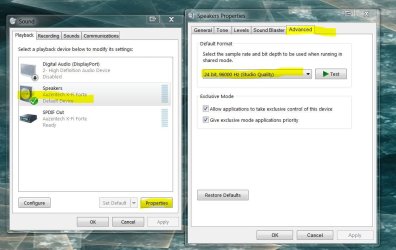
Have you tried adjusting your bitrate to see if makes any difference?

r-click volume icon > playback devices

Although if the PSU is flaky, or another piece of hardware (you seem to have a few issues) it may be interference.

In the interim, have you downloaded the most recent drivers for your mobos sound - from the manufacturers site, and not the ones on the disc (which are usually out of date)?
 

Attachments

  • bitrate.JPG
    bitrate.JPG
    86.7 KB · Views: 431

My Computer

Computer type
PC/Desktop
Computer Manufacturer/Model Number
Systems by SmartEyeball
OS
8 Pro x64
CPU
i7 3770K 4.6GHz
Motherboard
ASUS P8Z77 WS
Memory
16GB G.Skill Trident X 2666mhz
Graphics Card(s)
x2 EVGA 780 Ti Superclocked SLI
Sound Card
SB X-FI Surround 5.1 PRO USB / ATH-AD900 Headphones
Monitor(s) Displays
x3 Dell U2410 / 58" Samsung
Screen Resolution
5760*1200/ 1920*1200
Hard Drives
2x Intel 520 240GB (RAID 0) * 2x WD Caviar Blacks 2TB (RAID 0) * 2TB WD Caviar Black * Sony Optirac DVD
PSU
Silverstone Strider Evolution 1200W
Case
Thermaltake Level 10 GT Snow Edition
Cooling
Noctua NH-D14
Keyboard
Topre Realforce // Ducky Shine MX Black // Filco Ninja TKL
Mouse
Thermaltake Theron (Highly Recommended) + Razer Imperator
Antivirus
MSE
Browser
IE, FF, WaterFox
Other Info
GT Extreme V2 Sim Racing Cockpit + 40" LCD and K/B Mouse stand ▼
Fanatec CSR Elite Wheel + Clubsport V1 Pedals + CSR shifter/7G-H ▼Saitek X52 Pro ▼ TrackIR 5 Pro
Buttkicker v2 Seat Rumbler with Dedicated 5.1 and Sub Woofer attached to frame ▼
=
Bloody Big Grin
I just discovered that the noise is linked to the applications. For instance, looking at smarteyeball advice, if I select the playback screen, I have noise. If I select the recording screen, no noise. If my mouse navigates on active fields, I have small noise.

Interesting isn't it? Where does it come from?
 

My Computer

Computer Manufacturer/Model Number
Home made
OS
Win7 pro 64
CPU
Core i5-750
Motherboard
GA-P55M-UD4
Memory
4GB Patriot DDR3
Graphics Card(s)
ATI RADEON HD5450
Hard Drives
SSD Crucial CT250BX100SSD1 ATA
Internet Speed
DSL
Antivirus
Avast free
Good question. A more adequate/detailed explanation should come from somebody with a more in-depth understanding of how electronics work.

But it sounds like some sort of electrical interference. As for the cause.. :huh:

If you mute all your volume levels, can you still hear the noises?

Try disabling / muting all recording devices.
 

My Computer

Computer type
PC/Desktop
Computer Manufacturer/Model Number
Systems by SmartEyeball
OS
8 Pro x64
CPU
i7 3770K 4.6GHz
Motherboard
ASUS P8Z77 WS
Memory
16GB G.Skill Trident X 2666mhz
Graphics Card(s)
x2 EVGA 780 Ti Superclocked SLI
Sound Card
SB X-FI Surround 5.1 PRO USB / ATH-AD900 Headphones
Monitor(s) Displays
x3 Dell U2410 / 58" Samsung
Screen Resolution
5760*1200/ 1920*1200
Hard Drives
2x Intel 520 240GB (RAID 0) * 2x WD Caviar Blacks 2TB (RAID 0) * 2TB WD Caviar Black * Sony Optirac DVD
PSU
Silverstone Strider Evolution 1200W
Case
Thermaltake Level 10 GT Snow Edition
Cooling
Noctua NH-D14
Keyboard
Topre Realforce // Ducky Shine MX Black // Filco Ninja TKL
Mouse
Thermaltake Theron (Highly Recommended) + Razer Imperator
Antivirus
MSE
Browser
IE, FF, WaterFox
Other Info
GT Extreme V2 Sim Racing Cockpit + 40" LCD and K/B Mouse stand ▼
Fanatec CSR Elite Wheel + Clubsport V1 Pedals + CSR shifter/7G-H ▼Saitek X52 Pro ▼ TrackIR 5 Pro
Buttkicker v2 Seat Rumbler with Dedicated 5.1 and Sub Woofer attached to frame ▼
=
Bloody Big Grin
In my experience with Windows audio, there have been major problems since Windows Vista.

When I heard about Windows 7, I thought to myself.. Finally, Microsoft is going to have this audio thing fixed once and for all. To my dismay... It's still a tangled mess.

Some problems I were able to fix myself, and some I just gave up on. I bought an external soundcard and everything works now. It just shouldn't have to be that way.

If Microsoft really wants to keep what's left of the "audiophile" market, they need to get this sorted. I love Windows, it's all I really know. But if my profession dealt with the audio engineering side of things, I would seriously think of jumping ship.

There's not much that I found that needs addressed in SP1 for Windows 7, but please Microsoft... Get to the bottom of this onboard audio mess.
 

My Computer

Computer Manufacturer/Model Number
Toshiba P300
OS
Windows 8 Pro
CPU
Intel Centrino Dual Core P7450 2.13GHz
Memory
4gb
Graphics Card(s)
ATI Mobility Raedon HD3650
Hard Drives
Toshiba MK3252GSX ATA
Internet Speed
Wish it were faster
In my experience with Windows audio, there have been major problems since Windows Vista.

There's not much that I found that needs addressed in SP1 for Windows 7, but please Microsoft... Get to the bottom of this onboard audio mess.


XP was the end of times for direct access of hardware, the main problem is layers of OS inserted in between the drivers and hardware. The thing that's most aggravating is that Vista was actually better than Windows-7 at handling audio ~efficiently~. MS if you're going to add a bunch of OS added features they have to work in real time and enhance the audio system, not bring it to it's knees.

Yes, I have my system working very well now but it took a long time to get here and I've disabled a number of Win-7's features to get there. Most (as in 99.9%) of Windows users will either not know how or will not want to cripple Windows to get decent, reliable audio.

In my opinion... onboard audio is really not audiophile quality... but I know what you mean. Generally, 3rd party solutions work well but users shouldn't have to go that route to have a working audio system.

Worse... I bet they don't know how to fix it. The current audio system is geeked out, it's convoluted, laden with features that probably do more in making it unworkable than clean and consistent.

Ap
 
Last edited:

My Computer

Computer Manufacturer/Model Number
Assembled in my workshop
OS
Windows 7 Home Premium
CPU
Intel Core 2 Duo @ 3.00gHz
Motherboard
Gigabyte GA-P35-S3G
Memory
4 GB
Graphics Card(s)
ATI Radeon HD 2600 XT
Sound Card
RME 24/96 Card, Realtek Internal Audio PreSonus FireStudio
Monitor(s) Displays
Acer 1917 (x2)
Screen Resolution
1280 x 1024 on both monitors
Hard Drives
Three 250GB Seagate SATA Barracuda 7200rpm
PSU
Rosewill 500-watt
Case
Rosewill mid-tower
Cooling
Noctua NH-U9B (CPU), PwrSupply fan + single large case Fan
Keyboard
Macally w/2/USB ports.
Mouse
Trackman Wheel
Other Info
Event 20/20 bas studio monitors, Yamaha sub.
Rackmount Korg/Roland/Yamaha synthesizers,
Cubase MIDI/audio recording. Sony Soundforge audio/mastering software. CD Architect Mastering. RME & Presonus audio interfaces.
must be driver/Win7 related.

No noise in Bios, no noise at initial phase of booting.
Noise starts with win7 booton logo.

Mute everything doesn't change the noise issue.
 

My Computer

Computer Manufacturer/Model Number
Home made
OS
Win7 pro 64
CPU
Core i5-750
Motherboard
GA-P55M-UD4
Memory
4GB Patriot DDR3
Graphics Card(s)
ATI RADEON HD5450
Hard Drives
SSD Crucial CT250BX100SSD1 ATA
Internet Speed
DSL
Antivirus
Avast free
Starts with the Logo... hmm.

Try safe mode to see if there is any noise present. (no audio drivers involved at all)

If there is zero noise, then it's tentatively safe to say it is a driver issue.

However if there is still noise, even in safe mode, it's not driver related.
 

My Computer

Computer type
PC/Desktop
Computer Manufacturer/Model Number
Systems by SmartEyeball
OS
8 Pro x64
CPU
i7 3770K 4.6GHz
Motherboard
ASUS P8Z77 WS
Memory
16GB G.Skill Trident X 2666mhz
Graphics Card(s)
x2 EVGA 780 Ti Superclocked SLI
Sound Card
SB X-FI Surround 5.1 PRO USB / ATH-AD900 Headphones
Monitor(s) Displays
x3 Dell U2410 / 58" Samsung
Screen Resolution
5760*1200/ 1920*1200
Hard Drives
2x Intel 520 240GB (RAID 0) * 2x WD Caviar Blacks 2TB (RAID 0) * 2TB WD Caviar Black * Sony Optirac DVD
PSU
Silverstone Strider Evolution 1200W
Case
Thermaltake Level 10 GT Snow Edition
Cooling
Noctua NH-D14
Keyboard
Topre Realforce // Ducky Shine MX Black // Filco Ninja TKL
Mouse
Thermaltake Theron (Highly Recommended) + Razer Imperator
Antivirus
MSE
Browser
IE, FF, WaterFox
Other Info
GT Extreme V2 Sim Racing Cockpit + 40" LCD and K/B Mouse stand ▼
Fanatec CSR Elite Wheel + Clubsport V1 Pedals + CSR shifter/7G-H ▼Saitek X52 Pro ▼ TrackIR 5 Pro
Buttkicker v2 Seat Rumbler with Dedicated 5.1 and Sub Woofer attached to frame ▼
=
Bloody Big Grin
ok will try tonight when back home.

Have a nice day (humm good night in AUstralia....)
 

My Computer

Computer Manufacturer/Model Number
Home made
OS
Win7 pro 64
CPU
Core i5-750
Motherboard
GA-P55M-UD4
Memory
4GB Patriot DDR3
Graphics Card(s)
ATI RADEON HD5450
Hard Drives
SSD Crucial CT250BX100SSD1 ATA
Internet Speed
DSL
Antivirus
Avast free
Back
Top