Back up Nortons Utility ?

JerometheGiraff

New member
Member
VIP
Local time
4:00 AM
Messages
925
After recently having a high risk virus, I was thought that by buying Norton 360 would remove the virus, the good news was that it found the virus the bad news is it couldn't remove it. I was left to reinstall windows after a back up from Paragon Back up and Recovery (Free Edition) didn't work. Norton comes with a back up tool are there any reviews on Norton's back up utility ?

I would also like to mention that I was previously using Windows 7 x32 which was installed on my O: partition. Reinstalling Windows 7 x64 on the O: partition, windows renamed the partition to C: and I lost files I had on my C partition is it possible to get at least some of it back ?
 

My Computer

Computer type
PC/Desktop
Computer Manufacturer/Model Number
Custom Built
OS
Windows 10 Pro
CPU
Core2Quad (2.6 Ghz)
Motherboard
nVidia 775
Memory
8 Gigs DDR2
Graphics Card(s)
Geforce Titan Black
Sound Card
Motherboard Audio
Monitor(s) Displays
25" Asus LCD
Screen Resolution
1680x1050
Hard Drives
120 Gig SSD
60 Gig SSD
750 Gig HDD
PSU
850 Watts
Case
Mid-Size
Keyboard
Logitech
Mouse
Logitech - I love logitech mouses
Internet Speed
DSL 25Mbps - Although extremely expensive
Antivirus
Microsoft Anti-Virus
Browser
FireFox 36.x
After recently having a high risk virus, I was thought that by buying Norton 360 would remove the virus, the good news was that it found the virus the bad news is it couldn't remove it. I was left to reinstall windows after a back up from Paragon Back up and Recovery (Free Edition) didn't work. Norton comes with a back up tool are there any reviews on Norton's back up utility ?

I would also like to mention that I was previously using Windows 7 x32 which was installed on my O: partition. Reinstalling Windows 7 x64 on the O: partition, windows renamed the partition to C: and I lost files I had on my C partition is it possible to get at least some of it back ?


When you re-installed win 32 on O:\ did you format the partition?
 

My Computer

Computer Manufacturer/Model Number
HP Pavillion dv-7 1005 Tx
OS
Win 8 Release candidate 8400
CPU
[email protected]
Memory
4 gigs
Graphics Card(s)
Nvidia 9600M
Sound Card
HD built-in
Monitor(s) Displays
17" Wxga
Screen Resolution
1440x900
Cooling
none
Internet Speed
45Mb down 5Mb up
After recently having a high risk virus, I was thought that by buying Norton 360 would remove the virus, the good news was that it found the virus the bad news is it couldn't remove it. I was left to reinstall windows after a back up from Paragon Back up and Recovery (Free Edition) didn't work. Norton comes with a back up tool are there any reviews on Norton's back up utility ?

I would also like to mention that I was previously using Windows 7 x32 which was installed on my O: partition. Reinstalling Windows 7 x64 on the O: partition, windows renamed the partition to C: and I lost files I had on my C partition is it possible to get at least some of it back ?

In direct answer to your question: I recommend using Win 7 Backup and Restore which is part of Win 7.

Now to your virus problem:

If that computer has a working OS, then download, install and run MalwareBytes.
Malwarebytes

If not, then there are two products which I can recommend. Each of these can be burned to a CD (or put on a USB stick with a little more work).

You will end up with a .iso file which you must burn to a cd. If you have a working Win 7 system, then that's easy. Just click on the iso and the Win 7 burner will pop up and tell you to insert a cd/dvd.

I have tried both of these. I have the greater confidence in the Kaspersky product. Fortunately, or unfortunately, my test computer did not have any viruses but both have very good user interfaces.

Kaspersky Rescue Disk (free)
Panda SafeCD (free)
 

My Computer

Computer Manufacturer/Model Number
Toshiba Satellite S875D-S7239 laptop
OS
MS Windows 7 Ultimate SP1 64-bit
CPU
AMD A10-4600M
Motherboard
AMD Pumori (Socket FT1)
Memory
6.00 GB Dual-Channel DDR3 @ 798MHz (11-11-12-28)
Graphics Card(s)
AMD Radeon HD 7660G
Sound Card
High Definition Audio Device
Monitor(s) Displays
Generic PnP Monitor (1600x900@60Hz)
Screen Resolution
1600x900@60Hz
Hard Drives
SSD 119GB Corsair CSSD-V128GB2 ATA Device
Keyboard
Standard PS/2 Keyboard
Mouse
HP Wireless Optical Mobile Mouse Model FHA-3410
Internet Speed
What the local pub, local coffee shop offers.
Other Info
Optical Drive:MATSHITA BD-CMB UJ160B ATA Device


Also have an Asus ha1002xp netbook with Win 7 Ultimate installed.
JerometheGiraff- You might have some success retrieving some of your data from the reformatted drive, but a substantial part of it has already been overwritten with Win 7 x64. There are a lot of backup programs on the market. FWIW I have used Macrium Reflect to back up both of my Vista x86 and Win 7 x64 computers and it has never failed once to restore a perfectly working image to the drive.

87e3bf13.png


~Maxx~
.
da59fa57.png
 

My Computer

Computer Manufacturer/Model Number
HP HPE 270f
OS
Windows 7 x64 Home Premium
CPU
Intel Core i7 930 @ 2.8 Ghz Socket 1366 LGA
Motherboard
Pegatron Truckee v1.04E41
Memory
8 GB 1366 Mhz DDR3 (PC3-10700) RAM
Graphics Card(s)
ATI Radeon 5770 1 GB DDR5 RAM
Sound Card
Realtech High Definition
Monitor(s) Displays
32" Sony Bravia
Screen Resolution
1366 X 768
Hard Drives
Intel 25nm 120 GB Series 320 SSD HD Tune- 265 MBps Read/ 130 MBps Write

LaCie 1TB + 1TB RAID 0 eSATA Drive HD Tune- 160 MBps Read/ 90 MBps Write
Keyboard
Logitech Illuminated
Mouse
Logitech MX Revolution
Internet Speed
36.4 Mbps Maximum on a 37 Mbps Motorola SB501 Modem
FWIW I have used Macrium Reflect to back up both of my Vista x86 and Win 7 x64 computers and it has never failed once to restore a perfectly working image to the drive.

Will using Macrium Reflect be successful at retrieving some of the files that were over written upon installing Windows x64 on the same partition that was Windows x32 ? How does it compare with tools like Norton Back up there are quite a few back up utilities out there I'm just trying to find the one that is the most reliable and that is good whether that be something I currently have or another tool.
 

My Computer

Computer type
PC/Desktop
Computer Manufacturer/Model Number
Custom Built
OS
Windows 10 Pro
CPU
Core2Quad (2.6 Ghz)
Motherboard
nVidia 775
Memory
8 Gigs DDR2
Graphics Card(s)
Geforce Titan Black
Sound Card
Motherboard Audio
Monitor(s) Displays
25" Asus LCD
Screen Resolution
1680x1050
Hard Drives
120 Gig SSD
60 Gig SSD
750 Gig HDD
PSU
850 Watts
Case
Mid-Size
Keyboard
Logitech
Mouse
Logitech - I love logitech mouses
Internet Speed
DSL 25Mbps - Although extremely expensive
Antivirus
Microsoft Anti-Virus
Browser
FireFox 36.x
Jerome,
I am not a user of Macrium but several are. I will leave that question for them.

Norton products don't seem to have made the jump to Win 7 smoothly.

I use only the tools that come with Win 7 including Win 7 Backup & Restore.

I will tell you that your chances of recoverying, at this stage of the game, from reformatting and installing on a partition are slim to none. I have used recovery software, a commercial product, to recover from a format but that was immediately thereafter with no install or usage in between.
 

My Computer

Computer Manufacturer/Model Number
Toshiba Satellite S875D-S7239 laptop
OS
MS Windows 7 Ultimate SP1 64-bit
CPU
AMD A10-4600M
Motherboard
AMD Pumori (Socket FT1)
Memory
6.00 GB Dual-Channel DDR3 @ 798MHz (11-11-12-28)
Graphics Card(s)
AMD Radeon HD 7660G
Sound Card
High Definition Audio Device
Monitor(s) Displays
Generic PnP Monitor (1600x900@60Hz)
Screen Resolution
1600x900@60Hz
Hard Drives
SSD 119GB Corsair CSSD-V128GB2 ATA Device
Keyboard
Standard PS/2 Keyboard
Mouse
HP Wireless Optical Mobile Mouse Model FHA-3410
Internet Speed
What the local pub, local coffee shop offers.
Other Info
Optical Drive:MATSHITA BD-CMB UJ160B ATA Device


Also have an Asus ha1002xp netbook with Win 7 Ultimate installed.
Jerome, I will tell you that your chances of recoverying, at this stage of the game, from reformatting and installing on a partition are slim to none. I have used recovery software, a commercial product, to recover from a format but that was immediately thereafter with no install or usage in between.

No backup imaging software will be able to un-delete your lost files and I'm afraid that karlsnooks is right that the chances are slim to none at getting them back even with data retrieval software at this point.

In the past I have lost large chunks of data myself and learned the hard way that the old saying is true...

"If you only have your data backed up twice you don't really care about it..."

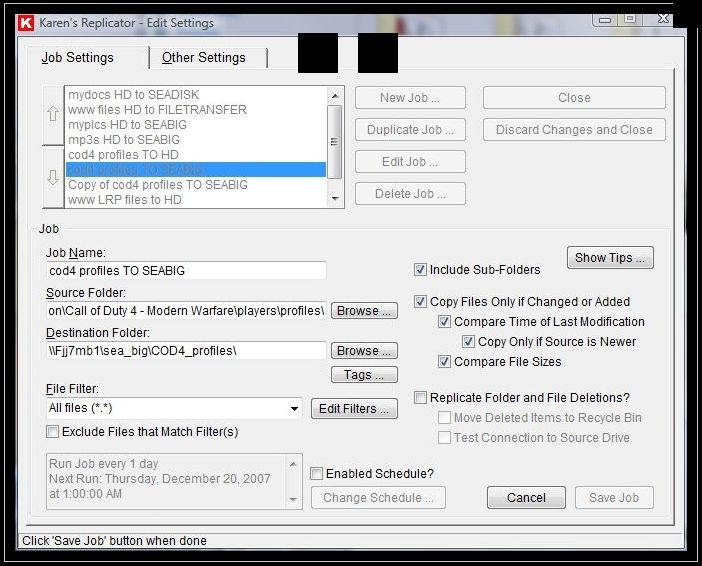
I now have Karen's Replicator freeware programmed to back up my data to 4 different drives.

~Maxx~
.
da59fa57.png
 

My Computer

Computer Manufacturer/Model Number
HP HPE 270f
OS
Windows 7 x64 Home Premium
CPU
Intel Core i7 930 @ 2.8 Ghz Socket 1366 LGA
Motherboard
Pegatron Truckee v1.04E41
Memory
8 GB 1366 Mhz DDR3 (PC3-10700) RAM
Graphics Card(s)
ATI Radeon 5770 1 GB DDR5 RAM
Sound Card
Realtech High Definition
Monitor(s) Displays
32" Sony Bravia
Screen Resolution
1366 X 768
Hard Drives
Intel 25nm 120 GB Series 320 SSD HD Tune- 265 MBps Read/ 130 MBps Write

LaCie 1TB + 1TB RAID 0 eSATA Drive HD Tune- 160 MBps Read/ 90 MBps Write
Keyboard
Logitech Illuminated
Mouse
Logitech MX Revolution
Internet Speed
36.4 Mbps Maximum on a 37 Mbps Motorola SB501 Modem
I will take a look at the two programs suggested. I didn't loose a ton of data a small chunk of what I lost has been recovered but there was other stuff including notes and design stuff I lost. Hopefully I can remember over time and rebuild some stuff I lost as well. I won't make the same mistake next time, I lost more data in previous formats/re-install then this time so that was the only blessing :)
 

My Computer

Computer type
PC/Desktop
Computer Manufacturer/Model Number
Custom Built
OS
Windows 10 Pro
CPU
Core2Quad (2.6 Ghz)
Motherboard
nVidia 775
Memory
8 Gigs DDR2
Graphics Card(s)
Geforce Titan Black
Sound Card
Motherboard Audio
Monitor(s) Displays
25" Asus LCD
Screen Resolution
1680x1050
Hard Drives
120 Gig SSD
60 Gig SSD
750 Gig HDD
PSU
850 Watts
Case
Mid-Size
Keyboard
Logitech
Mouse
Logitech - I love logitech mouses
Internet Speed
DSL 25Mbps - Although extremely expensive
Antivirus
Microsoft Anti-Virus
Browser
FireFox 36.x
I won't make the same mistake next time.

That is the same motivation that I have been running under in building up my file backup system. Unless you have a large drive in your computer that you can use you will need an external drive to back up to and I have run the gamut as far as the 1-2 TB Western Digital and Seagate drives available at local brick and mortar stores in that 4 out of 5 of them that usually only run in 480 Mbps USB 2 and have all failed within 6-18 months!

LaCie.png


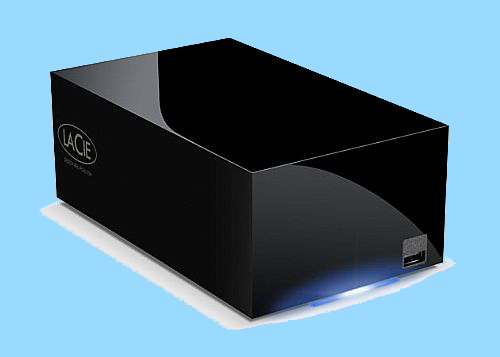
After spending well over $500 on a series of failed external HDD's I did some serious research and came across the LaCie Hard Disk MAX 2TB Quadra eSATA/FireWire800/FireWire400/USB 2.0 RAID Portable External Hard Drive that uses a 3 Gbps eSATA connection which I have measured at 160/90 read and write times in Raid 0 and when the two 1 TB drives are run in Raid 1 they are mirrored images of each other and if 1 should fail it can be replaced and re-imaged from the other for added security.

The LaCie 2 TB drive does cost a little more than the others did, but from the reviews I've seen there are people who have been using this drive for over 4 years with no performance issues. This LaCie HDD also has a fan which comes on during heavy use which I think has a lot to do with enabling its longevity and is almost silent when the drive is at idle.

~Maxx~
.
da59fa57.png
 

My Computer

Computer Manufacturer/Model Number
HP HPE 270f
OS
Windows 7 x64 Home Premium
CPU
Intel Core i7 930 @ 2.8 Ghz Socket 1366 LGA
Motherboard
Pegatron Truckee v1.04E41
Memory
8 GB 1366 Mhz DDR3 (PC3-10700) RAM
Graphics Card(s)
ATI Radeon 5770 1 GB DDR5 RAM
Sound Card
Realtech High Definition
Monitor(s) Displays
32" Sony Bravia
Screen Resolution
1366 X 768
Hard Drives
Intel 25nm 120 GB Series 320 SSD HD Tune- 265 MBps Read/ 130 MBps Write

LaCie 1TB + 1TB RAID 0 eSATA Drive HD Tune- 160 MBps Read/ 90 MBps Write
Keyboard
Logitech Illuminated
Mouse
Logitech MX Revolution
Internet Speed
36.4 Mbps Maximum on a 37 Mbps Motorola SB501 Modem
Thanks Maxxwire, I will keep that drive in mind for the future :) For now it's Macrium all the way and never let that happen again, what about the case with multiple computers backing them all up at once but separately can it be done with software and hardware if so what are the routes for both ?
 

My Computer

Computer type
PC/Desktop
Computer Manufacturer/Model Number
Custom Built
OS
Windows 10 Pro
CPU
Core2Quad (2.6 Ghz)
Motherboard
nVidia 775
Memory
8 Gigs DDR2
Graphics Card(s)
Geforce Titan Black
Sound Card
Motherboard Audio
Monitor(s) Displays
25" Asus LCD
Screen Resolution
1680x1050
Hard Drives
120 Gig SSD
60 Gig SSD
750 Gig HDD
PSU
850 Watts
Case
Mid-Size
Keyboard
Logitech
Mouse
Logitech - I love logitech mouses
Internet Speed
DSL 25Mbps - Although extremely expensive
Antivirus
Microsoft Anti-Virus
Browser
FireFox 36.x
What about the case with multiple computers backing them all up at once but separately can it be done with software and hardware if so what are the routes for both ?

I use Karen's Replicator to back up my data and with a file backup program like this you can program it to do a scheduled backup all of the new files in each of your computers to an external drive or drives. It will take some time to set up all the file backup paths in each computer, but once that is done you can choose whatever time interval you like between scheduled backups.

10cecbbb.jpg


~Maxx~
.
da59fa57.png
 

My Computer

Computer Manufacturer/Model Number
HP HPE 270f
OS
Windows 7 x64 Home Premium
CPU
Intel Core i7 930 @ 2.8 Ghz Socket 1366 LGA
Motherboard
Pegatron Truckee v1.04E41
Memory
8 GB 1366 Mhz DDR3 (PC3-10700) RAM
Graphics Card(s)
ATI Radeon 5770 1 GB DDR5 RAM
Sound Card
Realtech High Definition
Monitor(s) Displays
32" Sony Bravia
Screen Resolution
1366 X 768
Hard Drives
Intel 25nm 120 GB Series 320 SSD HD Tune- 265 MBps Read/ 130 MBps Write

LaCie 1TB + 1TB RAID 0 eSATA Drive HD Tune- 160 MBps Read/ 90 MBps Write
Keyboard
Logitech Illuminated
Mouse
Logitech MX Revolution
Internet Speed
36.4 Mbps Maximum on a 37 Mbps Motorola SB501 Modem
I use Karen's Replicator to back up my data and with a file backup program like this you can program it to do a scheduled backup all of the new files in each of your computers to an external drive or drives. It will take some time to set up all the file backup paths in each computer, but once that is done you can choose whatever time interval you like between scheduled backups.
Don't most backup programs have a scheduler ? You seem to swear by this product, what makes this one better over the other programs mentioned in this thread ? How reliable is it can I guarantee it will live up to what you say it will :)
 

My Computer

Computer type
PC/Desktop
Computer Manufacturer/Model Number
Custom Built
OS
Windows 10 Pro
CPU
Core2Quad (2.6 Ghz)
Motherboard
nVidia 775
Memory
8 Gigs DDR2
Graphics Card(s)
Geforce Titan Black
Sound Card
Motherboard Audio
Monitor(s) Displays
25" Asus LCD
Screen Resolution
1680x1050
Hard Drives
120 Gig SSD
60 Gig SSD
750 Gig HDD
PSU
850 Watts
Case
Mid-Size
Keyboard
Logitech
Mouse
Logitech - I love logitech mouses
Internet Speed
DSL 25Mbps - Although extremely expensive
Antivirus
Microsoft Anti-Virus
Browser
FireFox 36.x
While I don't use Replicator, I can vouch for some of Karen's other programs. She is very competent and knowledgeable of Windows.
 

My Computer

Computer Manufacturer/Model Number
Home built
OS
Windows 7 Ultimate 32 bit
CPU
Intel(R) Pentium(R) 4 CPU 3.00GHz
Motherboard
ASUS P4P800-VM Motherboard Chipset: Intel 865G + ICH5
Memory
2.50 GB RAM
Graphics Card(s)
NVIDIA GeForce 7600 GS
Sound Card
SoundMax Integrated Digital Audio (Chip)
Monitor(s) Displays
ViewSonic VX 1962 wm
Screen Resolution
1680 X 1050
Hard Drives
Seagate Barracuda 7200.10 80 GB
ST380215A ATA Device 18.6 GB
Western Digital "My Book" external hard drive 750 GB
Cooling
Fan based
Keyboard
Microsoft Comfort Curve Keyboard 2000 v10 USB
Mouse
Logitec optic USB
Internet Speed
3.01 Mb/s download 0.64 Mb/s upload
JerometheGiraff- I prefer to use Karen's Replicator because it is an excellently written diminutive resource conserving 2 MB free piece of backup software that is not the product of a software giant like Western Digital's backup software they included in a 1 TB Drive I bought from them which was monstrously large at over 600 MB in size with a price tag of $40, but rather a single individual's brilliant effort at a highly efficient and totally accurate backup software design offered to the public absolutely free.

~Maxx~
.
da59fa57.png
 

My Computer

Computer Manufacturer/Model Number
HP HPE 270f
OS
Windows 7 x64 Home Premium
CPU
Intel Core i7 930 @ 2.8 Ghz Socket 1366 LGA
Motherboard
Pegatron Truckee v1.04E41
Memory
8 GB 1366 Mhz DDR3 (PC3-10700) RAM
Graphics Card(s)
ATI Radeon 5770 1 GB DDR5 RAM
Sound Card
Realtech High Definition
Monitor(s) Displays
32" Sony Bravia
Screen Resolution
1366 X 768
Hard Drives
Intel 25nm 120 GB Series 320 SSD HD Tune- 265 MBps Read/ 130 MBps Write

LaCie 1TB + 1TB RAID 0 eSATA Drive HD Tune- 160 MBps Read/ 90 MBps Write
Keyboard
Logitech Illuminated
Mouse
Logitech MX Revolution
Internet Speed
36.4 Mbps Maximum on a 37 Mbps Motorola SB501 Modem
I suppose I never heard of Karen's Replicator so I assume it can't be as good as the major ones out there. I will try it out !!
 

My Computer

Computer type
PC/Desktop
Computer Manufacturer/Model Number
Custom Built
OS
Windows 10 Pro
CPU
Core2Quad (2.6 Ghz)
Motherboard
nVidia 775
Memory
8 Gigs DDR2
Graphics Card(s)
Geforce Titan Black
Sound Card
Motherboard Audio
Monitor(s) Displays
25" Asus LCD
Screen Resolution
1680x1050
Hard Drives
120 Gig SSD
60 Gig SSD
750 Gig HDD
PSU
850 Watts
Case
Mid-Size
Keyboard
Logitech
Mouse
Logitech - I love logitech mouses
Internet Speed
DSL 25Mbps - Although extremely expensive
Antivirus
Microsoft Anti-Virus
Browser
FireFox 36.x
Let us know what you think of it. Most of her utilities and tools work really well and have no bloat. Her programming is rock solid.
 

My Computer

Computer Manufacturer/Model Number
Home built
OS
Windows 7 Ultimate 32 bit
CPU
Intel(R) Pentium(R) 4 CPU 3.00GHz
Motherboard
ASUS P4P800-VM Motherboard Chipset: Intel 865G + ICH5
Memory
2.50 GB RAM
Graphics Card(s)
NVIDIA GeForce 7600 GS
Sound Card
SoundMax Integrated Digital Audio (Chip)
Monitor(s) Displays
ViewSonic VX 1962 wm
Screen Resolution
1680 X 1050
Hard Drives
Seagate Barracuda 7200.10 80 GB
ST380215A ATA Device 18.6 GB
Western Digital "My Book" external hard drive 750 GB
Cooling
Fan based
Keyboard
Microsoft Comfort Curve Keyboard 2000 v10 USB
Mouse
Logitec optic USB
Internet Speed
3.01 Mb/s download 0.64 Mb/s upload
What about if you had to install the backup contents of one PC onto another, or parts of it?
 

My Computer

Computer type
PC/Desktop
Computer Manufacturer/Model Number
Custom Built
OS
Windows 10 Pro
CPU
Core2Quad (2.6 Ghz)
Motherboard
nVidia 775
Memory
8 Gigs DDR2
Graphics Card(s)
Geforce Titan Black
Sound Card
Motherboard Audio
Monitor(s) Displays
25" Asus LCD
Screen Resolution
1680x1050
Hard Drives
120 Gig SSD
60 Gig SSD
750 Gig HDD
PSU
850 Watts
Case
Mid-Size
Keyboard
Logitech
Mouse
Logitech - I love logitech mouses
Internet Speed
DSL 25Mbps - Although extremely expensive
Antivirus
Microsoft Anti-Virus
Browser
FireFox 36.x
Norton products don't seem to have made the jump to Win 7 smoothly..
First time I've heard that. Care to elaborate?

JerometheGiraff, you've paid for it, why not try Norton 360's backup?

Here's a review mentioning it: Symantec’s Norton 360 Version 4.0 – Review

Don't evaluate Norton's protection capabilities from what you've seen. It's well known that anti-viruses tend to have trouble removing threats in an already infected machine. Norton Bootable Recovery Tool is for those times.
 

My Computer

OS
Arch Linux 64-bit
What about if you had to install the backup contents of one PC onto another, or parts of it?

This can be accomplished with Karen's Replicator by programming the 1st computer to backup to identical files located on the external hard drive and then programming the 2nd computer to have those files on the external drive backed to it by Karen's Replicator after the initial backup is finished which will produce an identical file backup on the 2nd computer or parts of it.

Most of her utilities and tools work really well and have no bloat. Her programming is rock solid.

This is so true! Watching the GUI while a backup is being done is like watching the files blaze by in the Peacekeeper Browser Benchmark doing the text parsing test where the files display is nothing but a blur!

~Maxx~
.
da59fa57.png
 

My Computer

Computer Manufacturer/Model Number
HP HPE 270f
OS
Windows 7 x64 Home Premium
CPU
Intel Core i7 930 @ 2.8 Ghz Socket 1366 LGA
Motherboard
Pegatron Truckee v1.04E41
Memory
8 GB 1366 Mhz DDR3 (PC3-10700) RAM
Graphics Card(s)
ATI Radeon 5770 1 GB DDR5 RAM
Sound Card
Realtech High Definition
Monitor(s) Displays
32" Sony Bravia
Screen Resolution
1366 X 768
Hard Drives
Intel 25nm 120 GB Series 320 SSD HD Tune- 265 MBps Read/ 130 MBps Write

LaCie 1TB + 1TB RAID 0 eSATA Drive HD Tune- 160 MBps Read/ 90 MBps Write
Keyboard
Logitech Illuminated
Mouse
Logitech MX Revolution
Internet Speed
36.4 Mbps Maximum on a 37 Mbps Motorola SB501 Modem
Malexous, you are right. Based on that review I decided to go with Norton back up since I bought it and it would be a waste not to use what I paid for, if things don't work out then I'll go with the recommendation brought upon by Maxwire :)
 

My Computer

Computer type
PC/Desktop
Computer Manufacturer/Model Number
Custom Built
OS
Windows 10 Pro
CPU
Core2Quad (2.6 Ghz)
Motherboard
nVidia 775
Memory
8 Gigs DDR2
Graphics Card(s)
Geforce Titan Black
Sound Card
Motherboard Audio
Monitor(s) Displays
25" Asus LCD
Screen Resolution
1680x1050
Hard Drives
120 Gig SSD
60 Gig SSD
750 Gig HDD
PSU
850 Watts
Case
Mid-Size
Keyboard
Logitech
Mouse
Logitech - I love logitech mouses
Internet Speed
DSL 25Mbps - Although extremely expensive
Antivirus
Microsoft Anti-Virus
Browser
FireFox 36.x
Back
Top