Back up Nortons Utility ?

Vista / Windows7
 

My Computer My Computer

Computer type
PC/Desktop
Computer Manufacturer/Model Number
Custom Built
OS
Windows 10 Pro
CPU
Core2Quad (2.6 Ghz)
Motherboard
nVidia 775
Memory
8 Gigs DDR2
Graphics Card(s)
Geforce Titan Black
Sound Card
Motherboard Audio
Monitor(s) Displays
25" Asus LCD
Screen Resolution
1680x1050
Hard Drives
120 Gig SSD
60 Gig SSD
750 Gig HDD
PSU
850 Watts
Case
Mid-Size
Keyboard
Logitech
Mouse
Logitech - I love logitech mouses
Internet Speed
DSL 25Mbps - Although extremely expensive
Antivirus
Microsoft Anti-Virus
Browser
FireFox 36.x
I have Vista x86 and Win 7 x64 computers so I use 2 different rescue discs and 2 different Macrium Reflect backups and I have had a 100% success rate for both.

~Maxx~

LaCie100.png
 

My Computer My Computer

Computer Manufacturer/Model Number
HP HPE 270f
OS
Windows 7 x64 Home Premium
CPU
Intel Core i7 930 @ 2.8 Ghz Socket 1366 LGA
Motherboard
Pegatron Truckee v1.04E41
Memory
8 GB 1366 Mhz DDR3 (PC3-10700) RAM
Graphics Card(s)
ATI Radeon 5770 1 GB DDR5 RAM
Sound Card
Realtech High Definition
Monitor(s) Displays
32" Sony Bravia
Screen Resolution
1366 X 768
Hard Drives
Intel 25nm 120 GB Series 320 SSD HD Tune- 265 MBps Read/ 130 MBps Write

LaCie 1TB + 1TB RAID 0 eSATA Drive HD Tune- 160 MBps Read/ 90 MBps Write
Keyboard
Logitech Illuminated
Mouse
Logitech MX Revolution
Internet Speed
36.4 Mbps Maximum on a 37 Mbps Motorola SB501 Modem
I will give Norton Backup a try if it fails by doing a very simple test, if it fails by my standards I will use one of the other programs, except Macrium.
 

My Computer My Computer

Computer type
PC/Desktop
Computer Manufacturer/Model Number
Custom Built
OS
Windows 10 Pro
CPU
Core2Quad (2.6 Ghz)
Motherboard
nVidia 775
Memory
8 Gigs DDR2
Graphics Card(s)
Geforce Titan Black
Sound Card
Motherboard Audio
Monitor(s) Displays
25" Asus LCD
Screen Resolution
1680x1050
Hard Drives
120 Gig SSD
60 Gig SSD
750 Gig HDD
PSU
850 Watts
Case
Mid-Size
Keyboard
Logitech
Mouse
Logitech - I love logitech mouses
Internet Speed
DSL 25Mbps - Although extremely expensive
Antivirus
Microsoft Anti-Virus
Browser
FireFox 36.x
I will give Norton Backup a try if it fails by doing a very simple test, if it fails by my standards I will use one of the other programs, except Macrium.

OUCH! :huh:
 

My Computer My Computer

Computer Manufacturer/Model Number
Toshiba Satellite
OS
Windows 7 Home Premium 64-bit
CPU
Pentium(R) Dual-Core T4300 @ 2.10GHz
Motherboard
Toshiba Model KSWAA - Chipset Intel GL40 Rev 07
Memory
3 GB DDR2 PC2-6400 (400 MHz) Samsung M4 70T2864Q23-CF7
Graphics Card(s)
Mobile Intel GMA4500M 32bit OS (64bit OS) dynamically
Sound Card
Realtek ALC272-GR Software Sound
Monitor(s) Displays
16.0" HD TFT with TrueBrite Matrix colour LCD display
Screen Resolution
1366 x 768
Hard Drives
FUJITSU MJA2320BH G2-(S2) 320GB (5400RPM) Serial-ATA
Keyboard
Canadian Bilingual Keyboard 105 keys with 13 Function keys
Mouse
Touchpad Point device & Lexma USB Mouse
Internet Speed
Walking is Faster
Other Info
Wireless LAN Realtek RTL89191SE 802.11n PCI-E NIC + a
LAN Realek PCIe FE Family Controller and
TOSHIBA Software Modem
I know many will disagree, but of all I have tried I have found Acronis to be the best overall.

It can Image Full Discs, Partitions, Folders, or just a single file.

backups can be made as a Full Backup, Incremental, or Differential

It can restore all types of a back up, however you choose.
Restoring the entire system disc/partition image or even a single folder or file, even if the main backup is a full disc image.

Backups can be stored on an Internal or External drive, on any drive drive marked as Acronis Secure Zone, or to a network location.

This of course is a paid program, but there is a trial to see if it may be what you are looking for.
 

My Computer My Computer

Computer Manufacturer/Model Number
Custom (Self Build)
OS
Windows 7 Home Premium 64bit
CPU
Intel Core i7 2700k
Motherboard
eVGA P67 SLI
Memory
8GB Mushkin Redline Ridgebacks @1866
Graphics Card(s)
EVGA GTX570 SC
Sound Card
XiFi Titanium HD
Monitor(s) Displays
LG W2453V
Screen Resolution
1920x1080
Hard Drives
Intel 320 80GB -- Intel X25-V 40GB --WD Black 1TB x2 -- WD Blue 640GB
PSU
Seasonic x750
Case
Corsair 600T SE White
Cooling
eVGA Superclocked CPU Cooler
Keyboard
Saitek Cyborg
Antivirus
Kaspersky
Browser
IE
Other Info
LG BD/DVD
For a while you were going to try Macrium. What changed?
 

My Computer My Computer

OS
Arch Linux 64-bit
Macrium Reflect certainly wasn't my first choice in backup software and I wouldn't expect it to be any one else's either. I had to try other more widely acclaimed names in backup software before I was able to appreciate which was the lightest running, had compact and conveniently stored backups and which software backed up quickly and restored with 100% accuracy. I also feel much more comfortable using the latest official version of the Windows Preinstall Environment (Win PE) that was designed for Win 7 which Reflect updates regularly with new Rescue Disc downloads direct from Microsoft rather than using a Linux PE to restore Win 7, but that's just my own personal opinion on the subject there's plenty of backup software to choose from out there
and everyone has their own criteria to go by in choosing which one to use.

Reflect36MB.jpg


~Maxx~

LaCie100.png
 

My Computer My Computer

Computer Manufacturer/Model Number
HP HPE 270f
OS
Windows 7 x64 Home Premium
CPU
Intel Core i7 930 @ 2.8 Ghz Socket 1366 LGA
Motherboard
Pegatron Truckee v1.04E41
Memory
8 GB 1366 Mhz DDR3 (PC3-10700) RAM
Graphics Card(s)
ATI Radeon 5770 1 GB DDR5 RAM
Sound Card
Realtech High Definition
Monitor(s) Displays
32" Sony Bravia
Screen Resolution
1366 X 768
Hard Drives
Intel 25nm 120 GB Series 320 SSD HD Tune- 265 MBps Read/ 130 MBps Write

LaCie 1TB + 1TB RAID 0 eSATA Drive HD Tune- 160 MBps Read/ 90 MBps Write
Keyboard
Logitech Illuminated
Mouse
Logitech MX Revolution
Internet Speed
36.4 Mbps Maximum on a 37 Mbps Motorola SB501 Modem
I was using Paragon Back up Free edition, and when I tried to restore the back up it failed. I've decided to first try Macrium free back up first then if that fails, fall back to Norton Backup.

Maxxwire you contraindicate your self, if you read message #42 & 47.
 
Last edited:

My Computer My Computer

Computer type
PC/Desktop
Computer Manufacturer/Model Number
Custom Built
OS
Windows 10 Pro
CPU
Core2Quad (2.6 Ghz)
Motherboard
nVidia 775
Memory
8 Gigs DDR2
Graphics Card(s)
Geforce Titan Black
Sound Card
Motherboard Audio
Monitor(s) Displays
25" Asus LCD
Screen Resolution
1680x1050
Hard Drives
120 Gig SSD
60 Gig SSD
750 Gig HDD
PSU
850 Watts
Case
Mid-Size
Keyboard
Logitech
Mouse
Logitech - I love logitech mouses
Internet Speed
DSL 25Mbps - Although extremely expensive
Antivirus
Microsoft Anti-Virus
Browser
FireFox 36.x
JerometheGiraffe- The only thing that I can see that I mention in post #42 that I don't in post #47 is the Reflect Image Backup that I do on my Vista laptop with a different version of Win PE. Is this the contradiction that you are referring to? Since the laptop sees very little use since I got my Win 7 desktop and I don't mention it very often on the Win 7 Forums, but I made an exception because you also have a Vista computer to back up.

I hope that things go well with your Macrium Reflect backups and Image Restorations although I do believe that Microsoft charges for downloading their Win PE.

~Maxx~

LaCie100.png
 

My Computer My Computer

Computer Manufacturer/Model Number
HP HPE 270f
OS
Windows 7 x64 Home Premium
CPU
Intel Core i7 930 @ 2.8 Ghz Socket 1366 LGA
Motherboard
Pegatron Truckee v1.04E41
Memory
8 GB 1366 Mhz DDR3 (PC3-10700) RAM
Graphics Card(s)
ATI Radeon 5770 1 GB DDR5 RAM
Sound Card
Realtech High Definition
Monitor(s) Displays
32" Sony Bravia
Screen Resolution
1366 X 768
Hard Drives
Intel 25nm 120 GB Series 320 SSD HD Tune- 265 MBps Read/ 130 MBps Write

LaCie 1TB + 1TB RAID 0 eSATA Drive HD Tune- 160 MBps Read/ 90 MBps Write
Keyboard
Logitech Illuminated
Mouse
Logitech MX Revolution
Internet Speed
36.4 Mbps Maximum on a 37 Mbps Motorola SB501 Modem
I have Vista x86 and Win 7 x64 computers so I use 2 different rescue discs and 2 different Macrium Reflect backups and I have had a 100% success rate for both.
#42

Macrium Reflect certainly wasn't my first choice in backup software and I wouldn't expect it to be any one else's either.
#47

What is Win PE ?
 

My Computer My Computer

Computer type
PC/Desktop
Computer Manufacturer/Model Number
Custom Built
OS
Windows 10 Pro
CPU
Core2Quad (2.6 Ghz)
Motherboard
nVidia 775
Memory
8 Gigs DDR2
Graphics Card(s)
Geforce Titan Black
Sound Card
Motherboard Audio
Monitor(s) Displays
25" Asus LCD
Screen Resolution
1680x1050
Hard Drives
120 Gig SSD
60 Gig SSD
750 Gig HDD
PSU
850 Watts
Case
Mid-Size
Keyboard
Logitech
Mouse
Logitech - I love logitech mouses
Internet Speed
DSL 25Mbps - Although extremely expensive
Antivirus
Microsoft Anti-Virus
Browser
FireFox 36.x
JerometheGiraff- Thanks for being specific. When I first started researching 3rd party Image Backup software my first choice was to go with the most popular recommendation and try Acronis True Image, but after I found out that it required its own partition on the main drive to hold backups, used a Linux Preinstall Environment (PE) and constantly used 250 MB of RAM I decided to try a different program which was Macrium Reflect. I don't mean to shed any negative light on Acronis, but Reflect turned out to be the 3.65 MB RAM light running 100% effective Image Backup program that I felt was better suited for use on my computers.

From Wikipedia...

"Windows Preinstallation Environment (aka Windows PE, WinPE) is a lightweight version of Windows XP, Windows Server 2003, Windows Vista, Windows 7, or Windows Server 2008 R2 that is used for the deployment of workstations and servers. It is intended as a 32-bit or 64-bit replacement for MS-DOS during the installation phase of Windows, and can be booted via PXE, CD-ROM, USB flash drive, or hard disk. Traditionally used by large corporations and OEMs (to preinstall Windows client operating systems to PCs during manufacturing), it is now widely available free of charge via the Windows Automated Installation Kit (WAIK)."

I have conveniently installed the 148 MB Windows 7 PE on the boot menu of my computer to eliminate the need to use a Rescue Disk simply by using the "Add a Boot Menu Option" in Reflect.

~Maxx~

LaCie100.png
 

My Computer My Computer

Computer Manufacturer/Model Number
HP HPE 270f
OS
Windows 7 x64 Home Premium
CPU
Intel Core i7 930 @ 2.8 Ghz Socket 1366 LGA
Motherboard
Pegatron Truckee v1.04E41
Memory
8 GB 1366 Mhz DDR3 (PC3-10700) RAM
Graphics Card(s)
ATI Radeon 5770 1 GB DDR5 RAM
Sound Card
Realtech High Definition
Monitor(s) Displays
32" Sony Bravia
Screen Resolution
1366 X 768
Hard Drives
Intel 25nm 120 GB Series 320 SSD HD Tune- 265 MBps Read/ 130 MBps Write

LaCie 1TB + 1TB RAID 0 eSATA Drive HD Tune- 160 MBps Read/ 90 MBps Write
Keyboard
Logitech Illuminated
Mouse
Logitech MX Revolution
Internet Speed
36.4 Mbps Maximum on a 37 Mbps Motorola SB501 Modem
Macrium Reflect, which was what I was intending to go with except when you compare the free features with the full edition it brings me back to square one as in what program can do all of that in with Macrium Full edition can do only for free ?

From what I understand from the wiki site, Windows PE is a light fast install of Windows that you can use for whatever reason, why would you want that if you are trying to restore a backup with Windows ?
 

My Computer My Computer

Computer type
PC/Desktop
Computer Manufacturer/Model Number
Custom Built
OS
Windows 10 Pro
CPU
Core2Quad (2.6 Ghz)
Motherboard
nVidia 775
Memory
8 Gigs DDR2
Graphics Card(s)
Geforce Titan Black
Sound Card
Motherboard Audio
Monitor(s) Displays
25" Asus LCD
Screen Resolution
1680x1050
Hard Drives
120 Gig SSD
60 Gig SSD
750 Gig HDD
PSU
850 Watts
Case
Mid-Size
Keyboard
Logitech
Mouse
Logitech - I love logitech mouses
Internet Speed
DSL 25Mbps - Although extremely expensive
Antivirus
Microsoft Anti-Virus
Browser
FireFox 36.x
Windows PE is a light fast install of Windows that you can use for whatever reason, why would you want that if you are trying to restore a backup with Windows?

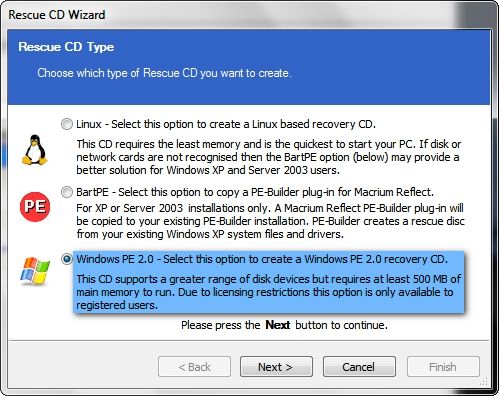
Macruim Reflect uses the Bart PE to restore Win XP, but it uses the 148 MB Win PE 2* to restore an Image to Win 7...

ReflectRecoveryCD.jpg


Macrium Reflect is indeed freeware, but Micro$oft charges $40 for the initial download including future updates of their Win PE 2. I have a very few programs that I have paid to use, but being able to use Macrium Reflect with this $40 M$ Win PE 2 has literally saved me hundreds of hours of manually restoring my computers.

Having a full set of Macrium Reflect Image backups allows me to try new programs and do new things that I would not have tried before because I can recover Win 7 from any disaster directly from the boot menu with a 4 minute 40 second Image Restore using the Win PE 2 with 100% accuracy each and every time I use it making Macrium Reflect my ultimate bottom line back to the wall computer security software with a complete contingent of 8 GB full Image backups from several different states going all the way back to the very first backup I did of my Win 7 computer and going back over 1 year for my Vista computer.

*The latest upgrade of the Win PE for Macrium Reflect is 2.1.2952.

~Maxx~

LaCie100.png
 

My Computer My Computer

Computer Manufacturer/Model Number
HP HPE 270f
OS
Windows 7 x64 Home Premium
CPU
Intel Core i7 930 @ 2.8 Ghz Socket 1366 LGA
Motherboard
Pegatron Truckee v1.04E41
Memory
8 GB 1366 Mhz DDR3 (PC3-10700) RAM
Graphics Card(s)
ATI Radeon 5770 1 GB DDR5 RAM
Sound Card
Realtech High Definition
Monitor(s) Displays
32" Sony Bravia
Screen Resolution
1366 X 768
Hard Drives
Intel 25nm 120 GB Series 320 SSD HD Tune- 265 MBps Read/ 130 MBps Write

LaCie 1TB + 1TB RAID 0 eSATA Drive HD Tune- 160 MBps Read/ 90 MBps Write
Keyboard
Logitech Illuminated
Mouse
Logitech MX Revolution
Internet Speed
36.4 Mbps Maximum on a 37 Mbps Motorola SB501 Modem
Curious Acronis would want to make a backup partion on the main drive, and not let you change it.

Although possible, its highly recommended to place the backups on a partiton or drive that does not have Windows installed on it.


True, it does require its own partition or disc, but, this partition can be a standard partition or drive with a Drive letter, or it can be hidden.
A.K.A Acronis Secure Zone.

ASZ has no drive letter and is hidden from Windows, and can be accessed through Acronis.


The Back Up partition or disc can be located anywhere you choose.
On a seperate Internal Drive, External Drive, or somewhere on the LAN.

This can all be changed and setup however you choose.
Also, whenever a backup is made, it can store it in the default location you choose, or you can choose another.
 

My Computer My Computer

Computer Manufacturer/Model Number
Custom (Self Build)
OS
Windows 7 Home Premium 64bit
CPU
Intel Core i7 2700k
Motherboard
eVGA P67 SLI
Memory
8GB Mushkin Redline Ridgebacks @1866
Graphics Card(s)
EVGA GTX570 SC
Sound Card
XiFi Titanium HD
Monitor(s) Displays
LG W2453V
Screen Resolution
1920x1080
Hard Drives
Intel 320 80GB -- Intel X25-V 40GB --WD Black 1TB x2 -- WD Blue 640GB
PSU
Seasonic x750
Case
Corsair 600T SE White
Cooling
eVGA Superclocked CPU Cooler
Keyboard
Saitek Cyborg
Antivirus
Kaspersky
Browser
IE
Other Info
LG BD/DVD
True, it does require its own partition or disc, but, this partition can be a standard partition or drive with a Drive letter, or it can be hidden.
A.K.A Acronis Secure Zone.

Wishmaster- Thanks for refreshing my memory. ASZ was the name of the 100 GB partition that Acronis created on my C Drive and it remains partitioned like that to this day.

~Maxx~

LaCie100.png
 

My Computer My Computer

Computer Manufacturer/Model Number
HP HPE 270f
OS
Windows 7 x64 Home Premium
CPU
Intel Core i7 930 @ 2.8 Ghz Socket 1366 LGA
Motherboard
Pegatron Truckee v1.04E41
Memory
8 GB 1366 Mhz DDR3 (PC3-10700) RAM
Graphics Card(s)
ATI Radeon 5770 1 GB DDR5 RAM
Sound Card
Realtech High Definition
Monitor(s) Displays
32" Sony Bravia
Screen Resolution
1366 X 768
Hard Drives
Intel 25nm 120 GB Series 320 SSD HD Tune- 265 MBps Read/ 130 MBps Write

LaCie 1TB + 1TB RAID 0 eSATA Drive HD Tune- 160 MBps Read/ 90 MBps Write
Keyboard
Logitech Illuminated
Mouse
Logitech MX Revolution
Internet Speed
36.4 Mbps Maximum on a 37 Mbps Motorola SB501 Modem
Macrium Reflect, which was what I was intending to go with except when you compare the free features with the full edition it brings me back to square one as in what program can do all of that in with Macrium Full edition can do only for free ?

You didn't answer the question, look at this page and you'll see that these things are not included in the free version:


  • Windows PE 2.0 Rescue CD with RAID support
  • File and Folder backup
  • Differential disk images and backups
  • Incremental disk images and backups

Macrium Reflect is indeed freeware, but Micro$oft charges $40 for the initial download including future updates of their Win PE 2. I have a very few programs that I have paid to use, but being able to use Macrium Reflect with this $40 M$ Win PE 2 has literally saved me hundreds of hours of manually restoring my computers.

And even after reading the wiki page on WinPE I still don't understand it, can you elaborate more ?
 

My Computer My Computer

Computer type
PC/Desktop
Computer Manufacturer/Model Number
Custom Built
OS
Windows 10 Pro
CPU
Core2Quad (2.6 Ghz)
Motherboard
nVidia 775
Memory
8 Gigs DDR2
Graphics Card(s)
Geforce Titan Black
Sound Card
Motherboard Audio
Monitor(s) Displays
25" Asus LCD
Screen Resolution
1680x1050
Hard Drives
120 Gig SSD
60 Gig SSD
750 Gig HDD
PSU
850 Watts
Case
Mid-Size
Keyboard
Logitech
Mouse
Logitech - I love logitech mouses
Internet Speed
DSL 25Mbps - Although extremely expensive
Antivirus
Microsoft Anti-Virus
Browser
FireFox 36.x
If you want to restore a Macrium Reflect Disk Image the first thing that you need is a Rescue Disk which contains the 148 MB Win PE which is a miniaturized version of Windows which is just large enough to contain the software that is used to wipe the C drive and restore the Reflect Image that you have stored on a remote drive. To make a Rescue CD just follow the instructions in the Reflect GUI and it will burn the Win PE to a CD R or DVD R. Insert it into your computer's optical player and when you start the computer you will see instructions to 'press any key to boot from the Rescue Disk' and then you will enter the Preinstall Environment where Reflect will allow you to repair the computer or restore any Reflect Disc Image that you have stored on a remote drive.

ReflectRecoveryCD.jpg


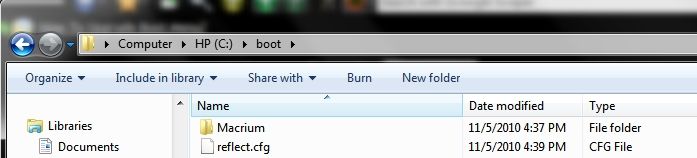
In Reflect it also offers the option to install the Win PE on your computer's Boot Menu and you can then select Reflect on the Boot Menu at start up instead of having to insert the Rescue Disc each time you want to restore a Reflect Image...

Patch11-5-10.jpg


The Reflect Images that I keep for Win 7 which date back from when I first had the computer set up through various stages right up until yesterday which takes up a total of about 64 GB. I also keep a couple of Windows 7 System Images, but this many Image Backups would have taken 192 GB of storage space on each backup storage drive.

~Maxx~

LaCie100.png
 

My Computer My Computer

Computer Manufacturer/Model Number
HP HPE 270f
OS
Windows 7 x64 Home Premium
CPU
Intel Core i7 930 @ 2.8 Ghz Socket 1366 LGA
Motherboard
Pegatron Truckee v1.04E41
Memory
8 GB 1366 Mhz DDR3 (PC3-10700) RAM
Graphics Card(s)
ATI Radeon 5770 1 GB DDR5 RAM
Sound Card
Realtech High Definition
Monitor(s) Displays
32" Sony Bravia
Screen Resolution
1366 X 768
Hard Drives
Intel 25nm 120 GB Series 320 SSD HD Tune- 265 MBps Read/ 130 MBps Write

LaCie 1TB + 1TB RAID 0 eSATA Drive HD Tune- 160 MBps Read/ 90 MBps Write
Keyboard
Logitech Illuminated
Mouse
Logitech MX Revolution
Internet Speed
36.4 Mbps Maximum on a 37 Mbps Motorola SB501 Modem
You didn't answer my question from post #52 ? And somewhat from post #56
 

My Computer My Computer

Computer type
PC/Desktop
Computer Manufacturer/Model Number
Custom Built
OS
Windows 10 Pro
CPU
Core2Quad (2.6 Ghz)
Motherboard
nVidia 775
Memory
8 Gigs DDR2
Graphics Card(s)
Geforce Titan Black
Sound Card
Motherboard Audio
Monitor(s) Displays
25" Asus LCD
Screen Resolution
1680x1050
Hard Drives
120 Gig SSD
60 Gig SSD
750 Gig HDD
PSU
850 Watts
Case
Mid-Size
Keyboard
Logitech
Mouse
Logitech - I love logitech mouses
Internet Speed
DSL 25Mbps - Although extremely expensive
Antivirus
Microsoft Anti-Virus
Browser
FireFox 36.x
JerometheGiraff- Although I did make an effort to answer your questions if you could be more specific as to what parts of those questions you are still unclear to you I will try to go into more detail.

~Maxx~

LaCie100.png
 

My Computer My Computer

Computer Manufacturer/Model Number
HP HPE 270f
OS
Windows 7 x64 Home Premium
CPU
Intel Core i7 930 @ 2.8 Ghz Socket 1366 LGA
Motherboard
Pegatron Truckee v1.04E41
Memory
8 GB 1366 Mhz DDR3 (PC3-10700) RAM
Graphics Card(s)
ATI Radeon 5770 1 GB DDR5 RAM
Sound Card
Realtech High Definition
Monitor(s) Displays
32" Sony Bravia
Screen Resolution
1366 X 768
Hard Drives
Intel 25nm 120 GB Series 320 SSD HD Tune- 265 MBps Read/ 130 MBps Write

LaCie 1TB + 1TB RAID 0 eSATA Drive HD Tune- 160 MBps Read/ 90 MBps Write
Keyboard
Logitech Illuminated
Mouse
Logitech MX Revolution
Internet Speed
36.4 Mbps Maximum on a 37 Mbps Motorola SB501 Modem
If you can please re-read posts #52 & 56 I have some question within that you did not answer.
 

My Computer My Computer

Computer type
PC/Desktop
Computer Manufacturer/Model Number
Custom Built
OS
Windows 10 Pro
CPU
Core2Quad (2.6 Ghz)
Motherboard
nVidia 775
Memory
8 Gigs DDR2
Graphics Card(s)
Geforce Titan Black
Sound Card
Motherboard Audio
Monitor(s) Displays
25" Asus LCD
Screen Resolution
1680x1050
Hard Drives
120 Gig SSD
60 Gig SSD
750 Gig HDD
PSU
850 Watts
Case
Mid-Size
Keyboard
Logitech
Mouse
Logitech - I love logitech mouses
Internet Speed
DSL 25Mbps - Although extremely expensive
Antivirus
Microsoft Anti-Virus
Browser
FireFox 36.x
Back
Top