
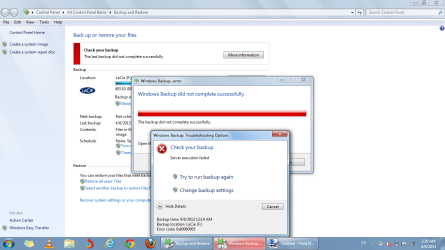
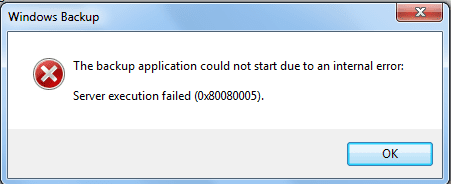
Backup error: Server execution failed (0x80080005)

thanks for the kind words sorry we could not come up with a solution to solve the problem was not for lack of trying for sure lol...at least all is well now
 

My Computer

Computer Manufacturer/Model Number
Custom Built
OS
Windows 7 Ultimate 32 bit
CPU
AMD Athlon 64 X2 4200+ Overclocked to 3.0Ghz
Motherboard
Biostar TF560 A2+
Memory
2 Gigs of G.Skill DDR2 800
Graphics Card(s)
HIS ATI Radeon HD 2600 Pro With IceQ cooler
Sound Card
6.1 Channel Sound Blaster Live 24 Bit
Monitor(s) Displays
Dual 20.5 " LG Flatrons W2052TO
Screen Resolution
1152x864
Hard Drives
Dual 36 Gig 10,000 RPM Raptors
PSU
430 watt Seasonic 80%+ Dual 12v Rails 2x80mm fans
Case
CHIEFMAX YA-5X
Cooling
4-80mm case fans 1-140mm case fan freezer 64 Pro CPU cooler
Keyboard
Saitek Eclipse II
Mouse
A4Tech wireless battery free optical scroll mouse
Internet Speed
1.5 meg down 384 up
Other Info
Logisys LED fan/light controller and dual 16" LED sticks mounted inside top of case all fans are LED all lighting is blue
DVD RW and CD RW both and Memory card reader
Thanks! I think I am about back to normal. As you said it was not for lack of trying that we didn't get it done!
That's for sure! :D I appreciate people like you who, like me, want to go the extra mile and explore the
possibilities without giving up! I was a programmer/analyst on mainframe stuff and I
always liked to write programs that no one would ever have to touch unless something extraneous changed like
the data, etc. And I was pretty good at doing that. I think that is what it is all about. Making things that need no
maintenance, at least for silly stuff, like it quit functioning just because it broke.

I just have one question related to this backup stuff: Do I need to make another repair disk or can I use the same
one I already have?

I have the backup set for every Sunday at 12:00 Noon. Is there anything else that you can think of that I can do to
avoid getting my system messed up like it was?

I hate fresh installs unless it is for a new OS.
Thanks again! :D
 

My Computer

OS
Windows 7 Home Premium x64, Ubuntu 10.04 x64
CPU
Intel Core 2 Quad Q9550(2.83GHz)
Motherboard
MSI G31M3-L V2
Memory
4MB Kingston DDR2
Graphics Card(s)
NVIDIA GeForce 9800 GT 512MB PCI Express
Sound Card
Sound card - Integrated
Monitor(s) Displays
Hanns·G HG-281DPB Black 28" 3ms 1080P LCD HDMI Monitor
Screen Resolution
1920 X 1200
Hard Drives
1) 500GB SATA-II 7200RPM
2) Fantom GreenDrive 1TB External HD - eSATA, USB 2.0
Cooling
Masscool 8W553 CPU Cooling Fan
Other Info
7 fans - 2400-2800 RPM cooling fans: (5 case fans, CPU and GPU)
The reason I would say that it is not an adequate solution to tell the OP "get different backup software" (although I think quite likely that other backup software is better than the one with Windows 7) (I think I will get a different one myself), is that it sounds like he has a serious system problem. That won't go away just by changing his backup software.

I, for instance, am getting that same error number, when I try to update to Win 7 SP1. I in fact downloaded the update package (not with Windows Update) (which now is not working either), I execute the update file, a long time with "preparing your computer", and finally a fail with the server execution failed message.

I think that message is a sign of a serious systemic problem.

Of course, System Restore could be a solution, to restore to a point before the problem started. But all my system restore points are lost. (That is something aggravating about SR. How it can suddenly delete SR points, without asking the user.) Restore from backup? I was also using Windows 7 backup, and that does not work either. (I will switch to a different backup program. But first I need to get my computer running right!)

I tried SFC /Scannow, and also got an error message. (OP If you did not do that, I would suggest it.) I would also try doing a repair install, although that did not work for me.
 

My Computer

OS
Windows 7
Hi Folks, I've read this post from start to finish and I have tried every solution that the very patient Computersplus has suggested. I've even done a complete re-install of my OS (Win7 Ultimate 64 bit) to no avail. My Taskmanager has 22 tasks listed, mainly Microsoft tasks with starting times like 1am. As my computer is off at that time of the morning I changed the times to a more reasonable one. I still can not do a Backup, I can't even set up Backups, yet, When it does an update that requires it to make a Restore Point it appears to do so and continues with the update, and creates an update. I've Googled this problem and it seems that there are multitudes out there with the same problem. Can anyone help?
 
Last edited:

My Computer

Computer Manufacturer/Model Number
Own Built
OS
Windows 7 Ultimate 64bit
CPU
QuadCore 4200MHz
Motherboard
Asus P8Z68-VLX
Memory
16296MB
Graphics Card(s)
GeForce GTX 550 Ti/PCIe/SSE2
Sound Card
On Board
Monitor(s) Displays
Polyview Chi Mei 19AW and Dell SE198WFP
Hard Drives
WDC WD5000AAKS-00A7BO (465GB) Samsung HD502HI (465GB) Seagate Desktop 1TB)
Please help!!!

BACKUP ERROR.png
 

Attachments

  • BACKUP ERROR2.png
    BACKUP ERROR2.png
    7 KB · Views: 8

My Computer

Computer type
Laptop
Computer Manufacturer/Model Number
MSI
OS
Microsoft Windows 7 Home Premium 64-bit SP1
CPU
Intel Core i3 330M @ 2.13GHz Arrandale 32nm Technology
Motherboard
Micro-Star International MS-1688 (CPU 1)
Memory
4.00 GB Dual-Channel DDR3 @ 531MHz (7-7-7-20)
Graphics Card(s)
Generic PnP Monitor (1366x768@60Hz) and Intel Graphics Media
Sound Card
Realtek High Definition Audio
Monitor(s) Displays
Generic PnP Monitor on Intel Graphics Media Accelerator HD
Screen Resolution
1366x768 pixels
Hard Drives
466GB Western Digital WDC WD5000BEVT-22ZAT0 ATA Device (SATA)
Antivirus
Microsoft security essentials
Browser
Firefox
SOLVED I hope that my solution is still useful to those who have the problem of backup

ERROR 0x80080005.

I solved in a simple way. With the help of Unlock I deleted the hidden directory

System Volume Information. Then I made ​​the normal procedure for Backup and everything

it worked out great.
 

My Computer

Computer type
PC/Desktop
OS
Windows 7
SOLVED I hope that my solution is still useful to those who have the problem of backup

ERROR 0x80080005.

I solved in a simple way. With the help of Unlock I deleted the hidden directory

System Volume Information. Then I made ​​the normal procedure for Backup and everything

it worked out great.
 

My Computer

Computer type
PC/Desktop
OS
Windows 7
SOLVED I hope that my solution is still useful to those who have the problem of backup

ERROR 0x80080005.

I solved in a simple way. With the help of Unlock I deleted the hidden directory

System Volume Information. Then I made ​​the normal procedure for Backup and everything

it worked out great.
 

My Computer

Computer type
PC/Desktop
OS
Windows 7
thanks for the kind words sorry we could not come up with a solution to solve the problem was not for lack of trying for sure lol...at least all is well now
SOLVED I hope that my solution is still useful to those who have the problem of backup

ERROR 0x80080005.

I solved in a simple way. With the help of Unlock I deleted the hidden directory

System Volume Information. Then I made ​​the normal procedure for Backup and everything

it worked out great.
 

My Computer

Computer type
PC/Desktop
OS
Windows 7
Thanks! I think I am about back to normal. As you said it was not for lack of trying that we didn't get it done!
That's for sure! :D I appreciate people like you who, like me, want to go the extra mile and explore the
possibilities without giving up! I was a programmer/analyst on mainframe stuff and I
always liked to write programs that no one would ever have to touch unless something extraneous changed like
the data, etc. And I was pretty good at doing that. I think that is what it is all about. Making things that need no
maintenance, at least for silly stuff, like it quit functioning just because it broke.

I just have one question related to this backup stuff: Do I need to make another repair disk or can I use the same
one I already have?

I have the backup set for every Sunday at 12:00 Noon. Is there anything else that you can think of that I can do to
avoid getting my system messed up like it was?

I hate fresh installs unless it is for a new OS.
Thanks again! :D
SOLVED I hope that my solution is still useful to those who have the problem of backup

ERROR 0x80080005.

I solved in a simple way. With the help of Unlock I deleted the hidden directory

System Volume Information. Then I made ​​the normal procedure for Backup and everything

it worked out great.
 

My Computer

Computer type
PC/Desktop
OS
Windows 7
The reason I would say that it is not an adequate solution to tell the OP "get different backup software" (although I think quite likely that other backup software is better than the one with Windows 7) (I think I will get a different one myself), is that it sounds like he has a serious system problem. That won't go away just by changing his backup software.

I, for instance, am getting that same error number, when I try to update to Win 7 SP1. I in fact downloaded the update package (not with Windows Update) (which now is not working either), I execute the update file, a long time with "preparing your computer", and finally a fail with the server execution failed message.

I think that message is a sign of a serious systemic problem.
SOLVED I hope that my solution is still useful to those who have the problem of backup

ERROR 0x80080005.

I solved in a simple way. With the help of Unlock I deleted the hidden directory

System Volume Information. Then I made ​​the normal procedure for Backup and everything

it worked out great.
 

My Computer

Computer type
PC/Desktop
OS
Windows 7
thanks for the kind words sorry we could not come up with a solution to solve the problem was not for lack of trying for sure lol...at least all is well now
SOLVED I hope that my solution is still useful to those who have the problem of backup

ERROR 0x80080005.

I solved in a simple way. With the help of Unlock I deleted the hidden directory

System Volume Information. Then I made ​​the normal procedure for Backup and everything

it worked out great.


HOW? Could you please analyze the steps you solve the error?

Thanks
 

My Computer

Computer type
Laptop
Computer Manufacturer/Model Number
MSI
OS
Microsoft Windows 7 Home Premium 64-bit SP1
CPU
Intel Core i3 330M @ 2.13GHz Arrandale 32nm Technology
Motherboard
Micro-Star International MS-1688 (CPU 1)
Memory
4.00 GB Dual-Channel DDR3 @ 531MHz (7-7-7-20)
Graphics Card(s)
Generic PnP Monitor (1366x768@60Hz) and Intel Graphics Media
Sound Card
Realtek High Definition Audio
Monitor(s) Displays
Generic PnP Monitor on Intel Graphics Media Accelerator HD
Screen Resolution
1366x768 pixels
Hard Drives
466GB Western Digital WDC WD5000BEVT-22ZAT0 ATA Device (SATA)
Antivirus
Microsoft security essentials
Browser
Firefox
I usually don't update old threads, but this error happened to me recently and I was so frustrated that Seven Forums didn't get to the bottom of it because this is always the first place I turn. Anyway for anybody searching the forums here is how I finally fixed it. No change in backup software and no 'nuke the site from orbit' total reinstall.
Solving error 0×80080005 of Windows Backup
 

My Computer

OS
7
server execution failed(0x80080005)

When I attempt either a Backup or Create System Image I get this error:
server execution failed(0x80080005)
I am working with Windows 7 x64,home premium. Clone,MSI MoBrd,2.8G CPU,4 GB Ram, 2-1GB Sata HD.
Actions Taken:
-Gave full permissions to System Volume Information Folder in C: drive
-Went back one restore point
-Started Volume Shadow Copy & MS Shadow Copy Provider Services(orig set to manual)
-ran vssadmin shadow delete /all from admin command prompt(deleted 23 copies)
-Unplugged my 1TB USB Ext Drive that I use for backups
When I click on the Backup or Image links in Backup & Restore, there is approx 30-40sec delay, then the error message window pops up. Does anyone have a new suggestion for solving this error. BTW, I am able to use Acronis True Image to make a system image backup so I believe there is something wrong with the Windows system.
 

My Computer

Computer Manufacturer/Model Number
Clone
OS
windows 7,32bit
CPU
Intel P4
Motherboard
Supermicro/C2SEA
Memory
4GB
Graphics Card(s)
EVGA 9400GT
Sound Card
Asus Essex
Monitor(s) Displays
Samsung SuncMaster SA350
Hard Drives
2 - WD 1GB Sata
PSU
Antec 400w
Case
In-Win
Cooling
Intel
Open Services

Open the Following Services

1) Stop Windows Backup
2) Stop Microsoft Software Shadow Copy Provider

Make the Startup -- Automatic


Stop the Following Services

1) Stop Windows Backup
2) Stop Microsoft Software Shadow Copy Provider

Run Command Prompt "CMD" as Administrator


To Access "System Volume Information" Directory
use the following command

cacls "driveletter:\System Volume Information" /E /G username:F

Delete Contents in

1) Windows Backup

2) WindowsImageBackup

remove the above two directories

Then Run Backup
It Works
 

My Computer

Computer type
PC/Desktop
OS
windows 7 64bit
I know this is an old thread, but I am directed here when searching for a fix for the referenced error when trying to start backup. I have also been directed (via search engine) to several other forums, all of which have the same issue, and all seem to end in 2012-2013, with not satisfactory fixes. I may have even posted here myself previously, in past years as this has been an issue for a very long time.

Summary: OS: Win 7 Ultimate, 64-Bit
Backup has always worked 'previously'. 'System Volume Information' exists on Backup Drive
Backup Drive (500GB HDD, half of a split 1TB external drive console, connected via USB, sans HUB) is visible and addressable in Windows Explorer. Drive location, name, and letter are all correct as listed in backup setup.
When I try to backup, I get the 'drive is unplugged' error.
When I try to 'manage backup', I get the 0x80080005 error.

Using the command prompt fixes noted above by CAVSFAN, way back in 2009, here are the results of the Administrative Command prompt entries and responses. AS there are so many errors within this process, I do not want to proceed until I get some input on the system responses to these commands.

Administrator: Command Prompt
C:\....\system32\

Net stop vss
Response: "The Volume Shadow Copy is not started"
"More help available by typying NET HELPMSG 3521"

Net stop swprv
Response: "The MS Software Shadow Copy Provider is not started"
"More help available by typying NET HELPMSG 3521"

regsvr32 ole32.dll
Response: (pop-up) "DllRegister Server in ole32.dll succeeded"

regsvr32 oleaut32.dll
Response: (pop-up) "DllRegister Server in ole32.dll succeeded,"

regsvr32 vss_ps.dll
Response: (pop-up) "DllRegister Server in vss_ps.dll succeeded,"

vssvc /register
Response: None- return to prompt

regsvr32 /i swprv.dll
Response: (Pop-up)
The module "swprv.dll" was loaded but the call to
DllRegisterServer failed with error code 0x80070715.
For more information about this problem, search
online using the error code as a search term.

regsvr32 /i eventcls.dll
Response: (Pop-up)
The module "eventcls.dll" was loaded but the call to
DllRegisterServer failed with error code 0x80070715.
For more information about this problem, search
online using the error code as a search term.

regsvr32 es.dll
Response: (Pop-up)
"The module "es.dll" was loaded but the entry-point
DllRegisterServer was not found.
Make sure that "es.dll" is a valid DLL or OCX file and
then try again."

regsvr32 stdprov.dll
Response: (pop-up) "DllRegister Server in stdprov.dll succeeded"

regsvr32 vssui.dll
Response: (pop-up)
"The module "vssui.dll" failed to load.
Make sure the binary is stored at the specified path or
debug it to check for problems with the binary or
dependent .DLL files."
The specified module could not be found.

regsvr32 msxml.dll
Response: (pop-up)
"The module "msxml.dll" failed to load.
Make sure the binary is stored at the specified path or
debug it to check for problems with the binary or
dependent .DLL files."
The specified module could not be found.

regsvr32 msxml3.dll
Response: (pop-up) "DllRegister Server in msxml3.dll succeeded"

regsvr32 msxml4.dll
Response: (pop-up)
"The module "msxml4.dll" failed to load.
Make sure the binary is stored at the specified path or
debug it to check for problems with the binary or
dependent .DLL files."
The specified module could not be found.

If this problem has been resolved in the past 5-6 years, perhaps someone can enlighten me as to how to fix this so I can backup my system.

Belarc Advisor file attached

Thanks

DN
 

Attachments

My Computer

OS
Windows 7 Ultimate 32bit
Back
Top