Solved bios configure restored ?

coto

New member
Local time
6:34 PM
Messages
3
My computer was self built about 2 years now. Never a problem. I have always, with this machine, used cloning for my back-up disaster recovery method. I keep 2 clone hard drives (a back-up and a spare). I clone the system every 2 weeks and rotate the drives. I replace the ‘c’ drive with a clone when an ‘experiment goes wrorg’; this could be trial software or just monkeying with the OS. This has been a flawless method until the last time I relaced ‘c’ with a clone..

It booted just fine; then sometime (days) later on a reboot I noticed there was no bios post or the screen to f2 to change or confiure the bios if needed.

From a cold boot or re-start...the screen is dark for some seconds then the win log-in screen; the option, admin or me user, click user (i don’t use a password) , welcome screen and win loads quickly. Is rock stable an is up usually for 7-9 days; or when reboot is required.

Question....any ideas on how to get screen for bios configure restored....for example If needed to boot from cd or any other bios change? My win 7 is legit; as is all softwae or programs, no warez, no malware or virus detected or known.

Win 7 sp1
asus m5a99fx pro r2.0
16 gig ram
nvidia geforce gtx750
amd fx 6300 3500mhz

.
 

My Computer

Computer type
PC/Desktop
Computer Manufacturer/Model Number
Custom Build
OS
Windows 7 Pro x64
CPU
AMD FX 6300 6 core 3.5 GHz
Motherboard
Gigabyte DUrable 970A-DS3 P
Memory
16 gig
Graphics Card(s)
Nvidia GTX 750
Hard Drives
5---14 Terabyte
c:\win 7 1 T
d:\misc\win 2 T
e:\linux mint 1 T
f:\back-up\misc 5 T
I:\audiobooks\video\music 3 T
j:\software 2 T
Antivirus
Emsisoft
Browser
Firefox .......IE 11
Shutdown your PC and Boot again and constantly press Delete. This should bring you to the screen that has several different options for continuing, one of which is "Enable Last Good Configuration". Choose that and see if it gets things right for you. == I am guessing the Key is Delete. My PC is Custom Build with an Asus motherboard and it uses Delete, yours might be different, F8 if Delete doesn't work. == If you get nothing there I would try your other backup. Post back with how things go. Thanks,
 

My Computer

Computer type
PC/Desktop
Computer Manufacturer/Model Number
Custom Build
OS
Windows 7 Home Premium 32-Bit - Build 7600 SP1
CPU
Intel Core i3-2120 3.30Ghz
Motherboard
Asus P8Z68-V LX Intel Z68 Socket H2 ATX
Memory
Kingston 4 GB DDR3 1333 mhz
Graphics Card(s)
AMD Radeon HD6670
Sound Card
Sound Blaster Audigy SE 24-Bit
Monitor(s) Displays
Asus VE228
Screen Resolution
1440 X 900
Hard Drives
OCZ Vertex 3 120 GB Sata 3 SSD ==
Kingston SH103/S3 120 G Hyper X 120 GB SSD ==
Western Digital 500 GB Caviar Green 7200 RPM ==
PSU
Corsair CX600M == 600 Watt
Case
NZXT Apollo - Silver with Clear Side Panel
Cooling
Three 120 mm Fans
Keyboard
Microsoft Natural 4000
Mouse
Microsoft Custom Optical 3000
Internet Speed
AT&T Fiber Optic Wireless Network
Antivirus
Microsoft Security Essentials
Browser
Chrome
Other Info
120 mm Blue LED Fan -- Three Blue LED Lazer Light Sticks
Sorry, should have noted in original post that had been tried. actually tried f2, delete, f8. Nothing. Screen remaims black. I never got 'last config' screen. Its like there is no bios, yet win boots just fine. I also put win 7 disc in an hoped it would give some options. Just boots into windows.
 

My Computer

Computer type
PC/Desktop
Computer Manufacturer/Model Number
Custom Build
OS
Windows 7 Pro x64
CPU
AMD FX 6300 6 core 3.5 GHz
Motherboard
Gigabyte DUrable 970A-DS3 P
Memory
16 gig
Graphics Card(s)
Nvidia GTX 750
Hard Drives
5---14 Terabyte
c:\win 7 1 T
d:\misc\win 2 T
e:\linux mint 1 T
f:\back-up\misc 5 T
I:\audiobooks\video\music 3 T
j:\software 2 T
Antivirus
Emsisoft
Browser
Firefox .......IE 11
I assume you tried booting with all your backup HD's and they all have the same issue.

Things i would try

1) Look in the Motherboard manual and see if you can find any info about "bypassing the BIOS screen".
2) If that doesn't help, disconnect the HD with Windows, see if that forces it to display a BIOS screen.
3) If that doesn't work, do a BIOS reset.
If you do a BIOS reset you will have to reconfigure any BIOS changes you previously made.

EDIT:

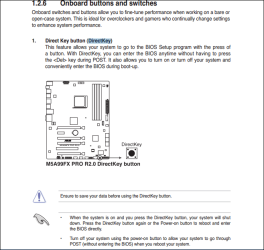
The asus m5a99fx pro r2.0 has a DirectKey button on the MB.
If you have this button enabled, you could give it a try.
This snip is from the asus m5a99fx pro r2.0 manual:

DirectKey.PNG
 
Last edited:

My Computer

Computer type
PC/Desktop
Computer Manufacturer/Model Number
home built
OS
Multi-Boot W7_Pro_x64 W8.1_Pro_x64 W10_Pro_x64 +Linux_VMs +Chromium_VM
CPU
AMD Athlon II x4 620
Motherboard
Gigabyte GA-MA785G-UD3H
Memory
6GB GSkill DDR2 800
Graphics Card(s)
AMD 4670 GPU + AMD 4200 IGP
Sound Card
on board Realtek ALC889A
Monitor(s) Displays
RCA 40" LCD TV, Insignia 32" LCD TV, HP 15" LCD monitor
Screen Resolution
1680 x 1050
Hard Drives
OCZ Vertex 3 120GB,
Samsung F3 1TB (3),
Several others - WD, Seagate, Hitachi, ...
PSU
Corsair 500 W
Case
Rosewill mid tower
Cooling
CM 90mm rifle
Keyboard
Gyration wireless, Logitech wireless, Dell USB wired
Mouse
Gyration wireless, Logitech wireless, V7 USB wired
Internet Speed
Spectrum - 100Mbps D / 10Mbps U
Antivirus
Avast, MBAM3, EMET, WinPatrol
Browser
Pale Moon, Firefox, IE
Other Info
2 multi-boot PC's
Mainly HTPC/Office/Gen purpose (no gaming).
Trendnet USB KVM.
LG DVD burner/Blue Ray Player.
Tray system for removable SATA backup drives.

Not currently OCd, under-volted.
I use Hybrid sleep, rarely re-boot or shutdown.

Hauppauge HD-PVR, Avermedia PCIe TV Tuner, Hauppauge PCI TV Tuner.
Are you using a second monitor?
 

My Computer

Computer type
PC/Desktop
Computer Manufacturer/Model Number
Custom Built
OS
Windows 10 Pro x64, Windows 8.1 Pro x64, Windows 7 Ultimate x64 SP1,
CPU
INTEL i9-7920X LGA 2066
Motherboard
Gigabyte X299-WU8 F3
Memory
64 GB (4 X 16 GB) G-Skill V Series DDR4 3200 Quad Channel
Graphics Card(s)
EVGA GTX 1060 SC 3 GB
Sound Card
Realtek Onboard ALC1220
Monitor(s) Displays
2 x Samsung S27E310
Screen Resolution
1920x1080
Hard Drives
Samsung 2 x 970 EVO Plus 500 GB NVMe
1 x 6TB WD 6003FZBX SATA
1 x 6TB WD 60EFRX SATA
12 x 3TB WD 30EFRX SATA
PSU
Seasonic X-1050
Case
Thermaltake Armor+
Cooling
Corsair H80i V2 Liquid AOI Cooler
Keyboard
Logitech G510s
Mouse
Logitech MX Master 2S
Internet Speed
200 Mb/s
Antivirus
ESET NOD32 13.1
Browser
EDGE (Dev, Canary, Beta), Chrome
Other Info
ASUS RT-AC68U router
Malwarebytes 4.0.4
Are you using a second monitor?

And to elaborate on this, have you made any changes to monitor configuration? For example, the nVidia card in my home machine won't display POST on HDMI even if it's the only output connected.
 

My Computer

Computer type
PC/Desktop
OS
Windows 7 Professional x64, Arch Linux
Bingo........thanks. After removing a sometime used second monitor (actually a 42 in tv by dvi connection) and with a re-boot all is right in computer land.
 

My Computer

Computer type
PC/Desktop
Computer Manufacturer/Model Number
Custom Build
OS
Windows 7 Pro x64
CPU
AMD FX 6300 6 core 3.5 GHz
Motherboard
Gigabyte DUrable 970A-DS3 P
Memory
16 gig
Graphics Card(s)
Nvidia GTX 750
Hard Drives
5---14 Terabyte
c:\win 7 1 T
d:\misc\win 2 T
e:\linux mint 1 T
f:\back-up\misc 5 T
I:\audiobooks\video\music 3 T
j:\software 2 T
Antivirus
Emsisoft
Browser
Firefox .......IE 11
Bingo........thanks. After removing a sometime used second monitor (actually a 42 in tv by dvi connection) and with a re-boot all is right in computer land.

Glad to hear it.
 

My Computer

Computer type
PC/Desktop
Computer Manufacturer/Model Number
Custom Built
OS
Windows 10 Pro x64, Windows 8.1 Pro x64, Windows 7 Ultimate x64 SP1,
CPU
INTEL i9-7920X LGA 2066
Motherboard
Gigabyte X299-WU8 F3
Memory
64 GB (4 X 16 GB) G-Skill V Series DDR4 3200 Quad Channel
Graphics Card(s)
EVGA GTX 1060 SC 3 GB
Sound Card
Realtek Onboard ALC1220
Monitor(s) Displays
2 x Samsung S27E310
Screen Resolution
1920x1080
Hard Drives
Samsung 2 x 970 EVO Plus 500 GB NVMe
1 x 6TB WD 6003FZBX SATA
1 x 6TB WD 60EFRX SATA
12 x 3TB WD 30EFRX SATA
PSU
Seasonic X-1050
Case
Thermaltake Armor+
Cooling
Corsair H80i V2 Liquid AOI Cooler
Keyboard
Logitech G510s
Mouse
Logitech MX Master 2S
Internet Speed
200 Mb/s
Antivirus
ESET NOD32 13.1
Browser
EDGE (Dev, Canary, Beta), Chrome
Other Info
ASUS RT-AC68U router
Malwarebytes 4.0.4
Back
Top