BIOS with no boot options

I agree. I have one of those phones too, as you know. But, I bought a whole box of Bic pens for less. :D
 

My Computers

System One System Two

  • Computer type
    PC/Desktop
    Computer Manufacturer/Model Number
    ALWAYS UNDER CONSTRUCTION
    OS
    Windows 11 Pro
    CPU
    Ryzen 9 5900X
    Motherboard
    Asus X570 Crosshair Viii Hero
    Memory
    32GB G Skill DDR4-3600
    Graphics Card(s)
    EVGA RTX 3080 FTW 3 Ultra
    Sound Card
    On Board/Sennheiser PC37X Headset
    Monitor(s) Displays
    3 X Asus 27"
    Screen Resolution
    2560x1440
    Hard Drives
    2 X 1 TB NVME drives
    PSU
    EVGA 850
    Case
    Phanteks Eclipse P400A
    Cooling
    EVGA 280 AIO
    Keyboard
    Logitech G510s/ Logitech G13
    Mouse
    Logitech G502
    Internet Speed
    24/1
    Antivirus
    ESET/MBAM Pro/SAS Pro
    Browser
    Chrome/ Firefox/ Edge
  • Computer type
    Laptop
    System Manufacturer/Model Number
    Dell 16 Plus
    OS
    Windows 11 Pro
    CPU
    Intel Ultra 9 288V
    Memory
    32 GB LPDDR5X 8533
    Monitor(s) Displays
    16" Mini-LED HDR600 Touch 90 Hz
    Screen Resolution
    2560X1600
    Hard Drives
    1 TB NVME
Now I am starting to get annoyed with Asus. I wanted to solve my imaging problem with Refresh images, but now I get the message that "recimg is not supported in this PC". I guess you cannot expect a lot for $99.
 

My Computer

Computer Manufacturer/Model Number
HP, Dell, Gateway, Toshiba - 4 laptops and 2 desktops
OS
Vista, Windows7, Mint Mate, Zorin, Windows 8
CPU
from 1.6GHz Duo to i7
Monitor(s) Displays
2x HP w2207
Hard Drives
5x HDD, 7x SSD, 12x Externals
Keyboard
with trackball - no mices
Mouse
Trackball mice
Internet Speed
DSL 6000
Suggestion

Something to look at:

Alternative to Lenovo one key recovery: AOMEI OneKey Recovery - Help

Note: I haven't used this myself.

Quote from the instructions:

For the traditional BIOS system, please reboot and at the beginning of power up, hit the letter A on the keyboard or select a Windows boot menu to start AOMEI OneKey Windows PE environment.

For EFI/UEFI based system, the keyboard function cannot be supported, so you can only choose "Enter into AOMEI OneKey Recovery" in the Windows boot menu after you reboot.
 

My Computer

Computer type
Laptop
Computer Manufacturer/Model Number
ASUS
OS
Microsoft Windows 7 Home Premium 64-bit 7601 Multiprocessor Free Service Pack 1
CPU
AMD C-60 APU with Radeon(tm) HD Graphics
Motherboard
ASUSTeK COMPUTER INC. X501U
Memory
4.00 GB
Graphics Card(s)
AMD Radeon HD 6290 Graphics
Sound Card
(1) AMD High Definition Audio Device (2) Realtek High Defi
Screen Resolution
1366 x 768 x 32 bits (4294967296 colors) @ 60 Hz
Hard Drives
Hitachi HTS545050A7E380 SATA Disk Device
Antivirus
Comodo CIS & FW, SecureAplus App Whitelisting, Threatfire
Browser
Cyberfox 64bit, Opera 64bit, Airfox
Other Info
Spy-The-Spy, HitmanPro.Alert, Norton Connect Safe, MJRegWatcher, BitDefender TrafficLight, Voodoo Shield, Zemana AntiMalware
Thank you. That sounds pretty swift. I did not yet read all of it but the fact that you need not trigger the recovery from outside may be the winner here. I hope my retarded system is going to let it work. They encrupted that system with bitlocker and I do not know what that implies in that case. But I will certainly try it.
 

My Computer

Computer Manufacturer/Model Number
HP, Dell, Gateway, Toshiba - 4 laptops and 2 desktops
OS
Vista, Windows7, Mint Mate, Zorin, Windows 8
CPU
from 1.6GHz Duo to i7
Monitor(s) Displays
2x HP w2207
Hard Drives
5x HDD, 7x SSD, 12x Externals
Keyboard
with trackball - no mices
Mouse
Trackball mice
Internet Speed
DSL 6000
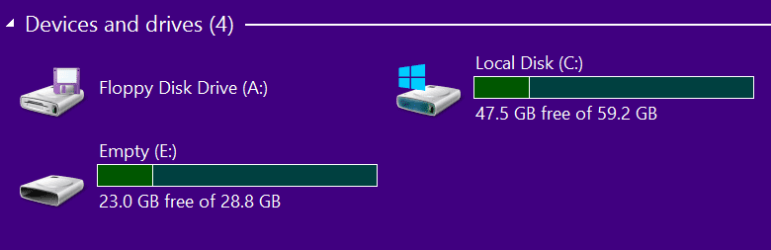
This worked great - at least on my 32bir Windows 8.1 in a virtual partition. I chose to backup to a 32GB USB2 stick. The control file (Oklog) was created on C, but that was only 40KB which suits me well because on my little laptop I have only 20GB for my C partition.


2015-01-15_0009.png


This Oklog contains only 3 text files. The C partition was appr. 12GB of data and the image on my stick (E) was 6GB. This means I can fit appr. 7 or 8 images on this stick because C on the little PC is only 8GB of data right now. And even with maximum data I can still fit at least 3 images because the whole C partition is only 20GB.


2015-01-15_0007.png


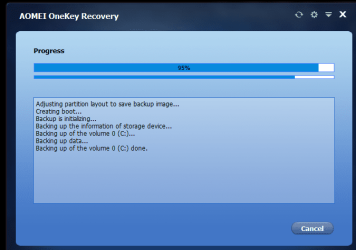
This is the action during the imaging.


2015-01-14_2350.png


And when the system reboots, you get the option to boot into Windows or AOMEI where you can either make another image or start a recovery.


2015-01-14_2352.png


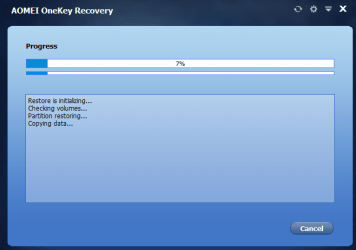
I immediately launched the recovery and when finished, I had my exact same system back. This is during the recovery phase which went very fast.


2015-01-14_2356.png


I am really impressed. This is a no-nonsense facility. The only criticism I have is the UI. Those little AOMEI windows with black writing on a dark blue background are really hard to read - especially on an 11" screen. I had menetioned that already last year when I was asked to test their Backupper program. But apparently they did nothing about it. For someone like me with only 40% vision that is a tough call.

PS. Whilst I was typing this post I made a second image in my virtual machine. It went just as smoothly as the first image. Tomorrow I will try it on the little PC.
 
Last edited:

My Computer

Computer Manufacturer/Model Number
HP, Dell, Gateway, Toshiba - 4 laptops and 2 desktops
OS
Vista, Windows7, Mint Mate, Zorin, Windows 8
CPU
from 1.6GHz Duo to i7
Monitor(s) Displays
2x HP w2207
Hard Drives
5x HDD, 7x SSD, 12x Externals
Keyboard
with trackball - no mices
Mouse
Trackball mice
Internet Speed
DSL 6000
Update - well, the sage goes on. AOMEI was not able to make an image on my little laptop. Reason is because the C partition is Bitlocker encrypted. Even the Asus 2nd level support guys did not know how that came about. They gave me an RMA shipping label to ship it to their service center. Hopefully those guys can decrypt the C partition. I'll see in 2 weeks when the thing comes back what can be done with it.
 

My Computer

Computer Manufacturer/Model Number
HP, Dell, Gateway, Toshiba - 4 laptops and 2 desktops
OS
Vista, Windows7, Mint Mate, Zorin, Windows 8
CPU
from 1.6GHz Duo to i7
Monitor(s) Displays
2x HP w2207
Hard Drives
5x HDD, 7x SSD, 12x Externals
Keyboard
with trackball - no mices
Mouse
Trackball mice
Internet Speed
DSL 6000
Did you ever get into the bios? They might have that Bitlocker also.
 

My Computer

Computer type
PC/Desktop
Computer Manufacturer/Model Number
Home made Desktop
OS
Windows 10 Pro. 64/ version 1709 Windows 7 Pro/64
CPU
Intel i7-6800K @ 4.3
Motherboard
ASUS X-99 Deluxe II
Memory
Corsair Platinum 16 gig @2400
Graphics Card(s)
EVGA GTX 1070 OC
Monitor(s) Displays
Asus 27" LED LCD/VE278Q
Screen Resolution
1920-1080 or 1280-720 HDMI
Hard Drives
INTEL SSD 730-240 Gb Sata 3.0/
PSU
EVGA Platium 1200W
Case
Phanteks Luxe Tempered Glass 8 fans/ one radiator
Cooling
XSPC/ Water Cooled CPU
Keyboard
Das 4 Professional
Mouse
Logitech M705/MX Anywhere 2-S
Internet Speed
100 mbits
Antivirus
Microsoft Security Essentials/ Malwarebytes Premium 3.0/ SAS
Browser
I.E. 11 default/Firefox/ ISP Time Warner Cable/Spectrum
Other Info
LG BluRay Burner/
Sound system-KLipsch-THX/
Icy Dock ssd Hot Swap bays.
Right, if you want to change anything in the BIOS (e.g. set Secure Boot off), you get stopped by the bitlocker. I hope these Asus guys can fix that. Even the second level support guys at Asus have never seen a thing like that.

The way it is right now, it is a disposable PC - if anything happens to the system, you can only put that PC into the garbage. No way to recover from an image or anything. Even RECIMG does not work.
 

My Computer

Computer Manufacturer/Model Number
HP, Dell, Gateway, Toshiba - 4 laptops and 2 desktops
OS
Vista, Windows7, Mint Mate, Zorin, Windows 8
CPU
from 1.6GHz Duo to i7
Monitor(s) Displays
2x HP w2207
Hard Drives
5x HDD, 7x SSD, 12x Externals
Keyboard
with trackball - no mices
Mouse
Trackball mice
Internet Speed
DSL 6000
I got my X205TA from eBay last month and everything is fine. But when I tried to flash the BIOS to ver.208 a few days ago, it has a black screen after reboot but the power LED is still green. I have sent it back to Asus for repair, hope they could fix it. My suggestion is DON'T flash the BIOS if it is okay.
 

My Computer

Computer type
PC/Desktop
OS
Windows 7 64bit
hai whs try this
1.turn on pc
2.plug in usb pendrive on to usb 2.0 port
3.restart and enter into bios
you may have the chance to see boot order option i hope it will help you.this how my laptop works.thankyou
 

My Computer

Computer type
Laptop
OS
windows 7 pro 32bit
hai whs try this
1.turn on pc
2.plug in usb pendrive on to usb 2.0 port
3.restart and enter into bios
you may have the chance to see boot order option i hope it will help you.this how my laptop works.thankyou

Thanks for the suggestion. I have tried all the tricks but nothing worked. Now the PC is at the Asus service center. They will flash a new OS on it.
 

My Computer

Computer Manufacturer/Model Number
HP, Dell, Gateway, Toshiba - 4 laptops and 2 desktops
OS
Vista, Windows7, Mint Mate, Zorin, Windows 8
CPU
from 1.6GHz Duo to i7
Monitor(s) Displays
2x HP w2207
Hard Drives
5x HDD, 7x SSD, 12x Externals
Keyboard
with trackball - no mices
Mouse
Trackball mice
Internet Speed
DSL 6000
wish you all the best.did you tried exactly the trick i suggested ?just i am curious.thankyou
 

My Computer

Computer type
Laptop
OS
windows 7 pro 32bit
in my laptop i do the above trick to boot from pendrive.when i do that trick and enter into bios i can see two boot options.but difficult to change boot order.what i did is simply selected internal hdd and disabled internal hdd thats it done my laptop booted from pendrive.
 

My Computer

Computer type
Laptop
OS
windows 7 pro 32bit
Wolfgang, is that the one you bought so cheap? Maybe if you paid full price they would have given you the password too. :what:
 

My Computers

System One System Two

  • Computer type
    PC/Desktop
    Computer Manufacturer/Model Number
    ALWAYS UNDER CONSTRUCTION
    OS
    Windows 11 Pro
    CPU
    Ryzen 9 5900X
    Motherboard
    Asus X570 Crosshair Viii Hero
    Memory
    32GB G Skill DDR4-3600
    Graphics Card(s)
    EVGA RTX 3080 FTW 3 Ultra
    Sound Card
    On Board/Sennheiser PC37X Headset
    Monitor(s) Displays
    3 X Asus 27"
    Screen Resolution
    2560x1440
    Hard Drives
    2 X 1 TB NVME drives
    PSU
    EVGA 850
    Case
    Phanteks Eclipse P400A
    Cooling
    EVGA 280 AIO
    Keyboard
    Logitech G510s/ Logitech G13
    Mouse
    Logitech G502
    Internet Speed
    24/1
    Antivirus
    ESET/MBAM Pro/SAS Pro
    Browser
    Chrome/ Firefox/ Edge
  • Computer type
    Laptop
    System Manufacturer/Model Number
    Dell 16 Plus
    OS
    Windows 11 Pro
    CPU
    Intel Ultra 9 288V
    Memory
    32 GB LPDDR5X 8533
    Monitor(s) Displays
    16" Mini-LED HDR600 Touch 90 Hz
    Screen Resolution
    2560X1600
    Hard Drives
    1 TB NVME
wish you all the best.did you tried exactly the trick i suggested ?just i am curious.thankyou

Nah, the PC was mailed 2 weeks ago to Asus.
 

My Computer

Computer Manufacturer/Model Number
HP, Dell, Gateway, Toshiba - 4 laptops and 2 desktops
OS
Vista, Windows7, Mint Mate, Zorin, Windows 8
CPU
from 1.6GHz Duo to i7
Monitor(s) Displays
2x HP w2207
Hard Drives
5x HDD, 7x SSD, 12x Externals
Keyboard
with trackball - no mices
Mouse
Trackball mice
Internet Speed
DSL 6000
Wolfgang, is that the one you bought so cheap? Maybe if you paid full price they would have given you the password too. :what:

Yeah, that's the cheap one. But I don't think that makes a difference for Asus. We also have an Asus T100 transformer which the wife really likes and does not have an encryption problem. That's why she recommended it to a fried. That friend bought the T100 for full price ($349) and guess what - the C partition is encrypted on that one too. I think I will recommend to send that one also back. We bought the cheap one from Staples and the friend bought from HHgregg. So it is not the dealer but Asus that produces such a nuisance.
 

My Computer

Computer Manufacturer/Model Number
HP, Dell, Gateway, Toshiba - 4 laptops and 2 desktops
OS
Vista, Windows7, Mint Mate, Zorin, Windows 8
CPU
from 1.6GHz Duo to i7
Monitor(s) Displays
2x HP w2207
Hard Drives
5x HDD, 7x SSD, 12x Externals
Keyboard
with trackball - no mices
Mouse
Trackball mice
Internet Speed
DSL 6000
Hai guys its a common problem for that particular version of asus product.Its an marketing strategy of MS in order to get market share so as to prevent chromeos invasion.If they allowed for install any other os every one will remove windows(we all know that windows occupies more space) so they can get more space and will install chrome or linux which destroys actual intention of MS.SoMS aware of this they should provided windows at low cost for asus so they produced locked windows only product.wait if any bios updates from asus.Look at this articleIs the ASUS X205 Microsoft
 

My Computer

Computer type
Laptop
OS
windows 7 pro 32bit
in my laptop i do the above trick to boot from pendrive.when i do that trick and enter into bios i can see two boot options.but difficult to change boot order.what i did is simply selected internal hdd and disabled internal hdd thats it done my laptop booted from pendrive.

Yeah right - you can add a boot entry with EasyUEFI.

EasyUEFI: Edit UEFI Boot Entries In Windows 8.1

And then there is also this one that explains it.

How To Boot From USB Drive Even If Your PC Doesn’t Support Booting From USB
 

My Computer

Computer Manufacturer/Model Number
HP, Dell, Gateway, Toshiba - 4 laptops and 2 desktops
OS
Vista, Windows7, Mint Mate, Zorin, Windows 8
CPU
from 1.6GHz Duo to i7
Monitor(s) Displays
2x HP w2207
Hard Drives
5x HDD, 7x SSD, 12x Externals
Keyboard
with trackball - no mices
Mouse
Trackball mice
Internet Speed
DSL 6000
Update - and that is a good one.

After I had RMAd the laptop 2 weeks ago to the Asus service center I did not hear from them. Had to call Asus twice to inquire what is going on. Today I get a mail from them saying that the laptop was sent to the wrong service center (with the FedEx papers that they gave me) and will now be forwarded to the right center - and that will take 4 to 7 days. Unbelievable !!!

Lesson learned - never buy an Asus.
 

My Computer

Computer Manufacturer/Model Number
HP, Dell, Gateway, Toshiba - 4 laptops and 2 desktops
OS
Vista, Windows7, Mint Mate, Zorin, Windows 8
CPU
from 1.6GHz Duo to i7
Monitor(s) Displays
2x HP w2207
Hard Drives
5x HDD, 7x SSD, 12x Externals
Keyboard
with trackball - no mices
Mouse
Trackball mice
Internet Speed
DSL 6000
whs do you read the post #37 and its link here in this thread. its a common problem not peculier to you.
 

My Computer

Computer type
Laptop
OS
windows 7 pro 32bit
Back
Top