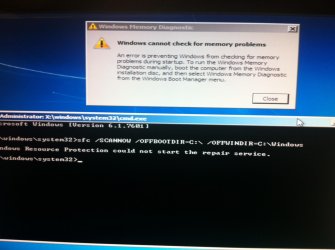
Black screen with cursor, safe mode wont load

this is what i get when i put in the command you gave me and also i tried checking the hard drive and it gave me that error
 

Attachments

  • image.jpg
    image.jpg
    308.4 KB · Views: 2

My Computer My Computer

Computer type
PC/Desktop
Computer Manufacturer/Model Number
Dell
OS
Windows 7 Ultimate x64
Use that disc to get to the command prompt .

1) Load disc in tab F12 for boot options
2) choose your DVD drive
3) Press Enter when you see " Press any key to boot from CD or DVD … " you have 8 seconds to press Enter or you would have to restart the PC to get back to this section .
4) Make sure the languages are English ( or any language you prefer )
5 ) In the window where it says Install Now click on Repair your computer on the lower left hand corner
6 ) Choose the OS click Next
7) Click on command prompt
Type in this command

Code:
sfc /SCANNOW /OFFBOOTDIR=C:\  /OFFWINDIR=C:\Windows

Added : That image you got with the disc in the computer or without the disc ?
 

My Computer My Computer

Computer Manufacturer/Model Number
Custom Built
OS
Windows 7 Ultimate 32-Bit & Windows 7 Ultimate 64-Bit
CPU
Intel Core i7 CPU 950 @ 3.07GHz
Motherboard
ASUS P6T DELUXE V2
Memory
OCZ 6GB (3 x 2GB) 240-Pin DDR3 SDRAM DDR3 1600 OCZ3X1600R2
Graphics Card(s)
ATI Radeon HD 5700 Series
Sound Card
OnBoard
Hard Drives
WD6400AACS-00M3B0 (640GB SATA )
PSU
CORSAIR 850w
Case
NZXT LEXA
Cooling
Intel Stock Heatsink Fan
Keyboard
Microsoft Wireless Laser Keyboard 7000
Mouse
Microsoft Wireless Laser Mouse 7000
the part where i have to choose the OS is empty, the list is empty and im not sure which driver i have to add :/
 

My Computer My Computer

Computer type
PC/Desktop
Computer Manufacturer/Model Number
Dell
OS
Windows 7 Ultimate x64
Lets try this get to the BIOS by hitting F2 once you see the DELL splash screen .

Go to the Advanced BIOS Features . If you see anything with Sata configuration and change it from AHCI to ATA(IDE or Legacy)

   Note
Your Service Tag label should be on the side of your PC


Open up a Command Prompt with the DVD (same steps as before) and run the command below . Reboot once you're done .
Code:
 c:\windows\system32\drivers\classpnp.sys classpnp.old
 
Last edited:

My Computer My Computer

Computer Manufacturer/Model Number
Custom Built
OS
Windows 7 Ultimate 32-Bit & Windows 7 Ultimate 64-Bit
CPU
Intel Core i7 CPU 950 @ 3.07GHz
Motherboard
ASUS P6T DELUXE V2
Memory
OCZ 6GB (3 x 2GB) 240-Pin DDR3 SDRAM DDR3 1600 OCZ3X1600R2
Graphics Card(s)
ATI Radeon HD 5700 Series
Sound Card
OnBoard
Hard Drives
WD6400AACS-00M3B0 (640GB SATA )
PSU
CORSAIR 850w
Case
NZXT LEXA
Cooling
Intel Stock Heatsink Fan
Keyboard
Microsoft Wireless Laser Keyboard 7000
Mouse
Microsoft Wireless Laser Mouse 7000
didnt work
 

My Computer My Computer

Computer type
PC/Desktop
Computer Manufacturer/Model Number
Dell
OS
Windows 7 Ultimate x64
Back
Top