Black screen with cursor, safe mode wont load

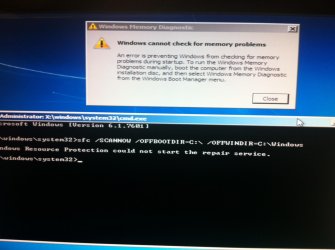
this is what i get when i put in the command you gave me and also i tried checking the hard drive and it gave me that error
 

Attachments

  • image.jpg
    image.jpg
    308.4 KB · Views: 2

My Computer My Computer

At a glance

Windows 7 Ultimate x64
Computer type
PC/Desktop
Computer Manufacturer/Model Number
Dell
OS
Windows 7 Ultimate x64
Use that disc to get to the command prompt .

1) Load disc in tab F12 for boot options
2) choose your DVD drive
3) Press Enter when you see " Press any key to boot from CD or DVD … " you have 8 seconds to press Enter or you would have to restart the PC to get back to this section .
4) Make sure the languages are English ( or any language you prefer )
5 ) In the window where it says Install Now click on Repair your computer on the lower left hand corner
6 ) Choose the OS click Next
7) Click on command prompt
Type in this command
Code:
sfc /SCANNOW /OFFBOOTDIR=C:\  /OFFWINDIR=C:\Windows

Added : That image you got with the disc in the computer or without the disc ?
 

My Computer My Computer

At a glance

Windows 7 Ultimate 32-Bit & Windows 7 Ultimat...Intel Core i7 CPU 950 @ 3.07GHzOCZ 6GB (3 x 2GB) 240-Pin DDR3 SDRAM DDR3 160...ATI Radeon HD 5700 Series
Computer Manufacturer/Model Number
Custom Built
OS
Windows 7 Ultimate 32-Bit & Windows 7 Ultimate 64-Bit

CPU
Intel Core i7 CPU 950 @ 3.07GHz
Motherboard
ASUS P6T DELUXE V2
Memory
OCZ 6GB (3 x 2GB) 240-Pin DDR3 SDRAM DDR3 1600 OCZ3X1600R2
Graphics Card(s)
ATI Radeon HD 5700 Series
Sound Card
OnBoard
Hard Drives
WD6400AACS-00M3B0 (640GB SATA )
PSU
CORSAIR 850w
Case
NZXT LEXA
Cooling
Intel Stock Heatsink Fan
Keyboard
Microsoft Wireless Laser Keyboard 7000
Mouse
Microsoft Wireless Laser Mouse 7000
the part where i have to choose the OS is empty, the list is empty and im not sure which driver i have to add :/
 

My Computer My Computer

At a glance

Windows 7 Ultimate x64
Computer type
PC/Desktop
Computer Manufacturer/Model Number
Dell
OS
Windows 7 Ultimate x64
Lets try this get to the BIOS by hitting F2 once you see the DELL splash screen .

Go to the Advanced BIOS Features . If you see anything with Sata configuration and change it from AHCI to ATA(IDE or Legacy)

   Note
Your Service Tag label should be on the side of your PC


Open up a Command Prompt with the DVD (same steps as before) and run the command below . Reboot once you're done .
Code:
 c:\windows\system32\drivers\classpnp.sys classpnp.old
 
Last edited:

My Computer My Computer

At a glance

Windows 7 Ultimate 32-Bit & Windows 7 Ultimat...Intel Core i7 CPU 950 @ 3.07GHzOCZ 6GB (3 x 2GB) 240-Pin DDR3 SDRAM DDR3 160...ATI Radeon HD 5700 Series
Computer Manufacturer/Model Number
Custom Built
OS
Windows 7 Ultimate 32-Bit & Windows 7 Ultimate 64-Bit
CPU
Intel Core i7 CPU 950 @ 3.07GHz
Motherboard
ASUS P6T DELUXE V2
Memory
OCZ 6GB (3 x 2GB) 240-Pin DDR3 SDRAM DDR3 1600 OCZ3X1600R2
Graphics Card(s)
ATI Radeon HD 5700 Series
Sound Card
OnBoard
Hard Drives
WD6400AACS-00M3B0 (640GB SATA )
PSU
CORSAIR 850w
Case
NZXT LEXA
Cooling
Intel Stock Heatsink Fan
Keyboard
Microsoft Wireless Laser Keyboard 7000
Mouse
Microsoft Wireless Laser Mouse 7000
didnt work
 

My Computer My Computer

At a glance

Windows 7 Ultimate x64
Computer type
PC/Desktop
Computer Manufacturer/Model Number
Dell
OS
Windows 7 Ultimate x64
Back
Top