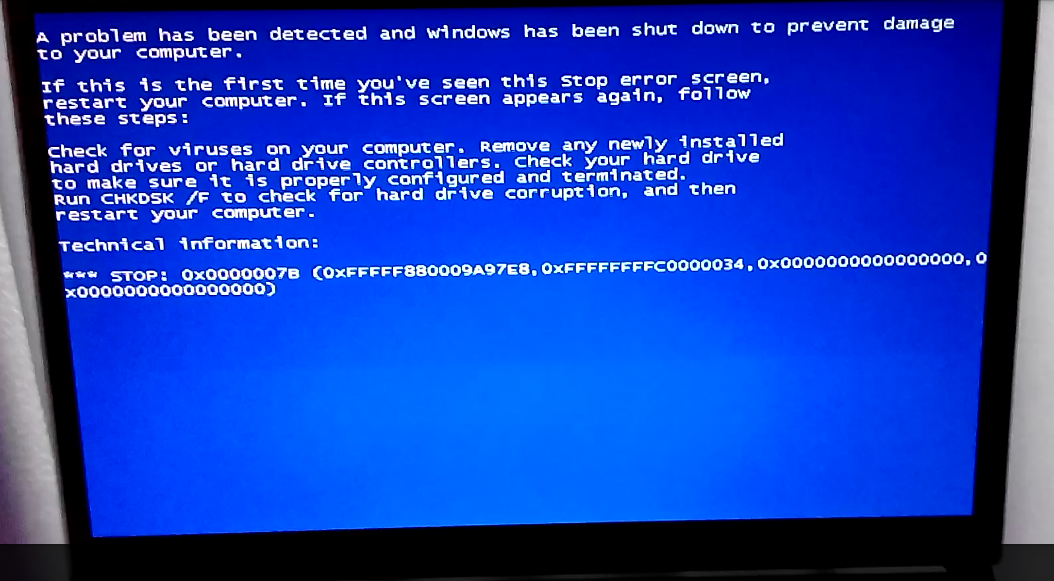
BSOD at boot, both normal and safe mode

andrepd

New member
Local time
4:04 AM
Messages
9
My video card was having problems so I used the warranty and sent my PC for repairs. They told me the card was faulty and swapped it for a new, identical one. When it got back I tried to boot into Windows, but the animation froze for a second right at the beginning and then a BSOD flashed for a tenth of a second and then it rebooted. If I try to boot into safe mode it shows me the log of the drivers being loaded, then it stops for a second at "amdkmpfd.sys" and BSOD's for a fraction of a second and reboots. I can't even read the BSOD because it flashes away almost instantly.

I searched the internet and did these steps, all to no avail:
  1. I ran startup repair
  2. I ran sfc /scannow at the command line
  3. I copyed the contents of Windows\system32\config to a backup folder, then copyed the contents of RegBak to it (supposedly restoring a backup of the registry). It also failed so I restored the mybackup.
  4. I renamed amdkmpfd.sys to amdkmpfd.sys.old. I rebooted, safe mode now hangs and crashes at "classpnp.sys", renamed classpnp.sys, now it hangs at "disk.sys", did the same, now hangs at "fvevol.sys", etc...
  5. I also did startup repair several times between these steps.

What can I do? Any suggestions? If you need more info, please ask. Thanks for any help.

EDIT: I forgot to mention, it isn't a hardware issue, because I can boot into Linux and use even the graphics card just fine. The graphics card is a AMD 7970M
 

My Computer My Computer

Computer type
PC/Desktop
Computer Manufacturer/Model Number
Clevo P170EM
OS
Windows 7 x64
CPU
Intel Core i7-3630QM CPU @ 2.40GHz
Memory
8GB DDR3 1600Mhz
Graphics Card(s)
AMD 7970M
Screen Resolution
1920x1080
Hard Drives
750 Gb WD
Internet Speed
30Mbps
Antivirus
Bitdefender Free
Browser
Chrome+Firefox
Other Info
Linux Mint 17 also installed :)
Bump. I've managed to film the BSOD with my phone and get the error message:

EcFa2BW.png


Any tips?
 

My Computer My Computer

Computer type
PC/Desktop
Computer Manufacturer/Model Number
Clevo P170EM
OS
Windows 7 x64
CPU
Intel Core i7-3630QM CPU @ 2.40GHz
Memory
8GB DDR3 1600Mhz
Graphics Card(s)
AMD 7970M
Screen Resolution
1920x1080
Hard Drives
750 Gb WD
Internet Speed
30Mbps
Antivirus
Bitdefender Free
Browser
Chrome+Firefox
Other Info
Linux Mint 17 also installed :)
Can you boot into Windows normally? Yes or No?
 

My Computer My Computer

Computer type
PC/Desktop
Computer Manufacturer/Model Number
Golden Mk. I.4
OS
Windows 10 Pro x64 ; Xubuntu x64
CPU
Intel i7 860 @ 2.80 GHz O/C'ed to 4.0GHz
Motherboard
Gigabyte P55A-UD3R Rev.1. Award BIOS F13
Memory
16GB Corsair Vengance DDR3 @ 661 MHz Dual Channel (9-9-9-24)
Graphics Card(s)
EVGA NVidia GTX 560 1024MB
Sound Card
Realtek Integrated
Monitor(s) Displays
Dual Samsung SyncMaster 2494HS
Screen Resolution
1920*1080 and 1920*1080
Hard Drives
1*Samsung 840 EVO 120GB SSD;
1*OCZ Vertex 2 60GB SSD;
2*Samsung F3 SpinPoint 1TB in RAID0;
1*Samsung F1 SpinPoint 1TB;
2*Western Digital 1TB External USB 3.0
1*Western Digital 500GB External USB 3.0
1*Seagate 500GB External USB 2.0
PSU
Thermaltake ToughPower QFan 750W
Case
Thermaltake Element S VK60001W2Z
Cooling
Corsair H60 Water Cooling, 2*230mm and 2*80mm case fans
Keyboard
Logitech G110
Mouse
Logitech MX518
Well, no I can't. That's precisely my problem, I get a BSOD at boot.
 

My Computer My Computer

Computer type
PC/Desktop
Computer Manufacturer/Model Number
Clevo P170EM
OS
Windows 7 x64
CPU
Intel Core i7-3630QM CPU @ 2.40GHz
Memory
8GB DDR3 1600Mhz
Graphics Card(s)
AMD 7970M
Screen Resolution
1920x1080
Hard Drives
750 Gb WD
Internet Speed
30Mbps
Antivirus
Bitdefender Free
Browser
Chrome+Firefox
Other Info
Linux Mint 17 also installed :)
You could try getting into WinRE from your windows install disk an attempt a repair from there, it may simply be that the gfx drivers installed are wrong for the new card
Is the new card same as old one or has it been changed for a different model ?
 

My Computer My Computer

Computer type
PC/Desktop
Computer Manufacturer/Model Number
Pauly Special
OS
Win7 Ultimate X64
CPU
Intel i5 3570K
Motherboard
Gigabyte Z77X-DS3H
Memory
8GB DDR3 1600
Graphics Card(s)
Onboard
Sound Card
Onboard
Screen Resolution
1280x1024
Hard Drives
Samsung 840 Evo SSD (OS)
1TB Spinner (Data)
PSU
800W Arctic
Case
Cooler Master
Cooling
3x120mm Fans
Keyboard
MS Wireless
Mouse
MS Wireless
Internet Speed
20M
The card is the same model as before. Would it be different to run startup repair from the F8 menu and to run from the install disk? I guess I could try.
 

My Computer My Computer

Computer type
PC/Desktop
Computer Manufacturer/Model Number
Clevo P170EM
OS
Windows 7 x64
CPU
Intel Core i7-3630QM CPU @ 2.40GHz
Memory
8GB DDR3 1600Mhz
Graphics Card(s)
AMD 7970M
Screen Resolution
1920x1080
Hard Drives
750 Gb WD
Internet Speed
30Mbps
Antivirus
Bitdefender Free
Browser
Chrome+Firefox
Other Info
Linux Mint 17 also installed :)
Not sure startup repair is going to help you in the situation you have but its worth a try if you want to
 

My Computer My Computer

Computer type
PC/Desktop
Computer Manufacturer/Model Number
Pauly Special
OS
Win7 Ultimate X64
CPU
Intel i5 3570K
Motherboard
Gigabyte Z77X-DS3H
Memory
8GB DDR3 1600
Graphics Card(s)
Onboard
Sound Card
Onboard
Screen Resolution
1280x1024
Hard Drives
Samsung 840 Evo SSD (OS)
1TB Spinner (Data)
PSU
800W Arctic
Case
Cooler Master
Cooling
3x120mm Fans
Keyboard
MS Wireless
Mouse
MS Wireless
Internet Speed
20M
You could try getting into WinRE from your windows install disk an attempt a repair from there, it may simply be that the gfx drivers installed are wrong for the new card
Is the new card same as old one or has it been changed for a different model ?

Just to be sure, by "getting into WinRE from your windows install disk an attempt a repair from there" you mean running startup repair from that disk, or installing in-place/upgrade?
 

My Computer My Computer

Computer type
PC/Desktop
Computer Manufacturer/Model Number
Clevo P170EM
OS
Windows 7 x64
CPU
Intel Core i7-3630QM CPU @ 2.40GHz
Memory
8GB DDR3 1600Mhz
Graphics Card(s)
AMD 7970M
Screen Resolution
1920x1080
Hard Drives
750 Gb WD
Internet Speed
30Mbps
Antivirus
Bitdefender Free
Browser
Chrome+Firefox
Other Info
Linux Mint 17 also installed :)
WinRE = windows recovery environment
This is where you get the options to run system restore, repair install etc
 

My Computer My Computer

Computer type
PC/Desktop
Computer Manufacturer/Model Number
Pauly Special
OS
Win7 Ultimate X64
CPU
Intel i5 3570K
Motherboard
Gigabyte Z77X-DS3H
Memory
8GB DDR3 1600
Graphics Card(s)
Onboard
Sound Card
Onboard
Screen Resolution
1280x1024
Hard Drives
Samsung 840 Evo SSD (OS)
1TB Spinner (Data)
PSU
800W Arctic
Case
Cooler Master
Cooling
3x120mm Fans
Keyboard
MS Wireless
Mouse
MS Wireless
Internet Speed
20M
Back
Top