Can`t create a restore date

restore

Thankyou ,i would like that.
 
Last edited:

My Computer My Computer

Computer type
PC/Desktop
Computer Manufacturer/Model Number
HP
OS
windows 7 64bit
Thankyou,i would appreciate that.
 

My Computer My Computer

Computer type
PC/Desktop
Computer Manufacturer/Model Number
HP
OS
windows 7 64bit
I'm back,
If all your trying to do is create a restore point then:
My Computer/Properties/Create give it a name and click create

To restore: My Computer/Properties/System Restore

TO Clone or Image the entire drive I would suggest using Aomei Backupper:

Download Freeware or Try 30 Days Free Trial - AOMEI Backupper

I use this myself.

Bill
 

My Computer My Computer

Computer type
Laptop
Computer Manufacturer/Model Number
Dell Precision 15 7550 Workstation
OS
Windows 10 22H2 Pro
CPU
Intel(R) Xeon W-10885M
Motherboard
Dell
Memory
2x 32 GB DDR4 ECC memory (128 GB max)
Graphics Card(s)
Intel onboard GPU 1080p - Quadro RTX 5000 Max-Q GPU 4K
Hard Drives
1TB Samsung 9100 Pro main M2 SSD
2x 2TB Samsung 9100 Pro temp storage M2 SSD (6 TB max)
Mouse
Logitech MX-25 Bluetooth
Internet Speed
slow
Antivirus
MS
Browser
Pale Moon 34.x.x - x64 AVX2 build
Update,
Two weeks ago my hard drive failed. Since I am a backup freak I had a cloned drive to replace it with. I had also done a differential backup to the clone every two weeks which only copies and overwrites Newer files. Hence I only lost about 15 files. I had ordered a new drive which came today and I just finished cloning the new drive using the above mentioned software. Took about 1 1/2 hours. I read a lot of forums and always have to laugh when I see another post stating "HELP my hard drive died, how can I retrieve my data?" All I can say is good luck, First rule of thumb is, BACKUP BACKUP BACKUP.

Bill
 

My Computer My Computer

Computer type
Laptop
Computer Manufacturer/Model Number
Dell Precision 15 7550 Workstation
OS
Windows 10 22H2 Pro
CPU
Intel(R) Xeon W-10885M
Motherboard
Dell
Memory
2x 32 GB DDR4 ECC memory (128 GB max)
Graphics Card(s)
Intel onboard GPU 1080p - Quadro RTX 5000 Max-Q GPU 4K
Hard Drives
1TB Samsung 9100 Pro main M2 SSD
2x 2TB Samsung 9100 Pro temp storage M2 SSD (6 TB max)
Mouse
Logitech MX-25 Bluetooth
Internet Speed
slow
Antivirus
MS
Browser
Pale Moon 34.x.x - x64 AVX2 build
restore

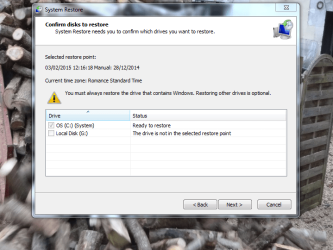
I can put a restore point in,but get this pic,when i try to restore ,it does not work ,i then get the messsage that it cannot do it due to errorr 0x80070005
 

Attachments

  • Capture.PNG
    Capture.PNG
    102 KB · Views: 1

My Computer My Computer

Computer type
PC/Desktop
Computer Manufacturer/Model Number
HP
OS
windows 7 64bit
restor

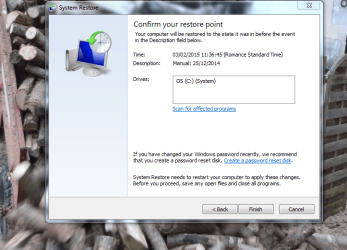
Then i get this
 

Attachments

  • Capture.PNG
    Capture.PNG
    97.1 KB · Views: 1

My Computer My Computer

Computer type
PC/Desktop
Computer Manufacturer/Model Number
HP
OS
windows 7 64bit
restore

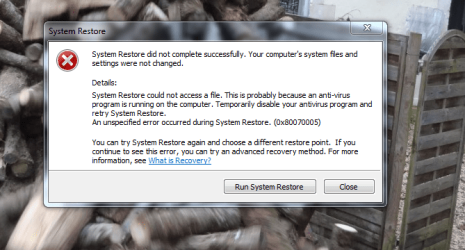
After attempting restore ,i then get this
 

Attachments

  • Capture.PNG
    Capture.PNG
    84.8 KB · Views: 9

My Computer My Computer

Computer type
PC/Desktop
Computer Manufacturer/Model Number
HP
OS
windows 7 64bit
restore

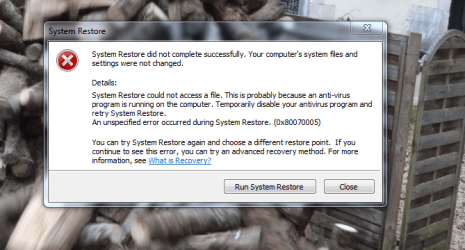
After attempting restore ,i then get this
 

Attachments

  • Capture.PNG
    Capture.PNG
    84.8 KB · Views: 8

My Computer My Computer

Computer type
PC/Desktop
Computer Manufacturer/Model Number
HP
OS
windows 7 64bit
restore

My problem is ( my computer will not restore to a earlier time,something is preventing it from doing so.??
 

My Computer My Computer

Computer type
PC/Desktop
Computer Manufacturer/Model Number
HP
OS
windows 7 64bit
I would try deleting all restore points:
My Computer/Properties/System Protection/ highlight your C:/ drive and press "Configure", check "Turn off System Protection".

Reboot the system to delete all previous restore points.
Reenable the "System Protection".

Since you are on a desktop I'm not sure why HP put a Recovery partition on your drive unless they didn't supply you with a Win 7 disk. If you have the Win 7 disk I would suggest booting to it and doing a Windows Repair. Not a reinstall which would lose all your data just as if using the F11 key and the recovery partition.

Bill
 

My Computer My Computer

Computer type
Laptop
Computer Manufacturer/Model Number
Dell Precision 15 7550 Workstation
OS
Windows 10 22H2 Pro
CPU
Intel(R) Xeon W-10885M
Motherboard
Dell
Memory
2x 32 GB DDR4 ECC memory (128 GB max)
Graphics Card(s)
Intel onboard GPU 1080p - Quadro RTX 5000 Max-Q GPU 4K
Hard Drives
1TB Samsung 9100 Pro main M2 SSD
2x 2TB Samsung 9100 Pro temp storage M2 SSD (6 TB max)
Mouse
Logitech MX-25 Bluetooth
Internet Speed
slow
Antivirus
MS
Browser
Pale Moon 34.x.x - x64 AVX2 build
restore

I turned off system protection for c/drive,deleted old restore points( i do this regular at the moment,as they are all current and won`t get me back to where i want to go. I created a new one,and tried to restore and got the present pic.

I did not get a disc with the computer,i took it for a reformat once ,he said it was built in,at the moment everything else works,but i may need to system restore one day.

Bill
 

Attachments

  • Capture.PNG
    Capture.PNG
    77.7 KB · Views: 12

My Computer My Computer

Computer type
PC/Desktop
Computer Manufacturer/Model Number
HP
OS
windows 7 64bit
OK, try booting the system tapping the F2 or F11 keys and get into recovery mode. HP's from about 2010 on had a system repair built in to the recovery partition. Do not do a Factory recovery as this will reformat the C:/ partition and reinstall windows.

Edit: also try booting with the escape key.

Bill
 

My Computer My Computer

Computer type
Laptop
Computer Manufacturer/Model Number
Dell Precision 15 7550 Workstation
OS
Windows 10 22H2 Pro
CPU
Intel(R) Xeon W-10885M
Motherboard
Dell
Memory
2x 32 GB DDR4 ECC memory (128 GB max)
Graphics Card(s)
Intel onboard GPU 1080p - Quadro RTX 5000 Max-Q GPU 4K
Hard Drives
1TB Samsung 9100 Pro main M2 SSD
2x 2TB Samsung 9100 Pro temp storage M2 SSD (6 TB max)
Mouse
Logitech MX-25 Bluetooth
Internet Speed
slow
Antivirus
MS
Browser
Pale Moon 34.x.x - x64 AVX2 build
I would try deleting all restore points:
My Computer/Properties/System Protection/ highlight your C:/ drive and press "Configure", check "Turn off System Protection".

Reboot the system to delete all previous restore points.
Reenable the "System Protection".

Since you are on a desktop I'm not sure why HP put a Recovery partition on your drive unless they didn't supply you with a Win 7 disk. If you have the Win 7 disk I would suggest booting to it and doing a Windows Repair. Not a reinstall which would lose all your data just as if using the F11 key and the recovery partition.

Bill

They have been doing recovery partitions since like 2008. You can purchase recovery media if you want.

@Billnotlob, What AV software are you using and you do not have any extra disk imaging software installed correct?
 

My Computer My Computer

Computer type
PC/Desktop
Computer Manufacturer/Model Number
Custom
OS
10 Pro x64
CPU
Ryzen 9 3900X
Motherboard
Asrock x370 Tachi
Memory
64GB(4x16GB) DDR4
Graphics Card(s)
EVGA 1080ti FTW3
Sound Card
ASUS Xonar Essence STX (V4 Bursons), ODAC rev B, NFB-11, O2
Monitor(s) Displays
3xASUS PB278Q/R, Optoma HD142X
Screen Resolution
3x1440p, 1080p
Hard Drives
512GB 850 EVO(OS, Programs)
4TB (Movies)
3TB (Downloads)
3TB (Programs)
1TB HDD (Games)
2x6TB R1 (videos)
PSU
AX760
Case
Fractal Define R5
Cooling
NH-D15S
Keyboard
Massdrop Ctrl with Box Navy's
Mouse
G903, Alioth XXL Mat
Internet Speed
280/40
Antivirus
MBAM, ESET
Browser
Canary 64 Bit
Other Info
I also own a Thinkpad P50 Xeon 4K, X220T, X1C5
Did the boot with the (f11) key. The last pic says to temporarily switch off anti virus,as it cannot access a file.( i have avg free edition).On switching off it allows me to create a restore point only if i have (G) on in system protection.I then create a date (4/1/2015.on doing restore,it ignores the date and restores to the one before ,which is a present date.in the past i have not had to disable my anti virus in order to restore. Bill
PS
Sorry but i don`t know what disc imaging software is ? ( i am not that computer literate) i have spoken to micro soft,they spent approx 20 min`s looking at it from their end,they said they would look further at a cost(120 euros per year. This sounds ok provided i still have use of computer to hand over to them.if it crashes ,it would be no use to me.
 
Last edited:

My Computer My Computer

Computer type
PC/Desktop
Computer Manufacturer/Model Number
HP
OS
windows 7 64bit
Did the boot with the (f11) key. The last pic says to temporarily switch off anti virus,as it cannot access a file.( i have avg free edition).On switching off it allows me to create a restore point only if i have (G) on in system protection.I then create a date (4/1/2015.on doing restore,it ignores the date and restores to the one before ,which is a present date.in the past i have not had to disable my anti virus in order to restore. Bill

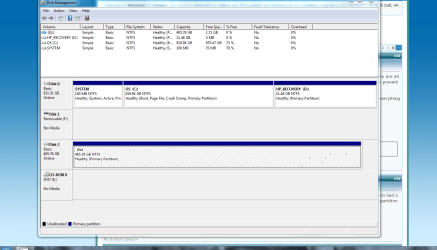
Odd that it would want G to also be selected, can you post the bottom of the disk management screen to give us a better breakup of your drives like this? It is seems that G is part of the same disk that C is using but that would be a pretty big disk for a hp computer to come with. The Map would help us narrow down why it wants certain things enabled for protection and not.
 

Attachments

  • storage.PNG
    storage.PNG
    11.5 KB · Views: 1

My Computer My Computer

Computer type
PC/Desktop
Computer Manufacturer/Model Number
Custom
OS
10 Pro x64
CPU
Ryzen 9 3900X
Motherboard
Asrock x370 Tachi
Memory
64GB(4x16GB) DDR4
Graphics Card(s)
EVGA 1080ti FTW3
Sound Card
ASUS Xonar Essence STX (V4 Bursons), ODAC rev B, NFB-11, O2
Monitor(s) Displays
3xASUS PB278Q/R, Optoma HD142X
Screen Resolution
3x1440p, 1080p
Hard Drives
512GB 850 EVO(OS, Programs)
4TB (Movies)
3TB (Downloads)
3TB (Programs)
1TB HDD (Games)
2x6TB R1 (videos)
PSU
AX760
Case
Fractal Define R5
Cooling
NH-D15S
Keyboard
Massdrop Ctrl with Box Navy's
Mouse
G903, Alioth XXL Mat
Internet Speed
280/40
Antivirus
MBAM, ESET
Browser
Canary 64 Bit
Other Info
I also own a Thinkpad P50 Xeon 4K, X220T, X1C5
restore

Hope this what you meant
 

Attachments

  • Capture.PNG
    Capture.PNG
    9.3 KB · Views: 0

My Computer My Computer

Computer type
PC/Desktop
Computer Manufacturer/Model Number
HP
OS
windows 7 64bit

My Computer My Computer

Computer type
PC/Desktop
Computer Manufacturer/Model Number
Custom
OS
10 Pro x64
CPU
Ryzen 9 3900X
Motherboard
Asrock x370 Tachi
Memory
64GB(4x16GB) DDR4
Graphics Card(s)
EVGA 1080ti FTW3
Sound Card
ASUS Xonar Essence STX (V4 Bursons), ODAC rev B, NFB-11, O2
Monitor(s) Displays
3xASUS PB278Q/R, Optoma HD142X
Screen Resolution
3x1440p, 1080p
Hard Drives
512GB 850 EVO(OS, Programs)
4TB (Movies)
3TB (Downloads)
3TB (Programs)
1TB HDD (Games)
2x6TB R1 (videos)
PSU
AX760
Case
Fractal Define R5
Cooling
NH-D15S
Keyboard
Massdrop Ctrl with Box Navy's
Mouse
G903, Alioth XXL Mat
Internet Speed
280/40
Antivirus
MBAM, ESET
Browser
Canary 64 Bit
Other Info
I also own a Thinkpad P50 Xeon 4K, X220T, X1C5
restore

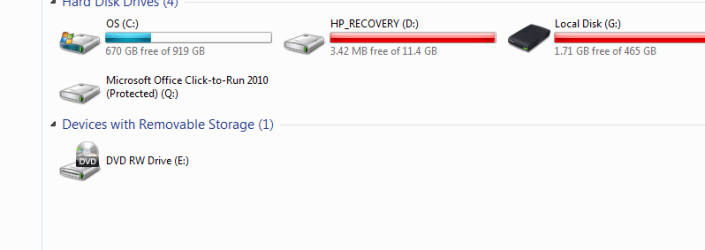
This one
 

Attachments

  • Capture.PNG
    Capture.PNG
    55.5 KB · Views: 4

My Computer My Computer

Computer type
PC/Desktop
Computer Manufacturer/Model Number
HP
OS
windows 7 64bit

Yeah that one shows that G:\ is another disk, is it another disk in the computer or is it a usb external disk? Your going to want to remove external disks before trying to make or use a restore point. Only the disk that is labeled as system and has the windows logo needs to have protection turned on for it.
 

My Computer My Computer

Computer type
PC/Desktop
Computer Manufacturer/Model Number
Custom
OS
10 Pro x64
CPU
Ryzen 9 3900X
Motherboard
Asrock x370 Tachi
Memory
64GB(4x16GB) DDR4
Graphics Card(s)
EVGA 1080ti FTW3
Sound Card
ASUS Xonar Essence STX (V4 Bursons), ODAC rev B, NFB-11, O2
Monitor(s) Displays
3xASUS PB278Q/R, Optoma HD142X
Screen Resolution
3x1440p, 1080p
Hard Drives
512GB 850 EVO(OS, Programs)
4TB (Movies)
3TB (Downloads)
3TB (Programs)
1TB HDD (Games)
2x6TB R1 (videos)
PSU
AX760
Case
Fractal Define R5
Cooling
NH-D15S
Keyboard
Massdrop Ctrl with Box Navy's
Mouse
G903, Alioth XXL Mat
Internet Speed
280/40
Antivirus
MBAM, ESET
Browser
Canary 64 Bit
Other Info
I also own a Thinkpad P50 Xeon 4K, X220T, X1C5
restore

(G) is a external disc. I never switch it off.when creating a restore point ,what should be on in system protection.
 

My Computer My Computer

Computer type
PC/Desktop
Computer Manufacturer/Model Number
HP
OS
windows 7 64bit
Back
Top