Cannot create a restore point

TerryinDorset

New member
Local time
3:23 PM
Messages
14
The Windows 7 Professional SP1 64 Bit my machine has will not create a restore point. I get a message to say the service cannot be started in safe mode but it's not in safe mode. Can you suggest a fix?


Intel Core I7 5820K EXTREME 3.6Ghz HEX Core CPU Processor BX80648I75820K - Socket 2011
Gigabyte X99M-Gaming 5 Intel X99 (Socket 2011) DDR4 Micro ATX Motherboard
Corsair Vengeance LPX 16GB (4 x 4GB) Memory Kit PC4-22400 2800MHz DDR4 DIMM C16 (Blue)
AMD Radeon R9 290
CORSAIR PSU 850W CS GOLD MODULAR PSU
Corsair Carbide Air 240 Micro Mini ITX White Gaming PC Case
2 x Samsung 500GB 850 EVO SSD (one for OS, one for Flight Sim)
1X 2TB HDD (for general file storage)
1 x Corsair SP120 PWM Air Series QUIET High Static Pressure 120mm Fan
Microsoft Windows 7 Professional SP1 64 Bit
 

My Computer

Computer type
PC/Desktop
OS
Windows 7 Professional SP1 64 Bit
Creating Restoration Points manually? Well, I do really wish this feature to exist, because i can't find it anywhere.
 

My Computer

Computer type
PC/Desktop
Computer Manufacturer/Model Number
Current Primary Computer: Samsung NP700G7A-S02
OS
Windows 7 Ultimate on my Primary Computer
Other Info
There is not enough Place to list everything here.
Here is it: http://pastebin.com/afD3kre7
Update: old VistaPC has TEN GigaBytes of RAM.
@TerryinDorset, what Flight Simulator do you have? (I know, that this is Off-Topic, but i can't find any options for Private Messages.:))
 

My Computer

Computer type
PC/Desktop
Computer Manufacturer/Model Number
Current Primary Computer: Samsung NP700G7A-S02
OS
Windows 7 Ultimate on my Primary Computer
Other Info
There is not enough Place to list everything here.
Here is it: http://pastebin.com/afD3kre7
Update: old VistaPC has TEN GigaBytes of RAM.

My Computer

Computer type
PC/Desktop
Computer Manufacturer/Model Number
Home made Desktop
OS
Windows 10 Pro. 64/ version 1709 Windows 7 Pro/64
CPU
Intel i7-6800K @ 4.3
Motherboard
ASUS X-99 Deluxe II
Memory
Corsair Platinum 16 gig @2400
Graphics Card(s)
EVGA GTX 1070 OC
Monitor(s) Displays
Asus 27" LED LCD/VE278Q
Screen Resolution
1920-1080 or 1280-720 HDMI
Hard Drives
INTEL SSD 730-240 Gb Sata 3.0/
PSU
EVGA Platium 1200W
Case
Phanteks Luxe Tempered Glass 8 fans/ one radiator
Cooling
XSPC/ Water Cooled CPU
Keyboard
Das 4 Professional
Mouse
Logitech M705/MX Anywhere 2-S
Internet Speed
100 mbits
Antivirus
Microsoft Security Essentials/ Malwarebytes Premium 3.0/ SAS
Browser
I.E. 11 default/Firefox/ ISP Time Warner Cable/Spectrum
Other Info
LG BluRay Burner/
Sound system-KLipsch-THX/
Icy Dock ssd Hot Swap bays.
Thanks for the create link. I'll check it out tomorrow. On that tack, I've had this machine for 3 months & there are no restore points. When I tried to create it via manual option, as I've done with other machines, it said I was in safe mode but I wasn't :cry:

I've got FS9 & make my own WW2 airfields. I've put some screenshots on my website: RAF Ibsley - Information

I made RAF Ibsley from the Record Site Plans & show it at local events.
If I could migrate it to FSX I would but MS have fixed it so FS9 files are incompatible.
 

My Computer

Computer type
PC/Desktop
OS
Windows 7 Professional SP1 64 Bit
I've already tried the Brink suggestions & I already do it in the 2 other Windows 7 machines I have, & in a Vista machine.

The problem is with the new machine, when it tells me 'Cannot start this service in Safe Mode' when I am not in Safe Mode.
What I want to know is, is there a fix to solve this problem? I have no restore points & cannot make any.
 

My Computer

Computer type
PC/Desktop
OS
Windows 7 Professional SP1 64 Bit
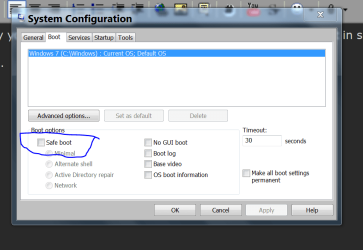
I have no idea why your system states you are in safe mode when you are not in safe mode.

You can check this.
msconfig/boot.


Safe Mode.PNG
 

My Computer

Computer type
PC/Desktop
Computer Manufacturer/Model Number
Home made Desktop
OS
Windows 10 Pro. 64/ version 1709 Windows 7 Pro/64
CPU
Intel i7-6800K @ 4.3
Motherboard
ASUS X-99 Deluxe II
Memory
Corsair Platinum 16 gig @2400
Graphics Card(s)
EVGA GTX 1070 OC
Monitor(s) Displays
Asus 27" LED LCD/VE278Q
Screen Resolution
1920-1080 or 1280-720 HDMI
Hard Drives
INTEL SSD 730-240 Gb Sata 3.0/
PSU
EVGA Platium 1200W
Case
Phanteks Luxe Tempered Glass 8 fans/ one radiator
Cooling
XSPC/ Water Cooled CPU
Keyboard
Das 4 Professional
Mouse
Logitech M705/MX Anywhere 2-S
Internet Speed
100 mbits
Antivirus
Microsoft Security Essentials/ Malwarebytes Premium 3.0/ SAS
Browser
I.E. 11 default/Firefox/ ISP Time Warner Cable/Spectrum
Other Info
LG BluRay Burner/
Sound system-KLipsch-THX/
Icy Dock ssd Hot Swap bays.
Thanks, I'll check it out.
I'm wondering about repairing 7 if all else fails.

The maker AWDIT who installed W7 don't care & told me to reinstall it. So much for their customer care.
 

My Computer

Computer type
PC/Desktop
OS
Windows 7 Professional SP1 64 Bit
Safe Boot is UNTICKED .
 

My Computer

Computer type
PC/Desktop
OS
Windows 7 Professional SP1 64 Bit
A clean reinstall has fixed the problems!
 

My Computer

Computer type
PC/Desktop
OS
Windows 7 Professional SP1 64 Bit
That sure is one way to fix the problem.
Glad your fixed.
 

My Computer

Computer type
PC/Desktop
Computer Manufacturer/Model Number
Home made Desktop
OS
Windows 10 Pro. 64/ version 1709 Windows 7 Pro/64
CPU
Intel i7-6800K @ 4.3
Motherboard
ASUS X-99 Deluxe II
Memory
Corsair Platinum 16 gig @2400
Graphics Card(s)
EVGA GTX 1070 OC
Monitor(s) Displays
Asus 27" LED LCD/VE278Q
Screen Resolution
1920-1080 or 1280-720 HDMI
Hard Drives
INTEL SSD 730-240 Gb Sata 3.0/
PSU
EVGA Platium 1200W
Case
Phanteks Luxe Tempered Glass 8 fans/ one radiator
Cooling
XSPC/ Water Cooled CPU
Keyboard
Das 4 Professional
Mouse
Logitech M705/MX Anywhere 2-S
Internet Speed
100 mbits
Antivirus
Microsoft Security Essentials/ Malwarebytes Premium 3.0/ SAS
Browser
I.E. 11 default/Firefox/ ISP Time Warner Cable/Spectrum
Other Info
LG BluRay Burner/
Sound system-KLipsch-THX/
Icy Dock ssd Hot Swap bays.
Yes,& done by Sense IT Support in Ringwood for £40. I took it to them as I was afraid I'd messed up the C drive when Gigabyte didn't recognise it after I'd formatted it.

All my documents etc, were preserved as well as updates. All I had to reinstall was kaspersky, Malwarebytes & a couple of flight sim things. I'll use them again should I get stuck.

FS9 is running as smooth as silk too.
 

My Computer

Computer type
PC/Desktop
OS
Windows 7 Professional SP1 64 Bit
Back
Top