Solved Cannot install updates

There isn't officially a SP2 for Windows 7 just a rollup update. Even when that is done the status will still say Windows 7 SP1.

I couldn't get my original SP2 rollup file I downloaded years ago to work. Instead I downloaded the two files last week from Microsoft to do the update. Did you try downloading these two files to see if they worked for you?

For example to do the unofficial Window 7 SP2 64-bit update you would download and run the following files:

1. Prerequisites
Windows6.1-KB3020369-x64.msu

2. Download
windows6.1-kb3125574-v4-x64_2dafb1d203c8964239af3048b5dd4b1264cd93b9.msu
 

My Computers

System One System Two

  • Computer type
    PC/Desktop
    Computer Manufacturer/Model Number
    Custom build
    OS
    Windows 7 Home Premium 64-bits
    CPU
    AMD FX-8350
    Motherboard
    Gigabyte GA-990FXA-UD3 (AM3+)
    Memory
    GSKILL Ripjaw-X PC3 12800 8GB (2x4GB)
    Graphics Card(s)
    ASUS ROG STRIX GTX 1060 6GB
    Sound Card
    Integrated
    Monitor(s) Displays
    Asus VE228H (21.5-in)
    Screen Resolution
    1920x1080 60Hz
    Hard Drives
    SAMSUNG 870 EVO 2.5 Inch SATA SSD (1TB)
    SAMSUNG 870 EVO 2.5 Inch SATA SSD (1TB)
    SAMSUNG 870 EVO 2.5 Inch SATA SSD (1TB)
    PSU
    Corsair RM750x (750 watts)
    Case
    Corsair Carbide Series 200R
    Cooling
    Corsair Hydro Series H60 (CWCH60)
    Keyboard
    Logitech Elite
    Mouse
    Logitech M510 Wireless Mouse
    Internet Speed
    Comcast Gigabit Extra (1200Mbps down / 35Mbps up)
    Antivirus
    Malwarebytes
    Browser
    Firefox, Edge, Chrome
    Other Info
    ASUS DRW-24B1ST DVD-RW (24X) optical drive
    Seagate Expansion Desk (5TB) external SATA/USB HDD
    Comcast XB8 Internet Gateway
  • Computer type
    PC/Desktop
    System Manufacturer/Model Number
    Custom
    OS
    Windows 7 Pro (64-bit)
    CPU
    AMD Phenom II 960T X4
    Motherboard
    ASUS M4N82 Deluxe
    Memory
    Corsair XMS2 DDR2-800 8GB (4x2GB)
    Graphics Card(s)
    ASUS ENGTX560 DCII OC/2DI/1GD5 1GB
    Monitor(s) Displays
    Samsung 930B 19-inch LCD
    Screen Resolution
    1280x1024
    Hard Drives
    Samsung SSD 870 EVO 1000 GB (Windows 10)
    Seagate ST1000DM003 1000 GB (Windows 7)
    PSU
    Antec TruePower (new) TP-650
    Case
    Antec Three Hundred
    Cooling
    AMD stock cooler from FX8350
    Mouse
    Logitech M100
    Internet Speed
    Xfinity Gigabit Extra 1200/35 Mbps
SP2, just a typo.

This system is x32 so those files are not pertinent. Next system will be x64, using Win7 Pro disk (hopefully no more issues as with the Win7 Ultimate disk), so they may be necessary then, but the 32 bit system has priority because it is already in use and this laptop is dieing.

I am trying to proceed methodically, a step at a time, addressing any issues as they appear. So now I need Device Manager working so I can see why the optical drive is missing (all was well a few days ago, then one morning - no D drive).
 

My Computers

System One System Two

  • Computer type
    PC/Desktop
    Computer Manufacturer/Model Number
    custom
    OS
    win7 Pro SP1 x86
    CPU
    64x2 6000+
    Motherboard
    winfast
    Memory
    2gig
    Graphics Card(s)
    GTX950
    Antivirus
    Avast
    Browser
    Brave
  • Computer type
    PC/Desktop
    Antivirus
    Avast
OK, if the system is 32-bit and already has SP1 then you could update using these files two files.

Windows 7 SP2 (Rollup) 32-bit

1. Prerequisites
Windows6.1-KB3020369-x86.msu

2. Download
windows6.1-kb3125574-v4-x86_ba1ff5537312561795cc04db0b02fbb0a74b2cbd.msu

How to obtain and install Windows 7 SP2
https://answers.microsoft.com/en-us/...9-48e1e883051e
 

My Computers

System One System Two

  • Computer type
    PC/Desktop
    Computer Manufacturer/Model Number
    Custom build
    OS
    Windows 7 Home Premium 64-bits
    CPU
    AMD FX-8350
    Motherboard
    Gigabyte GA-990FXA-UD3 (AM3+)
    Memory
    GSKILL Ripjaw-X PC3 12800 8GB (2x4GB)
    Graphics Card(s)
    ASUS ROG STRIX GTX 1060 6GB
    Sound Card
    Integrated
    Monitor(s) Displays
    Asus VE228H (21.5-in)
    Screen Resolution
    1920x1080 60Hz
    Hard Drives
    SAMSUNG 870 EVO 2.5 Inch SATA SSD (1TB)
    SAMSUNG 870 EVO 2.5 Inch SATA SSD (1TB)
    SAMSUNG 870 EVO 2.5 Inch SATA SSD (1TB)
    PSU
    Corsair RM750x (750 watts)
    Case
    Corsair Carbide Series 200R
    Cooling
    Corsair Hydro Series H60 (CWCH60)
    Keyboard
    Logitech Elite
    Mouse
    Logitech M510 Wireless Mouse
    Internet Speed
    Comcast Gigabit Extra (1200Mbps down / 35Mbps up)
    Antivirus
    Malwarebytes
    Browser
    Firefox, Edge, Chrome
    Other Info
    ASUS DRW-24B1ST DVD-RW (24X) optical drive
    Seagate Expansion Desk (5TB) external SATA/USB HDD
    Comcast XB8 Internet Gateway
  • Computer type
    PC/Desktop
    System Manufacturer/Model Number
    Custom
    OS
    Windows 7 Pro (64-bit)
    CPU
    AMD Phenom II 960T X4
    Motherboard
    ASUS M4N82 Deluxe
    Memory
    Corsair XMS2 DDR2-800 8GB (4x2GB)
    Graphics Card(s)
    ASUS ENGTX560 DCII OC/2DI/1GD5 1GB
    Monitor(s) Displays
    Samsung 930B 19-inch LCD
    Screen Resolution
    1280x1024
    Hard Drives
    Samsung SSD 870 EVO 1000 GB (Windows 10)
    Seagate ST1000DM003 1000 GB (Windows 7)
    PSU
    Antec TruePower (new) TP-650
    Case
    Antec Three Hundred
    Cooling
    AMD stock cooler from FX8350
    Mouse
    Logitech M100
    Internet Speed
    Xfinity Gigabit Extra 1200/35 Mbps
This machine will never update to SP1

ms has designated it as >>non genuine<< it will only recieve security updates

SHA2 validation follows AFTER System status
 

My Computer

Computer type
PC/Desktop
Computer Manufacturer/Model Number
medionl/Aspire 6930G/acer x55a
OS
W7 home premium 32bit/W7HP 64bit/w10 tp insider ring
CPU
E5300 dual core
Motherboard
medion MS7366
Memory
3gb
Graphics Card(s)
Nvidia Geforce 7100 Nforce 630i
Monitor(s) Displays
avixc
Internet Speed
n (isp resticted to 72)
Antivirus
mse/pands
Browser
palemoon
Other Info
Belkin Fd7050 n USB using Railink RT2870 drivers, more upto date
So I am just SOL with Win7 on the desktop?

Did the laptop update to SP1 and further because it was a clean install, not an update install? or because it updated while those files were still available from MS?
 

My Computers

System One System Two

  • Computer type
    PC/Desktop
    Computer Manufacturer/Model Number
    custom
    OS
    win7 Pro SP1 x86
    CPU
    64x2 6000+
    Motherboard
    winfast
    Memory
    2gig
    Graphics Card(s)
    GTX950
    Antivirus
    Avast
    Browser
    Brave
  • Computer type
    PC/Desktop
    Antivirus
    Avast
No RTM install whatsoever, including a clean one, would receive SP1 at Windows Update after August 2020. Because no RTM install would receive any update.

Any clean RTM install, however, would update to SP1 offline like before.

You're not having an issue with obtaining SP1. You're having one with installing it.
 

My Computer

Computer type
PC/Desktop
OS
Windows 7 Home Premium
Yes, so there is no way to install it? I'm just SOL?
 

My Computers

System One System Two

  • Computer type
    PC/Desktop
    Computer Manufacturer/Model Number
    custom
    OS
    win7 Pro SP1 x86
    CPU
    64x2 6000+
    Motherboard
    winfast
    Memory
    2gig
    Graphics Card(s)
    GTX950
    Antivirus
    Avast
    Browser
    Brave
  • Computer type
    PC/Desktop
    Antivirus
    Avast
Yes, so there is no way to install it? I'm just SOL?
Before you close this out I have some comments and questions...

SP1
1. Do you have the Windows 7 SP1 file?
2. If so, have you tried to install it?

SP2
1. You mentioned KB3138612. I tried that file and it wouldn't work for me either.
2. Have you tried KB3020369 and KB3125574?

Notes
1. SP1 (KB976932) is no longer available from Microsoft. However, there are ways to get it if needed.
2. SP2 (KB3020369 & KB3125574) are still available to download from Microsoft.

Files:
SP1:
* windows6.1-KB976932-X86.exe (537 MB)
SP2:
* Windows6.1-KB3020369-x86.msu (4.03 MB)
* windows6.1-kb3125574-v4-x86_ba1ff5537312561795cc04db0b02fbb0a74b2cbd.msu (316 MB)

Update
I just checked my 17 year old laptop that has Windows 7 Home 32-bit installed on it.
The log shows SP1 was installed on it in August 2020.
I tried the SP2 updates on it
KB3020369 - Update not applicable message. I assume that means update not needed.
KB3125574 - Update was a success.
 
Last edited:

My Computers

System One System Two

  • Computer type
    PC/Desktop
    Computer Manufacturer/Model Number
    Custom build
    OS
    Windows 7 Home Premium 64-bits
    CPU
    AMD FX-8350
    Motherboard
    Gigabyte GA-990FXA-UD3 (AM3+)
    Memory
    GSKILL Ripjaw-X PC3 12800 8GB (2x4GB)
    Graphics Card(s)
    ASUS ROG STRIX GTX 1060 6GB
    Sound Card
    Integrated
    Monitor(s) Displays
    Asus VE228H (21.5-in)
    Screen Resolution
    1920x1080 60Hz
    Hard Drives
    SAMSUNG 870 EVO 2.5 Inch SATA SSD (1TB)
    SAMSUNG 870 EVO 2.5 Inch SATA SSD (1TB)
    SAMSUNG 870 EVO 2.5 Inch SATA SSD (1TB)
    PSU
    Corsair RM750x (750 watts)
    Case
    Corsair Carbide Series 200R
    Cooling
    Corsair Hydro Series H60 (CWCH60)
    Keyboard
    Logitech Elite
    Mouse
    Logitech M510 Wireless Mouse
    Internet Speed
    Comcast Gigabit Extra (1200Mbps down / 35Mbps up)
    Antivirus
    Malwarebytes
    Browser
    Firefox, Edge, Chrome
    Other Info
    ASUS DRW-24B1ST DVD-RW (24X) optical drive
    Seagate Expansion Desk (5TB) external SATA/USB HDD
    Comcast XB8 Internet Gateway
  • Computer type
    PC/Desktop
    System Manufacturer/Model Number
    Custom
    OS
    Windows 7 Pro (64-bit)
    CPU
    AMD Phenom II 960T X4
    Motherboard
    ASUS M4N82 Deluxe
    Memory
    Corsair XMS2 DDR2-800 8GB (4x2GB)
    Graphics Card(s)
    ASUS ENGTX560 DCII OC/2DI/1GD5 1GB
    Monitor(s) Displays
    Samsung 930B 19-inch LCD
    Screen Resolution
    1280x1024
    Hard Drives
    Samsung SSD 870 EVO 1000 GB (Windows 10)
    Seagate ST1000DM003 1000 GB (Windows 7)
    PSU
    Antec TruePower (new) TP-650
    Case
    Antec Three Hundred
    Cooling
    AMD stock cooler from FX8350
    Mouse
    Logitech M100
    Internet Speed
    Xfinity Gigabit Extra 1200/35 Mbps

My Computer

Computer type
PC/Desktop
OS
Windows 7 Home Premium
Before you close this out I have some comments and questions...
...

When I tried the updates Malwarebytes wanted i got the 80072EFE error.

Post 16 is the error message from first attempt at running SP1 file.
Post 20 is the error message from running SP1 file after using the "Readiness Tool".
Post 24 is the error message from trying a repair install from an SP1 iso installed to another drive.

Post 75 lists the KB files I have.

To recap, system is old emachines Vista 32 OEM, fully updated as of Dec. '16; brought out of mothballs in early June as interim replacement for this dieing Inspiron laptop. Had trouble getting java program to work (standalone, not browser ...and discovered there is no end user java support online, only for programmers), after a futile three months decided to try upgrade to Win7 Ultimate, using same disk (apparently not a valid one) from which Win7 was installed on the laptop in Jan '17 (that install is fully updated).
(I had always planned to resurrect this desktop, but with no need to upgrade; in fact was going to remove browsers and anti-malware since it would never have gone online again.)

- - - Updated - - -

What happened to Fixit 50485?
...

Was awaiting further input regarding all these files i've accumulated. I don't want to stumble on and possibly render this system inoperative. Would a simple system restore before running that be sufficient insurance?
 

My Computers

System One System Two

  • Computer type
    PC/Desktop
    Computer Manufacturer/Model Number
    custom
    OS
    win7 Pro SP1 x86
    CPU
    64x2 6000+
    Motherboard
    winfast
    Memory
    2gig
    Graphics Card(s)
    GTX950
    Antivirus
    Avast
    Browser
    Brave
  • Computer type
    PC/Desktop
    Antivirus
    Avast
It certainly would.
 

My Computer

Computer type
PC/Desktop
OS
Windows 7 Home Premium
If you decide you are NOT going to fix what you have you should at least try to do a clean install of Windows .

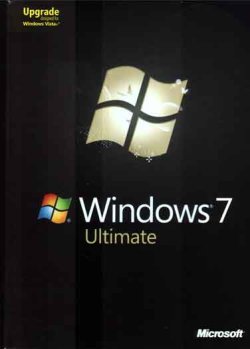
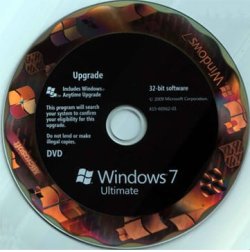
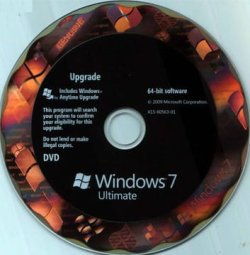
Important: It is well known fact that Windows 7 Ultimate upgrade does not check for a previous version of Windows. That is the version of Windows 7 I bought back in 2009. I installed it on a new computer I built back then that had no previous install of Windows on it. I had the retail version so I was able to uninstall it on the first computer and reinstall it on another computer I built a couple years later.

BTW, I have a couple old computers with Windows 7 on them. One is a desktop I built in 2002 and the other is a laptop I bought in 2004. They both started with Windows XP but in 2013 I did a clean install on both of them with Windows 7 Home 32-bit.

Here is what you should do:

  1. Boot the Windows 7 Ultimate DVD.
  2. Delete all partitions on the drive
  3. Install Windows 7 on the drive
  4. Do not try to update at this point because it will fail
  5. Install SP1: windows6.1-KB976932-X86.exe
  6. Install SP2 (two files): Windows6.1-KB3020369-x86.msu & windows6.1-kb3125574-v4-x86_ba1ff5537312561795cc04db0b02fbb0a74b2cbd.msu

Do you have a Retail or an OEM version of Windows 7 Ultimate? The difference is:
Retail - You can reinstall it on another computer in the future as long as it has been uninstalled on the first one.
OEM - It can only be installed on one computer. It can't legally ever be installed on another computer. Note a new motherboard is considered a different computer and will cause the activation to fail.

W7UBox.jpg

W7UDVD32 .jpgW7UDVD64 .jpg

- - - Updated - - -

Could you just stop insisting he install the Convenience Rollup while falsely calling it SP2?
I realize there is no official SP2 but that is what the Convenience Rollup is called on the Microsoft Community Forum.

How to obtain and install Windows 7 SP2
https://answers.microsoft.com/en-us...ws-7-sp2/c2c7009f-3a10-4199-9c89-48e1e883051e

I had no problems updating two computers with Windows 7 in the last week. On both of them both SP1 and the Convenience Rollup were installed. After that they received a number of regular Windows Updates.
 

My Computers

System One System Two

  • Computer type
    PC/Desktop
    Computer Manufacturer/Model Number
    Custom build
    OS
    Windows 7 Home Premium 64-bits
    CPU
    AMD FX-8350
    Motherboard
    Gigabyte GA-990FXA-UD3 (AM3+)
    Memory
    GSKILL Ripjaw-X PC3 12800 8GB (2x4GB)
    Graphics Card(s)
    ASUS ROG STRIX GTX 1060 6GB
    Sound Card
    Integrated
    Monitor(s) Displays
    Asus VE228H (21.5-in)
    Screen Resolution
    1920x1080 60Hz
    Hard Drives
    SAMSUNG 870 EVO 2.5 Inch SATA SSD (1TB)
    SAMSUNG 870 EVO 2.5 Inch SATA SSD (1TB)
    SAMSUNG 870 EVO 2.5 Inch SATA SSD (1TB)
    PSU
    Corsair RM750x (750 watts)
    Case
    Corsair Carbide Series 200R
    Cooling
    Corsair Hydro Series H60 (CWCH60)
    Keyboard
    Logitech Elite
    Mouse
    Logitech M510 Wireless Mouse
    Internet Speed
    Comcast Gigabit Extra (1200Mbps down / 35Mbps up)
    Antivirus
    Malwarebytes
    Browser
    Firefox, Edge, Chrome
    Other Info
    ASUS DRW-24B1ST DVD-RW (24X) optical drive
    Seagate Expansion Desk (5TB) external SATA/USB HDD
    Comcast XB8 Internet Gateway
  • Computer type
    PC/Desktop
    System Manufacturer/Model Number
    Custom
    OS
    Windows 7 Pro (64-bit)
    CPU
    AMD Phenom II 960T X4
    Motherboard
    ASUS M4N82 Deluxe
    Memory
    Corsair XMS2 DDR2-800 8GB (4x2GB)
    Graphics Card(s)
    ASUS ENGTX560 DCII OC/2DI/1GD5 1GB
    Monitor(s) Displays
    Samsung 930B 19-inch LCD
    Screen Resolution
    1280x1024
    Hard Drives
    Samsung SSD 870 EVO 1000 GB (Windows 10)
    Seagate ST1000DM003 1000 GB (Windows 7)
    PSU
    Antec TruePower (new) TP-650
    Case
    Antec Three Hundred
    Cooling
    AMD stock cooler from FX8350
    Mouse
    Logitech M100
    Internet Speed
    Xfinity Gigabit Extra 1200/35 Mbps
Well, this just gets better and better. I ran the fixit, which got Device Manager back to normal, but the DVD drive is still not shown there nor in explorer ("scan for hardware" doesn't find it, nor did the suggestion of adding "Controller 1" in the registry have any effect other than having that appear in Device Manager). And the secondary HD is not shown in Device Manager, though it appears in Explorer, and I can access files and software on it; it is also not shown in an HD monitor, though the partitions on it are displayed (it is currently disconnected since it was running nonstop, even though there was no access, and was getting warm). Still cannot install SP1 ("A system error prevented the service pack from installing." ERROR_INVALID_DATA (0x8007000D) as before).

And instead of "Windows is activated" I now see I have 30 days to activate it.

My gut feeling is I'm just screwed, and unless I can recover the original Vista from the Macrium backup (there is no windows.old folder from the upgrade) MS has ruined this computer.
 

My Computers

System One System Two

  • Computer type
    PC/Desktop
    Computer Manufacturer/Model Number
    custom
    OS
    win7 Pro SP1 x86
    CPU
    64x2 6000+
    Motherboard
    winfast
    Memory
    2gig
    Graphics Card(s)
    GTX950
    Antivirus
    Avast
    Browser
    Brave
  • Computer type
    PC/Desktop
    Antivirus
    Avast
It has been four weeks since you started this thread. Would you refresh my memory on why you even need Vista? Is there a reason you can't just do a clean install of Windows 7?

If you ever activated Windows 7 on that computer it should activate again automatically. If not then don't you have the original product key for Windows 7 so you can use that for activation.

Last week a computer of mine with Windows 7 Home would no longer boot. A repair install failed. I had to reinstall it. Unfortunately the Windows activation failed. However doing a Windows activation over the phone did work.
 

My Computers

System One System Two

  • Computer type
    PC/Desktop
    Computer Manufacturer/Model Number
    Custom build
    OS
    Windows 7 Home Premium 64-bits
    CPU
    AMD FX-8350
    Motherboard
    Gigabyte GA-990FXA-UD3 (AM3+)
    Memory
    GSKILL Ripjaw-X PC3 12800 8GB (2x4GB)
    Graphics Card(s)
    ASUS ROG STRIX GTX 1060 6GB
    Sound Card
    Integrated
    Monitor(s) Displays
    Asus VE228H (21.5-in)
    Screen Resolution
    1920x1080 60Hz
    Hard Drives
    SAMSUNG 870 EVO 2.5 Inch SATA SSD (1TB)
    SAMSUNG 870 EVO 2.5 Inch SATA SSD (1TB)
    SAMSUNG 870 EVO 2.5 Inch SATA SSD (1TB)
    PSU
    Corsair RM750x (750 watts)
    Case
    Corsair Carbide Series 200R
    Cooling
    Corsair Hydro Series H60 (CWCH60)
    Keyboard
    Logitech Elite
    Mouse
    Logitech M510 Wireless Mouse
    Internet Speed
    Comcast Gigabit Extra (1200Mbps down / 35Mbps up)
    Antivirus
    Malwarebytes
    Browser
    Firefox, Edge, Chrome
    Other Info
    ASUS DRW-24B1ST DVD-RW (24X) optical drive
    Seagate Expansion Desk (5TB) external SATA/USB HDD
    Comcast XB8 Internet Gateway
  • Computer type
    PC/Desktop
    System Manufacturer/Model Number
    Custom
    OS
    Windows 7 Pro (64-bit)
    CPU
    AMD Phenom II 960T X4
    Motherboard
    ASUS M4N82 Deluxe
    Memory
    Corsair XMS2 DDR2-800 8GB (4x2GB)
    Graphics Card(s)
    ASUS ENGTX560 DCII OC/2DI/1GD5 1GB
    Monitor(s) Displays
    Samsung 930B 19-inch LCD
    Screen Resolution
    1280x1024
    Hard Drives
    Samsung SSD 870 EVO 1000 GB (Windows 10)
    Seagate ST1000DM003 1000 GB (Windows 7)
    PSU
    Antec TruePower (new) TP-650
    Case
    Antec Three Hundred
    Cooling
    AMD stock cooler from FX8350
    Mouse
    Logitech M100
    Internet Speed
    Xfinity Gigabit Extra 1200/35 Mbps
It has been four weeks since you started this thread. Would you refresh my memory on why you even need Vista? Is there a reason you can't just do a clean install of Windows 7?
If you ever activated Windows 7 on that computer it should activate again automatically. If not then don't you have the original product key for Windows 7 so you can use that for activation.
Last week a computer of mine with Windows 7 Home would no longer boot. A repair install failed. I had to reinstall it. Unfortunately the Windows activation failed. However doing a Windows activation over the phone did work.

I don't need Vista, but that was the OEM install on that old emachines desktop, fully authenticated/verified/certified/registered/legislated and working well. And it has quite a bit of installed software that for various reasons would be difficult to replace now, which is why a clean install of any OS is not a viable option. It was always my intention to refurbish it and keep it in operation but priority was to a newer 64 bit Win7 desktop for which I was slowly gathering parts. Plan was to "convert" the Vista install to a VM and move that HD to the new system to run in Win7 x64. In the meantime I've been using this antique Inspiron 1720 laptop (originally Vista, previous owner had installed W10, I reformatted and installed Win7 Ulimate 32 from my disk).

In May the vid card in the laptop starts failing, first not going to x4 mode, then not even into x2 mode, finally no 3D mode at all; useless to replace it since I'd just be getting another 10 year old vid card; no idea how long it will last, problem slowly getting worse. So I took the power supply intended for the "new" desktop and put in the old Vista system; it still worked well with the installed software but had issues with some new software. Wasted the summer trying to get some java software working (it works fine on this laptop - same program, same java, same everything except Win7 on the laptop). So apparently I would have to do an upgrade install of Win7 over Vista in order to run the new software plus keep the old registered software. So used the same Win7 disk I'd used for the laptop (no worry of same install on two systems since once desktop was running I'd format the laptop HD and give it away, throw it away, or use it to play with Linux), basic Win7 installed and fired up with no issues but many programs, such as Malwarebytes and the java program, wouldn't run; eventually found I needed certain Win7 updates but first and foremost needed SP1. And here we are.


FWIW!
I now have SP1 installed and the java program is working, next will be Malwarebytes and, I assume, the Simplex installer from here, not I'm not sure if the other KB files I have are needed along with it. DVD drive was back in Device Manager until I restarted system, now it's disappeared again (seems a common issue, judging from number of threads i found regarding it).

System shows I have Win7 Ultimate SP1 "29 days to activate" .... that is the next hurdle. Wonder if a call to MS now would take care of this. MGA results below -

xxxxxxxxxxxxxxxxxxxxxxxxxxxxxxx

Diagnostic Report (1.9.0027.0):-----------------------------------------Windows Validation Data-->Validation Code: 0Cached Online Validation Code: N/A, hr = 0xc004f012Windows Product Key: *****-*****-TMVMJ-BBMRX-3MBMVWindows Product Key Hash: 55n8g6xdzhe4AOWhmTzdzQoLfa4=Windows Product ID: 00426-292-0000007-85259Windows Product ID Type: 5Windows License Type: RetailWindows OS version: 6.1.7601.2.00010100.1.0.001ID: {A50AAA1A-C719-4CF6-A127-A0343E116313}(3)Is Admin: YesTestCab: 0x0LegitcheckControl ActiveX: N/A, hr = 0x80070002Signed By: N/A, hr = 0x80070002Product Name: Windows 7 UltimateArchitecture: 0x00000000Build lab: 7601.win7sp1_rtm.101119-1850TTS Error: Validation Diagnostic: Resolution Status: N/AVista WgaER Data-->ThreatID(s): N/A, hr = 0x80070002Version: N/A, hr = 0x80070002Windows XP Notifications Data-->Cached Result: N/A, hr = 0x80070002File Exists: NoVersion: N/A, hr = 0x80070002WgaTray.exe Signed By: N/A, hr = 0x80070002WgaLogon.dll Signed By: N/A, hr = 0x80070002OGA Notifications Data-->Cached Result: N/A, hr = 0x80070002Version: N/A, hr = 0x80070002OGAExec.exe Signed By: N/A, hr = 0x80070002OGAAddin.dll Signed By: N/A, hr = 0x80070002OGA Data-->Office Status: 109 N/AOGA Version: N/A, 0x80070002Signed By: N/A, hr = 0x80070002Office Diagnostics: B4D0AA8B-604-645_025D1FF3-364-80041010_025D1FF3-229-80041010_025D1FF3-230-1_025D1FF3-517-80040154_025D1FF3-237-80040154_025D1FF3-238-2_025D1FF3-244-80070002_025D1FF3-258-3Browser Data-->Proxy settings: N/AUser Agent: Mozilla/4.0 (compatible; MSIE 8.0; Win32)Default Browser: C:\Program Files\Mozilla Firefox59\firefox.exeDownload signed ActiveX controls: PromptDownload unsigned ActiveX controls: DisabledRun ActiveX controls and plug-ins: AllowedInitialize and script ActiveX controls not marked as safe: DisabledAllow scripting of Internet Explorer Webbrowser control: DisabledActive scripting: AllowedScript ActiveX controls marked as safe for scripting: AllowedFile Scan Data-->File Mismatch: C:\Windows\system32\wat\watadminsvc.exe[Hr = 0x80070003]File Mismatch: C:\Windows\system32\wat\npwatweb.dll[Hr = 0x80070003]File Mismatch: C:\Windows\system32\wat\watux.exe[Hr = 0x80070003]File Mismatch: C:\Windows\system32\wat\watweb.dll[Hr = 0x80070003]Other data-->Office Details: <GenuineResults><MachineData><UGUID>{A50AAA1A-C719-4CF6-A127-A0343E116313}</UGUID><Version>1.9.0027.0</Version><OS>6.1.7601.2.00010100.1.0.001</OS><Architecture>x32</Architecture><PKey>*****-*****-*****-*****-3MBMV</PKey><PID>00426-292-0000007-85259</PID><PIDType>5</PIDType><SID>S-1-5-21-3867056976-849016701-749785769</SID><SYSTEM><Manufacturer>Gateway</Manufacturer><Model>T5246</Model></SYSTEM><BIOS><Manufacturer>Phoenix Technologies, LTD</Manufacturer><Version>6.00 PG</Version><SMBIOSVersion major="2" minor="4"/><Date>20071110000000.000000+000</Date></BIOS><HWID>7FE20100010000F6</HWID><UserLCID>0409</UserLCID><SystemLCID>0409</SystemLCID><TimeZone>Eastern Standard Time(GMT-05:00)</TimeZone><iJoin>0</iJoin><SBID><stat>3</stat><msppid></msppid><name></name><model></model></SBID><OEM><OEMID>GATEWA</OEMID><OEMTableID>SYSTEM </OEMTableID></OEM><GANotification/></MachineData><Software><Office><Result>109</Result><Products/><Applications/></Office></Software></GenuineResults> Spsys.log Content: 0x80070002Licensing Data-->Software licensing service version: 6.1.7601.17514Name: Windows(R) 7, Ultimate editionDescription: Windows Operating System - Windows(R) 7, RETAIL channelActivation ID: ac96e1a8-6cc4-4310-a4ff-332ce77fb5b8Application ID: 55c92734-d682-4d71-983e-d6ec3f16059fExtended PID: 00426-00170-292-000000-00-1033-7601.0000-3142021Installation ID: 014583114102301431718693803271335904607054800734642094Processor Certificate URL: Bing Certificate URL: Bing License URL: Bing Key Certificate URL: Bing Product Key: 3MBMVLicense Status: Initial grace periodTime remaining: 43140 minute(s) (29 day(s))Remaining Windows rearm count: 3Trusted time: 11/10/2021 5:09:43 PMWindows Activation Technologies-->HrOffline: 0x00000000HrOnline: N/AHealthStatus: 0x0000000000000000Event Time Stamp: N/AActiveX: Not Registered - 0x80040154Admin Service: Not Registered - 0x80040154HealthStatus Bitmask Output:HWID Data-->HWID Hash Current: LgAAAAAAAgABAAEAAQACAAAAAQABAAEAJJQ8QNb3kgBUK4J6BF+wAJxZeGEm6Q==OEM Activation 1.0 Data-->N/AOEM Activation 2.0 Data-->BIOS valid for OA 2.0: yesWindows marker version: 0x0OEMID and OEMTableID Consistent: yesBIOS Information: ACPI Table Name OEMID Value OEMTableID Value APIC GATEWA SYSTEM FACP GATEWA SYSTEM HPET GATEWA SYSTEM MCFG GATEWA SYSTEM SLIC GATEWA SYSTEM SSDT PTLTD POWERNOW

 

My Computers

System One System Two

  • Computer type
    PC/Desktop
    Computer Manufacturer/Model Number
    custom
    OS
    win7 Pro SP1 x86
    CPU
    64x2 6000+
    Motherboard
    winfast
    Memory
    2gig
    Graphics Card(s)
    GTX950
    Antivirus
    Avast
    Browser
    Brave
  • Computer type
    PC/Desktop
    Antivirus
    Avast
It looks like the Simplex was created to simplify the installation of Windows 7 for some. I have never used it. Besides I have never needed it. The problem that I see with Simplex is that if nobody maintains it on a regular basis and tests it there is no guarantee that it will always work.

All I did was install SP1 and the two so-called "SP2" files. The regular automatic Windows Update handled the rest.

You can do what you want but what I did last week worked with absolutely no problems.
 

My Computers

System One System Two

  • Computer type
    PC/Desktop
    Computer Manufacturer/Model Number
    Custom build
    OS
    Windows 7 Home Premium 64-bits
    CPU
    AMD FX-8350
    Motherboard
    Gigabyte GA-990FXA-UD3 (AM3+)
    Memory
    GSKILL Ripjaw-X PC3 12800 8GB (2x4GB)
    Graphics Card(s)
    ASUS ROG STRIX GTX 1060 6GB
    Sound Card
    Integrated
    Monitor(s) Displays
    Asus VE228H (21.5-in)
    Screen Resolution
    1920x1080 60Hz
    Hard Drives
    SAMSUNG 870 EVO 2.5 Inch SATA SSD (1TB)
    SAMSUNG 870 EVO 2.5 Inch SATA SSD (1TB)
    SAMSUNG 870 EVO 2.5 Inch SATA SSD (1TB)
    PSU
    Corsair RM750x (750 watts)
    Case
    Corsair Carbide Series 200R
    Cooling
    Corsair Hydro Series H60 (CWCH60)
    Keyboard
    Logitech Elite
    Mouse
    Logitech M510 Wireless Mouse
    Internet Speed
    Comcast Gigabit Extra (1200Mbps down / 35Mbps up)
    Antivirus
    Malwarebytes
    Browser
    Firefox, Edge, Chrome
    Other Info
    ASUS DRW-24B1ST DVD-RW (24X) optical drive
    Seagate Expansion Desk (5TB) external SATA/USB HDD
    Comcast XB8 Internet Gateway
  • Computer type
    PC/Desktop
    System Manufacturer/Model Number
    Custom
    OS
    Windows 7 Pro (64-bit)
    CPU
    AMD Phenom II 960T X4
    Motherboard
    ASUS M4N82 Deluxe
    Memory
    Corsair XMS2 DDR2-800 8GB (4x2GB)
    Graphics Card(s)
    ASUS ENGTX560 DCII OC/2DI/1GD5 1GB
    Monitor(s) Displays
    Samsung 930B 19-inch LCD
    Screen Resolution
    1280x1024
    Hard Drives
    Samsung SSD 870 EVO 1000 GB (Windows 10)
    Seagate ST1000DM003 1000 GB (Windows 7)
    PSU
    Antec TruePower (new) TP-650
    Case
    Antec Three Hundred
    Cooling
    AMD stock cooler from FX8350
    Mouse
    Logitech M100
    Internet Speed
    Xfinity Gigabit Extra 1200/35 Mbps
I now have SP1 installed

How did you finally manage to do that ?

simplix will do the updates now you are sp1.
 

My Computers

System One System Two

  • Computer type
    PC/Desktop
    OS
    7 X64
    CPU
    i5 8400
    Motherboard
    gigabyte b365m ds3h
    Memory
    2x8gb 3200mhz
    Hard Drives
    various
    PSU
    pure power 11 400w cm
    Case
    Coolermaster
    Cooling
    cryorig m9i
  • Computer type
    PC/Desktop
    OS
    7x64
    CPU
    g5400
    Motherboard
    ga b365m ds3h
    Memory
    8gb ddr4 2400
    PSU
    xfx pro 450w
How did you finally manage to do that ?

simplix will do the updates now you are sp1.

I ran the MS "Fixit" file someone linked here; only obvious result from that was the DVD drive reappeared in Device Manager and in explorer. Tried the downloaded SP1 file again and immediately got the same message as before ("A system error prevented the service pack from installing ... ERROR_INVALID_DATA (0x8007000D)). Then again tried the iso you sent ... went without a hitch, an hour and a half later I had Win7 SP1 running. (Thanks again.)

Now, how to get it activated.
 

My Computers

System One System Two

  • Computer type
    PC/Desktop
    Computer Manufacturer/Model Number
    custom
    OS
    win7 Pro SP1 x86
    CPU
    64x2 6000+
    Motherboard
    winfast
    Memory
    2gig
    Graphics Card(s)
    GTX950
    Antivirus
    Avast
    Browser
    Brave
  • Computer type
    PC/Desktop
    Antivirus
    Avast
You now have the W7 Ultimate DEFAULT Retail key on that machine, by using SIW's iso you have overwritten the previously installed version, it has removed the *Mod* (SLIC now only shows Gateway details) and applied the licencing file correctly.
All that is required is a genuine W7 Ultimate product key

not sure if Simplex will completely update your machine because of this
 

My Computer

Computer type
PC/Desktop
Computer Manufacturer/Model Number
medionl/Aspire 6930G/acer x55a
OS
W7 home premium 32bit/W7HP 64bit/w10 tp insider ring
CPU
E5300 dual core
Motherboard
medion MS7366
Memory
3gb
Graphics Card(s)
Nvidia Geforce 7100 Nforce 630i
Monitor(s) Displays
avixc
Internet Speed
n (isp resticted to 72)
Antivirus
mse/pands
Browser
palemoon
Other Info
Belkin Fd7050 n USB using Railink RT2870 drivers, more upto date
Back
Top