cannot update, error 80072EFE , 80072EE2

ajaye

New member
Member
Local time
4:47 AM
Messages
79
Hi guys,

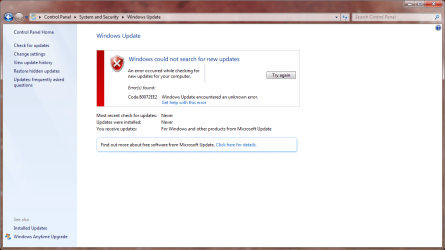
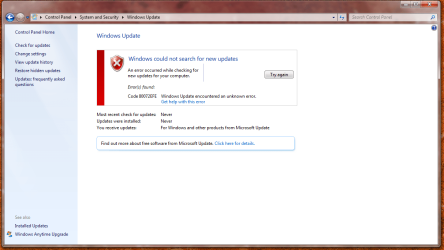
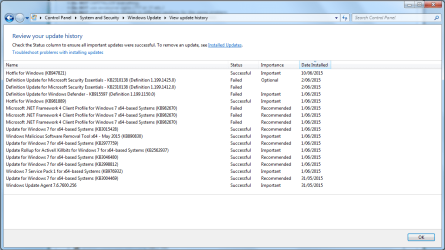
I did a factory restore on my desktop computer a few weeks back and have had trouble with windows updates ever since. It did install some updates successfully (see screenshot in Post 2 below) when I first reset the computer - though the Windows Update screen says that updates have never been installed, and were never last checked for. I was able to manually install Service Pack 1.

I have tried to follow the posting instructions, here's what I got -

SURT - I had to manually install and run it (I have slow satellite internet). It ran for awhile, then asked if I wanted to download Hotfix. I said yes and it did that successfully but then nothing else happened. So I ran SURT again and ignored the Hotfix window and SURT ran the same searching screen for about four hours and I ended up cancelling it.

SFC Scan - I did that and it said 'Windows Resource Protection did not find any integrity violations.'
But - I also did a Microsoft troubleshooting thing that found two errors and I've included a screenshot of that along with the error codes.

I've included the CBS file.

Thank you in anticipation.
 

Attachments

  • updatetroubleshoot150613.png
    updatetroubleshoot150613.png
    16.7 KB · Views: 32
  • windowsupdate150610.png
    windowsupdate150610.png
    54.2 KB · Views: 1
  • windowsupdate150613b.png
    windowsupdate150613b.png
    66.6 KB · Views: 1
Last edited:

My Computer

Computer type
Laptop
Computer Manufacturer/Model Number
HP
OS
64 bit, Windows 7 Home Premium SP1
CPU
Intel (R) Core (TM) i3 CPU M370 @ 2.40GHz
Memory
4.0GB (3.8GB usable)
Internet Speed
rural = satellite = woefully slow
Antivirus
MSE, free Malwarebytes
Sorry, meant to include this update history too (even though it says it successfully installed Service Pack 1, that was never showing in my computer properties, but I managed to install it manually).
 

Attachments

  • updatehistory.png
    updatehistory.png
    36 KB · Views: 2

My Computer

Computer type
Laptop
Computer Manufacturer/Model Number
HP
OS
64 bit, Windows 7 Home Premium SP1
CPU
Intel (R) Core (TM) i3 CPU M370 @ 2.40GHz
Memory
4.0GB (3.8GB usable)
Internet Speed
rural = satellite = woefully slow
Antivirus
MSE, free Malwarebytes
Both the error messages you get are related to connection problems, rather than file problems.
What Anti-Virus is installed? What other AV's have EVER been installed?
What Firewall is in use?
What is your normal connection to the Internet? Wired/wireless? broadband/dialup/cable? - through a router, or what?
 

My Computer

Computer type
Laptop
Computer Manufacturer/Model Number
Asus K52F or Lenovo B51-80
OS
Win 7 x64 Home Premium (and x86 VirtualBox VM)/Win10
CPU
i3 370M/i7 6500U
Motherboard
Asus/Lenovo
Memory
8GB - finally :)/8GB
Graphics Card(s)
it's an i3, dude!/dual Intel&nVidia
Sound Card
onboard
Monitor(s) Displays
15.6" built-in
Screen Resolution
1366x768/1920x1080
Hard Drives
750GB Seagate internal
Sundry external drives attached to other computers on the local network
1TB SSD on the Lenovo
PSU
n/a
Internet Speed
as much as I can get - usually on a dongle/phone, so <1MB/s
Antivirus
MSE/Defender
Browser
IE11/12/Edge/Chrome/FF(if I must)
Hi Noel, thanks for helping out again.

Anti virus -
Prior to the factory restore I ran the free trial of Norton (that came with the computer) until it expired, then used the free version of Avira, then changed to Microsoft Essentials.
Since the factory restore I ran Norton but when I tried to address this update problem I uninstalled it (via the uninstall program). I downloaded Microsoft Essentials but had problems getting it updated so have uninstalled that too.
So I currently have no anti virus installed at all on the desktop. (I am mostly using my laptop to use the internet instead, but if I do use the desktop it is not noticeably slower than the laptop to bring up web pages.)
I do have Malwarebytes installed on the desktop (I loaded it manually).

Windows Firewall - the domain profile says:
Windows Firewall is on.
Inbound connections that do not match a rule are blocked.
Outbound connections that do not match a rule are allowed.

My internet is and always has been satellite and it is pretty slow. I can find out the speeds if you need them.
The desktop is wired directly to the modem - my laptop is wifi connected via a router. My laptop does the window updates automatically without a problem, as did the desktop prior to the factory restore.
 

My Computer

Computer type
Laptop
Computer Manufacturer/Model Number
HP
OS
64 bit, Windows 7 Home Premium SP1
CPU
Intel (R) Core (TM) i3 CPU M370 @ 2.40GHz
Memory
4.0GB (3.8GB usable)
Internet Speed
rural = satellite = woefully slow
Antivirus
MSE, free Malwarebytes
You need to run the Norton Removal tool to get rid of the dregs left behind...

Download theNorton Removal Tool from here https://www-secure.symantec.com/norton-support/jsp/help-solutions.jsp?lg=english&ct=united+states&docid=20080710133834EN&product=home&version=1&pvid=f-home

Close all otherprograms, then run the tool. When it's complete, reboot the machine whether it asks for it or not.

Afterthe reboot, open an Elevated Command Prompt, and run the following command

NETSH WINSOCK RESET

You'llbe advised to reboot - do so.

thenpost another MGADiag report.
 

My Computer

Computer type
Laptop
Computer Manufacturer/Model Number
Asus K52F or Lenovo B51-80
OS
Win 7 x64 Home Premium (and x86 VirtualBox VM)/Win10
CPU
i3 370M/i7 6500U
Motherboard
Asus/Lenovo
Memory
8GB - finally :)/8GB
Graphics Card(s)
it's an i3, dude!/dual Intel&nVidia
Sound Card
onboard
Monitor(s) Displays
15.6" built-in
Screen Resolution
1366x768/1920x1080
Hard Drives
750GB Seagate internal
Sundry external drives attached to other computers on the local network
1TB SSD on the Lenovo
PSU
n/a
Internet Speed
as much as I can get - usually on a dongle/phone, so <1MB/s
Antivirus
MSE/Defender
Browser
IE11/12/Edge/Chrome/FF(if I must)
Ok thanks, will do. Is the MGADiag report the CBS?
 

My Computer

Computer type
Laptop
Computer Manufacturer/Model Number
HP
OS
64 bit, Windows 7 Home Premium SP1
CPU
Intel (R) Core (TM) i3 CPU M370 @ 2.40GHz
Memory
4.0GB (3.8GB usable)
Internet Speed
rural = satellite = woefully slow
Antivirus
MSE, free Malwarebytes
Sorry - forget that! (unedited copy/paste!)
 

My Computer

Computer type
Laptop
Computer Manufacturer/Model Number
Asus K52F or Lenovo B51-80
OS
Win 7 x64 Home Premium (and x86 VirtualBox VM)/Win10
CPU
i3 370M/i7 6500U
Motherboard
Asus/Lenovo
Memory
8GB - finally :)/8GB
Graphics Card(s)
it's an i3, dude!/dual Intel&nVidia
Sound Card
onboard
Monitor(s) Displays
15.6" built-in
Screen Resolution
1366x768/1920x1080
Hard Drives
750GB Seagate internal
Sundry external drives attached to other computers on the local network
1TB SSD on the Lenovo
PSU
n/a
Internet Speed
as much as I can get - usually on a dongle/phone, so <1MB/s
Antivirus
MSE/Defender
Browser
IE11/12/Edge/Chrome/FF(if I must)
To clarify what I think Noel wants you to do: Run the Norton removal tool, reboot, then run the NETSH WINSOCK RESET command in an elevated command prompt, reboot, but forget the MGADiag report.

Hi ajaye, I'm glad you came back... you're in good hands with "Dr Noel"
:)
 
Last edited:

My Computer

Computer type
Laptop
Computer Manufacturer/Model Number
MSI PE60 6QE
OS
Win 10 Pro x64, Win 7 Pro x64
CPU
Intel Core i7-6700HQ Skylake
Motherboard
MSI MS-16J5
Memory
16gb Crucial DDR4
Graphics Card(s)
NVIDIA GeForce GTX 960M 2 GB
Screen Resolution
1920 x 1080
Hard Drives
Samsung 850 EVO 250 GB M.2 SSD (MZ-N5E250BW)
HGST 1TB @7200 RPM HTS721010A9E630
Case
Plastic
Keyboard
Got one...
Mouse
Yep, one of those too.
Internet Speed
FIOS 75/75
Antivirus
Defender
Browser
Chrome/FFox/Ex-PLODE-r/(L)Edge
Other Info
Defender, Custom Hosts, uBlock, regular backups w/ Macrium (Free)
thanks Urthbound, I downloaded the SURT and Service Pack files in mere minutes at my town's library and was able to manually run them on the desktop. I was a little worried about the posting guidelines but turned out they were very easy to follow.

I've just run the Norton removal tool (had to wait for my satellite's speedy period to do so) and am now about to do the next step. I shall return :)

You and Dr Noel have both been wonderfully helpful. Thankyou :D
 
Last edited:

My Computer

Computer type
Laptop
Computer Manufacturer/Model Number
HP
OS
64 bit, Windows 7 Home Premium SP1
CPU
Intel (R) Core (TM) i3 CPU M370 @ 2.40GHz
Memory
4.0GB (3.8GB usable)
Internet Speed
rural = satellite = woefully slow
Antivirus
MSE, free Malwarebytes
I downloaded and ran the Norton removal tool ok.
Closed all programmes and ran the NETSH WINSOCK RESET command.
Restarted the computer.
Ran the Windows check for Updates (it checked for at least 15 minutes) and again got Error code 80072EFE.

It's just gone midnight here so I'll run one more Updates check whilst the satellite's speedy (slow as opposed to really slow) before turning in. I'll come back if I have success, otherwise will check in tomorrow.
 

My Computer

Computer type
Laptop
Computer Manufacturer/Model Number
HP
OS
64 bit, Windows 7 Home Premium SP1
CPU
Intel (R) Core (TM) i3 CPU M370 @ 2.40GHz
Memory
4.0GB (3.8GB usable)
Internet Speed
rural = satellite = woefully slow
Antivirus
MSE, free Malwarebytes
If You still have problems, try the following in this order, testing between each

  • Please run thefollowing commands in an Elevated Command Prompt

NET STOP CRYPTSVC
REN C:\WINDOWS\SYSTEM32\CATROOT2 CATROOT2OLD
NET START CRYPTSVC


once complete,leave the system alone for at least an hour to rebuild the database, thenreboot, and try WU again
  • ControlPanel > Internet Options > Connections

    click on LAN settings

    Proxy server UnTick the Use a proxy server for your LAN
reboot and try WU again

If it finds anything, post back with details as well as trying Windows update again


My Computer

Computer type
Laptop
Computer Manufacturer/Model Number
Asus K52F or Lenovo B51-80
OS
Win 7 x64 Home Premium (and x86 VirtualBox VM)/Win10
CPU
i3 370M/i7 6500U
Motherboard
Asus/Lenovo
Memory
8GB - finally :)/8GB
Graphics Card(s)
it's an i3, dude!/dual Intel&nVidia
Sound Card
onboard
Monitor(s) Displays
15.6" built-in
Screen Resolution
1366x768/1920x1080
Hard Drives
750GB Seagate internal
Sundry external drives attached to other computers on the local network
1TB SSD on the Lenovo
PSU
n/a
Internet Speed
as much as I can get - usually on a dongle/phone, so <1MB/s
Antivirus
MSE/Defender
Browser
IE11/12/Edge/Chrome/FF(if I must)
Ok will do, thanks Noel.
Perhaps I should have mentioned before - when the computer restarted after running the Norton Removal tool I got a message saying Windows Firewall has blocked some features of this program ... Norton Online Backup Services.
I just cancelled that window, didn't notice the 'some' in that message.
Didn't get it again when the computer restarted after giving the NETSH WINSOCK RESET command.
But did get it when I started the computer this morning.
Do I need to do anything about that before following your Post 11 advice?

ETA - I realised I haven't mentioned in this thread that the reason I did a factory restore was because I turned the power off while the desktop was shutting down and it then wouldn't boot up despite various system restore attempts. Just mentioned in case it could be a factor.
 
Last edited:

My Computer

Computer type
Laptop
Computer Manufacturer/Model Number
HP
OS
64 bit, Windows 7 Home Premium SP1
CPU
Intel (R) Core (TM) i3 CPU M370 @ 2.40GHz
Memory
4.0GB (3.8GB usable)
Internet Speed
rural = satellite = woefully slow
Antivirus
MSE, free Malwarebytes
Um, what should I do now, still put the third command line in?
 

Attachments

  • catroot.png
    catroot.png
    17.6 KB · Views: 7

My Computer

Computer type
Laptop
Computer Manufacturer/Model Number
HP
OS
64 bit, Windows 7 Home Premium SP1
CPU
Intel (R) Core (TM) i3 CPU M370 @ 2.40GHz
Memory
4.0GB (3.8GB usable)
Internet Speed
rural = satellite = woefully slow
Antivirus
MSE, free Malwarebytes
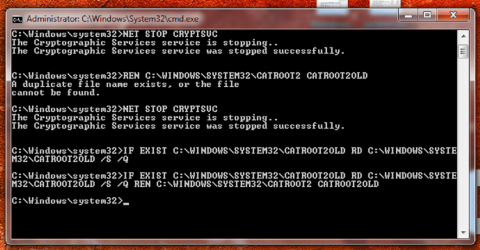
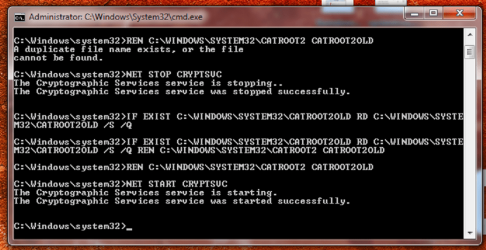
Run these commands instead...

NET STOP CRYPTSVC
IF EXIST C:\WINDOWS\SYSTEM32\CATROOT2OLD RD C:\WINDOWS\SYSTEM32\CATROOT2OLD /S /Q
REN C:\WINDOWS\SYSTEM32\CATROOT2 CATROOT2OLD
NET START CRYPTSVC


(note all the spaces!)
 

My Computer

Computer type
Laptop
Computer Manufacturer/Model Number
Asus K52F or Lenovo B51-80
OS
Win 7 x64 Home Premium (and x86 VirtualBox VM)/Win10
CPU
i3 370M/i7 6500U
Motherboard
Asus/Lenovo
Memory
8GB - finally :)/8GB
Graphics Card(s)
it's an i3, dude!/dual Intel&nVidia
Sound Card
onboard
Monitor(s) Displays
15.6" built-in
Screen Resolution
1366x768/1920x1080
Hard Drives
750GB Seagate internal
Sundry external drives attached to other computers on the local network
1TB SSD on the Lenovo
PSU
n/a
Internet Speed
as much as I can get - usually on a dongle/phone, so <1MB/s
Antivirus
MSE/Defender
Browser
IE11/12/Edge/Chrome/FF(if I must)
Thanks Noel. Sorry to test your patience yet again but do I hit enter at the end of each of those lines? I got this so far (wasn't sure whether the 2nd & 3rd lines were combined or not so tried both ways). Am I looking for an actual response to each command each time?
 

Attachments

  • catroot2.png
    catroot2.png
    70.5 KB · Views: 0

My Computer

Computer type
Laptop
Computer Manufacturer/Model Number
HP
OS
64 bit, Windows 7 Home Premium SP1
CPU
Intel (R) Core (TM) i3 CPU M370 @ 2.40GHz
Memory
4.0GB (3.8GB usable)
Internet Speed
rural = satellite = woefully slow
Antivirus
MSE, free Malwarebytes
Yes - and it looks like you did for the fist two lines.
I'm not sure what happened in the third line?
(maybe you accidentally pressed the 'up' cursor button before typing the third command? - that would do that) hit the ESC key, and the line will go back to its default and you can re-enter the third command
 

My Computer

Computer type
Laptop
Computer Manufacturer/Model Number
Asus K52F or Lenovo B51-80
OS
Win 7 x64 Home Premium (and x86 VirtualBox VM)/Win10
CPU
i3 370M/i7 6500U
Motherboard
Asus/Lenovo
Memory
8GB - finally :)/8GB
Graphics Card(s)
it's an i3, dude!/dual Intel&nVidia
Sound Card
onboard
Monitor(s) Displays
15.6" built-in
Screen Resolution
1366x768/1920x1080
Hard Drives
750GB Seagate internal
Sundry external drives attached to other computers on the local network
1TB SSD on the Lenovo
PSU
n/a
Internet Speed
as much as I can get - usually on a dongle/phone, so <1MB/s
Antivirus
MSE/Defender
Browser
IE11/12/Edge/Chrome/FF(if I must)
ok I don't know if I've done it right but I ended up with this ?
 

Attachments

  • catroot3.png
    catroot3.png
    70.5 KB · Views: 1

My Computer

Computer type
Laptop
Computer Manufacturer/Model Number
HP
OS
64 bit, Windows 7 Home Premium SP1
CPU
Intel (R) Core (TM) i3 CPU M370 @ 2.40GHz
Memory
4.0GB (3.8GB usable)
Internet Speed
rural = satellite = woefully slow
Antivirus
MSE, free Malwarebytes
Looks OK

reboot, then open an Elevated Command Prompt, and run the following command

DIR C:\Windows\System32\CATROOT2

post the results.
 

My Computer

Computer type
Laptop
Computer Manufacturer/Model Number
Asus K52F or Lenovo B51-80
OS
Win 7 x64 Home Premium (and x86 VirtualBox VM)/Win10
CPU
i3 370M/i7 6500U
Motherboard
Asus/Lenovo
Memory
8GB - finally :)/8GB
Graphics Card(s)
it's an i3, dude!/dual Intel&nVidia
Sound Card
onboard
Monitor(s) Displays
15.6" built-in
Screen Resolution
1366x768/1920x1080
Hard Drives
750GB Seagate internal
Sundry external drives attached to other computers on the local network
1TB SSD on the Lenovo
PSU
n/a
Internet Speed
as much as I can get - usually on a dongle/phone, so <1MB/s
Antivirus
MSE/Defender
Browser
IE11/12/Edge/Chrome/FF(if I must)
many thanks, again.
 

Attachments

  • DIR.png
    DIR.png
    56 KB · Views: 0

My Computer

Computer type
Laptop
Computer Manufacturer/Model Number
HP
OS
64 bit, Windows 7 Home Premium SP1
CPU
Intel (R) Core (TM) i3 CPU M370 @ 2.40GHz
Memory
4.0GB (3.8GB usable)
Internet Speed
rural = satellite = woefully slow
Antivirus
MSE, free Malwarebytes
Oh heck - the new files don't appear to have been generated for some reason.

Try installing the IRST drivers.
...
This may simplybe caused by a bad set of Intel Rapid Storage Technology drivers -


Installing theIntel Rapid Storage Drivers

try downloadingand installing them from here - https://downloadcenter.intel.com/Detail_Desc.aspx?agr=Y&ProdId=2101&DwnldID=22194


(you want theiata_enu.exe download)


Reboot twice, then open an Elevated Command Prompt, and run the DIR command again, and we'll see if it's working yet.


My Computer

Computer type
Laptop
Computer Manufacturer/Model Number
Asus K52F or Lenovo B51-80
OS
Win 7 x64 Home Premium (and x86 VirtualBox VM)/Win10
CPU
i3 370M/i7 6500U
Motherboard
Asus/Lenovo
Memory
8GB - finally :)/8GB
Graphics Card(s)
it's an i3, dude!/dual Intel&nVidia
Sound Card
onboard
Monitor(s) Displays
15.6" built-in
Screen Resolution
1366x768/1920x1080
Hard Drives
750GB Seagate internal
Sundry external drives attached to other computers on the local network
1TB SSD on the Lenovo
PSU
n/a
Internet Speed
as much as I can get - usually on a dongle/phone, so <1MB/s
Antivirus
MSE/Defender
Browser
IE11/12/Edge/Chrome/FF(if I must)
Back
Top