cannot update, error 80072EFE , 80072EE2

ok will do. I'll try to download and save it in town, where I can utilise much quicker internet service.

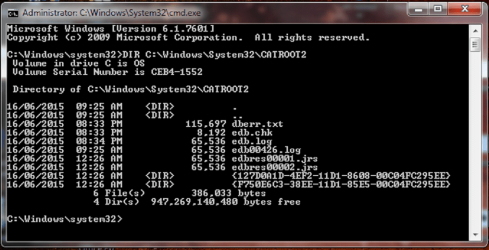
are the commands I type in case sensitive? cos 'system' in the prompt has a small 's' but I typed in a capital 'S' - would that matter?

ETA - oh heck, and last time, in Post 17, should I have given it an hour to rebuild the database again? cos I didn't.
 

My Computer

Computer type
Laptop
Computer Manufacturer/Model Number
HP
OS
64 bit, Windows 7 Home Premium SP1
CPU
Intel (R) Core (TM) i3 CPU M370 @ 2.40GHz
Memory
4.0GB (3.8GB usable)
Internet Speed
rural = satellite = woefully slow
Antivirus
MSE, free Malwarebytes
there is not usually any case-sensitivity in the Command Shell - certainly not here.
The folder should have been created immediately the Cryptography service was restarted - the tag-lag is simply to allow the files to be rebuilt without interruption by the reboot.

I'll be here - hopefully! ;)
 

My Computer

Computer type
Laptop
Computer Manufacturer/Model Number
Asus K52F or Lenovo B51-80
OS
Win 7 x64 Home Premium (and x86 VirtualBox VM)/Win10
CPU
i3 370M/i7 6500U
Motherboard
Asus/Lenovo
Memory
8GB - finally :)/8GB
Graphics Card(s)
it's an i3, dude!/dual Intel&nVidia
Sound Card
onboard
Monitor(s) Displays
15.6" built-in
Screen Resolution
1366x768/1920x1080
Hard Drives
750GB Seagate internal
Sundry external drives attached to other computers on the local network
1TB SSD on the Lenovo
PSU
n/a
Internet Speed
as much as I can get - usually on a dongle/phone, so <1MB/s
Antivirus
MSE/Defender
Browser
IE11/12/Edge/Chrome/FF(if I must)
ooh hopefully this looks better?
 

Attachments

  • DIR2.png
    DIR2.png
    52.7 KB · Views: 0

My Computer

Computer type
Laptop
Computer Manufacturer/Model Number
HP
OS
64 bit, Windows 7 Home Premium SP1
CPU
Intel (R) Core (TM) i3 CPU M370 @ 2.40GHz
Memory
4.0GB (3.8GB usable)
Internet Speed
rural = satellite = woefully slow
Antivirus
MSE, free Malwarebytes
Ah, good!
That does look a lot better.
Run a new Check for Updates, and see what happens.
 

My Computer

Computer type
Laptop
Computer Manufacturer/Model Number
Asus K52F or Lenovo B51-80
OS
Win 7 x64 Home Premium (and x86 VirtualBox VM)/Win10
CPU
i3 370M/i7 6500U
Motherboard
Asus/Lenovo
Memory
8GB - finally :)/8GB
Graphics Card(s)
it's an i3, dude!/dual Intel&nVidia
Sound Card
onboard
Monitor(s) Displays
15.6" built-in
Screen Resolution
1366x768/1920x1080
Hard Drives
750GB Seagate internal
Sundry external drives attached to other computers on the local network
1TB SSD on the Lenovo
PSU
n/a
Internet Speed
as much as I can get - usually on a dongle/phone, so <1MB/s
Antivirus
MSE/Defender
Browser
IE11/12/Edge/Chrome/FF(if I must)
no success with the update, got error code 80072EFE again.
 

My Computer

Computer type
Laptop
Computer Manufacturer/Model Number
HP
OS
64 bit, Windows 7 Home Premium SP1
CPU
Intel (R) Core (TM) i3 CPU M370 @ 2.40GHz
Memory
4.0GB (3.8GB usable)
Internet Speed
rural = satellite = woefully slow
Antivirus
MSE, free Malwarebytes
Still a connection problem :(
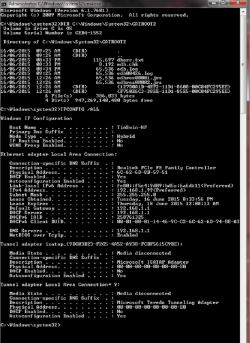
Please open an Elevated Command Prompt, and run the following commands:

IPCONFIG /ALL

post the results.

on broadband connections, I have seen this type persistent error caused by the exchange speed being set too high. The resolution was to (very patiently) explain to the ISP that they were overclocking the available bandwidth and get them to urn it down.
How this relates to a satellite connection I have no idea!
 

My Computer

Computer type
Laptop
Computer Manufacturer/Model Number
Asus K52F or Lenovo B51-80
OS
Win 7 x64 Home Premium (and x86 VirtualBox VM)/Win10
CPU
i3 370M/i7 6500U
Motherboard
Asus/Lenovo
Memory
8GB - finally :)/8GB
Graphics Card(s)
it's an i3, dude!/dual Intel&nVidia
Sound Card
onboard
Monitor(s) Displays
15.6" built-in
Screen Resolution
1366x768/1920x1080
Hard Drives
750GB Seagate internal
Sundry external drives attached to other computers on the local network
1TB SSD on the Lenovo
PSU
n/a
Internet Speed
as much as I can get - usually on a dongle/phone, so <1MB/s
Antivirus
MSE/Defender
Browser
IE11/12/Edge/Chrome/FF(if I must)
ew, that sounds like fun :/
seems odd that the laptop on the same internet connection is updating. is that because it has kept up to date whereas the desktop is now so far behind, because of the factory restore?
can you tell me the implications of not fixing this update issue?
 

Attachments

  • IPCONFIG.png
    IPCONFIG.png
    81.9 KB · Views: 1

My Computer

Computer type
Laptop
Computer Manufacturer/Model Number
HP
OS
64 bit, Windows 7 Home Premium SP1
CPU
Intel (R) Core (TM) i3 CPU M370 @ 2.40GHz
Memory
4.0GB (3.8GB usable)
Internet Speed
rural = satellite = woefully slow
Antivirus
MSE, free Malwarebytes
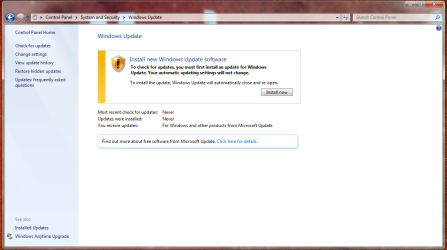
I got this different window when I tried to run a quick update in the wee hours, thinking the internet might be less busy. I clicked install - an install window flashed by very quickly (too quickly to read anything) and then the usual checking for updates window started. It searched for 10 minutes or so (which is usual for it) before returning to this yellow window again. I clicked install again and it repeated the process but got stuck searching for updates for over half an hour. I gave up, closed it down and am going to bed. But perhaps it's worth trying again very late at night or early morning?
 

Attachments

  • yellow.png
    yellow.png
    63.9 KB · Views: 0

My Computer

Computer type
Laptop
Computer Manufacturer/Model Number
HP
OS
64 bit, Windows 7 Home Premium SP1
CPU
Intel (R) Core (TM) i3 CPU M370 @ 2.40GHz
Memory
4.0GB (3.8GB usable)
Internet Speed
rural = satellite = woefully slow
Antivirus
MSE, free Malwarebytes
If it was my machine, I'd manually add a secondary DNS server - 8.8.8.8 (aka Google!) to the existing one that appears to be from your router/modem. This may eliminate the modem from being the culprit.

It's certainly worth a try.
Go to Networking and Sharing, and lick on the 'Change Adapter settings' link in the left pane
Find the Ethernet adapter and double-click on it
Click on Properties
find the IPv4 entry in the list and highlight it
click on the Properties button
If there are any entries there at all, delete them and chose 'Obtain address automatically' for both sections in General tab - OK out and reboot - try things again

If it's already in that state, in the DNS section, enter 8.8.8.8 and 192.168.1.1 and OK out, reboot and try things again.
 

My Computer

Computer type
Laptop
Computer Manufacturer/Model Number
Asus K52F or Lenovo B51-80
OS
Win 7 x64 Home Premium (and x86 VirtualBox VM)/Win10
CPU
i3 370M/i7 6500U
Motherboard
Asus/Lenovo
Memory
8GB - finally :)/8GB
Graphics Card(s)
it's an i3, dude!/dual Intel&nVidia
Sound Card
onboard
Monitor(s) Displays
15.6" built-in
Screen Resolution
1366x768/1920x1080
Hard Drives
750GB Seagate internal
Sundry external drives attached to other computers on the local network
1TB SSD on the Lenovo
PSU
n/a
Internet Speed
as much as I can get - usually on a dongle/phone, so <1MB/s
Antivirus
MSE/Defender
Browser
IE11/12/Edge/Chrome/FF(if I must)
The screen that you uploaded shows that it's attempting to install one of the Windows Update Agents - probably v320 - this can take a while, but shouldn't bomb out unless there are other problems. I'd just leave it to run while you do other things.
You can download the update - but last time I looked for the download, I couldn't find it :(
I'll have another hunt and come back to you if/when I find it.
 

My Computer

Computer type
Laptop
Computer Manufacturer/Model Number
Asus K52F or Lenovo B51-80
OS
Win 7 x64 Home Premium (and x86 VirtualBox VM)/Win10
CPU
i3 370M/i7 6500U
Motherboard
Asus/Lenovo
Memory
8GB - finally :)/8GB
Graphics Card(s)
it's an i3, dude!/dual Intel&nVidia
Sound Card
onboard
Monitor(s) Displays
15.6" built-in
Screen Resolution
1366x768/1920x1080
Hard Drives
750GB Seagate internal
Sundry external drives attached to other computers on the local network
1TB SSD on the Lenovo
PSU
n/a
Internet Speed
as much as I can get - usually on a dongle/phone, so <1MB/s
Antivirus
MSE/Defender
Browser
IE11/12/Edge/Chrome/FF(if I must)
...You can download the update - but last time I looked for the download, I couldn't find it :(
I'll have another hunt and come back to you if/when I find it.

Here you go...
How to Install the Windows Update Agent on Client Computers - System Center Configuration Manager Team Blog - Site Home - TechNet Blogs

Direct d/l x64 .exe: http://download.windowsupdate.com/w...e/7.6.7600.320/WindowsUpdateAgent-7.6-x64.exe

For client computers running Windows 7 Service Pack 1 and below
Updating using standalone installer

The standalone installer applies to Windows Vista with SP2, and Windows 7 RTM or SP1. For Windows 7 SP1, the standalone installer will install the client version Windows Update Agent7.6.7600.320. For all previous versions, the standalone installer will install the client version 7.6.7600.256.
 

My Computer

Computer type
Laptop
Computer Manufacturer/Model Number
MSI PE60 6QE
OS
Win 10 Pro x64, Win 7 Pro x64
CPU
Intel Core i7-6700HQ Skylake
Motherboard
MSI MS-16J5
Memory
16gb Crucial DDR4
Graphics Card(s)
NVIDIA GeForce GTX 960M 2 GB
Screen Resolution
1920 x 1080
Hard Drives
Samsung 850 EVO 250 GB M.2 SSD (MZ-N5E250BW)
HGST 1TB @7200 RPM HTS721010A9E630
Case
Plastic
Keyboard
Got one...
Mouse
Yep, one of those too.
Internet Speed
FIOS 75/75
Antivirus
Defender
Browser
Chrome/FFox/Ex-PLODE-r/(L)Edge
Other Info
Defender, Custom Hosts, uBlock, regular backups w/ Macrium (Free)
Thanks UBM!
 

My Computer

Computer type
Laptop
Computer Manufacturer/Model Number
Asus K52F or Lenovo B51-80
OS
Win 7 x64 Home Premium (and x86 VirtualBox VM)/Win10
CPU
i3 370M/i7 6500U
Motherboard
Asus/Lenovo
Memory
8GB - finally :)/8GB
Graphics Card(s)
it's an i3, dude!/dual Intel&nVidia
Sound Card
onboard
Monitor(s) Displays
15.6" built-in
Screen Resolution
1366x768/1920x1080
Hard Drives
750GB Seagate internal
Sundry external drives attached to other computers on the local network
1TB SSD on the Lenovo
PSU
n/a
Internet Speed
as much as I can get - usually on a dongle/phone, so <1MB/s
Antivirus
MSE/Defender
Browser
IE11/12/Edge/Chrome/FF(if I must)
I'll get that download today and try that and the other changes tonight. In the meantime I'll let the update check run and see what happens. Thank you both :)
 

My Computer

Computer type
Laptop
Computer Manufacturer/Model Number
HP
OS
64 bit, Windows 7 Home Premium SP1
CPU
Intel (R) Core (TM) i3 CPU M370 @ 2.40GHz
Memory
4.0GB (3.8GB usable)
Internet Speed
rural = satellite = woefully slow
Antivirus
MSE, free Malwarebytes
I downloaded and installed the Windows Update Agent but got error 80072EE2 when checking for updates.

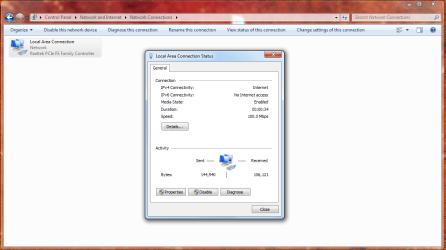
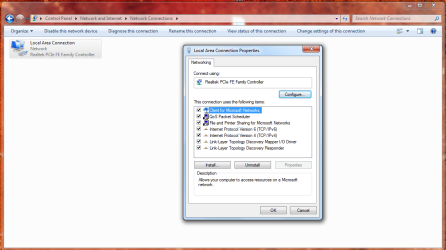
I tried to follow Post 29 but after clicking Change Adapter Settings I got this and couldn't find an Ethernet adapter anywhere.
 

Attachments

  • lac.png
    lac.png
    58.6 KB · Views: 2
  • network.png
    network.png
    63 KB · Views: 2
Last edited:

My Computer

Computer type
Laptop
Computer Manufacturer/Model Number
HP
OS
64 bit, Windows 7 Home Premium SP1
CPU
Intel (R) Core (TM) i3 CPU M370 @ 2.40GHz
Memory
4.0GB (3.8GB usable)
Internet Speed
rural = satellite = woefully slow
Antivirus
MSE, free Malwarebytes
That's the right one - some people like to hide the truth under their branding :)
 

My Computer

Computer type
Laptop
Computer Manufacturer/Model Number
Asus K52F or Lenovo B51-80
OS
Win 7 x64 Home Premium (and x86 VirtualBox VM)/Win10
CPU
i3 370M/i7 6500U
Motherboard
Asus/Lenovo
Memory
8GB - finally :)/8GB
Graphics Card(s)
it's an i3, dude!/dual Intel&nVidia
Sound Card
onboard
Monitor(s) Displays
15.6" built-in
Screen Resolution
1366x768/1920x1080
Hard Drives
750GB Seagate internal
Sundry external drives attached to other computers on the local network
1TB SSD on the Lenovo
PSU
n/a
Internet Speed
as much as I can get - usually on a dongle/phone, so <1MB/s
Antivirus
MSE/Defender
Browser
IE11/12/Edge/Chrome/FF(if I must)
aha! :)
Both sections had Obtain address automatically so I changed the DNS section as advised and ran the Update. Got error code 80072EFE.

Would I be able to download a 'pack' of updates and install manually? Or would I have to do that individually which would not be viable?
 

My Computer

Computer type
Laptop
Computer Manufacturer/Model Number
HP
OS
64 bit, Windows 7 Home Premium SP1
CPU
Intel (R) Core (TM) i3 CPU M370 @ 2.40GHz
Memory
4.0GB (3.8GB usable)
Internet Speed
rural = satellite = woefully slow
Antivirus
MSE, free Malwarebytes
The trick is always to know which updates you actually need - and to do that, you need a functional Check for Updates. :(

Does surfing still work OK - or any better?

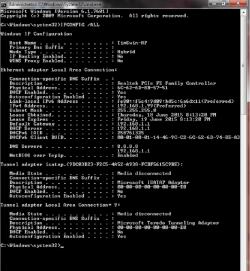
let's have a look at the new ipconfig detail..

Open an Elevated Command Prompt, and run the following command...

IPCONFIG /ALL

Post the results.
 

My Computer

Computer type
Laptop
Computer Manufacturer/Model Number
Asus K52F or Lenovo B51-80
OS
Win 7 x64 Home Premium (and x86 VirtualBox VM)/Win10
CPU
i3 370M/i7 6500U
Motherboard
Asus/Lenovo
Memory
8GB - finally :)/8GB
Graphics Card(s)
it's an i3, dude!/dual Intel&nVidia
Sound Card
onboard
Monitor(s) Displays
15.6" built-in
Screen Resolution
1366x768/1920x1080
Hard Drives
750GB Seagate internal
Sundry external drives attached to other computers on the local network
1TB SSD on the Lenovo
PSU
n/a
Internet Speed
as much as I can get - usually on a dongle/phone, so <1MB/s
Antivirus
MSE/Defender
Browser
IE11/12/Edge/Chrome/FF(if I must)
Surfing is a little slower if anything - it's hard to tell cos the speed varies all the time anyway.

Here's the ipconfig :)
 

Attachments

  • ipconfig2.png
    ipconfig2.png
    63.2 KB · Views: 0

My Computer

Computer type
Laptop
Computer Manufacturer/Model Number
HP
OS
64 bit, Windows 7 Home Premium SP1
CPU
Intel (R) Core (TM) i3 CPU M370 @ 2.40GHz
Memory
4.0GB (3.8GB usable)
Internet Speed
rural = satellite = woefully slow
Antivirus
MSE, free Malwarebytes

My Computer

Computer type
Laptop
Computer Manufacturer/Model Number
Asus K52F or Lenovo B51-80
OS
Win 7 x64 Home Premium (and x86 VirtualBox VM)/Win10
CPU
i3 370M/i7 6500U
Motherboard
Asus/Lenovo
Memory
8GB - finally :)/8GB
Graphics Card(s)
it's an i3, dude!/dual Intel&nVidia
Sound Card
onboard
Monitor(s) Displays
15.6" built-in
Screen Resolution
1366x768/1920x1080
Hard Drives
750GB Seagate internal
Sundry external drives attached to other computers on the local network
1TB SSD on the Lenovo
PSU
n/a
Internet Speed
as much as I can get - usually on a dongle/phone, so <1MB/s
Antivirus
MSE/Defender
Browser
IE11/12/Edge/Chrome/FF(if I must)
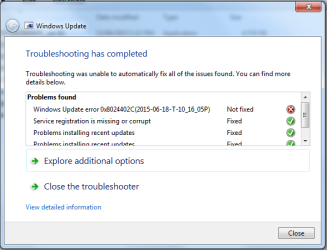
I have previously run the troubleshooter. Did it again and this time it has fixed the Service registration but shows one error per the screenshot.

I couldn't download MicrosoftFixit.wu.LB.14635808669047299.1.1.Run.exe - will try again later or download it in town tomorrow. I don't know if I've previously run that one, looks like I've only downloaded MicrosoftFixit50123 (1).msi before.

I may be offline for a day or two cos my internet account is being changed - only the account name, not the provider or eqpt. I shall report back as soon as I can.

A big big thanks for your help once again :D
 

Attachments

  • troubleshoot.png
    troubleshoot.png
    18.8 KB · Views: 10

My Computer

Computer type
Laptop
Computer Manufacturer/Model Number
HP
OS
64 bit, Windows 7 Home Premium SP1
CPU
Intel (R) Core (TM) i3 CPU M370 @ 2.40GHz
Memory
4.0GB (3.8GB usable)
Internet Speed
rural = satellite = woefully slow
Antivirus
MSE, free Malwarebytes
Back
Top