Can't access my WD My Passport (WDBL1D5000ABK-01) on my laptop

TerryAPrice

New member
Local time
6:57 PM
Messages
3
Hello, my name is Ryan and let me start by admitting that i'm not exactly the most technologically skilled person in the world. With that being said, the issue i'm having is that I can't access my WD My Passport from my laptop in particular (a Compaq Presario CQ56). Meaning when I plug it in the light turns on and it starts working (I can feel it vibrate) but it never pops up, although when I plugged it into my friend's desktop the menu came up giving me the option of accessing it. The drivers are up to date and when I go to my local disk properties it's listed under hardware as a Disk drive, so it seems my laptop isn't having an issue connecting with it; but I can't actually get INTO it. Is there a way to correct this?
 

My Computer My Computer

At a glance

Windows 7 64 Bit2 Gigs
Computer type
Laptop
Computer Manufacturer/Model Number
Compaq Presario CQ56
OS
Windows 7 64 Bit
Memory
2 Gigs
Hi, Welcome to Sevenforums.

As you mentioned that the drive is visible in disk management. Follow these steps.

1) Control panel===>administrative tools===>computer management===>Disk management

2) You'll see a list of Disks (and partititions) and DVD's (if you have any) and you'll probably see something like Disk 1 with no partition letter assigned

3) Right mouse click and choose Change drive letter and paths ===> add chose a letter from the drop down and the drive will be available.
 

My Computer My Computer

At a glance

Windows 11 x64i5 2500K @ 3.3 GHz16 GB DDR 3 @ 1600MhzMSI 1050TI 4GB OC version
Computer type
PC/Desktop
Computer Manufacturer/Model Number
Custom Bulid/Self made
OS
Windows 11 x64
CPU
i5 2500K @ 3.3 GHz
Motherboard
ASUS P8 Z77 V pro
Memory
16 GB DDR 3 @ 1600Mhz
Graphics Card(s)
MSI 1050TI 4GB OC version
Sound Card
On Board (Realtek HD audio)
Monitor(s) Displays
Samsung 22" LCD
Screen Resolution
1920*1080
Hard Drives
Seagate 1 TB, WD 1TB, Seagate 2 TB ( I use a lot of space)
PSU
coolermaster 750 W
Case
Coolermaster HAF912
Cooling
Coolermaster hyper 212 EVO
Keyboard
Samsung
Mouse
Dell Wireless
Internet Speed
Wireless 50 Mbps
Antivirus
AVG 2016 Internet Security
Browser
Google Chrome
Thank you for the warm welcome!

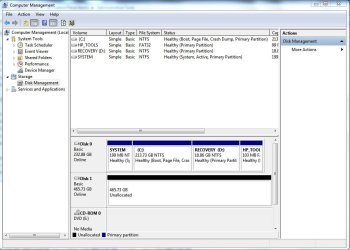
When I did as instructed, this is what I run into.

Capture.JPG

Right clicking on Disk 1 (on the lower half of the screen, since it's not listed above) only gives me the option to "Convert to Dynamic Disk" or to "Convert to GPT Disk".

and clicking on properties shows this.

Capture1.JPG
 

My Computer My Computer

At a glance

Windows 7 64 Bit2 Gigs
Computer type
Laptop
Computer Manufacturer/Model Number
Compaq Presario CQ56
OS
Windows 7 64 Bit
Memory
2 Gigs
OK, not a very serious problem since you are able to access your external HDD on your friend's computer.

Now a few queries.

1. Was the external drive OK on your laptop before?

2. Do other external drives/ pen drives OK on your laptop?

3. Do you remember or even guess any event that could have caused this problem - such as sudden power loss when the ext. HDD was connected?

4. When did this happen?

5. What is the OS on your friend's computer on which it is accessible?

Now keep your problem HDD unplugged( safely remove) then see whether you have any system restore point before this event occurred. Try a system restore to that point. Check whether it resolves the problem.
 

My Computer My Computer

At a glance

Windows 7 Home Premium 32 bit
OS
Windows 7 Home Premium 32 bit
This is the first time I plugged this particular external drive into my laptop, so I don't have any previous experiences with it on this machine. And yes, when I plugged a Toshiba external drive into it; it worked perfectly fine. At first I thought it was because this one (WD external hard rive) was for Mac that it wasn't working; but the other computer I tested it on ran on windows as well and it was perfectly fine on that. I don't remember anything happening the first time I tried it, I can't think of any extenuating circumstances that would've affected it.
 

My Computer My Computer

At a glance

Windows 7 64 Bit2 Gigs
Computer type
Laptop
Computer Manufacturer/Model Number
Compaq Presario CQ56
OS
Windows 7 64 Bit
Memory
2 Gigs
Yep, that is exactly why I asked for the OS on your friend's computer for it is advertised as the one for a Mac, may be because of a beautiful skin - though it should work on Windows too.

A new drive that works on one PC but does not on another. I am really perplexed in this case. Are you sure that it works on your friend's computer? Did you try copying a file to it and then reading it? If not will you repeat and report? A disk management shot on it will also help. Now this is only of academic interest.:)

( In your position, I would have returned the drive to the vendor and got a replacement drive and a Seagate at that without pulling my hair on it.. OMG, how many problems being reported with WD drives!For one, I had long back decided not to touch one.:))
 

My Computer My Computer

At a glance

Windows 7 Home Premium 32 bit
OS
Windows 7 Home Premium 32 bit
Back
Top