Can't delete or rename empty folder due to network problem

Siempre

New member
Local time
7:41 AM
Messages
4
Location
Antwerp
Hello,

My laptop is attached to a network server (drive H: which is only accessible by me and the admin) On there I have an empty folder that just will not delete. I tried many things and read multiple threads.... This puzzles me.

When I hit delete in Win Explorer simply nothing happens. No error message, nada! The folder stays where it is... on the H: drive.

When I try to rename or cut/paste the folder, I get a dialog box (see attached).

Extra info that may be useful:
  • The H: drive is synched to my C: drive (a little green circle with yellow arrows can be seen on the H: drive icon) so I can access the H: drive even when I am not on the network. However, even when I am offline I can't do anything with the folder.
  • The folder is empty (0 bytes, no hidden files in it)
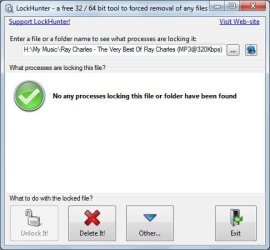
  • I tried LockHunter. When I ask if anything is blocking the folder it says no (see attached). When I delete the folder from within LockHunter it says it has been successfully sent to the recycle bin, but the folder stays where it is.
All this is very frustrating. I welcome your thoughts.

Best regards,
Stefan
 

Attachments

  • dialogbox.jpg
    dialogbox.jpg
    15.3 KB · Views: 2
  • lockhunter.jpg
    lockhunter.jpg
    29 KB · Views: 4

My Computer My Computer

OS
Windows 7 Professional x32
Try unlocker as well, though it seems like the problem is that is a network drive, do you have enough righs over the folder/drive?
 

My Computer My Computer

Computer type
PC/Desktop
Computer Manufacturer/Model Number
Custom Built PC
OS
Windows 7 Ultimate 64 bit SP1
CPU
Intel(R) Core(TM) i5-2500K
Motherboard
Gigabyte Technology Co., Ltd. Z68X-UD3-B3
Memory
12GB Kingston Hyperx 1600MHz
Graphics Card(s)
Asus GTS 450
PSU
500W Coolink
Other Info
Genius G-Pen F610 (PenPad)
My anti virus program said Unlocker is not safe... However, since I used it before on my home PC, I took your advice and installed it...

However, the same thing occurs as with LockHunter. Unlocker states that nothing blocks the folder. If I choose to delete it, it confirms that the job was done. However the folder is still there. No change! Screen refreshing, rebooting, nothing helps.

I have full rights to the drive/folder where the problematic folder is located. I can add files to that folder and delete them from it. However I can't create any files in the problematic folder itself. When I try, I get an error (see attached). But the folder stays visible at all times. How can this be??

Very strange behaviour...
 

Attachments

  • dialogbox.jpg
    dialogbox.jpg
    17.2 KB · Views: 3

My Computer My Computer

OS
Windows 7 Professional x32
You can't use it bacuse it is deleted, I'm surprised that it still shows up for you/server. Is that a paid server that belongs to a company? No idea, it should have gone.
 

My Computer My Computer

Computer type
PC/Desktop
Computer Manufacturer/Model Number
Custom Built PC
OS
Windows 7 Ultimate 64 bit SP1
CPU
Intel(R) Core(TM) i5-2500K
Motherboard
Gigabyte Technology Co., Ltd. Z68X-UD3-B3
Memory
12GB Kingston Hyperx 1600MHz
Graphics Card(s)
Asus GTS 450
PSU
500W Coolink
Other Info
Genius G-Pen F610 (PenPad)
I will have a word with our network administrator... I have a feeling it has to do with the synching to my laptop which is corrupted or so. Still it is strange because I have full read/write access to that part of the server.
 

My Computer My Computer

OS
Windows 7 Professional x32
You could run Ccleaner, to remove any temporary files from the computer then restart it. Reconnect your router manually (turn router off/on for a minute)
 

My Computer My Computer

Computer type
PC/Desktop
Computer Manufacturer/Model Number
Custom Built PC
OS
Windows 7 Ultimate 64 bit SP1
CPU
Intel(R) Core(TM) i5-2500K
Motherboard
Gigabyte Technology Co., Ltd. Z68X-UD3-B3
Memory
12GB Kingston Hyperx 1600MHz
Graphics Card(s)
Asus GTS 450
PSU
500W Coolink
Other Info
Genius G-Pen F610 (PenPad)
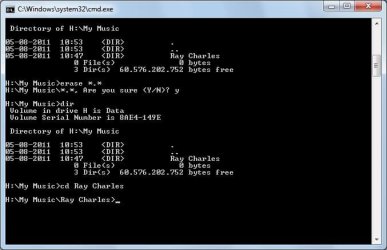
CCleaner didn't help... The folder is still showing up. I can even double-click to open it. It then says the folder is empty. Still can't delete the folder. When I look at its properties (so it still has properties) it shows up as 0 bytes. After fiddling with the Sync Now button I managed to RENAME the folder... So I believe it's still there. I tried to erase *.* in the parent folder. See attached screen shot. It has NO effect! This is really giving me headaches... Any other suggestions?
 

Attachments

  • Clipboard01.jpg
    Clipboard01.jpg
    32.5 KB · Views: 12

My Computer My Computer

OS
Windows 7 Professional x32
If you still have unlocker installed...
It says that nothing blocks the access to it, but if you click whatever (the other option) a new little screen will come up, where you can select delete at the bottom then click ok! try it :D
 

My Computer My Computer

Computer type
PC/Desktop
Computer Manufacturer/Model Number
Custom Built PC
OS
Windows 7 Ultimate 64 bit SP1
CPU
Intel(R) Core(TM) i5-2500K
Motherboard
Gigabyte Technology Co., Ltd. Z68X-UD3-B3
Memory
12GB Kingston Hyperx 1600MHz
Graphics Card(s)
Asus GTS 450
PSU
500W Coolink
Other Info
Genius G-Pen F610 (PenPad)
Back
Top