Hello,
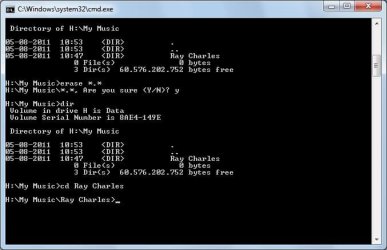
My laptop is attached to a network server (drive H: which is only accessible by me and the admin) On there I have an empty folder that just will not delete. I tried many things and read multiple threads.... This puzzles me.
When I hit delete in Win Explorer simply nothing happens. No error message, nada! The folder stays where it is... on the H: drive.
When I try to rename or cut/paste the folder, I get a dialog box (see attached).
Extra info that may be useful:
Best regards,
Stefan
My laptop is attached to a network server (drive H: which is only accessible by me and the admin) On there I have an empty folder that just will not delete. I tried many things and read multiple threads.... This puzzles me.
When I hit delete in Win Explorer simply nothing happens. No error message, nada! The folder stays where it is... on the H: drive.
When I try to rename or cut/paste the folder, I get a dialog box (see attached).
Extra info that may be useful:
- The H: drive is synched to my C: drive (a little green circle with yellow arrows can be seen on the H: drive icon) so I can access the H: drive even when I am not on the network. However, even when I am offline I can't do anything with the folder.
- The folder is empty (0 bytes, no hidden files in it)
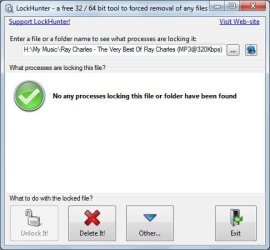
- I tried LockHunter. When I ask if anything is blocking the folder it says no (see attached). When I delete the folder from within LockHunter it says it has been successfully sent to the recycle bin, but the folder stays where it is.
Best regards,
Stefan
Attachments

My Computer
At a glance
Windows 7 Professional x32
- OS
- Windows 7 Professional x32