
The problem I'm having is that I can access the "Home Group" file sharing folder in the Control Panel, but no where does it give me the option to create or join the "Home Group".
I'm trying to network an HP Pavilion desktop connected to my router via patch cable to an HP laptop and having the same problems on both ends.
I don't have AVG or a third party firewall; is there a solution out there for the problem I'm experiencing?
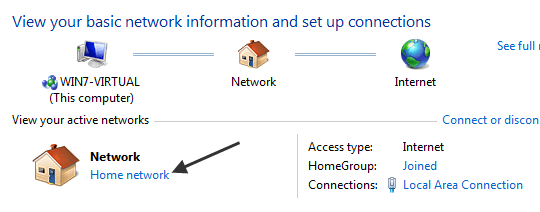
You can only create a Homegroup with Windows 7 Home Premium or above. I'm not sure what you mean by patch cable? You should be using a standard eithernet cable to the router.
You might want to go down this Homegroup check list and make sure everything is correct.
Ultimate Troubleshooting Guide for Windows 7 HomeGroup Connection Issues
Yes Ethernet cable is what I meant; thanks.
I finally got it figured out when I noticed that I had, in fact, forgotten to change the "Workgroup" to "HOMEGROUP" in the laptop's "System Properties" (I had already done so on the desktop); I rebooted the laptop and was then able to join the "HOMEGROUP". Thanks for the assistance.
My Computer
At a glance
Windows 7AMD Semprron Dual Core Processor 2200 2.00 GHz2.00 GB (1.87 GB Usable)NVIDIA GeForce 6150SE nForce 430
- Computer Manufacturer/Model Number
- HP Pavilian
- OS
- Windows 7
- CPU
- AMD Semprron Dual Core Processor 2200 2.00 GHz
- Motherboard
- 32 bit
- Memory
- 2.00 GB (1.87 GB Usable)
- Graphics Card(s)
- NVIDIA GeForce 6150SE nForce 430
- Sound Card
- High Definition Audio Controller
- Monitor(s) Displays
- Generic PnP Monitor
- Hard Drives
- Hitachi HDP725016GLA SCSI Disk Device
SanDisk Cruzer USB Device
WD 10EAVS External USB Device




 ..................

