Can't join Homegroup

The problem I'm having is that I can access the "Home Group" file sharing folder in the Control Panel, but no where does it give me the option to create or join the "Home Group".

I'm trying to network an HP Pavilion desktop connected to my router via patch cable to an HP laptop and having the same problems on both ends.


I don't have AVG or a third party firewall; is there a solution out there for the problem I'm experiencing?

You can only create a Homegroup with Windows 7 Home Premium or above. I'm not sure what you mean by patch cable? You should be using a standard eithernet cable to the router.

You might want to go down this Homegroup check list and make sure everything is correct.
Ultimate Troubleshooting Guide for Windows 7 HomeGroup Connection Issues

Yes Ethernet cable is what I meant; thanks.

I finally got it figured out when I noticed that I had, in fact, forgotten to change the "Workgroup" to "HOMEGROUP" in the laptop's "System Properties" (I had already done so on the desktop); I rebooted the laptop and was then able to join the "HOMEGROUP". Thanks for the assistance.
 

My Computer

Computer Manufacturer/Model Number
HP Pavilian
OS
Windows 7
CPU
AMD Semprron Dual Core Processor 2200 2.00 GHz
Motherboard
32 bit
Memory
2.00 GB (1.87 GB Usable)
Graphics Card(s)
NVIDIA GeForce 6150SE nForce 430
Sound Card
High Definition Audio Controller
Monitor(s) Displays
Generic PnP Monitor
Hard Drives
Hitachi HDP725016GLA SCSI Disk Device
SanDisk Cruzer USB Device
WD 10EAVS External USB Device
Yes setting all the desired Homegroup machines to use the Home network location does matter. Luckily that step is included in the Homegroup trouble shooting guide I posted.

I'm glad that you have your Homegroup up and running Gyork. :)

Set Network Location to Home

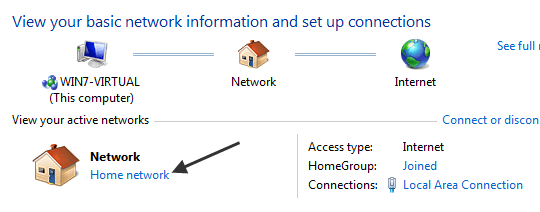
Another reason why you can’t access your HomeGroup is because it only works for home networks where you trust all the computers. If, for some reason, you chose Work, Public, or Domain, then HomeGroups will not work.

You can check this by going to Network and Sharing center and looking under Network. If it’s not set to Home network, you can change it by clicking on the link and choosing the new network location.

If I helped don't forget to Rep. Small scale upper right>
 

My Computer

Computer type
PC/Desktop
Computer Manufacturer/Model Number
Home built
OS
Windows 7 Ult, Windows 8.1 Pro,
CPU
Q9650-4.275GHz, E8600 4.5GHz, E6750-3.8GHz
Motherboard
Evga 780i FTW
Memory
G.Skill PC2 9600 1200Mhz 5 5 5 15 2T
Graphics Card(s)
GTX480
Sound Card
Asus Xonar D2
Monitor(s) Displays
HannsG
Screen Resolution
1680X1050
Hard Drives
GSkill Phoenix Pro 120GB SSD
PSU
ThermalTake Toughpower 1000Watt modular
Case
ThermalTake XaserV
Cooling
Xigmatek S1283
Keyboard
Logitech G15
Mouse
Logitech G9
Internet Speed
T1
Regedit to the rescue

Thanks to an earlier post I was able to home network my two Win 7 computers by using regedit to change the "ff" designation "0" in the registry! This solved the my "you must have IVP6 activated" problem.

Now I need to know how to add my Vista Laptop to the network. Anyone have a step by step for this?? I am told that you have to have Win 7 only in the Home Network but surely that cannot be true.

Any help appreciated.

John
 

My Computer

Computer Manufacturer/Model Number
Home brew and Toshiba Laptop
OS
Win 7 & Vista
CPU
AMD Athelon
Motherboard
MSI and Ausus
Memory
2 giga Bytes
Hard Drives
Western Digital SATA And EIDE
You can only have win7 systems in a homegroup, not a home network ;)

you will find that the regular sharing system from Vista will work fine in win7,

Assuming you wish to use workgroup networking just make sure that the workgroup settings are the same on all machines, they are all on the same subnet, you have identical user names on each machine and that you are actually sharing some folders, also remember that simple sharing will not work on NTFS shares so you have to select advanced sharing.

Oh and this is fully compatible with running a homegroup at the same time :D
 

My Computers

System One System Two

  • Computer type
    PC/Desktop
    Computer Manufacturer/Model Number
    ChillBlast - Custom to my design
    OS
    Windows 11 Pro x64 [Latest Release and Release Preview]
    CPU
    Ryzen 9 5950X, 3.8 - 5.2 MHz
    Motherboard
    Asus Prime X570-Pro
    Memory
    64GB [2 x 32GB] DDR4 3200MHz
    Graphics Card(s)
    4GB NVIDIA GEFORCE GTX 1650 Ti
    Sound Card
    On-board SPDIF to 5.1 System + HDMI [5.1 system]
    Monitor(s) Displays
    32" UHD 32 Bit HDR Monitor + 43" UHD 4K 32Bit HDR TV
    Screen Resolution
    2 x 3840 x 2160 @60Hz
    Hard Drives
    1TB M2 SSD OS, 500GB Fast Access SSD, 2 x 8TB Data + Various Externals from 1TB to 4TB, 10TB NAS
    PSU
    NZXT C750 80 PLUS Gold 750W Modular PSU
    Case
    Workstation Case [Matt Black]
    Cooling
    NZXT Kraken X63 280mm CPU Cooler +2x Quiet Case fans
    Keyboard
    Logitech Wireless MX Keys & K400 + others
    Mouse
    Logitech Wireless MX Master 3S
    Internet Speed
    920 MB Down 50 MB Up
    Antivirus
    BitDefender Total Security Pro
    Browser
    Chrome (always run latest Non-Beta)
    Other Info
    Also run ...
    Laptop - Quad 8GB - Windows 10 Pro x64
    Nexus 7 Android tablet x2
    Samsung 10.2" tablet
    Blackview TAB 8 4G Android Tablet c/w Keyboard
    Wacom Intuos Pro Medium Pen Pad
    Wacom Intuos Pro Small Pen Pad
    Wacom Expresskeys Remote
    Loopdeck+ Graphics Controller
    Shuttle Pro v2 Control
  • Computer type
    Laptop
    System Manufacturer/Model Number
    Dell XPS 17 10750H
    OS
    Windows 11 Pro x64 Latest RP
    CPU
    Intel I7 10750H 5.0GHz
    Motherboard
    Dell XPS
    Memory
    32GB [2x16GB] DDR4 2933 MHz
    Graphics Card(s)
    nVidia GTX1650Ti 4 GB GDDR6
    Sound Card
    Stock [Realtek] 4 Speaker
    Monitor(s) Displays
    17" IPS UHD+ Infinity Edge Touchscreen
    Screen Resolution
    3840 x 2400
    Hard Drives
    2TB M2 NVMe, 4TB External + various 500GB & 1TB External NVMe (also have access to spinner HDD from
    PSU
    Stock
    Case
    Stock XPS Aluminium & Carbon Fibre
    Cooling
    Stock - Active Fan Control
    Keyboard
    Backlit + Various Logitech
    Mouse
    Stock Track Pad + Logitech MX Trackball
    Internet Speed
    72 MB Down 18MB Up
    Browser
    Chrome
    Other Info
    Also run ...
    Laptop - Quad 8GB - Windows 10 Pro x64
    Nexus 7 Android tablet x2
    10.2" tablet
    Sony Z3 Android Smartphone
    Wacom Intuos Pro Medium Pen Pad
    Wacom Intuos Pro Small Pen Pad
    Wacom Expresskeys Remote
    Loopdeck+ Graphics Controller
    Shuttle Pro v2 Control Pad
    10TB NAS
Yes setting all the desired Homegroup machines to use the Home network location does matter. Luckily that step is included in the Homegroup trouble shooting guide I posted.

I'm glad that you have your Homegroup up and running Gyork. :)

Thanks again for all the help!
 

My Computer

Computer Manufacturer/Model Number
HP Pavilian
OS
Windows 7
CPU
AMD Semprron Dual Core Processor 2200 2.00 GHz
Motherboard
32 bit
Memory
2.00 GB (1.87 GB Usable)
Graphics Card(s)
NVIDIA GeForce 6150SE nForce 430
Sound Card
High Definition Audio Controller
Monitor(s) Displays
Generic PnP Monitor
Hard Drives
Hitachi HDP725016GLA SCSI Disk Device
SanDisk Cruzer USB Device
WD 10EAVS External USB Device
I'm having a ton o trouble and not sure how to fix things. I have 2 hardwired desktops, on Win7 32bit and one 64bit as well as a laptop with Win7 x64.

If I open Windows explorer on my main desktop computer I see homegroup, which doesn't show any computers under it and if I go down past Computer I have an entry Network and all 3 computers show up under there as well as, if I click on one, all the shared files/folders for each computer.

I thought maybe was an issue with my main computer not being in the right homegroup so I went to the CP (Control Panel) homegroup section. I wanted to check the password but when I click the "View or print the homegroup password" nothing happens. I then thought humm and clicked the option to "Leave the homegroup" and I get a red circle with an X in it & a mssg that says "Windows couldn't remove your computer from the home group". I then went ahead and ran the troubleshooter.

When I ran the troubleshooter the error it shows is "Peer networking Grouping Service isn't running". I tried running the troubleshooter with the auto fix option enabled but it still gives me that error. I opened services and I see 3 entries for Peer:

• Peer Name Resolution Protocal - not running - set to Manual. If I right click on it and say Run I get the following mssg "Windows could not start Peer Name Resolution Service on Local computer" and "Error 0x80630801: 0x80630801"

• Peer Networking Grouping - not running - set to automatic. If I right click on it and say Run I get the following mssg "Windows could not start Peer Networking Grouping Service on Local computer" and "Error 1068: The dependency service or group failed to start"

• Peer Networking Identity Manager - started - set to manual.

On the second desktop under homegroup I can pull up a password & it actually lists all the computers on the network under the homegroup section as well as under the network section of Windows explorer so I'm at a loss as to where the trouble lies.

Any ideas as to where my problem may be? Like I said I can see the shared folders and such from all 3 computers so I do have access but I can't figure out why I'm unable, with my main desktop, to either see or leave the homegroup or view the password. I did go to the network section of CP and see that my main computer is listed as connected to "Home Network" so I'm at a total loss as to whats wrong and would appreciate the help
 

My Computer

OS
Vista
Could you please provide more information on your actual network Set-up - there are various things that may prevent homegroup networking from running, and a fuller understanding of your system would help to diagnose and suggest options :)
 

My Computers

System One System Two

  • Computer type
    PC/Desktop
    Computer Manufacturer/Model Number
    ChillBlast - Custom to my design
    OS
    Windows 11 Pro x64 [Latest Release and Release Preview]
    CPU
    Ryzen 9 5950X, 3.8 - 5.2 MHz
    Motherboard
    Asus Prime X570-Pro
    Memory
    64GB [2 x 32GB] DDR4 3200MHz
    Graphics Card(s)
    4GB NVIDIA GEFORCE GTX 1650 Ti
    Sound Card
    On-board SPDIF to 5.1 System + HDMI [5.1 system]
    Monitor(s) Displays
    32" UHD 32 Bit HDR Monitor + 43" UHD 4K 32Bit HDR TV
    Screen Resolution
    2 x 3840 x 2160 @60Hz
    Hard Drives
    1TB M2 SSD OS, 500GB Fast Access SSD, 2 x 8TB Data + Various Externals from 1TB to 4TB, 10TB NAS
    PSU
    NZXT C750 80 PLUS Gold 750W Modular PSU
    Case
    Workstation Case [Matt Black]
    Cooling
    NZXT Kraken X63 280mm CPU Cooler +2x Quiet Case fans
    Keyboard
    Logitech Wireless MX Keys & K400 + others
    Mouse
    Logitech Wireless MX Master 3S
    Internet Speed
    920 MB Down 50 MB Up
    Antivirus
    BitDefender Total Security Pro
    Browser
    Chrome (always run latest Non-Beta)
    Other Info
    Also run ...
    Laptop - Quad 8GB - Windows 10 Pro x64
    Nexus 7 Android tablet x2
    Samsung 10.2" tablet
    Blackview TAB 8 4G Android Tablet c/w Keyboard
    Wacom Intuos Pro Medium Pen Pad
    Wacom Intuos Pro Small Pen Pad
    Wacom Expresskeys Remote
    Loopdeck+ Graphics Controller
    Shuttle Pro v2 Control
  • Computer type
    Laptop
    System Manufacturer/Model Number
    Dell XPS 17 10750H
    OS
    Windows 11 Pro x64 Latest RP
    CPU
    Intel I7 10750H 5.0GHz
    Motherboard
    Dell XPS
    Memory
    32GB [2x16GB] DDR4 2933 MHz
    Graphics Card(s)
    nVidia GTX1650Ti 4 GB GDDR6
    Sound Card
    Stock [Realtek] 4 Speaker
    Monitor(s) Displays
    17" IPS UHD+ Infinity Edge Touchscreen
    Screen Resolution
    3840 x 2400
    Hard Drives
    2TB M2 NVMe, 4TB External + various 500GB & 1TB External NVMe (also have access to spinner HDD from
    PSU
    Stock
    Case
    Stock XPS Aluminium & Carbon Fibre
    Cooling
    Stock - Active Fan Control
    Keyboard
    Backlit + Various Logitech
    Mouse
    Stock Track Pad + Logitech MX Trackball
    Internet Speed
    72 MB Down 18MB Up
    Browser
    Chrome
    Other Info
    Also run ...
    Laptop - Quad 8GB - Windows 10 Pro x64
    Nexus 7 Android tablet x2
    10.2" tablet
    Sony Z3 Android Smartphone
    Wacom Intuos Pro Medium Pen Pad
    Wacom Intuos Pro Small Pen Pad
    Wacom Expresskeys Remote
    Loopdeck+ Graphics Controller
    Shuttle Pro v2 Control Pad
    10TB NAS
What more do you want to know? Im using a Actiontec 4 etherport DSL Gateway router to connect all the computers together. Running Avast Antivirus on all of them but have tried turning it off and starting the services but same issues and error messages persist.

Under Network Sharing advanced I have the following options set:
Home or Work
• Turn on network discovery
• Turn on file & printer sharing
• Turn on Public Folder sharing
• Media sharing enabled
• Enabled sharing 40 & 56 encryption
• Turn off password protected sharing
• Allow windows to manage homegroup

Public
Home or Work
• Turn off network discovery
• Turn on file & printer sharing
• Turn on Public Folder sharing
• Media sharing enabled
• Enabled sharing 40 & 56 encryption
• Turn off password protected sharing

Any other info you want?
 

My Computer

OS
Vista
So the network is a "home" network type so that should be OK only other things to check would be IPv6 is running and the times on the machines are synced within a second or so.

If these are all OK I can only suggest you leave the homegroup on all the machines and re-create again, which I'm sure you've already tried
 

My Computers

System One System Two

  • Computer type
    PC/Desktop
    Computer Manufacturer/Model Number
    ChillBlast - Custom to my design
    OS
    Windows 11 Pro x64 [Latest Release and Release Preview]
    CPU
    Ryzen 9 5950X, 3.8 - 5.2 MHz
    Motherboard
    Asus Prime X570-Pro
    Memory
    64GB [2 x 32GB] DDR4 3200MHz
    Graphics Card(s)
    4GB NVIDIA GEFORCE GTX 1650 Ti
    Sound Card
    On-board SPDIF to 5.1 System + HDMI [5.1 system]
    Monitor(s) Displays
    32" UHD 32 Bit HDR Monitor + 43" UHD 4K 32Bit HDR TV
    Screen Resolution
    2 x 3840 x 2160 @60Hz
    Hard Drives
    1TB M2 SSD OS, 500GB Fast Access SSD, 2 x 8TB Data + Various Externals from 1TB to 4TB, 10TB NAS
    PSU
    NZXT C750 80 PLUS Gold 750W Modular PSU
    Case
    Workstation Case [Matt Black]
    Cooling
    NZXT Kraken X63 280mm CPU Cooler +2x Quiet Case fans
    Keyboard
    Logitech Wireless MX Keys & K400 + others
    Mouse
    Logitech Wireless MX Master 3S
    Internet Speed
    920 MB Down 50 MB Up
    Antivirus
    BitDefender Total Security Pro
    Browser
    Chrome (always run latest Non-Beta)
    Other Info
    Also run ...
    Laptop - Quad 8GB - Windows 10 Pro x64
    Nexus 7 Android tablet x2
    Samsung 10.2" tablet
    Blackview TAB 8 4G Android Tablet c/w Keyboard
    Wacom Intuos Pro Medium Pen Pad
    Wacom Intuos Pro Small Pen Pad
    Wacom Expresskeys Remote
    Loopdeck+ Graphics Controller
    Shuttle Pro v2 Control
  • Computer type
    Laptop
    System Manufacturer/Model Number
    Dell XPS 17 10750H
    OS
    Windows 11 Pro x64 Latest RP
    CPU
    Intel I7 10750H 5.0GHz
    Motherboard
    Dell XPS
    Memory
    32GB [2x16GB] DDR4 2933 MHz
    Graphics Card(s)
    nVidia GTX1650Ti 4 GB GDDR6
    Sound Card
    Stock [Realtek] 4 Speaker
    Monitor(s) Displays
    17" IPS UHD+ Infinity Edge Touchscreen
    Screen Resolution
    3840 x 2400
    Hard Drives
    2TB M2 NVMe, 4TB External + various 500GB & 1TB External NVMe (also have access to spinner HDD from
    PSU
    Stock
    Case
    Stock XPS Aluminium & Carbon Fibre
    Cooling
    Stock - Active Fan Control
    Keyboard
    Backlit + Various Logitech
    Mouse
    Stock Track Pad + Logitech MX Trackball
    Internet Speed
    72 MB Down 18MB Up
    Browser
    Chrome
    Other Info
    Also run ...
    Laptop - Quad 8GB - Windows 10 Pro x64
    Nexus 7 Android tablet x2
    10.2" tablet
    Sony Z3 Android Smartphone
    Wacom Intuos Pro Medium Pen Pad
    Wacom Intuos Pro Small Pen Pad
    Wacom Expresskeys Remote
    Loopdeck+ Graphics Controller
    Shuttle Pro v2 Control Pad
    10TB NAS

My Computers

System One System Two

  • Computer type
    PC/Desktop
    Computer Manufacturer/Model Number
    ChillBlast - Custom to my design
    OS
    Windows 11 Pro x64 [Latest Release and Release Preview]
    CPU
    Ryzen 9 5950X, 3.8 - 5.2 MHz
    Motherboard
    Asus Prime X570-Pro
    Memory
    64GB [2 x 32GB] DDR4 3200MHz
    Graphics Card(s)
    4GB NVIDIA GEFORCE GTX 1650 Ti
    Sound Card
    On-board SPDIF to 5.1 System + HDMI [5.1 system]
    Monitor(s) Displays
    32" UHD 32 Bit HDR Monitor + 43" UHD 4K 32Bit HDR TV
    Screen Resolution
    2 x 3840 x 2160 @60Hz
    Hard Drives
    1TB M2 SSD OS, 500GB Fast Access SSD, 2 x 8TB Data + Various Externals from 1TB to 4TB, 10TB NAS
    PSU
    NZXT C750 80 PLUS Gold 750W Modular PSU
    Case
    Workstation Case [Matt Black]
    Cooling
    NZXT Kraken X63 280mm CPU Cooler +2x Quiet Case fans
    Keyboard
    Logitech Wireless MX Keys & K400 + others
    Mouse
    Logitech Wireless MX Master 3S
    Internet Speed
    920 MB Down 50 MB Up
    Antivirus
    BitDefender Total Security Pro
    Browser
    Chrome (always run latest Non-Beta)
    Other Info
    Also run ...
    Laptop - Quad 8GB - Windows 10 Pro x64
    Nexus 7 Android tablet x2
    Samsung 10.2" tablet
    Blackview TAB 8 4G Android Tablet c/w Keyboard
    Wacom Intuos Pro Medium Pen Pad
    Wacom Intuos Pro Small Pen Pad
    Wacom Expresskeys Remote
    Loopdeck+ Graphics Controller
    Shuttle Pro v2 Control
  • Computer type
    Laptop
    System Manufacturer/Model Number
    Dell XPS 17 10750H
    OS
    Windows 11 Pro x64 Latest RP
    CPU
    Intel I7 10750H 5.0GHz
    Motherboard
    Dell XPS
    Memory
    32GB [2x16GB] DDR4 2933 MHz
    Graphics Card(s)
    nVidia GTX1650Ti 4 GB GDDR6
    Sound Card
    Stock [Realtek] 4 Speaker
    Monitor(s) Displays
    17" IPS UHD+ Infinity Edge Touchscreen
    Screen Resolution
    3840 x 2400
    Hard Drives
    2TB M2 NVMe, 4TB External + various 500GB & 1TB External NVMe (also have access to spinner HDD from
    PSU
    Stock
    Case
    Stock XPS Aluminium & Carbon Fibre
    Cooling
    Stock - Active Fan Control
    Keyboard
    Backlit + Various Logitech
    Mouse
    Stock Track Pad + Logitech MX Trackball
    Internet Speed
    72 MB Down 18MB Up
    Browser
    Chrome
    Other Info
    Also run ...
    Laptop - Quad 8GB - Windows 10 Pro x64
    Nexus 7 Android tablet x2
    10.2" tablet
    Sony Z3 Android Smartphone
    Wacom Intuos Pro Medium Pen Pad
    Wacom Intuos Pro Small Pen Pad
    Wacom Expresskeys Remote
    Loopdeck+ Graphics Controller
    Shuttle Pro v2 Control Pad
    10TB NAS
My Fix, hope it helps!

OK, so I had a problem where I could create a homegroup and no one could join. However, on my laptop, I could create one and then create one and then I could join with my desktop, but the laptop could not see the desktop.

Here is why....

On the laptop, the local area connection properties have a sharing tab. There was not one on the desktop. I enabled on the laptop, but on the desktop you have to do it a different way.

I did it on both though.

First follow location....Start menu -> Control Panel -> Network and Internet - > Homegroup - > Select the option to "Change advanced sharing settings..."

Next there are two arrows on the rightto drop down setting options....
Under the first labeled "Home or Work (Current profile)" one make sure to...
Turn on Network discovery.
Turn on File and printer sharing.
Turn on public folder sharing " Turn on sharing so anyone with network access..ect"
Use 128 bit encryption.
Turn off password protected sharing.
Allow Windows to manage homegroup connections.

Now colapse that one and expand the "public" one...
Turn on file and printer sharing.
Turn on public folder sharing.
Use 128 bit encryption.
Turn off password protected sharing.

Then Click " Save Changes" button at the bottom.

Give it a minute to sort itself out. Do this on all computers you connect to homegroup.

Now when in the Network and Sharing center, look under the "View your active networks" field, click the blue link to the right of " Connections:" should either be wireless or local area connection.
It will bring up a status box with a button labeled "properties" lower right. Click it.
There may or may not be two tabs in here. There is always one, the "Networking". This will have your adapter at the top and other properties like QoS packet scheduler, Internet Protocol Version 4 and version 6, stuff like that.
If you have a second tab at the top, it should be a :sharing" tab. Select the tab and Allow sharing.

Simple as that. Hope this helps people.

Thanks!
 

My Computer

Computer Manufacturer/Model Number
Compaq
OS
Windows 7 Ultimate 64bit
CPU
AMD Athalon
Memory
3 GB
Graphics Card(s)
EVGA 9500GT 1GB DDR2
Enski,

I can see one major issue with your solution, especially when talking about a laptop

The three different network types are made available to meet security requirements for three specific scenarios. This is the reason that the access settings are in the two groups you mention. This allows you to share files on networks that you control (or at least trust all others with access to it), and those where you cannot know who else has access

Home
Private networks where you trust all users and are not too concerned about security of files, this enables you to share using windows workgroup file sharing or with win7 systems, homegroup.

Work
Private networks where the network is under the control of a domain controller and a network administrator will allocate what shares a user can access, based on them logging in to the domain, you can also set up workgroup based sharing to access files on other workstations.

Public
The public network type is for those occasions where you are in a public place, for example a cyber café or coffee shop, where you use a network to access the internet.
In this scenario it is important that no one else has access to your files. turning on network discovery and file & printer sharing for this zone will leave the laptop open to anyone on the network, the amount of access they have will be dependent on the file permissions on the system but all items shared with everyone would be visible.

What you have to do here is to ensure that the settings are only open for the home/work network group and not the public one.

I personally have homegroup and workgroup sharing available between my desktop and netbook but use a public network, at the same time, to access the internet which has no sharing enabled.

Also when I use my netbook on a non trusted network that is set as public and therefore is protected, as much as possible.

Although setting the public group to have open access may solve a connectivity issue it cannot be recommended due to possible security concerns
 

My Computers

System One System Two

  • Computer type
    PC/Desktop
    Computer Manufacturer/Model Number
    ChillBlast - Custom to my design
    OS
    Windows 11 Pro x64 [Latest Release and Release Preview]
    CPU
    Ryzen 9 5950X, 3.8 - 5.2 MHz
    Motherboard
    Asus Prime X570-Pro
    Memory
    64GB [2 x 32GB] DDR4 3200MHz
    Graphics Card(s)
    4GB NVIDIA GEFORCE GTX 1650 Ti
    Sound Card
    On-board SPDIF to 5.1 System + HDMI [5.1 system]
    Monitor(s) Displays
    32" UHD 32 Bit HDR Monitor + 43" UHD 4K 32Bit HDR TV
    Screen Resolution
    2 x 3840 x 2160 @60Hz
    Hard Drives
    1TB M2 SSD OS, 500GB Fast Access SSD, 2 x 8TB Data + Various Externals from 1TB to 4TB, 10TB NAS
    PSU
    NZXT C750 80 PLUS Gold 750W Modular PSU
    Case
    Workstation Case [Matt Black]
    Cooling
    NZXT Kraken X63 280mm CPU Cooler +2x Quiet Case fans
    Keyboard
    Logitech Wireless MX Keys & K400 + others
    Mouse
    Logitech Wireless MX Master 3S
    Internet Speed
    920 MB Down 50 MB Up
    Antivirus
    BitDefender Total Security Pro
    Browser
    Chrome (always run latest Non-Beta)
    Other Info
    Also run ...
    Laptop - Quad 8GB - Windows 10 Pro x64
    Nexus 7 Android tablet x2
    Samsung 10.2" tablet
    Blackview TAB 8 4G Android Tablet c/w Keyboard
    Wacom Intuos Pro Medium Pen Pad
    Wacom Intuos Pro Small Pen Pad
    Wacom Expresskeys Remote
    Loopdeck+ Graphics Controller
    Shuttle Pro v2 Control
  • Computer type
    Laptop
    System Manufacturer/Model Number
    Dell XPS 17 10750H
    OS
    Windows 11 Pro x64 Latest RP
    CPU
    Intel I7 10750H 5.0GHz
    Motherboard
    Dell XPS
    Memory
    32GB [2x16GB] DDR4 2933 MHz
    Graphics Card(s)
    nVidia GTX1650Ti 4 GB GDDR6
    Sound Card
    Stock [Realtek] 4 Speaker
    Monitor(s) Displays
    17" IPS UHD+ Infinity Edge Touchscreen
    Screen Resolution
    3840 x 2400
    Hard Drives
    2TB M2 NVMe, 4TB External + various 500GB & 1TB External NVMe (also have access to spinner HDD from
    PSU
    Stock
    Case
    Stock XPS Aluminium & Carbon Fibre
    Cooling
    Stock - Active Fan Control
    Keyboard
    Backlit + Various Logitech
    Mouse
    Stock Track Pad + Logitech MX Trackball
    Internet Speed
    72 MB Down 18MB Up
    Browser
    Chrome
    Other Info
    Also run ...
    Laptop - Quad 8GB - Windows 10 Pro x64
    Nexus 7 Android tablet x2
    10.2" tablet
    Sony Z3 Android Smartphone
    Wacom Intuos Pro Medium Pen Pad
    Wacom Intuos Pro Small Pen Pad
    Wacom Expresskeys Remote
    Loopdeck+ Graphics Controller
    Shuttle Pro v2 Control Pad
    10TB NAS
checked everything but no option to join home group

Wireless laptop and wired desktop to DIR-615 D-LINK router. ENABLED MULTICAST in router settings got it working :mad::cry:..................:)


Hope this helps somebody. Billions in R&D and this cant be detected by windows???????????????????????????????????????????????
 

My Computer

Computer Manufacturer/Model Number
custom
OS
windows7
CPU
amd athlon x2 6000 3.00GHz
Motherboard
asus
Memory
4g ddr2
Graphics Card(s)
bfg 8800gt
Sound Card
5.1
Monitor(s) Displays
27in vizio lcd
Hard Drives
3.5T internal .6T external
PSU
800w OCZ
Case
$35 COOLER MASTER
Cooling
2X 8CM, OE 3.5 w/heat exchanger
I've tried several of the ideas posted up here in this thread but I still can't seem to have another laptop join my homegroup... any suggestions and help much appreciated! Both computers are running Windows 7 (home premium and professional). I'm quite bad with the whole idea of networking, if that possibly explains why :shock:

Both of the computers are connected to the internet through the same wireless modem, and they both show that they are connected to the same network. But I could only see my own laptop in the network...

Also, I tried creating a homegroup on one computer, but the other computer doesn't 'see' the homegroup and I'm only prompted to create yet another homegroup (is this to do with the network showing only 1 computer?)

I've tried re-creating my homegroup, and changing the 'workgroup' name of both computers (to the same name) and have rebooted. I've tried disabling firewalls. Much help appreciated! My end goal is so I could share the printer between the two computers (and if possible, to share with other computers which are running Windows XP). Thanks!! :)
 

My Computer

OS
Windows7 Professional
Dlink Issue for me

We'll my problem came down to this.

Computer's that worked in homegroup with ipv6 on

My computer<------ Dlink 655
Wife computer<---- DLINK655
Daughter's Puter<---Dlink655

Computer's the refused to connect

Son's computer<----Bridged Dlink 1522
any computer in the dlink 1522 which is bridged via wireless to the Dlink655

Disabled son's network card installed a usb N wireless card that could directly connect to my dlink 655 and it worked perfect. Joined Homegroup first round.
Uninistalled usb network wireless card , re-enabled his lan card and connected directly back to 1522 and still works.


Seems the 1522 isnt handling ipv6 correctly during the homegroup join phase. you can reproduce these results everytime. So it does seem to prove that certain routers etc cannot handle the ipv6 protocol properly.

As i have found a workaround connecting and joining anything new directly to my dlink655 first then plugging it into my bridge in the living room i hope to see a dlink bridge soon that fully supports ipv6.
 

My Computer

OS
win 7 64bit ultimate
Solved (for me)

Homegroup is working at my house. (finally).

It came down to a bonehead error on my part, this time. My desktop was connected into the lan port on my vonage device and my vonage was connected on the internet port to my cable modem. The vonage was providing DHCP to the PC and using a different vlan (192.168.15.x for example). This effectively placed the PC on a different network and homegroup doesn't work unless everyone is on the same network.

(my post started this thread, lo those many pages ago, and back then the problem was with Win7RC1 and back then I wasn't using Vonage in-line. The problem had to be something else.)
 

My Computer

OS
Windows 7
Vonage

I have had to many problems lately to go into but the latest was solved when I disconnected my Vonage adapter. Do you know how to have a Homegroup and use Vonage?
Thanks, Mike:confused:
 

My Computer

OS
windows 7 ultimate
Like everyone else I'm pulling my hair out trying to get this working. I have a laptop and a PC. I can get it to work fine if i connect my laptop to the router, but when i try wirelessly no such luck. I've setting it up going from pc to laptop and vice versa. I tried the troubleshooter and tried some things off this forum. I'm probably just being a n00b and missing something simple but I just can't figure it out. any help would be appreciated.
 

My Computer

OS
windows 7
As a last resort....

I'll team view to you and remote fix your homegroup if you like but only as a last resort.
 

My Computer

Computer Manufacturer/Model Number
HP Pavilion Elite HPE-410f
OS
Windows 7 Ultimate x64
CPU
AMD Phenom x6 1045t
Motherboard
N/A
Memory
8 GB
Graphics Card(s)
ATI Radeon HD 5570
Sound Card
Realtek Highdefinition Audio / 5.1 Dolby Setup
Monitor(s) Displays
HP w2207h Widescreen
Screen Resolution
1680*1050
Hard Drives
1 TB (fixed), 320 Portable maxtor, Server Hard drives
PSU
350 Watt
Case
HP CASE
Cooling
Bass
Keyboard
Logitech MX 5500
Mouse
Logitech MX 5500
Internet Speed
ROAD RUNNER 16MB D/512 U
Back
Top