cant restore zips

balm

New member
Local time
11:25 PM
Messages
58
i cant seem to restore files or folders using the backup & restore utility.

i can see some of the filles i need when using the utility, but right before restoring i get:

restore encountered problem validating zip file .....\\....backup files 2010-06-21 ...\backup files1.zip

....make sure drive backup is saved on is attached or try restore from different backup (0x8100001A)

the backup is on my external western digital, the computer name with utility icon appears

ive also tried manually unzipping the folders, but the process hangs, and when it did go further i could not see the files in the appropriate folders...

ive tried restoring from advanced....,all users, from different computer, different backup dates, disabled antivirus, restore to different drives...etc....no go....

internet search reveals issues with mediaid.bin file but it appears properly on the external drive

previous history includes changes of computer name, upgrade from Vista to windows 7, change user account names/type, but i dont think this is relevant...


Geek squad tried explaining , saying its normal because set up with compressed files, utility wont do that, need to search other solution on internet.....

im quite lost now....any help is appreciated...thank you....
 

My Computer

Computer Manufacturer/Model Number
compaq
OS
Windows 7 Home Premium - Desktop 32 bit / Laptop HP (G62) 64 BIT
CPU
AMD Athlon 64 Dualcore - 2.1 GHz
Memory
RAM 2 G
Other Info
2 in 1, Bell Gateway 2-Wire 2701, wireless, modem, NAT router
If you are talking about file/folder backup (based on zip files) I have seen reference to rebuilding the mediaid.bin file
HM2K.com » Missing Mediaid.bin file

I always assumed that in a bind I could manually unzip the backup *.zip files.

Edit: I don't appear to have problems viewing and extracting with 7-zip
 
Last edited:

My Computer

Computer type
PC/Desktop
Computer Manufacturer/Model Number
Own build
OS
Windows 7x64 Home Premium SP1
CPU
Intel i7 2600k
Motherboard
ASUS P8Z68 Deluxe
Memory
G.Skill Ripjaws (DDR3-1600) 2x4GB
Graphics Card(s)
Nvidia GeForce GTS 450; Intel HD Graphics 3000(GT2+)
Monitor(s) Displays
Dell Ultrasharp IPS panel U2311H, Samsung SyncMaster P2350
Screen Resolution
1920x1080
Hard Drives
Samsung 850 Pro SSD 256GB, Samsung SSD 840 120GB, Seagates 1TB Barracuda ST31000528AS x2
PSU
Seasonic M12II 520W
Case
Lian Li Lancool PC-K60
Cooling
Case: 1x120mm, 3x140mm CPU: Hyper 212+
Keyboard
Logitech MK520 (wireless)
Mouse
Logitech MK520
Internet Speed
6-7 Mbps
Antivirus
Norton Security Premium, Malwarebytes on 2 (MSE on 3rd PC)
Browser
FireFox
Other Info
Audio: Logitech Z523 2.1
mjf,

thank you for the reference, i was aware about that one, but my mediaid.bin file appears in its place, and dated back quite far to may 2010, im not sure exactly what i had done at that date though....

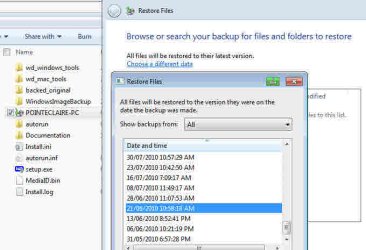
here are the some of the files visible thru restore and the pdf shows the error message:
 

Attachments

Last edited by a moderator:

My Computer

Computer Manufacturer/Model Number
compaq
OS
Windows 7 Home Premium - Desktop 32 bit / Laptop HP (G62) 64 BIT
CPU
AMD Athlon 64 Dualcore - 2.1 GHz
Memory
RAM 2 G
Other Info
2 in 1, Bell Gateway 2-Wire 2701, wireless, modem, NAT router

My Computer

Computer type
PC/Desktop
Computer Manufacturer/Model Number
Self built custom
OS
64-bit Windows 11 Pro for Workstations
CPU
Intel i7-8700K OC'd to 5 GHz
Motherboard
ASUS ROG Maximus XI Formula Z390
Memory
64 GB (4x16GB) G.SKILL TridentZ RGB DDR4 3600 MHz
Graphics Card(s)
ASUS ROG-STRIX-GTX1080TI-O11G-GAMING
Sound Card
Integrated
Monitor(s) Displays
2 x Samsung Odyssey G7 27"
Screen Resolution
2560x1440
Hard Drives
1TB Samsung 990 PRO M.2,
4TB Samsung 990 PRO PRO M.2,
TerraMaster F8 SSD Plus NAS
PSU
Seasonic Prime Titanium 850W
Case
Thermaltake Core P3
Cooling
Corsair Hydro H115i
Keyboard
Logitech wireless K800
Mouse
Logitech MX Master 4
Internet Speed
2 Gb/s Download and 100 Mb/s Upload
Antivirus
Malwarebyte Anti-Malware Premium
Browser
Google Chrome
Other Info
Logitech Z625 speaker system,
Logitech BRIO 4K Pro webcam,
HP Color LaserJet Pro MFP M477fdn,
APC SMART-UPS RT 1000 XL - SURT1000XLI,
Galaxy S23 Plus phone
re. mediaid.bin refer to my post #6, #10 (first screen shot), all backups only ever done my J:


im not sure i understand you correctly, based on my searches and responses received, does this mean there is no known method of retrieving the files (which are clearly there - ref. post #10) using manual or restore utility .... and there is no known reason for receiving this error when using the restore...what???!!!


if the backup & restore utility only does back up part, what is the point, im perplexed to say the least...so what should i be using for all this from now on....

thank you for your efforts
 

My Computer

Computer Manufacturer/Model Number
compaq
OS
Windows 7 Home Premium - Desktop 32 bit / Laptop HP (G62) 64 BIT
CPU
AMD Athlon 64 Dualcore - 2.1 GHz
Memory
RAM 2 G
Other Info
2 in 1, Bell Gateway 2-Wire 2701, wireless, modem, NAT router
I'm a bit perplexed as well.
My understanding is Windows has 2 quite functionally and technically different backup mechanisms rolled into what is generically called "Backup and Restore"
These are:
(1) System imaging which creates one large .vhd file per partition
(2) File/folder backup which creates a multitude of .zip files and corresponding .wbcat files.
They are parallel independent systems.

Both (1) and (2) have their own separate MediaID files. The Ops original post seemed to be referencing category (2) backups as do his screenshots.

For category (1) you have a 16 byte "MediaID" file. For category (2) you have a 1kB "MediaID.bin" file. They may be in place but errors in either will cause a reimage or a file/folder restore to fail. The link I gave was for rebuilding the MediaID.bin file.

The core data in (1) and (2) can be recovered provided the vhd and zip files respectively have not been damaged.

balm,
which backup is your issue?
 

My Computer

Computer type
PC/Desktop
Computer Manufacturer/Model Number
Own build
OS
Windows 7x64 Home Premium SP1
CPU
Intel i7 2600k
Motherboard
ASUS P8Z68 Deluxe
Memory
G.Skill Ripjaws (DDR3-1600) 2x4GB
Graphics Card(s)
Nvidia GeForce GTS 450; Intel HD Graphics 3000(GT2+)
Monitor(s) Displays
Dell Ultrasharp IPS panel U2311H, Samsung SyncMaster P2350
Screen Resolution
1920x1080
Hard Drives
Samsung 850 Pro SSD 256GB, Samsung SSD 840 120GB, Seagates 1TB Barracuda ST31000528AS x2
PSU
Seasonic M12II 520W
Case
Lian Li Lancool PC-K60
Cooling
Case: 1x120mm, 3x140mm CPU: Hyper 212+
Keyboard
Logitech MK520 (wireless)
Mouse
Logitech MK520
Internet Speed
6-7 Mbps
Antivirus
Norton Security Premium, Malwarebytes on 2 (MSE on 3rd PC)
Browser
FireFox
Other Info
Audio: Logitech Z523 2.1
i didnt know much about the image restore (1) - (nor its mediaid file), before coming here.

i am concerned at the moment restoring from file/folder backup, as that is where i see the emls as in screenshot, for pointe-claire username

is there a way to know if any file (mediaid) is damaged, ill check the 1k size....then i assume you are saying rebuild the file anyway?

thanks


EDIT: both mediaid file are 1K
 
Last edited:

My Computer

Computer Manufacturer/Model Number
compaq
OS
Windows 7 Home Premium - Desktop 32 bit / Laptop HP (G62) 64 BIT
CPU
AMD Athlon 64 Dualcore - 2.1 GHz
Memory
RAM 2 G
Other Info
2 in 1, Bell Gateway 2-Wire 2701, wireless, modem, NAT router
I don't know of a way to check the integrity of the (vhd) MediaID file or the (zip) MediaID.bin file. I know one byte change in the MediaID file and Windows will not auto locate my images.

In your case I'd copy the MediaID.bin file and use the procedure to rebuild it. Then the only solution I know is to manually unzip the multiple *.zip files in your file/folder backup.


EDIT: Do a right click properties
MediaID = 16 bytes
MediaID.bin = 528 bytes
 

My Computer

Computer type
PC/Desktop
Computer Manufacturer/Model Number
Own build
OS
Windows 7x64 Home Premium SP1
CPU
Intel i7 2600k
Motherboard
ASUS P8Z68 Deluxe
Memory
G.Skill Ripjaws (DDR3-1600) 2x4GB
Graphics Card(s)
Nvidia GeForce GTS 450; Intel HD Graphics 3000(GT2+)
Monitor(s) Displays
Dell Ultrasharp IPS panel U2311H, Samsung SyncMaster P2350
Screen Resolution
1920x1080
Hard Drives
Samsung 850 Pro SSD 256GB, Samsung SSD 840 120GB, Seagates 1TB Barracuda ST31000528AS x2
PSU
Seasonic M12II 520W
Case
Lian Li Lancool PC-K60
Cooling
Case: 1x120mm, 3x140mm CPU: Hyper 212+
Keyboard
Logitech MK520 (wireless)
Mouse
Logitech MK520
Internet Speed
6-7 Mbps
Antivirus
Norton Security Premium, Malwarebytes on 2 (MSE on 3rd PC)
Browser
FireFox
Other Info
Audio: Logitech Z523 2.1
which bin file do i rebuild, the one in the main J: directory, or the one insidde the backup icon...

thank you

doesnt work for me, in CMD sdutil is not recognized command!

EDIT: this is for VISTA!
 
Last edited by a moderator:

My Computer

Computer Manufacturer/Model Number
compaq
OS
Windows 7 Home Premium - Desktop 32 bit / Laptop HP (G62) 64 BIT
CPU
AMD Athlon 64 Dualcore - 2.1 GHz
Memory
RAM 2 G
Other Info
2 in 1, Bell Gateway 2-Wire 2701, wireless, modem, NAT router
doesnt work for me, in CMD sdutil is not recognized command!

EDIT: this is for VISTA!
It's also tried as a possible fix for Windows 7.
sdutil needs to be downloaded from MS.

Good Luck!!
 

My Computer

Computer type
PC/Desktop
Computer Manufacturer/Model Number
Own build
OS
Windows 7x64 Home Premium SP1
CPU
Intel i7 2600k
Motherboard
ASUS P8Z68 Deluxe
Memory
G.Skill Ripjaws (DDR3-1600) 2x4GB
Graphics Card(s)
Nvidia GeForce GTS 450; Intel HD Graphics 3000(GT2+)
Monitor(s) Displays
Dell Ultrasharp IPS panel U2311H, Samsung SyncMaster P2350
Screen Resolution
1920x1080
Hard Drives
Samsung 850 Pro SSD 256GB, Samsung SSD 840 120GB, Seagates 1TB Barracuda ST31000528AS x2
PSU
Seasonic M12II 520W
Case
Lian Li Lancool PC-K60
Cooling
Case: 1x120mm, 3x140mm CPU: Hyper 212+
Keyboard
Logitech MK520 (wireless)
Mouse
Logitech MK520
Internet Speed
6-7 Mbps
Antivirus
Norton Security Premium, Malwarebytes on 2 (MSE on 3rd PC)
Browser
FireFox
Other Info
Audio: Logitech Z523 2.1
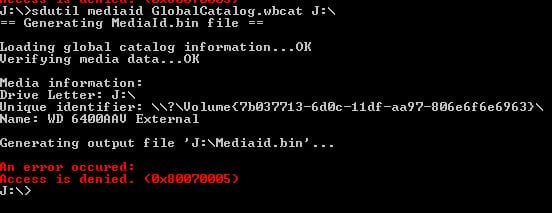
i get the following error, im running as administrator also:

i reran it directly from the Admins account only, answered yes to the admin user accounts prompt, after the command, and enter, and last prompt, i get the cmd screen flash for less than a second (i think i saw the red colored error writing), then nothing at the cmd screen except for J:>

:confused:

i disabled antivirus, and disabled user accounts, logged on as admin, scanned the disk with checkdisk, and got the same error message (in red) as in post #21


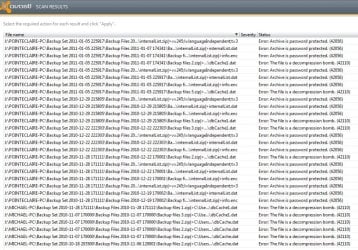
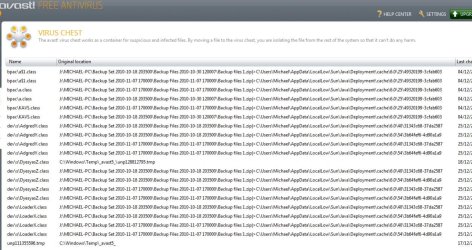
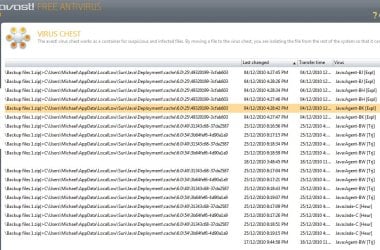
previously when scanning with avast antivirus i do get the following inthe virus chest, and scan logs, however avst tells me not worry about these, but can these affect the backup zips:

well, i guess this was a waste of time, ill never use this garbage utility again, most people dont wont use it anyway, now i understand why....:eek:


can anyone suggest another, free backup and restore utility program, that actually does what supposed to do?

thank you all

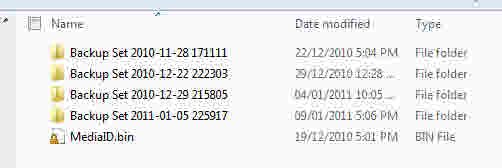
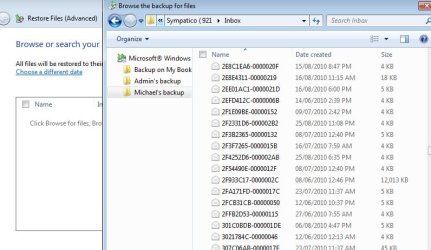
something no one can answer is why do ALL my backups (and required files) appear here, using the the utility icon, but when using the manual open/unzip only a few backups appear, see each respective case below.
 

Attachments

  • baknew.jpg
    baknew.jpg
    16.7 KB · Views: 9
  • avast.jpg
    avast.jpg
    173.4 KB · Views: 4
  • avast2.jpg
    avast2.jpg
    150.3 KB · Views: 3
  • avas3.jpg
    avas3.jpg
    146.7 KB · Views: 2
  • why.jpg
    why.jpg
    27 KB · Views: 10
  • wh2y.jpg
    wh2y.jpg
    7.1 KB · Views: 9
Last edited by a moderator:

My Computer

Computer Manufacturer/Model Number
compaq
OS
Windows 7 Home Premium - Desktop 32 bit / Laptop HP (G62) 64 BIT
CPU
AMD Athlon 64 Dualcore - 2.1 GHz
Memory
RAM 2 G
Other Info
2 in 1, Bell Gateway 2-Wire 2701, wireless, modem, NAT router
I'm assuming the a backup set (right shot) contains a number of incrementals (left shot) until a new full backup set is created. The inremental file indexing may be part of the .wbcat files.
In any case all your current backup information should be in the .zip files.
 

My Computer

Computer type
PC/Desktop
Computer Manufacturer/Model Number
Own build
OS
Windows 7x64 Home Premium SP1
CPU
Intel i7 2600k
Motherboard
ASUS P8Z68 Deluxe
Memory
G.Skill Ripjaws (DDR3-1600) 2x4GB
Graphics Card(s)
Nvidia GeForce GTS 450; Intel HD Graphics 3000(GT2+)
Monitor(s) Displays
Dell Ultrasharp IPS panel U2311H, Samsung SyncMaster P2350
Screen Resolution
1920x1080
Hard Drives
Samsung 850 Pro SSD 256GB, Samsung SSD 840 120GB, Seagates 1TB Barracuda ST31000528AS x2
PSU
Seasonic M12II 520W
Case
Lian Li Lancool PC-K60
Cooling
Case: 1x120mm, 3x140mm CPU: Hyper 212+
Keyboard
Logitech MK520 (wireless)
Mouse
Logitech MK520
Internet Speed
6-7 Mbps
Antivirus
Norton Security Premium, Malwarebytes on 2 (MSE on 3rd PC)
Browser
FireFox
Other Info
Audio: Logitech Z523 2.1
i have no idea what it did/does, anyway it doesnt matter, big waste of time. it doesnt make sense, see my previous post
 

My Computer

Computer Manufacturer/Model Number
compaq
OS
Windows 7 Home Premium - Desktop 32 bit / Laptop HP (G62) 64 BIT
CPU
AMD Athlon 64 Dualcore - 2.1 GHz
Memory
RAM 2 G
Other Info
2 in 1, Bell Gateway 2-Wire 2701, wireless, modem, NAT router
Balm,
Were you ever able to find a solution to this? I have the EXACT same issue and have tried all of the suggestions listed here and on various other sites. I have 15 years worth of information on this backup and my main laptop just suffered a severe crash, so I'm getting pretty nervous here.

Hope to hear back from you.

EZ
 

My Computer

Computer Manufacturer/Model Number
Dell Vostro 1700
OS
Windows 7 Pro 64bit
ezufall....


i feel bad for you, i was so frustrated with this issue, and thats with no real loss of important files (thankfully i had periodically done some manually copy/paste backups), so i cant even imagine how you must feel


no, no solution was found. very frustrating when you can "See" your files, but cant access them via "restore" or "unzipping"....im not sure if its some sort of virus that got in during the backups, or the backup just malfunctioned. im not too tech savvy, but i thought i gave a pretty perserverant attempt to solve, eventually i gave up, basically reformatted the drive and started over.

did you do any format conversion of your drive, i beleive at one point i converted from FAT to NTFS on the drive, not sure if that messed up things, but what i could never determine is "when" exactly things went wrong with backing up.

id suggest in the future you should use some other utility/methos (as you know), esp if important files

have you checked ALL the other "forums" out there. i wish i could help you more, but i dont have enough experience.

I did ask "BEST BUY" what they would do, they wanted me to bring in the drive and they said they would attempt various methods they know to access the files, and look to 3rd party advice as well...but i did not pursue it

sorry about that.
 

My Computer

Computer Manufacturer/Model Number
compaq
OS
Windows 7 Home Premium - Desktop 32 bit / Laptop HP (G62) 64 BIT
CPU
AMD Athlon 64 Dualcore - 2.1 GHz
Memory
RAM 2 G
Other Info
2 in 1, Bell Gateway 2-Wire 2701, wireless, modem, NAT router
Thanks for your reply. I have 340 zipped folders and will just extract them all. My files will be intact (most of them at least), but the order of them is completely rearranged. Oh well, better than nothing I guess. I will most definitely be using a 3rd party backup program after this! Regards.
 

My Computer

Computer Manufacturer/Model Number
Dell Vostro 1700
OS
Windows 7 Pro 64bit
Many 3rd party file/folder (NOT image) backup software use spanned or split zip archives. If one goes faulty (especially the primary .zip) then manual recovery may be more of a problem.

If the 340 .zips (folders) are all part of one Windows backup set then you can select them all and use 7zip or IZarc to test the integrity of the archive set and extract all, including all directory/folder structures to a temporary location. Then do a manual folder copy back to where ever you like.
 
Last edited:

My Computer

Computer type
PC/Desktop
Computer Manufacturer/Model Number
Own build
OS
Windows 7x64 Home Premium SP1
CPU
Intel i7 2600k
Motherboard
ASUS P8Z68 Deluxe
Memory
G.Skill Ripjaws (DDR3-1600) 2x4GB
Graphics Card(s)
Nvidia GeForce GTS 450; Intel HD Graphics 3000(GT2+)
Monitor(s) Displays
Dell Ultrasharp IPS panel U2311H, Samsung SyncMaster P2350
Screen Resolution
1920x1080
Hard Drives
Samsung 850 Pro SSD 256GB, Samsung SSD 840 120GB, Seagates 1TB Barracuda ST31000528AS x2
PSU
Seasonic M12II 520W
Case
Lian Li Lancool PC-K60
Cooling
Case: 1x120mm, 3x140mm CPU: Hyper 212+
Keyboard
Logitech MK520 (wireless)
Mouse
Logitech MK520
Internet Speed
6-7 Mbps
Antivirus
Norton Security Premium, Malwarebytes on 2 (MSE on 3rd PC)
Browser
FireFox
Other Info
Audio: Logitech Z523 2.1
Back
Top